3 Ways to Transfer Your Playlist from SoundCloud to Spotify
 by Ethan Carter | July 2, 2026 | Playlist Transfer
Quick Summary
You can transfer Soundcloud playlists and tracks to Spotify via TopVox All Music Converter, Soundiiz, or Free Your Music. The Soundiiz and Free Your Music services connect the cloud accounts to match the metadata. However, TopVox All Music Converter uses the desktop application equipped with the Playlist Transfer feature to transfer collections.
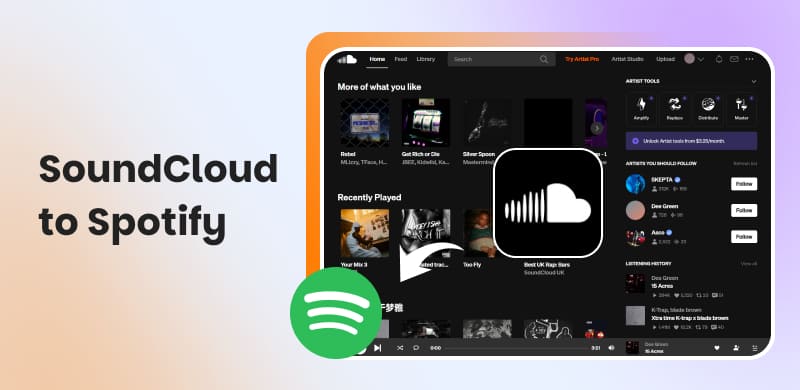
If you love music, you probably know the feeling of switching platforms just to listen to the songs you love. SoundCloud hosts millions of independent artists, unreleased songs, DJ mixes, and fan-made remixes. On the other hand, Spotify offers one of the world's largest collections of licensed songs. Nevertheless, not all of the songs on SoundCloud are available on Spotify. They are often posted there independently and without commercial licensing, which prevents Spotify from legally distributing them. If you are fed up with constantly switching between these two apps, your problem is over right now. In this post, we will teach you how to transfer SoundCloud to Spotify. We will also provide some easy tricks to help you keep all the SoundCloud-exclusive songs that aren't on Spotify. In this way, you will be able to keep all the music in one place, avoiding jumping from one platform to another.
| Platform | Price | Music Services | Transfer Speed | Batch Transfer | Match Accuracy | |
|---|---|---|---|---|---|---|
| TopVox All Music Converter | Windows and Mac | Starts at $19.95 with a free trial available | SoundCloud, Spotify, Apple Music, Amazon Music, Deezer, Pandora, YouTube Music, Line Music, and Audible | Up to 35× faster | ✅ | 99% |
| Soundiiz | Web browser | Starts at €3.25; no free trial available | 45 music services, including SoundCloud and Spotify | Depends on the server | ✅ | 80% |
| Free Your Music | Windows, Mac, Linux, Android, and iOS | Starts at €5.00 with free trial available | SoundCloud, Spotify, Tidal, Audius, Bomplay, and 11 others | Normal Speed | ✅ | 95% |
Method 1. TopVox All Music Converter
Best For: Transfers SoundCloud playlists to Spotify or downloads SoundCloud-only songs, remixes, DJ mixes, and bootlegs as local files.
TopVox All Music Converter isn't just about downloading and converting music from major music streaming services. It also includes a Playlist Transfer feature that lets you move your favorite music collections from SoundCloud to Spotify. It uses the most advanced hardware-accelerating media processing to batch-transfer music at 35× speed. It can transfer your songs while preserving ID3 tags and metadata, ensuring they are recognized and categorized. It also ensures the entire playlist is transferred and that all songs are in the same order.
Features
- Preserves the source’s quality, ID3 tags, and important metadata info.
- Batch transfer individual tracks, albums, and entire playlists simultaneously.
- Built-in web player for logging in, browsing, and searching without leaving the app.
- Move SoundCloud music to Spotify, Apple Music, YouTube Music, and other services.
- Built-in Playlist Transfer tool that automatically syncs or moves music between platforms.
100% Secure. No virus.
100% Secure. No virus.
Here's how to get a song from SoundCloud to Spotify:
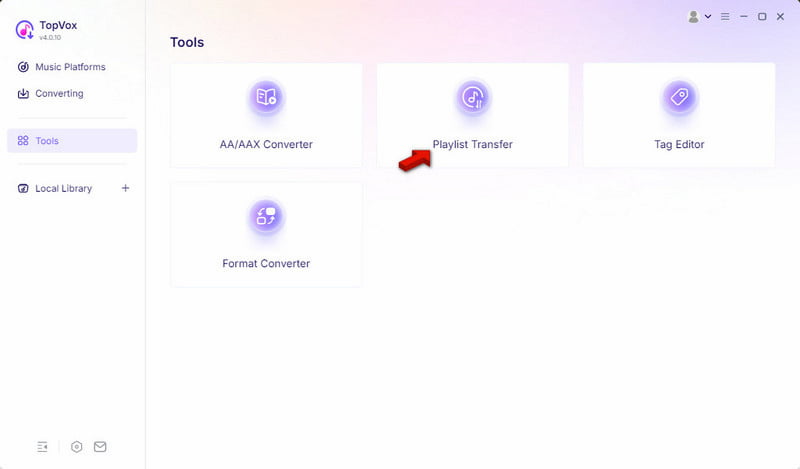
Step 1. Download TopVox All Music Converter and complete the installation. After setup, run the software. Go to the Tools tab and select the Playlist Transfer tool from the dashboard.
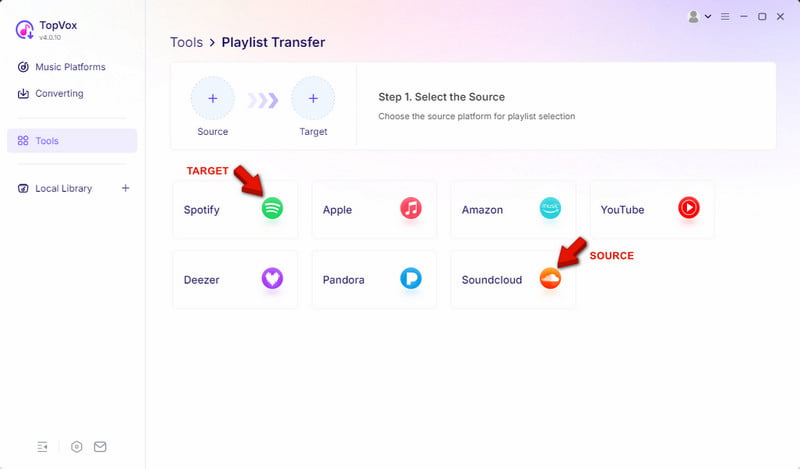
Step 2. Select SoundCloud as your source platform for selecting playlists. Then, click Spotify as your target where you want to move the SoundCloud playlists.
Step 3. Select the playlists you want to transfer, then click Next to proceed. In the final window, click the Convert button to start transferring the playlist you selected.
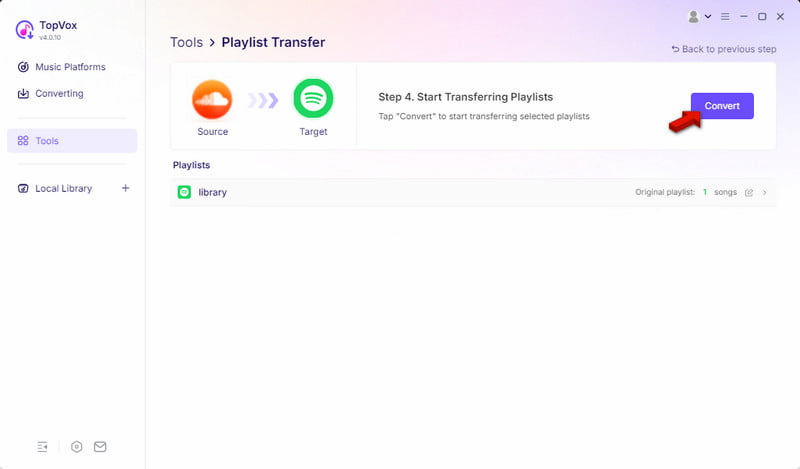
The Playlist Transfer feature of TopVox All Music Converter lets you transfer playlists by linking all your music streaming accounts to the software. It analyzes playlist data without downloading any tracks and recreates the playlist on the target service. For offline listening, we suggest downloading songs from SoundCloud to your computer.
Method 2. Soundiiz
Best For: Transfers playlists, albums, artists, and liked songs to music services.
Soundiiz is an internet-based playlist transfer tool that lets you switch between streaming platforms. This SoundCloud to Spotify converter does not download tracks. Instead, it scans SoundCloud playlists and finds the corresponding songs on Spotify to recreate them in your account.
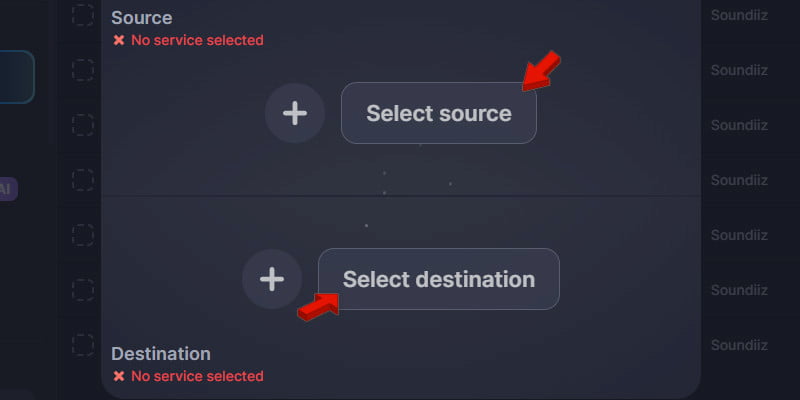
Step 1. In Soundiiz, go to Transfer, then click +Select Source to set SoundCloud as your source. Then, click +Set Destination and choose Spotify as your target platform.
Step 2. Click Start to authorize Soundiiz to access your SoundCloud library. Select all the playlists you want to move to Spotify, confirm the selection, and start the transfer.
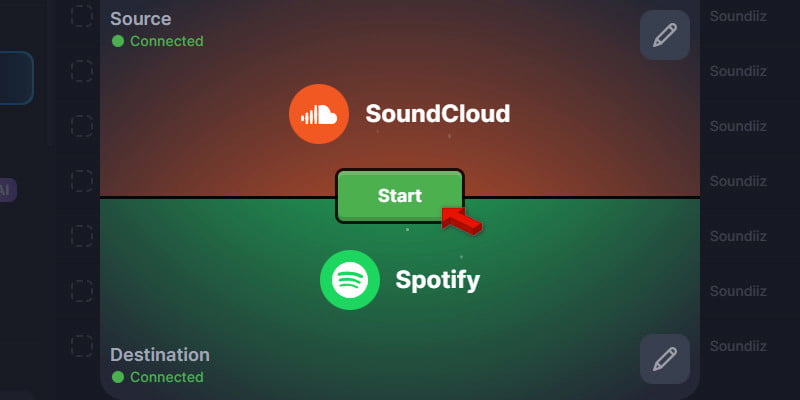
Soundiiz is among the easiest SoundCloud to Spotify transfer tools available. It provides access to 45 music streaming services and transfers playlists quickly. But here’s the catch: it cannot transfer songs that aren't in the Spotify catalog.
Method 3. Free Your Music
Best For: Transfers multiple playlists with optional Auto-Sync to keep playlists updated.
Free Your Music is an application for transferring playlists on Windows, Mac, Linux, Android, and iOS. It can help you move your playlists from SoundCloud and more than 10 other popular music providers, including Spotify. There is also Rematch for unmatched tracks and Auto-Sync for playlist synchronization.
Step 1. Open Free Your Music, select SoundCloud as your source music service, and authorize access. The same goes for the destination platform; choose Spotify and grant access.
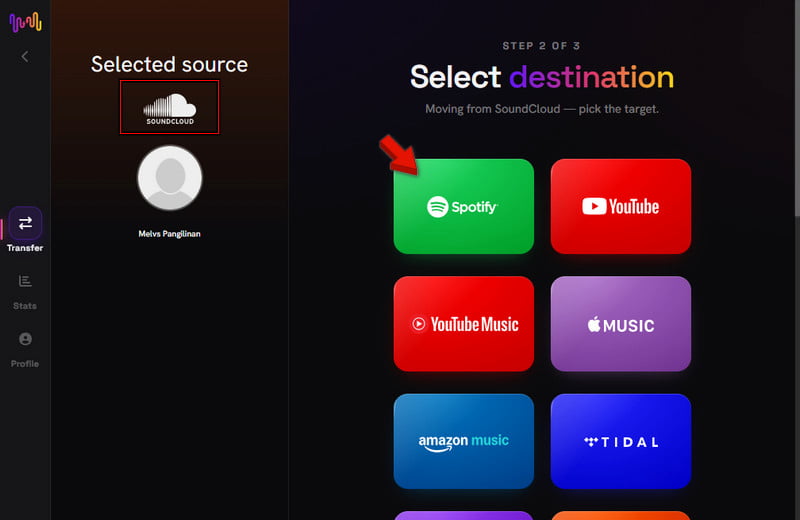
Step 2. Select the playlists, albums, or liked songs you want to transfer. Then, click Begin Transfer to start migrating the music to Spotify.
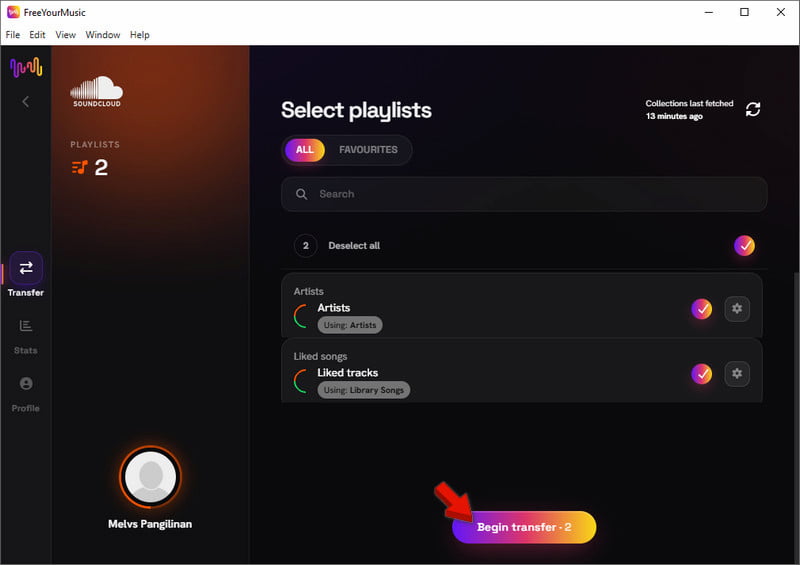
That’s how to add songs from SoundCloud to Spotify in Free Your Music. This tool transfers large libraries quickly. However, not every track transfers successfully. SoundCloud-exclusive remixes, DJ mixes, and unofficial uploads often have no Spotify equivalent, so they are skipped during migration.
Pro Tip: How to Move SoundCloud Remixes that Don’t Exist on Spotify
You cannot find all SoundCloud songs on Spotify's music library. You cannot find unofficial remixes, bootlegs, DJ mixes, mashups, or live versions on Spotify, and they will therefore be listed as failed matches during the transfer process.
Here's how you can keep those songs in your Spotify playlists:
- • Find your SoundCloud exclusives. After completing the playlist transfer, check the list of failed matches or skipped songs.
- • Download the unavailable songs using an online SoundCloud playlist downloader like TopVox All Music Converter.
- • In the Spotify desktop app, click on Settings, scroll down to Local Files, and enable Show Local Files. Add the directory containing the downloaded SoundCloud songs.
- • Make a mixed playlist. After indexing your local songs in Spotify, just drag them into your playlist along with other songs that synced correctly.
FAQs about Transferring SoundCloud to Spotify
Q: Can SoundCloud get your music on Spotify?
A: Yes, SoundCloud can distribute its content to Spotify. Using SoundCloud for Artists, independent artists can distribute their content to Spotify, Apple Music, and 50 other digital distribution partners.
Q: What's better, SoundCloud or Spotify?
A: SoundCloud ensures direct interaction with fans and creativity. However, Spotify gives them access to an extensive fan base and monetization. It is through such a combination of the two platforms that most of the artists are making their decisions.
Q: Can you sync Spotify and SoundCloud?
A: Yes, you can connect Spotify and SoundCloud. Although the two applications do not work together, you can connect them using a third-party application. Tools like TopVox All Music Converter can help sync the libraries using the Playlist Transfer feature. Besides, you can download songs from Spotify, and then upload them to SoundCloud for syncing.
Conclusion
Moving SoundCloud to Spotify is by far the easiest way to ensure all your favorite music is saved in one place. Although playlist-transferring software can transfer nearly all official music, some SoundCloud remixes and independent uploads may require additional effort to move. This is what makes TopVox All Music Converter different. In addition to the Playlist Transfer function, it can also download SoundCloud exclusive tracks as local files.