How to Transfer Apple Music Playlist to Spotify in an Easy Way
There are plenty of reasons why you want to convert from Apple Music to Spotify. Good thing, you have so many options of tools that can help you make the process possible. Thus, this article is the complete guide you need because we will guide you throughout the process. Here, we will give you the best three tools you can use for the conversion. What are you waiting for? Let us read this post now as a guide for a smooth process.
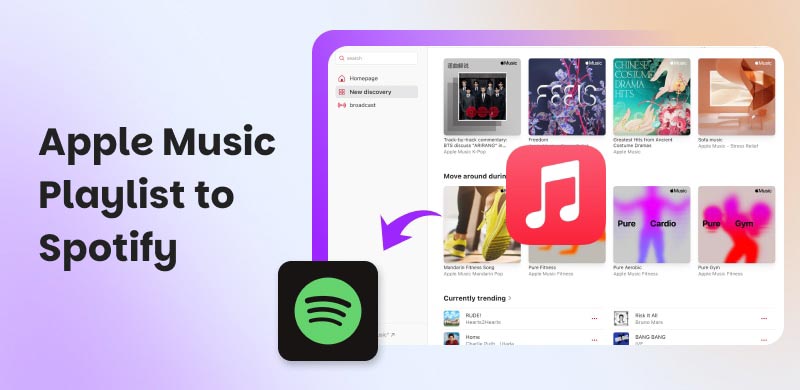
Part 1. What You Actually Lose When You Switch
Despite whatever reasons you have for moving from Apple Music to Spotify, things will not always work for you. Moving to it without the help of a third-party tool will require you to sacrifice and leave most of the things you used to have in Apple Music that are not available with Spotify. With that, here are the common elements you actually lose when switching music platforms;
- • Your own playlist. You leave your curated playlist, how it is being organized, how you put it in order, and how you label them for mood grouping. You can manually copy the Apple Music Playlist to Spotify, yet you need time to make it.
- • Liked songs and libraries. The songs that you discovered and liked will be left out.
- • Algorithm-generated. Both tools have different algorithms. If you are already used to Apple Music’s favorites mix and chill mix, then you must be ready to let go of that. Although Spotify has similar features to the Daily Mix, there will always be differences.
- • Collaborative Playlist. The playlist you built together with your friends, and also the connection you had in music.
Part 2. 3 Ways to Move Your Library
TopVox All Music Converter
Best for: Users who want to have a fast transfer with minimal processing.
Top of the list in moving Apple Music to Spotify is the amazing tool of TopVox All Music Converter. This tool is made exactly to help users organize, copy, and get their music playlist whenever they want to move to a new music platform. It has wide support for different music platforms like Apple Music, Spotify, Amazon Music, and more.
Features
- Can move and convert Apple Music tracks to Spotify or to a supported file format.
- It supports preserving metadata, including artist, album, and cover art.
- Large libraries can undergo batch conversion.
Steps to Use TopVox
Step 1. Install TopVox All Music Converter for free from their website.
Step 2. Open the software and access the Tool feature and click on the Transfer Playlist.
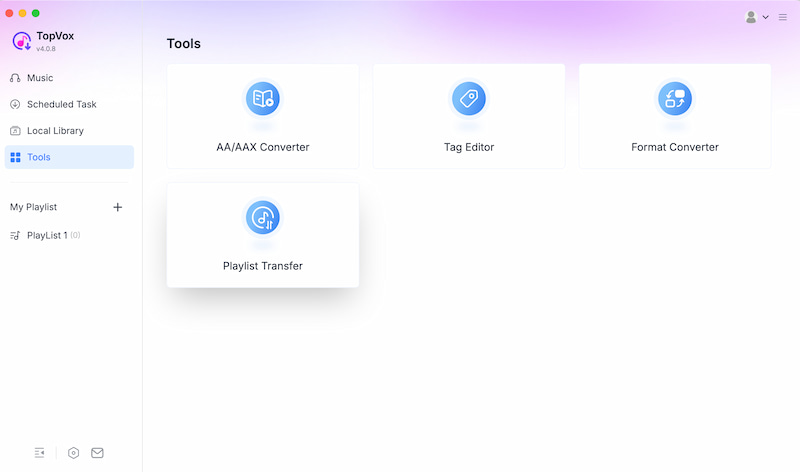
Step 3. Now, set the source as Apple Music and the target as Spotify.
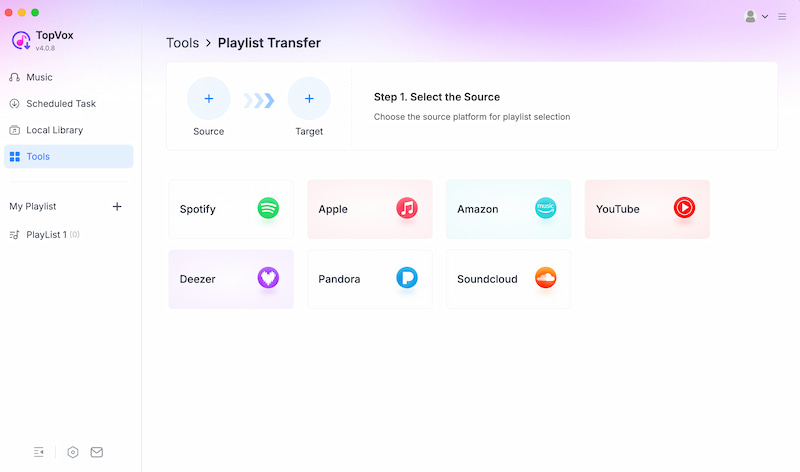
Step 4. Select playlist or track and click Next.
Verdict:
TopVox All Music Converter is a reliable and comprehensive tool that you can use. It has flexibility tied up with simplicity.
Soundiiz
Best for: Cloud-based solutions.
The next on the list is a tool called Soundiiz. This is known to be a cloud-based transfer service that can connect your Apple Music to Spotify. This tool can allow automatic syncing of your playlist. Yet, mismatches can always happen, especially with the songs that are not available on Spotify.
Features
- Cloud-based transfer.
- Syncing without third-party use.
- General control over everything.
Simple Steps
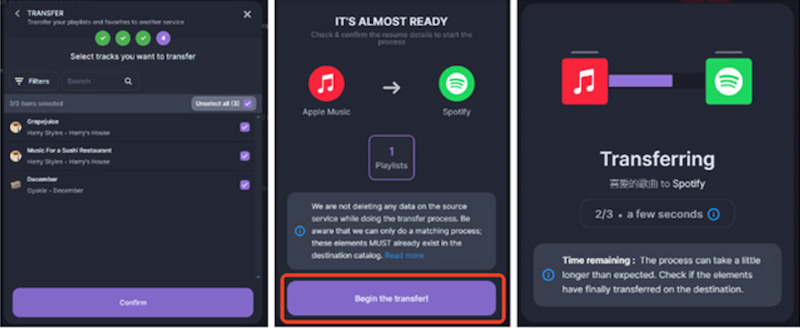
Step 1. Open Soundiiz and sign up for your account.
Step 2. You can now connect your Apple Music and Spotify accounts on the tool.
Step 3. Select the playlist you want to transfer and let the tool do the syncing. Click Begin to Transfer and let the tool do it.
Verdict:
This tool is made for a convenient and quick process. Yet, songs mismatch most often.
Manual Route
Best for: Users who do not want to use a third-party tool.
Manual Route is the version of the do-it-yourself approach to moving your playlist. The process is simple: you will search every track you have on Apple Music on Spotify. The best thing about this is that it is free, and you have full control over it. Yet, this process will only work if you have a limited number of tracks to move, but having a huge playlist will definitely devastate you.
Step 1. Get a list of the tracks you want to move.
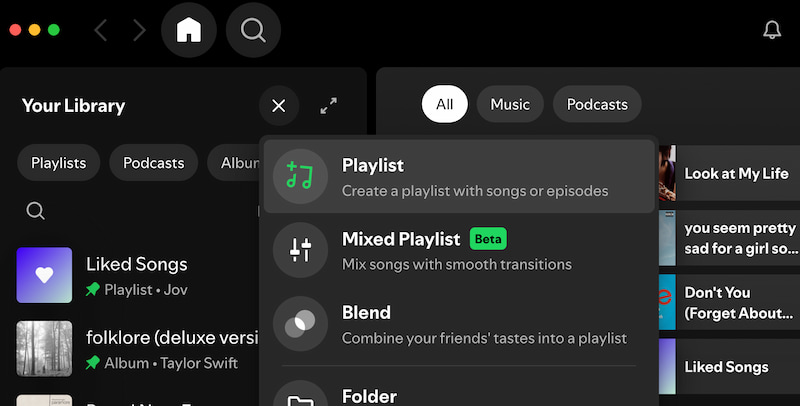
Step 2. Create a new playlist on Spotify.
Step 3. Search one by one on Spotify and allow your playlist to be naturally made.
Verdict:
This way is free to use, yet time-consuming. Thus, small libraries can do it, but not for huge playlist users.
Part 3. Things That Break During Migration
Even though you have your reasons why you want to move to a new platform, we want to balance this review by giving you the honest failures you can experience in the process and a quick fix you can do for it. Thus, you know what to do if you encounter these problems.
- • Regional Licensing Gaps: There are songs only available on Apple Music in your region that will not exist on Spotify at all. In this situation, no tool can fix this; you’ll lose these tracks or put an alternative version on it manually.
- • Collaborative Playlists: Apple Music exposes collaborators differently from Spotify. After the process of moving, those collaborative playlists you have will become personal playlists.
- • Liked Songs vs. Playlists: Similarly, Apple Music and Spotify have different internal structures. The best way to fix it is to double-check your Liked Songs after migration.
- • Duplicates: Some transfer tools will not always know that you’ve already migrated the same track or playlist. A quick fix for it is to keep a log to prevent clutter.
Part 4. We Tested All Three Side by Side: Here's What Actually Happened
As we give you a deeper understanding of the things that these tools can do, we tested these three tools one by one, and these results are completely insane. Here's how it went:
TopVox All Music Converter: I tested this tool against 47 playlists and 800+ liked songs. My result hit 96% accuracy, and it is still the cleanest user experience that made my process effortless compared to other tools.
Soundiiz: I am impressed with the tool, but it took me 12 minutes for manual mapping per batch. I found it very effective for small conversions, but huge volumes are punishing me.
Manual Method: The manual method of moving is fine for those users who have a single playlist or fewer tracks to move. Yet, this is not recommended for users with a huge curated playlist.
Verdict:
After trying all of the tools, TopVox All Music Converter wins me over. This tool is a perfect balance of accuracy, speed, and usability.
Part 5. Making Spotify Feel Like Home After The Move
After you succeed with the moving process, here are some things you can do to ensure everything will be fine and will go in place. Then be consistent in doing it so that you will maximize the great experience in using the Spotify platform:
Give Spotify's Algorithm Time
Let Spotify take time by allowing yourself to use it consistently for two weeks. You should also allow yourself to like and listen to songs consistently. This process will let your algorithm know your tastes in music. This steady input for two weeks will help Spotify's algorithm build your personalized discovery pathways.
Rebuild Mood Playlists Organically
Instead of re-importing everything from Apple Music, you can always start in some aspect. Not everything should be moved. You can gradually add songs as you listen to them. This process lets your mood playlist develop naturally and organically. A suitable way to have a playlist that really reflects your current mood and vibe.
Use Blend with Friends to Cross-pollinate Taste Signals
Worrying about the collaborative playlist is no more; instead, use the blend with Spotify's features. These features will let you merge listening habits with your friends. The cross-pollinating taste signals will now allow you to discover new tracks and strengthen your algorithm. These features prioritize social listening while giving algorithm benefits.
Conclusion
In conclusion, we can see that moving from Apple Music to Spotify is simple. In fact, you have different options to make the process possible. One of the tools you can use is the amazing TopVox All Music Converter. This is a great tool that can offer efficiency and a smooth process of transferring playlists. Use it now and expect great things from it.
Luna Harper
Luna Harper is a passionate music lover and an inspiring content sharer. She has explored most of the music converters available on the market, acquiring thorough knowledge of their features, usability, and differences. Luna enjoys using her professionalism to help fellow music lovers get superior audio quality.




 by
by