Best Ways on How to Download SoundCloud Songs to a Computer
 by Owen Bannett | April 10, 2026 | SoundCloud
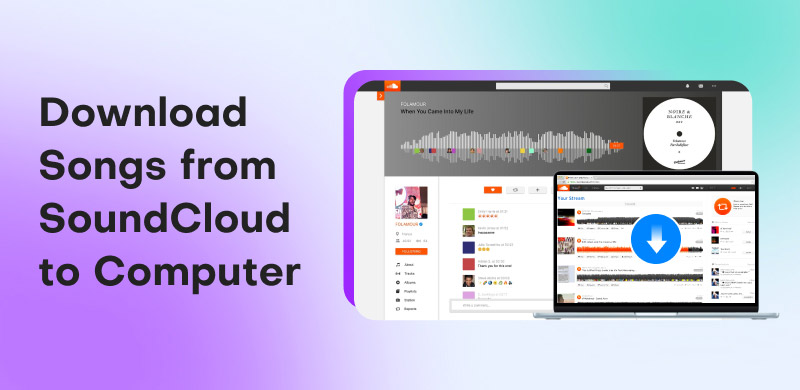
SoundCloud is among the worthy audio streaming platforms you can access on your device. It can give you millions of songs. It can even provide various playlists, perfect for music enthusiasts. The best part here is that you can save or download the music for offline listening. With that, if you want to learn how to download songs from SoundCloud to a computer, we are here to assist you. In this guide, we will offer various methods, including the official way, to download the music from the platform. Thus, read here and learn the most reliable music downloading process to obtain your favorite songs.
Part 1. Official Way to Download SoundCloud Songs
SoundCloud is an excellent platform that can offer numerous types of music. It can even ensure that you can get the best quality for up to 320 kbps. What we like here is that when using the SoundCloud Go+ version, you can access its download feature, allowing you to download the music for offline listening. It can even offer a simple downloading process, making it more ideal for users. The best part here is that if the artist allows the download button, then you don't have to get the platform's paid version. All you need to do is tap the download button to begin the downloading process.
Pros
- The platform that can give you an excellent audio quality, resulting in satisfying audio playback.
- If the owner allows the download feature, you can save the music as a file without getting the premium version.
- The main layout of the platform is simple to navigate, making it ideal for non-professional users and listeners.
Cons
- Not all tracks are downloadable. If the artists didn't offer the download button, you must access the SWoundCloud Go+ version.
- Even using the paid version, you cannot save the music as a file. The music will only stay on the app/platform itself.
- The playlist cannot be saved and downloaded as a whole.
Why is the Download Button Missing?
• You cannot access the download button if the artist has disabled it.
• Due to licensing restrictions, copyrighted tracks cannot be downloaded.
• You cannot see a download button when saving the whole playlist, only individual tracks.
Limitations of SoundCloud Go+ (Offline Mobile-Only vs PC Local Files)
There are still limitations you might encounter when using the paid version of SoundCloud compared to the PC local files.
• The music can only be saved on the platform, unlike local files that will stay on the device permanently.
• When using the Go+ version, you cannot choose your preferred audio format since you cannot access it on your device.
• You cannot share the music with other users or listeners. MP3 and other audio files are ideal for sharing, editing, and converting.
How to Use SoundCloud to Download Songs
You can use the steps below and learn how to download from SoundCloud.
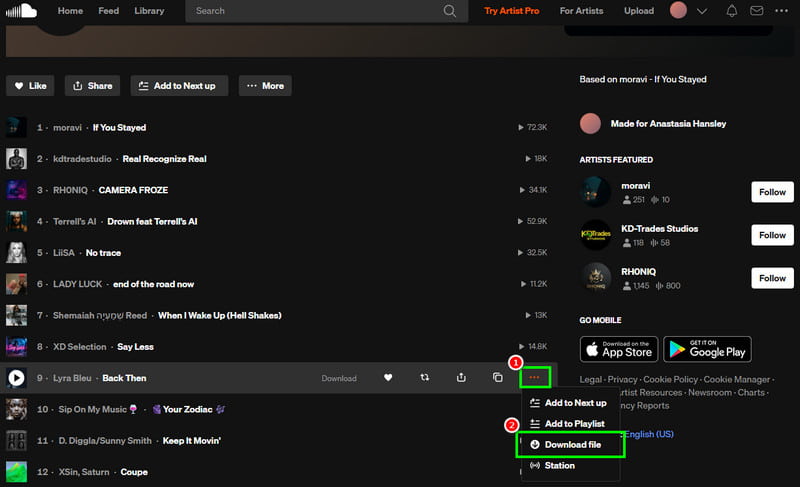
Step 1. Open SoundCloud on your browser and start creating an account.
Step 2. After that, proceed to the Search section to start browsing the music you want to download.
Step 3. Tap the three-dot button and choose the Download button. If the artists disabled the download button, then you must use the SoundCloud Go+ version.
Part 2. Best Way to Download SoundCloud Songs to a Computer
Since SoundCloud has various limitations when downloading music, you might need a better SoundCloud music downloader. If that is the case, we suggest using TopVox All Music Converter. This program is ideal since it can give you the best performances you can't get from the official SoundCloud platform. You can download/keep the music directly to your computer permanently. What we like here is that you can save the song with the best quality for up to 320 kbps. You can also choose your preferred audio formats, such as MP3, AAC, WAV, FLAC, M4A, AC3, and more. Additionally, you can even download entire SoundCloud playlist, making it more powerful for users. Thus, if you want a better music downloader, it would be ideal to choose TopVox All Music Converter as your first choice.
To get more details about the program's features and how it benefits users, you can check the table below.
| Key Features | How it Benefits Users |
|---|---|
| Batch Downloading | Users can download multiple songs in just a single go. |
| Fast Downloading and Conversion | Since the program can download and convert music 35× faster, users can get the music instantly while saving much time. |
| Comprehensive User Interface | With its straightforward UI, users can navigate all the functions without encountering any trouble. |
| Support Various Audio Streaming Platforms | The program can download music from various platforms, like Spotify, Deezer, Apple Music, and more. With this feature, users don’t need to look for separate software to download their favorite music. |
| Built-In Web Player | This feature is ideal if users want to play music during the downloading procedure. |
To start downloading SoundCloud songs on your computer, you can follow the steps below.
Step 1. Download TopVox All Music Converter on your computer. Then, begin running it to start the music downloading process.
100% Secure. No virus.
100% Secure. No virus.
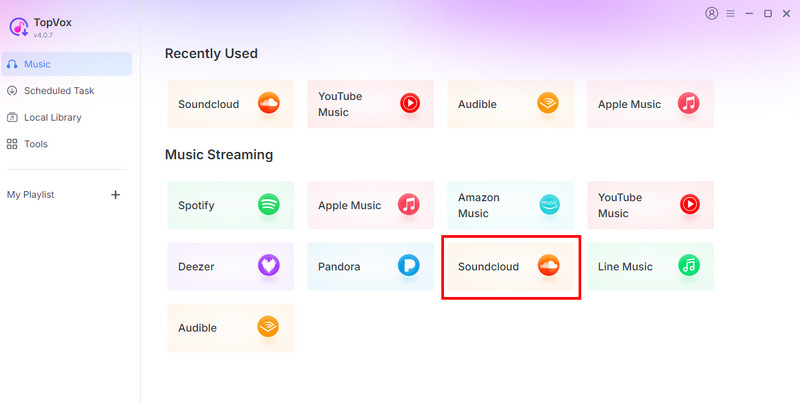
Step 2. After launching the primary interface, choose the SoundCloud platform and insert your account.
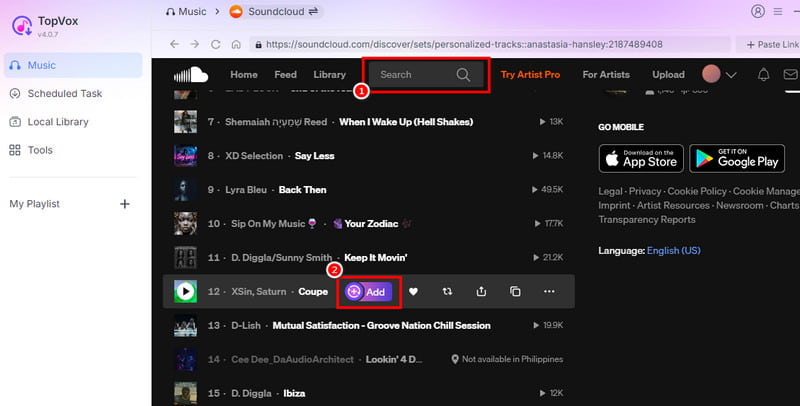
Step 3. Browse the music you want to download from the Search section. Then, hit the Add button.
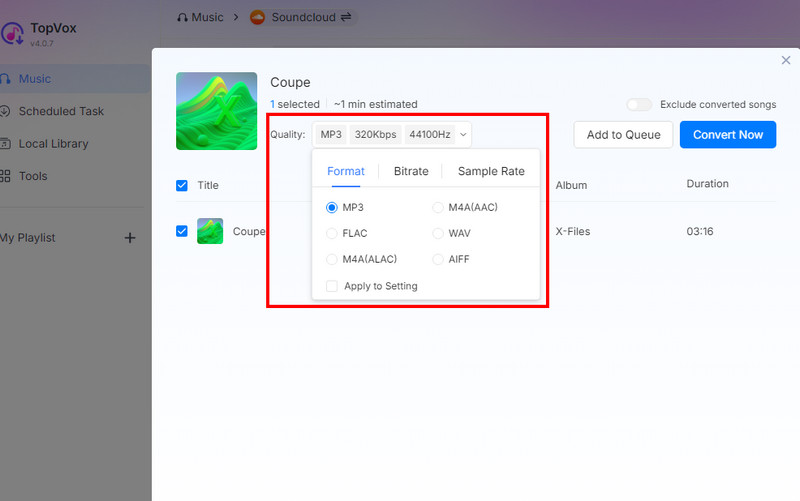
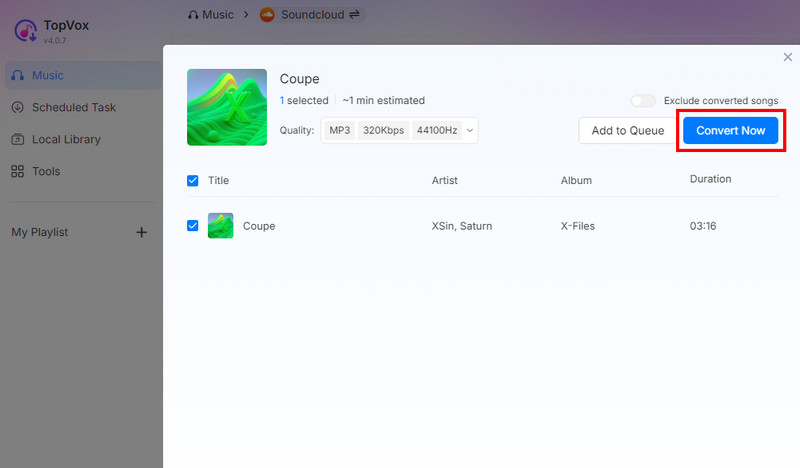
Step 4. You can now begin choosing your desired audio format, sample rate, and quality.
Step 5. Finally, tap the Convert Now button to start downloading the SoundCloud music to your computer.
User's Feedback
TopVox All Music Converter is an ideal software if you need a fast downloading and conversion process. The good thing here is that it can download music, playlists, and albums effectively. It can even offer a good audio quality, allowing you to have a satisfying listening experience.
You can also pay a visit: Explore the best SoundCloud to WAV downloaders.
Part 3. Online Way to Download SoundCloud Songs
Want to know how to download SoundCloud files online? Then, we suggest using DownCloudMe. This web-based tool is perfect if you want to instantly get your favorite SoundCloud songs. The best part here is that you can also get an exceptional audio quality for up to 320 kbps.
Pros
- It has a simple interface for a smoother downloading process.
- The tool is safe to use.
- It is accessible to all web platforms.
Cons
- It needs a fast internet connection.
- It cannot support batch downloading and conversion processes.
- Ads are everywhere.
To learn how to use this tool to download SoundCloud songs, see the instructions below.
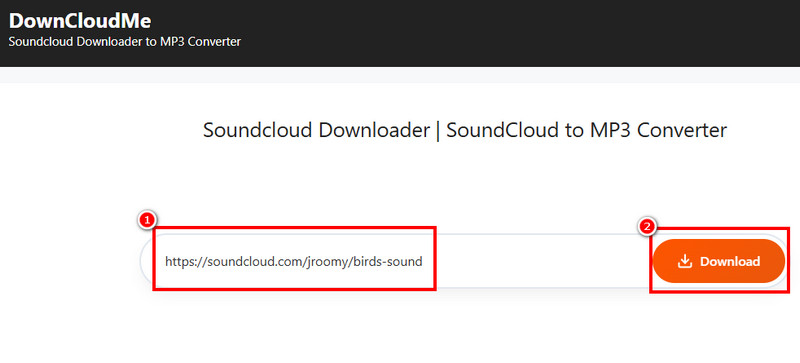
Step 1. Access DownCloudMe on your browser. Then, go back to the SoundCloud platform to copy the link from the song.
Step 2. From the DownCloudMe interface, paste the link and hit the Download button.
Step 3. After that process, tap the final Download button to save and download music to your computer.
User's Feedback
This online tool is helpful since it can download songs from SoundCloud effectively. It also has a simple UI, allowing you to download songs without any trouble. The only problem here is that it does not support batch conversion, and ads are always popping up on the screen.
Part 4. Download SoundCloud Songs to a Computer via Extension
If you need an extension, you can use Addoncrop. After accessing this extension, the download button will appear on your SoundCloud music. The best part here is that this extension is free to install, making it more accessible to all users.
Pros
- The extension can let you download SoundCloud songs directly to the computer.
- It can preserve the metadata of the music.
- It is free to use.
Cons
- The extension may violate SoundCloud's Terms of Service.
- It might not be helpful if SoundCloud changes its platform.
You can check/follow the steps below to learn how to use Addoncrop to download SoundCloud to PC.
Step 1. Go to your browser and install the Addoncrop extension.
Step 2. After that, proceed to SoundCloud and browse the music.
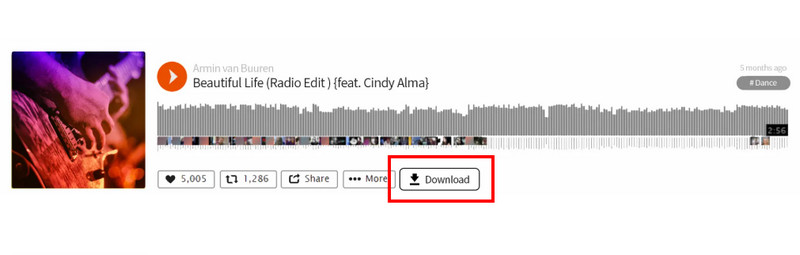
Step 3. Since you already installed the extension, you will see the Download button below the music. Click it to start the downloading process.
User's Feedback
This extension is helpful since it can provide the Download button feature for an effective downloading process. What makes it more accessible is that it is easy to install and completely free.
To get more ideas on which SoundCloud downloader to use, see the table below.
| SoundCloud Downloaders | TopVox All Music Converter | SoundCloud Official | DownCloudMe | Addoncrop |
|---|---|---|---|---|
| Audio Quality | Up to 320 kbps | Depends on the artist | Up to 192 kbps | Up to 320 kbps |
| Offers Batch Download | Yes | No | No | |
| Security | Fully safe and legal | Safe | Risk of ads | Risk if installed outside trusted sources. |
| ID3 Tags and Metadata | It can preserve the original metadata. | It can preserve the original metadata. | Often incomplete | Basic metadata |
| Speed | Up to 35× faster | Fast | Depends on the internet connection. | Depends on the internet connection. |
| Format Options | MP3, AAC, WAV, M4A, AC3, FLAC, and more. | Depends on the artist | MP3 | MP3 |
| Success Rate | 100% | 100% | May fail on private tracks. | May break if SoundCloud updates. |
| Platform | Windows and Mac | Desktop and browser | Wb-based | Chrome, Edge, and Opera browsers. |
Part 5. FAQs about How to Download Songs from SoundCloud to a Computer
Q: Can I download multiple tracks on SoundCloud at once?
A: It depends on the tool you use. If you are using the SoundCloud platform, you cannot download multiple tracks. To achieve your objective, you must use another downloader, like TopVox All Music Converter, since it supports batch conversion.
Q: Are third-party SoundCloud downloaders free to use?
A: Not all third-party downloaders are safe. If you want a safe SoundCloud downloader, you can try using TopVox All Music Converter, SoundCloud Go+, DownCloudMe, and more.
Q: Can I keep the song after using SoundCloud Go+?
A: You can keep the songs as long as you have the paid version. If the subscription expires, all the downloaded music from SoundCloud will also disappear.
Conclusion
To get more insights on how to download songs from SoundCloud to a computer, you can use all the methods we have provided in this tutorial. Plus, if you want to download your favorite SoundCloud songs without any limitations, we suggest using TopVox All Music Converter. This program can give you a fast conversion and exceptional audio quality for a better listening experience. Thus, rely on this software and achieve your objective.
Owen Bannett is a music enthusiasm as well as a senior writer. He has paid close attention on the pros & cons of various audio formats, bitrate, sample rate and encoding methods. Always seeking the best listening experience, Owen has deep insights about lossless music and diverse music converters on the markets.