SoundCloud to WAV Converters: Turn SoundCloud to WAV Easily
 by Owen Bannett | July 16, 2026 | SoundCloud
TL;DR
If you want to take a peek at the best SoundCloud to WAV converters, you can get some information below.
TopVox All Music Converter – This converter is ideal for a smooth and fast conversion process. It can even save music up to 320 Kbps, resulting in a better listening experience.
ViWizard SoundCloud Music Downloader – this program is perfect for the simple conversion process, thanks to its comprehensive user interface.
DownloaderSoundCloud – When it comes to online conversion, we can tell that this tool is ideal. It can even offer high-quality audio, ideal for satisfying audio playback.
Want the best SoundCloud to WAV converters? I will offer you several SoundCloud to WAV downloaders to help you to keep your favorite SoundCloud tracks to local music library for offline pure listening and use the music for various purposes, such as remixing, DJing, editing, and more.
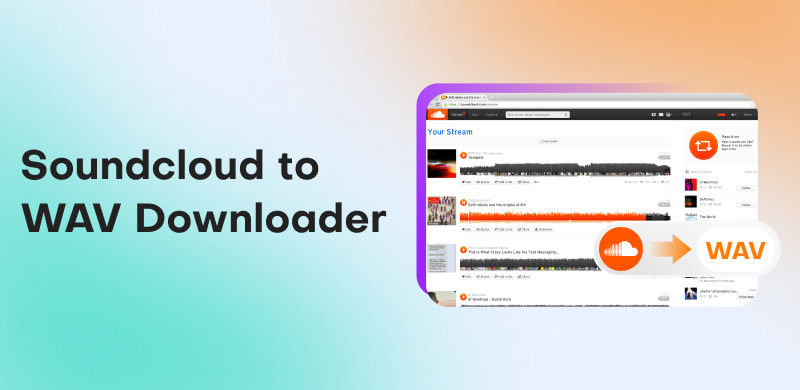
How We Test the SoundCloud to WAV Converters
To ensure that our recommendations are reliable, we test the output audio quality and download success rate first, which are the top factors when users select a suitable SoundCloud to WAV converter. Then we compare these tools from layout (if easy to operate), download speed, and privacy, etc. All test were processed on my personal PC and macOS 13 Ventura.
Which is the Best SoundCloud to WAV Converter?
To get more insights into the best SoundCloud to WAV converter, see the comparison table below.
| SoundCloud to WAV Converters | TopVox All Music Converter | MusicFab SoundCloud Converter | ViWizard Streaming Audio Recorder | Soundcloudrips | DownlaoderSoundCloud |
|---|---|---|---|---|---|
| Rating |
|
|
| No official rating | |
| Audio Quality | 🏆24bit/48kHz | Up to 24-bit | 16-bit/44.1kHz | Compressed | Compressed |
| Output Formats | MP3, WAV, AAC, AC3, FLAV, M4A, and more. | MP3, WAV, Opus, and M4A | WAV, MP3, FLAC, and AAC | MP3, WAV, M4A, OGG, WebM, and more. | WAV, MP3, FLAC, and AAC |
| Batch Download | ✅️ | ✅️ | ✅️ | ❌️ | ❌️ |
| Metadata | Full ID3 Tags | Full ID3 Tags | Full ID3 Tags | ❌️ | ❌️ |
| Speed | 🏆35× | 20× | Fast | Depends on the internet | Depends on the internet |
| Windows 7 or later (64-bit), macOS 10.14~27 | Windows 7 or later (64-bit) macOS 10.14 or above | Windows 11/10 (32bits & 64bits), macOS 10.11-15.x | Windows: 10 or later (32-bit & 64-bit), macOS 11 or later | Online | Online |
| Supported Platform | 9+ (Spotify, Apple Music, etc.) | Only SoundCloud | Qobuz, YouTube Music, etc. | Only SoundCloud | Only SoundCloud |
| Price | 🏆$149.95/Lifetime | $69.99/Lifetime | $159.95/Lifetime | Free | Starts at $5.00 |
Download SoundCloud to WAV Lossless: TopVox 🔥
To download a WAV from SoundCloud, you must have an exceptional program to achieve your goal. In that case, we suggest using TopVox All Music Converter. With the help of this converter, you can ensure that you get the WAV format after the conversion process. What we like about this software is that you can get a fast conversion procedure that is up to 35 times faster than other converters. In addition, you can also save the music as WAV file up to 24bit/48kHz. Plus, the converter can even convert multiple music files, thanks to its batch conversion feature. Thus, TopVox All Music Converter can give you the result you need, making it the most reliable SoundCloud to WAV converter out there.
100% Secure. No virus.
100% Secure. No virus.
Features
- The music converter can save songs smoothly and instantly.
- It has a fast conversion and downloading process, up to 35 times faster.
- It can also download various music from different platforms, like Spotify, Apple Music, Deezer, and more.
- The software offers a built-in web player.
- It is accessible on both Mac and Windows.
Pros
- The program has a user-friendly interface.
- It can convert music to DRM-free formats.
- The program ensures that your information and music are safe.
Cons
- To get more features, use the premium version.
Use this SoundCloud to WAV converter and start converting your favorite music.
Step 1. Download TopVox All Music Converter on your computer. Click the buttons below to start accessing the program.
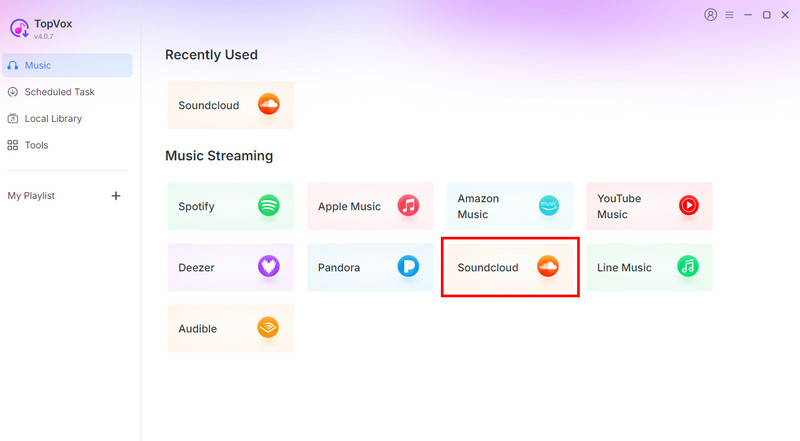
Step 2. After you launch the primary layout, click the SoundCloud platform and insert your account.
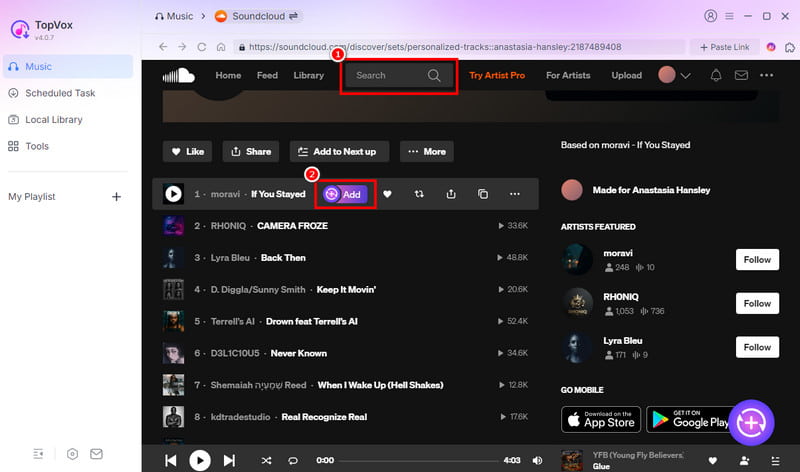
Step 3. You can now browse the music you want to download from the Search section. Then, hit the Add button to insert the music into the Conversion section.
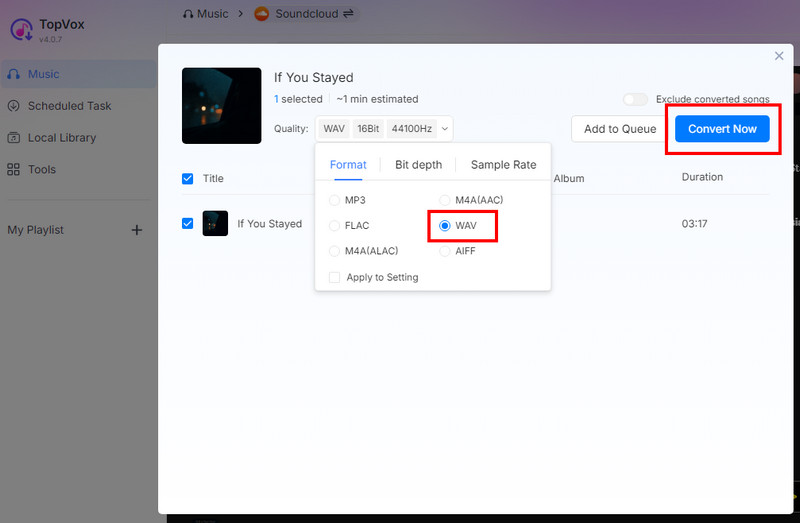
Step 4. Lastly, hit the Convert Now button above to begin the SoundCloud to WAV conversion process.
In my test, I can tell that it successfully converts music from SoundCloud without any issues. I downloaded several playlists with hundreds of tracks (added up to 632 songs) in one go. Amazingly enough, this SoundCloud music converter fast process the task within one hour. It offers all the necessary features, achieving my preferred result. As Lucy Bennett (Contributing Editor at iLounge) reviewed, "Whether you are a free user or a Pro user, it provides seamless and high-quality music conversion to various formats" —— there is no doubt that TopVox All Music Converter is among the best converters to access.
More SoundCloud to WAV converter Software
If you are still looking for another converter that can convert music from SoundCloud to WAV, see all the details below.
Method 1. Convert SoundCloud to WAV Using MusicFab
MusicFab SoundCloud Converter is also an ideal tool if you want to convert your favorite music from SoundCloud to the WAV format. It can offer a smooth conversion process and can even offer good audio quality. Aside from that, you can save and download playlists from SoundCloud, making the software more ideal and helpful for users.
Pros
- The user interface of the converter is understandable.
- It can support various output formats, such as MP3, WAV, M4A, and more.
- It is simple to access.
Cons
- There are times when the conversion process is time-consuming.
To download SoundCloud to WAV, check the instructions below.
Step 1. Download MusicFab on your computer. Then, launch it and select the 'SoundCloud' platform to add your account.
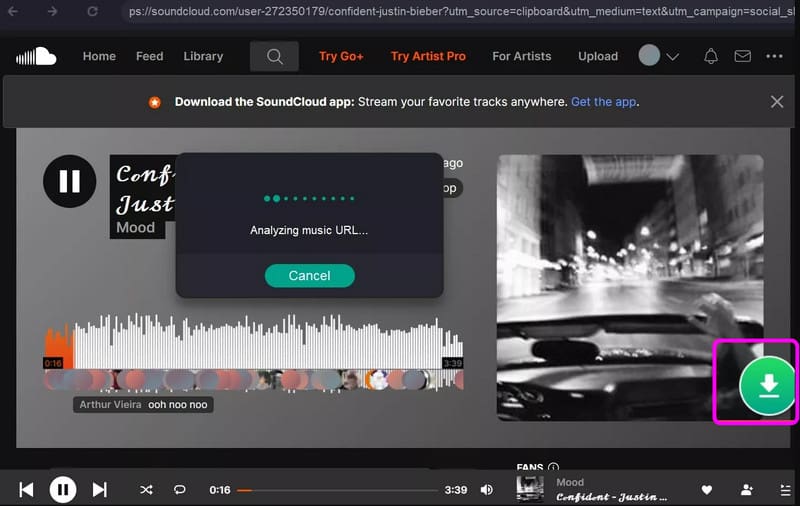
Step 2. Navigate to the Search section to begin browsing your desired music. Once done, tap the Arrow Down button.
Step 3. Go to the Format section and click the WAV format. You can also adjust some settings below. Then, hit the Download Now option to start the conversion process.
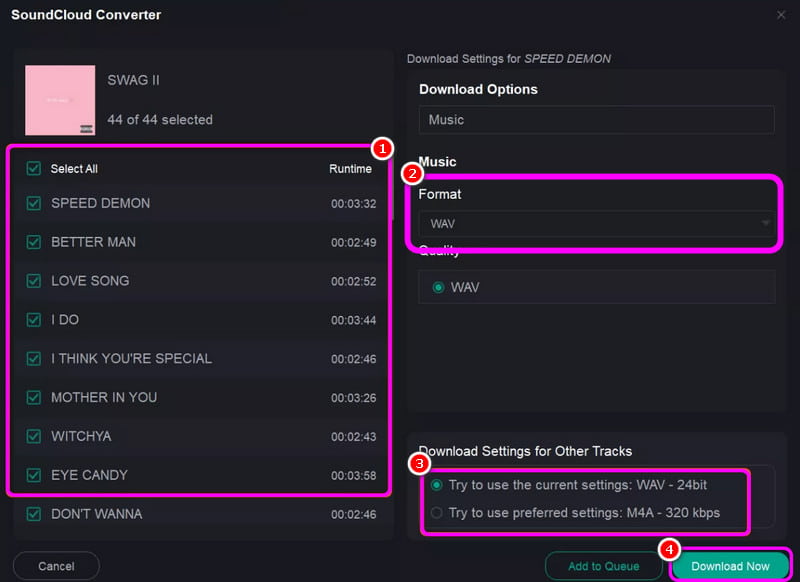
Testing Experience
After following the steps, we can conclude that MusicFab is another helpful converter you can use to convert SoundCloud to WAV. You can also convert SoundCloud to M4A, MP3, and other formats. The problem here is that there are times when the conversion process takes a long time. And many users reported that they have an unpleasant experience with purchasing MusicFab.
Method 2. Convert SoundCloud to WAV Using ViWizard
ViWizard Streaming Audio Recorder is a go-to converter for non-professional users. It is because it has an easy-to-use layout with simple features for conversion. It supports convert ad-free SoundCloud music to WAV in queue. What makes it powerful is that it ensures a better quality, perfect for smooth and satisfying audio playback.
Pros
- The program can offer a smooth conversion process.
- It can download music from Apple Music, Spotify, Amazon Music, and more.
- It supports batch conversion.
Cons
- Some songs are not downloadable.
To begin converting SoundCloud to WAV, use the instructions below.
Step 1. Install ViWizard on your computer and launch it to begin the process.
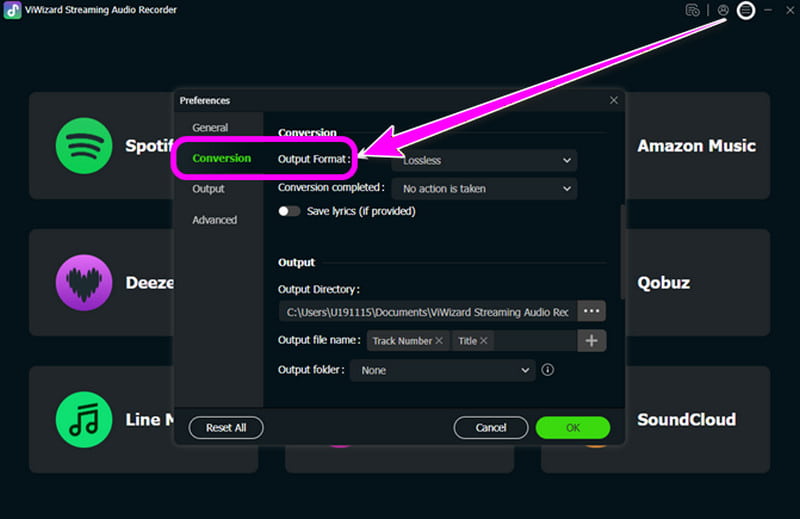
Step 2. From the interface, click the Preference section and tap WAV under the 'Format' section.
Step 3. Now, go to the SoundCloud platform and start looking for the music you want to download. After that, tap the Plus symbol from the right interface.
Step 4. Finally, hit the Convert function to start the conversion process.
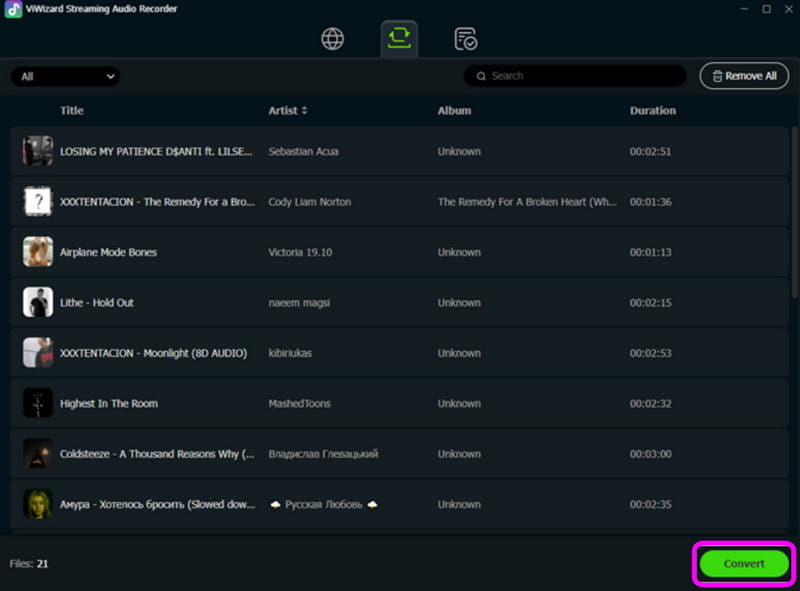
This method is ideal if you are a beginner. With its simple conversion process, you can get the WAV file from SoundCloud. The only drawback here is that there are some songs that you cannot convert and save for some reason.
And many negative comments on its downloading speed and success rate like:
"On my Mac, I have been converting 200 songs for the last 25 minutes. So far, 4 songs have converted. I guess I’ll transfer my songs to my watch, in about 21 hours, when it is done converting them." —— Kurt Alexander from Trustpilot
2 Online SoundCloud to WAV Downloaders
If you prefer an online way to convert SoundCloud to WAV, check all the methods in this section.
Method 1. Convert SoundCloud to WAV via Soundcloudrips
Soundcloudrips is a web-based converter that can help you transcode your favorite music to WAV and other formats. What makes it powerful is that you can download your favorite music with 320 kbps, allowing you to enjoy it during playback.
Pros
- It can support various audio formats, such as WebM, MP3, Opus, FLAC, AAC, AC3, and more.
- The tool is available to all web platforms.
- It is free to use.
Cons
- It needs a stable internet connection to perform well.
- It does not support copyrighted material.
To begin using this tool, follow the steps below.
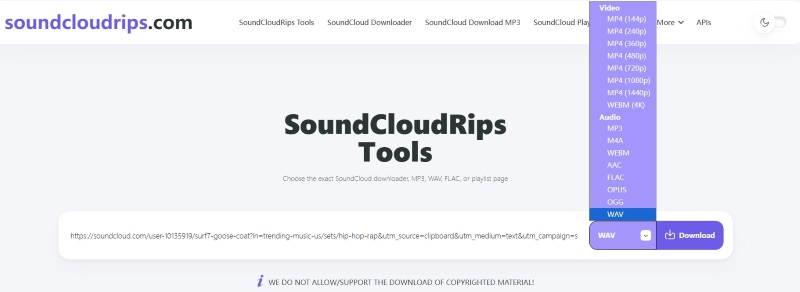
Step 1. Copy the music link from the SoundCloud platform. Then, go to the main website of Soundcloudrips.
Step 2. Then, paste the link and go to the Format section to select the WAV format.
Step 3. For the final process, hit the Download button below. Once done, you can check the music on your device.
Soundcloudrips is an excellent tool that can give your preferred result. It can even offer a good quality for up to 320 kbps. However, since it is an online tool, always ensure that you have an internet connection for a smooth and fast conversion procedure.
Note: How to Identify Fake SoundCloud to WAV downloader?
For musicians, video editors, and content creators, this is a common annoyance. You locate the ideal sound effect or sample on a website that offers ‘Free WAV Downloads,’ but when you import it into your project, it sounds strange. The file size is suspiciously small, the highs are murky, or it lacks impact. A ‘fake’ WAV file has likely deceived you. Since WAV is a professional, high-quality format, many dishonest websites take advantage of this. They take a low-quality MP3 file, change its filename from .mp3 to .wav, and then make it available for download.
Method 2. Convert SoundCloud to WAV via DownloaderSoundCloud
If you are still looking for another tool that can download songs from SoundCloud to a computer, try using DownloaderSoundCloud. When it comes to a smooth and simple conversion, no one can beat this tool since it has a simple layout. You can even download unlimited tracks, making it ideal for music enthusiasts.
Pros
- There are no ads during the conversion process.
- It can support various formats, including MP3, FLAC, AAC, and more.
Cons
- It requires a premium version to access the batch conversion feature.
- To save music up to 320 kbps, using the paid version is necessary.
To start converting your music using DownloaderSoundCloud, follow the provided steps.
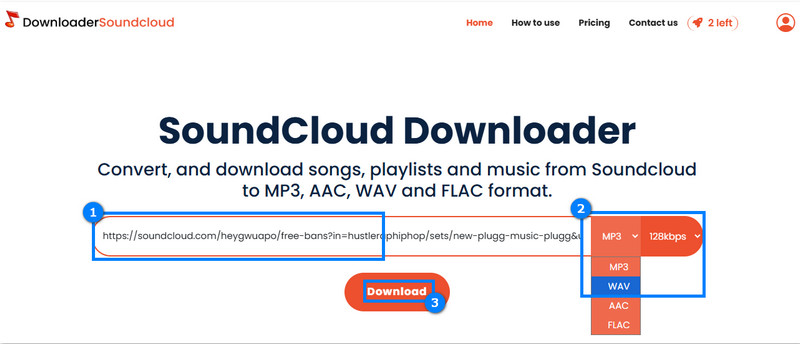
Step 1. After you copied the music link from the SoundCloud platform, go to the primary website of DownloaderSoundCloud.
Step 2. You can start inserting the link and choose WAV from the Format section.
Step 3. After that, start the conversion and saving process by hitting the Download button
Author Note:
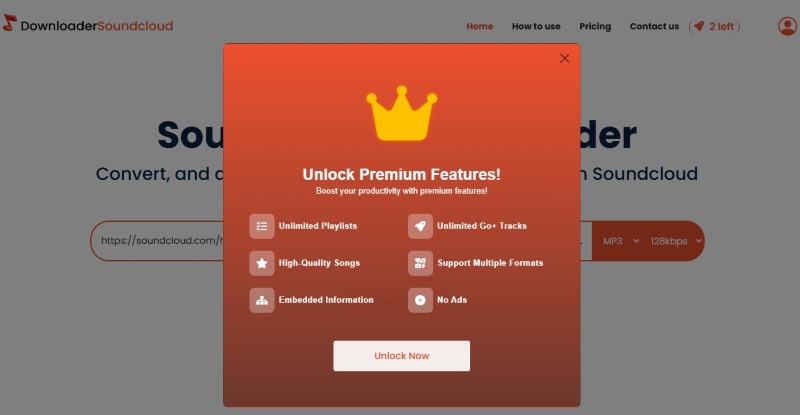
After using the tool, it is reliable for converting SoundCloud to WAV. Need to be reminded that, you can only convert music link to MP3 on the free version. For WAV format output, this SoundCloud to WAV converter will remind you to subscribe to its Pro Plan to unlock more features.
To check if the WAV downloader is real or fake, you must:
- • Always check the link and branding.
- • Analyze the Download button.
- • Read the Fine print.
- • Check for other users’ reviews about the tool.
- • Test its overall capabilities.
Do You Really Need to Turn SoundCloud to WAV?
There are several reasons why you need to convert SoundCloud to WAV. It can be for:
Better Audio Quality
WAV is lossless and uncompressed. It can preserve the full frequency range for DJing, mastering, and mixing use.
Editing Flexibility
Another reason why you need to convert SoundCloud to WAV is that you can easily manipulate various parameters without introducing artifacts. You can even improve the image file instantly.
Preservation Purposes
WAV is among the ideal formats you can use to preserve audio. It ensures that there will be no degradation over time compared to other compressed formats.
Benefits of WAV Format
- • Lossless Fidelity – Exact copy of the original audio, no compression.
- • High Bitrate (~1411 kbps) – Matches CD-quality standards.
- • Reliable for Editing – Maintains integrity during repeated processing.
- • Universal Compatibility – Supported by most professional audio software.
- • Better for Large Systems – Superior playback quality on studio monitors and club speakers.
If you want to see the differences between the WAV and MP3 formats, you can check the comparison table below.
| WAV | vs. | MP3 |
|---|---|---|
| • Lossless • Full spectrum | Audio Quality | • Lossy • Some data removed |
| 1411 kbps | Bitrate | Up to 320 kbps |
| Large (30–50 MB per track) | File Size | Small (3–10 MB per track) |
| • Editing • DJing • Archiving | Best Use Case | • Casual listening • Portability |
| Widely supported in Pro Tools | Compatibility | Universally supported on devices |
FAQs about SoundCloud to WAV
Is WAV the best audio quality?
Yes. WAV is among the best quality you can have since it is lossless. It means that you can enjoy its best quality during the audio playback.
Can I save the SoundCloud music on my computer permanently?
Absolutely, Yes. If you are using TopVox All Music Converter, you can download the music with your preferred quality. With that, you can listen to your music as long as you want.
What are the best SoundCloud to WAV converters?
If you are looking for the best converters, you can use TopVox All Music Converter, Soundcloudrips, MusicFab, and more. Access these converters and achieve your desired result.
Conclusion
With these SoundCloud to WAV converters, you can get your favorite music from SoundCloud and save it on your device for a better listening experience. Thus, use all these converters for an effective conversion process. Also, if you are looking for an astounding converter that can convert music to various formats, we prefer using TopVox All Music Converter. This program can convert your music to any format with the best audio quality, making it the most reliable tool on Mac and Windows.
100% Secure. No virus.
100% Secure. No virus.
Owen Bannett is a music enthusiasm as well as a senior writer. He has paid close attention on the pros & cons of various audio formats, bitrate, sample rate and encoding methods. Always seeking the best listening experience, Owen has deep insights about lossless music and diverse music converters on the markets.