Reviewing DRmare Apple Music Converter: Features and Best Alternative
Quick Summary
DRmare Apple Music Converter is a solid and user-friendly desktop utility for casual users who want backup Apple Music locally. It supports turn high-quality songs to various audio formats. However, if you’re seeking a more effective solution with higher stability, faster batch handling, and useful toolkits, Topvox All Music Converter serves as the superior modern alternative. In this review, we test the overall performance of DRmare and compare it with TopVox.
Apple Music virtually useless if you do not have a subscription. That means, listening to your favorite jam will always require you to pay a monthly subscription. That is why, having a tool that can help us use Apple Music without purchasing a premium account is something that we want to do here. Allow us to introduce you to DRmare Apple Music Converter which has the capability to download music from Apple Music and convert it to MP3 so that you can listen. Well, let us discover more about this tool and there are more great details and a great tool waiting for you to unveil. Read this article now.
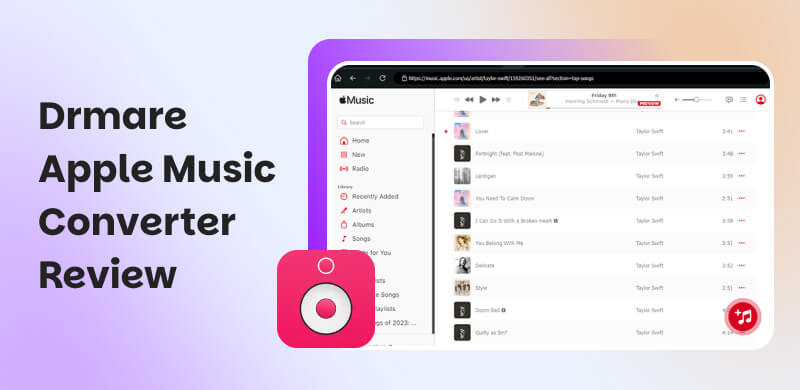
Part 1. What is the DRmare Apple Music Converter?
Overview of DRmare Apple Music Converter
Defining first what DRmare Apple Music Converter is all about. This tool is designed for your computer for the ability to download Apple Music songs and turn it into a different file format for permanent offline listening experience. Converting the tracks to various audio formats such as MP3, M4A, M4B, WAV, FLAC, and AAC. This amazing software is also capable of removing DRM protections which are commonly applied to Apple Music.
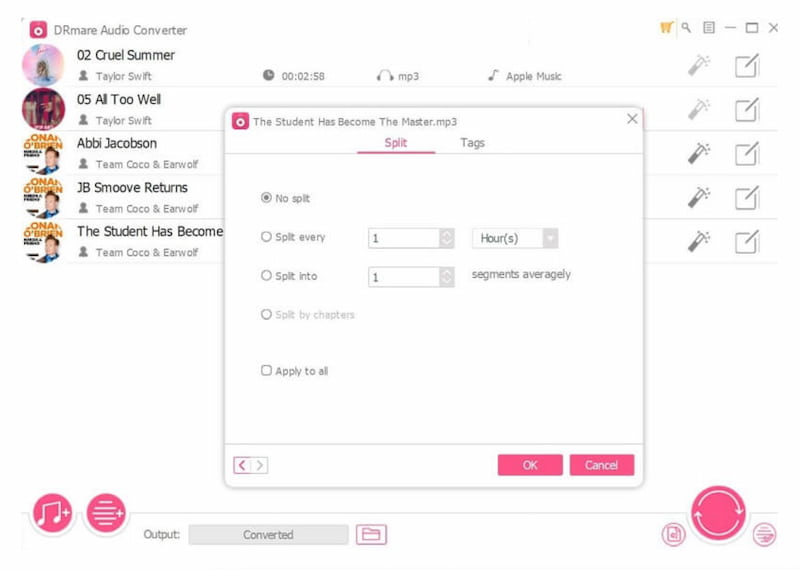
①In addition, this Apple Music converter has a great method to download Apple Music in batches for offline listening. This process usually comes with 30X faster speed as per their website, while also fully preserving the original audio quality and ID3 tags. More than that, DRmare Apple Music Converter can also convert other music such as music from iTunes, Audible audiobooks. No wonder why many users think it is a versatile music conversion tool.
System Compatibility
| Version | RAM | Processor | Monitor |
| macOS | macOS 11 Big Sur, 12 Monterey, 13 Ventura, macOS 14 Sonoma, macOS 15 Sequoia, and macOS 26 Tahoe | 512MB or higher of RAM. | 1G Hz processor, or above. | Monitor with 1024×768 pixels or higher resolution. |
| Windows | Windows 11, 10, 8, 7, XP, and Vista. |
DRmare Pricing and Subscription Plans
| Platform | Price | Features Included |
| Single License | Mac or Windows | $39.95 for one-time purchase. | ●Lifetime use.
●Free updates.
●Technical support |
| Family License | Mac or Windows | $59.95 for one-time purchase. | ●Up to 2–5 devices.
●Lifetime use.
●Free updates. |
| Bundle Deals | Mac and Windows | $69.95 for one-time purchase. | ●Both versions included.
●Lifetime use. |
Part 2. Performance Testing of DRmare Audio Converter
Key Features
Versatile DRM Protection Removal
The tool is equipped with powerful DRM removal. This feature is the reason why we can convert all the protected AAC songs from Apple Music to MP3 or other DRM-free formats. More than that, this feature is also the one that enables an AAC to MP3 converter to extend its support to iTunes music, Audible audiobooks, and other protected audio files. Good thing, it also comes with a built-in splitter where you can easily pick the specific audiobook chapter you want to listen to.
Original ID3 Tags Preservation
Another feature it possesses is its ability to convert tracks while maintaining the original ID3 tags. As we all know, ID3 tags are great with our music tracks because these tags typically include vital information such as artist name, album title, track number, and genre. In addition, while using the tool you will have an option to archive output tracks by selecting None, Artist, or Name. Basically, this feature of the tool is helpful with keeping your music library well-organized after you convert Apple Music songs.
Batch Conversion at Up to 30X Faster Speed
Using these tools you can expect a conversion of Apple Music songs quickly and efficiently. Because in this tool, you can easily select a batch of songs that you want to convert. You will also notice in the process that the software will take care of the rest at a 30X faster speed. Finally, once the conversion is complete, you can enjoy your music on any device that supports the selected format.
Testing Experience
| Official Claim | Tested |
| Speed | 30x | Single 3‑min track ~5X (~36 sec)
100‑song batch ~20–25 min (Several songs failed to download) |
| Audio Quality | Lossless original quality | No obvious degradation on short clips |
| ID3 Tag Preservation | Fully Preserved | ✅️ |
The advertised "30X faster" is only approached on high-end Windows setups. The Mac version falls far short of that. All test sources confirm metadata (including cover art) is retained intact. Library organization stays clean. The free version is limited to convert 60-sec per track, making it hard to evaluate real performance before paying. Some users reported that he had palyback issues with DRmare on Mac/Windows. (Cite from Reddit)
"Ripping the DRM and ending up with very low volume that cannot be adjusted, noticed it happening on all Albums since August 24, wasn't aware until moving files to an MP3 player, the originals play fine through Music App."
"Drmare works fine with me on Windows 11 pro. Now and then I have indeed a converted song with low volume. I did not try adjusting it."
Part 3. How Does DRmare Apple Music Converter Work?
After knowing its definition and the useful feature to convert Apple Music tracks, let us now proceed in knowing how we can make it possible. See the simple steps below;
Step 1. First, we need to install the tool on our computer. Then, after the installation, we need to launch DRmare Apple Music Converter now and then see if iTunes will run automatically.
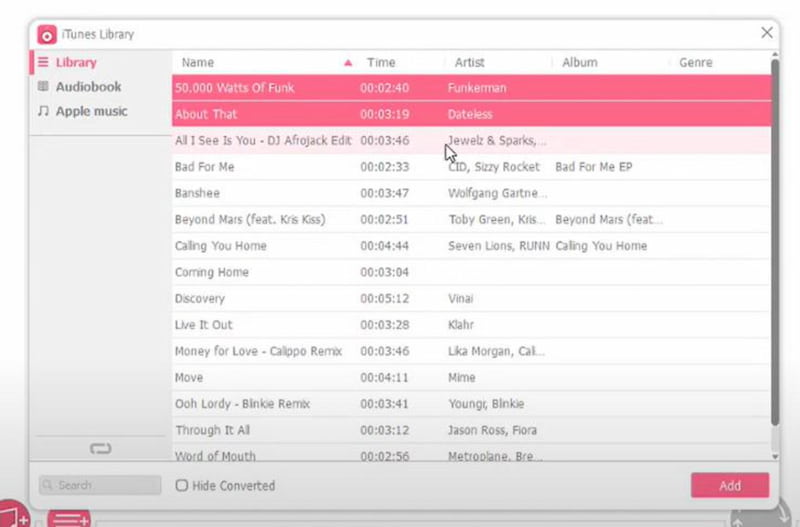
Step 2. Next, please click on the Add button. You will now see a pop-up window that displays all your downloaded songs on the iTunes music library. You can now select the songs you wish to convert and click Add.
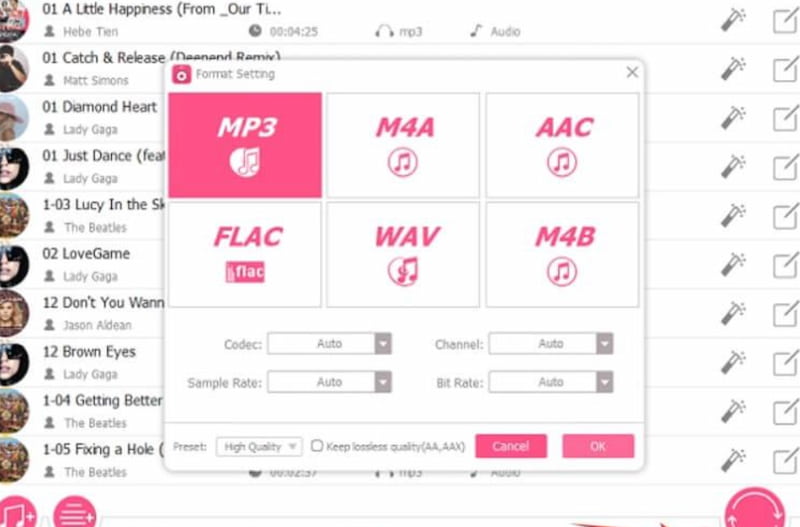
Step 3. After that, you can now tap the Format Setting. This will allow you to customize the output settings. In these steps, follow what you prefer in adjusting the output format, codec, channel, sample rate, and bitrate to fit your needs. Note, the default output format is MP3.
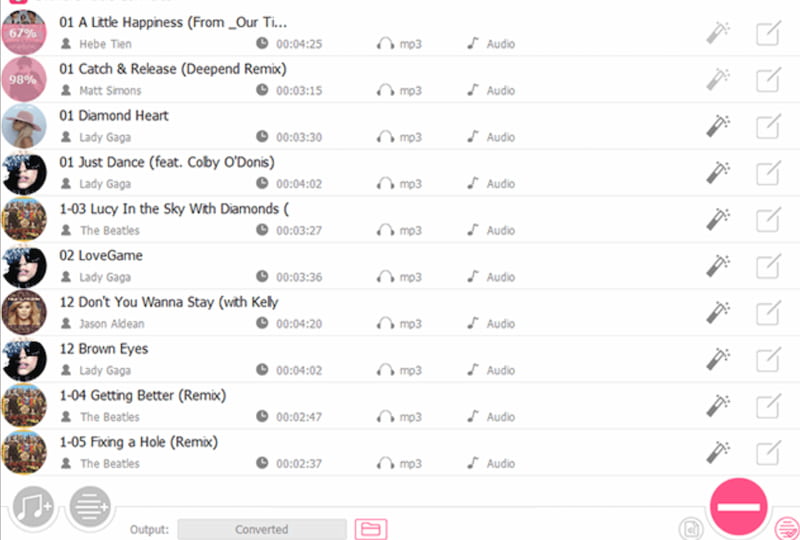
Step 4. At this moment, we can now click on the Convert button to start removing DRM protection and turning Apple Music tracks to MP3 files.
Part 4. Best Alternative to DRmare Apple Music Converter: Topvox All Music Converter
Despite having a great feature that allows us to convert songs from Apple Music to MP3, it is still lacking some features that users really love like a built-in player. That is why, if you are looking for an alternative that can offer both, then TopVox All Music Converter is the one tool you are looking for. This tool will easily allow you to use different music platforms like Apple Music. You can now listen even if you do not have a premium account.In addition, you can also download music for offline listening. All of these experiences are for free and come with no advertisement. Therefore, TopVox All Music Converter is indeed one of the best and an alternative to DRmare you can use for a better experience. Here is the simple guide you can follow:
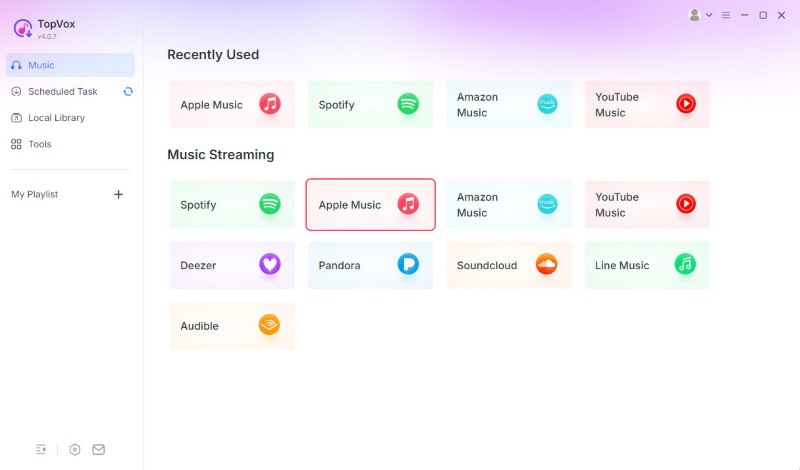
Step 1. Install TopVox All Music Converter for free and immediately install it on your computer. Then, open it to access the Apple Music platform.
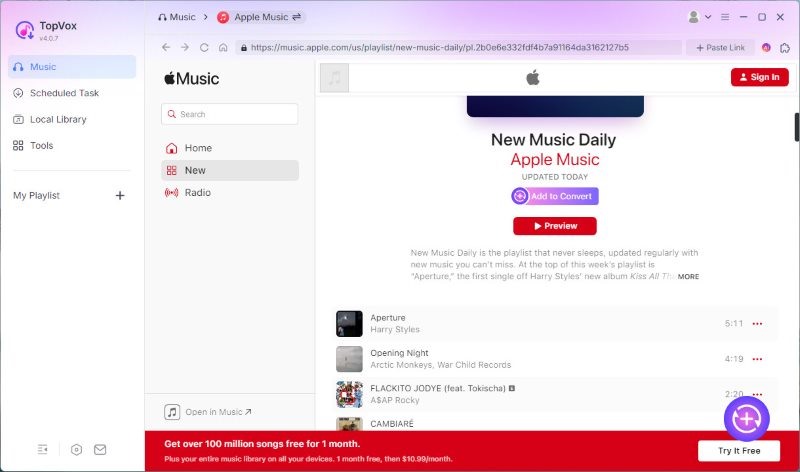
Step 2. Without complications, you can now search for the music you love to hear and play it with ease.
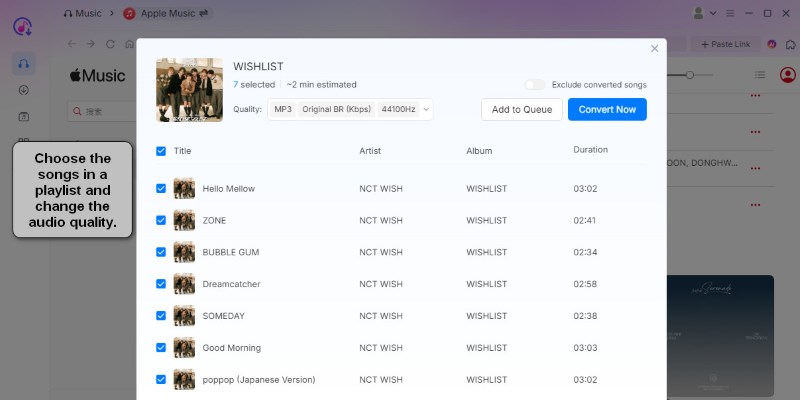
Step 3. From there, you can also proceed clicking the Add button to make the music be playable on an offline experience.
Part 5. Comparison of DRmare vs. TopVox All Music Converter
| VS | TopVox All Music Converter |
| Download songs form Apple Music/iTunes with full metadata for offline listening. | Best For | High-speed batch downloads Apple Music songs, playlists, podcasts and albums across 9+ platforms for free/paid users. |
●One-time purchase for $39.95 single account.
●$59.95 for family.
●$69.95 for a bundle. | Pricing | Free to use |
| Available on macOS and Windows. | Supported Platforms | Available on macOS and Windows. |
| It can remove DRM from Apple Music, iTunes, and Audible. | DRM Removal | It remove DRM from Apple Music and other platforms. |
| MP3, M4A, M4B, WAV, FLAC, and AAC. | Output Formats | MP3, AAC, FLAC, and WAV. |
| Up to 30X faster. | Conversion Speed | Fast, but speed not specified. |
| Yes | Batch Conversion | Yes |
| No | Built-in Player | Yes |
| Yes, after conversion. | Offline Listening | Yes, directly supported. |
| None | Advertisements | None |
| Requires setup and conversion steps. | Ease of Use | Simple, direct playback and download. |
FAQs on DRmare Apple Music Converter
Q: Is it legal to use DRmare?
A: Using tools like DRmare is allowed. However, it is very important to know that these tools are intended for personal use only. You might face a problem when you decide to use it for commercial use.
Q: Does DRmare preserve metadata like album art and track info?
A: Yes. DRmare has a feature that maintains ID3 tags including artist, album, genre, and cover art during conversion. Making your library management easy and organized.
Q: Do I need an Apple Music subscription to use DRmare?
A: Yes. It is important that you must have an active Apple Music subscription to access and convert songs. Without it, you cannot use it at all.
Q: What audio output formats does DRmare support?
A: The paid full version supports MP3, M4A, FLAC, WAV, AIFF and M4B. You can keep high-qulaity converted MP3 files up to 320 kbps with no obvious audio degradation. But many feedbacks shows that the volume turned lower after converting.
Q: Does DRmare support batch conversion for playlists?
A: Yes. DRmare is accessible to download tracks in bulk but limited to processing 100 tracks simultaneously. You can copy and paste playlist link or add the playlist from its web player, it will automatically load and batch-process all the tracks listed.
Conclusion
In the end, getting the music we love in Apple Music is now possible without having a premium version. That became possible with the DRmare tool. But having to download every song is kind of complicated because of the waiting time. Good thing, you also have TopVox All Music Converter to give you a built-in player and a downloadable capability too. Use it to maximize its free account in Apple Music.
Ethan Carter
Ethan Carter creates in-depth content, timely news, and practical guides on AI audio, helping readers understand AI audio tools, making them accessible to non-experts. He specializes in reviewing top AI tools, explaining the ethics of AI music, and covering regulations. He uses data-driven insights and analysis, making his work trusted.




 by
by