Top 6 Methods to Convert Spotify Music to MP3 [2026 Updated]
 by Luna Harper | July 3, 2026 | Spotify
Expert Insight:
The most reliable method to convert Spotify to MP3 is by using a professional desktop software like TopVox All Music Converter. It allows both Spotify Free and Premium users to download songs, playlists, and podcasts at 320kbps speed with ID3 tags preserved. For convenience, you can try some online Spotify to MP3 converters that have potential risks. Spotiflyer is more appropriate than other tools when you need to save Spotify music tracks on mobile.
How to download Spotify to MP3? Although you subscribe to premium, you can’t download Spotify songs as MP3 files for offline enjoyment or even transfer playlists to your MP3 player. To do so, the post provides different ways to save your favorite Spotify songs, albums, or playlists to MP3 on desktop or mobile devices.
How We Test
We have reviewed Spotify-to-MP3 converters using a standardized process to ensure reliability. We purchase all testing accounts independently without any involvement or sponsorship. Audio performance is benchmarked with commercial measurement tools, covering aspects such as bitrate, frequency response, dynamic range, and delay (latency) under a range of network conditions.
Why Convert Spotify to MP3?
User Review From Reddit:
“It's not DRM in the traditional "oh I paid for this song but I can only listen to it here" because you didn't pay for a song. you payed for the service. You don't own anything on Spotify…”
“I don't understand putting DRM on songs you actually buy for their full price.”
Although you are a Premium user, you’re only allowed to enjoy the DRM-protected Spotify music within the Spotify app. Therefore, many listeners want to convert Spotify to other devices and choose MP3 as the output format due to its compatibility. It significantly reduces file sizes while maintaining a reasonable level of audio quality.
There’s another issue: is converting Spotify to MP3 legal? Well, it depends on how you use the music. If you plan to download Spotify music and share it on your social media accounts without the owner's consent, it is illegal. As laid out in Spotify’s Terms and Conditions, Spotify is only for personal, non-commercial use.
First Look: Comparison of 6 Spotify to MP3 Converters
Before choosing the right one, you should understand how different Spotify downloaders operate. The workflow directly dictates audio quality, song version accuracy, and overall downloading reliability. There are 3 ways:
1. Directly connect to official Spotify (Best)
Most Spotify downloader that uses this workflow are desktop software that fetch original audio streams and transcode them into MP3 and other formats. A valid Spotify account is required, and the music quality is based on that – 160kbps for Spotify Free and 256kbps for Premium.
2. Real-time Audio Recording
Some online audio converters will capture background audio during playback and encode it to MP3. These tools provide slow download speeds and fake bitrates (e.g., claiming 320kbps when the actual quality is compressed) while you can paste links without logging in.
3. Match Music Metadata (Highly Misleading)
Although advertised as “Spotify Downloader”, some tools do not interact with Spotify servers at all. Instead, they extract the song title and artist name from the Spotify URL, then search for audio from public platforms like YouTube or YouTube Music. This workflow suffers from limited audio quality, which is bounded by YouTube's sources. That means you can’t keep high-quality music, let alone avoid version mismatch.
| Tools | Workflow Type | Success Rate | Download Method | Requires Spotify Account | Actual Audio Quality | Batch Download | Limitations |
|---|---|---|---|---|---|---|---|
| TopVox All Music Converter | Way 1: Desktop Direct | ~99% | Connect directly to Spotify servers | ✅️Both Free or Paid | Customized | ✅️35× speed batch download | None (reliable) |
| SpotiDownloader | Way 1: Server proxy | ~85% | Use private server-side account pools | ❌️ | Fake 320kbps | ❌️ | Fake bitrate; no guarantee of official source |
| Spotisong Downloader | Way 3: YouTube Matching | ~70–75% | Match metadata to YouTube sources | ❌️ | Depends on YouTube source availability & quality | ⚠️ ZIP package but slow | Downloads may be live/cover/wrong version |
| Spowload | Way 3: YouTube Matching | ~50–60% | Parse Spotify URLs on YouTube | ❌️ | Limited by YouTube (~128kbps) | ❌️ | Often fails to recognize Spotify URLs |
| Spotiflyer | Way 3: YouTube Matching | ~70% | Fetch audio from YouTube/external sources | ❌️ | 128kbps – 160kbps | ⚠️ Unstable | Low quality; version mismatches |
| Spotify Save Bot | Way 3: YouTube Matching | ~10–20% | Match tracks on YouTube | ❌️ | Limited by YouTube audio quality | ❌️ | Most such bots are dead due to Spotify API changes. |
TopVox: Best Way to Download Spotify to MP3?
To convert Spotify to MP3, you need a reliable Spotify converter that provides a smooth, straightforward conversion process. We suggest using TopVox All Music Converter.
Andrei Verdeanu, a technology critic, reported, “efficient audio downloader, targeting a range of streaming platforms, also capable of reliable conversion.” Thanks to this offline program, you can perfectly convert and batch-download Spotify Music playlists to MP3 format with a simple main interface. Aside from that, it also ensures the best quality for up to 320 kbps and a fast conversion speed up to 35 times faster than other converters. With that, you can finish the task without consuming much time at a high level of quality, supporting an available playback anywhere, anytime.
(TopVox respects the intellectual property rights of Spotify and is intended for personal backup only.)
100% Secure. No virus.
100% Secure. No virus.
Features
- Fast Spotify-to-MP3 conversion with ID3 tags.
- Supports numerous audio output formats.
- Provides a lossless audio quality at 320kbps.
- Download music from different platforms, like Apple Music, Pandora, Amazon, etc.
- Available on both Windows and Mac OS.
- The advanced tool supports more conversion options.
Pros
- An all-in-one solution eliminates the need for multiple tools.
- Downloading large playlists or entire albums quickly.
- Keep with the original audio fidelity.
- Tag Editor makes it easy to organize your local music library.
Cons
- It only converts the first 3 minutes of each song during a 14-day free trial.
How to convert Spotify to MP3 via TopVox:
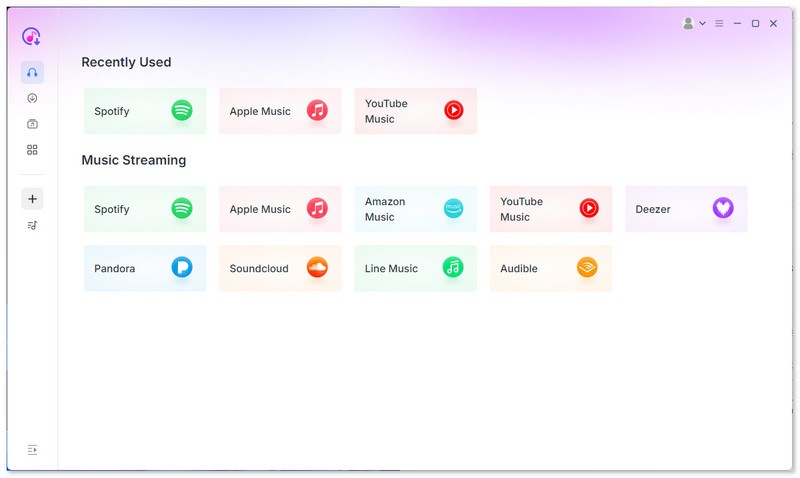
Step 1. After the installation, run it on your computer. Click the Spotify platform, then enter your Spotify account information.
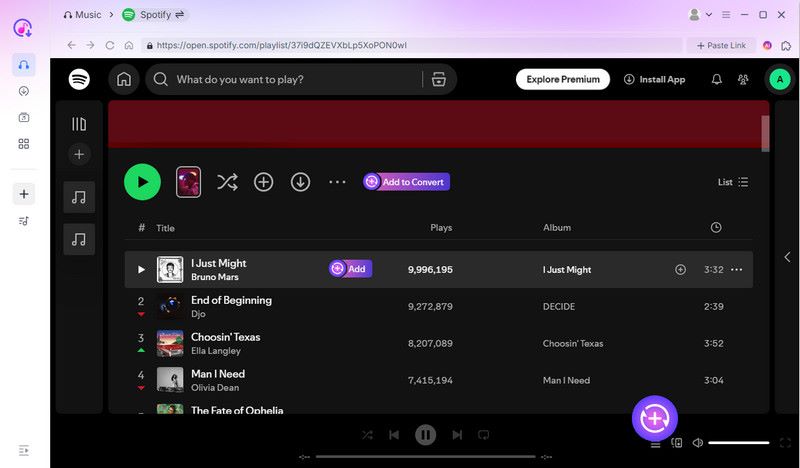
Step 2. Go to the Search section and browse the Spotify music you want to convert. Then hit the Add to Convert button. You can add as many songs as you want.
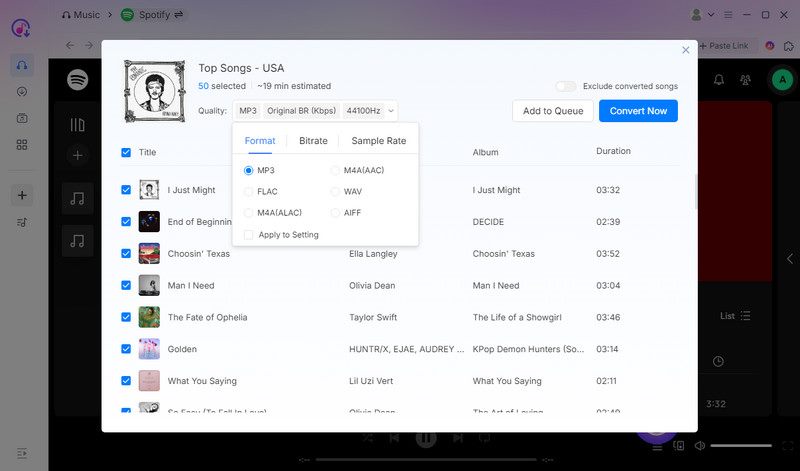
Step 3. Go to the Format section and choose MP3 as your output format. Once done, tap Convert Now to begin converting your Spotify music to MP3.
User experience:
After following this method, converting Spotify music to MP3 is a straightforward task. What we like here is that it can give you a smooth and fast conversion process. It also ensures that you can enjoy exceptional audio quality for an enhanced listening experience.
Tips
- Pay a visit: TopVox All Music Converter Review: Worth Buying?
Other 5 Ways to Convert Spotify to MP3
If you're looking for an alternative method to download music from Spotify to MP3, refer to this section. We will show you how to convert your favorite music using your browser, as well as on Android and iOS devices.
SpotiDownloader
If you prefer using an online tool to convert Spotify songs to MP3, you can try SpotiDownloader. This tool is ideal if you want an easy way to achieve your primary objective. It features a simple layout and provides results in just a few clicks. Additionally, it can automatically convert your Spotify link into an MP3 or FLAC file. So, see the instructions below and start converting your favorite music from Spotify.
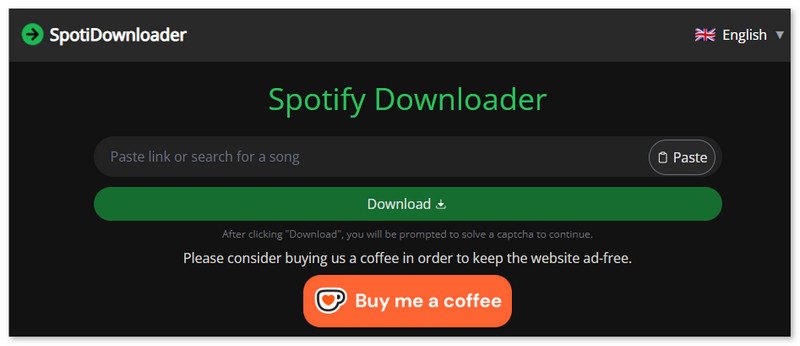
Step 1. Go to your browser and visit the main Spotify Downloader website. After that, return to your Spotify account and copy the link of the song you want to download.
Step 2. Then, proceed to the tool and paste the link to the music. Once done, tap the Submit button.
Step 3. After the loading process, click the Download button to start saving the converted music to your computer.
Pros
- No downloads or special software required.
- A simple one-click conversion process.
- An ad-block feature allows you to enjoy pure tracks.
- Supports multiple languages.
Cons
- Not capable of converting multiple songs.
- Converted sound with lossy quality.
- Difficult to find the saved location of the song.
User experience:
The downloading process is straightforward and fast without installing any apps. It has a user-friendly feature that lets you choose 21 languages. But the biggest problem is that I can’t find where the converted songs are! Such a conversion is simply meaningless.
Spotisong Downloader
To download a Spotify playlist to MP3, you can try using Spotisong Downloader. This free tool is among the best converters, offering a fast conversion process. It is compatible with multiple browsers, including Google, Safari, Opera, and others. You can customize the output quality from 128 kbps to 320 kbps.
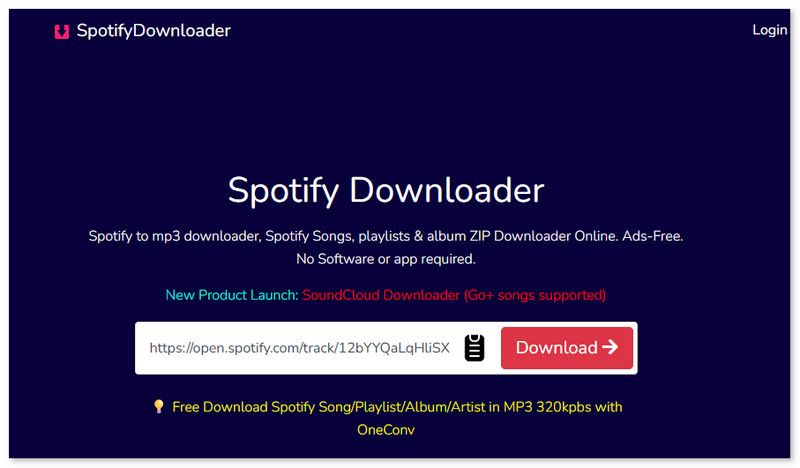
Step 1. Copy and paste the music link to the tool.
Step 2. A new page will automatically present. Click Generate Download Link, then you can choose the output quality.
Step 3. Click Download to save the MP3 files on your computer.
Pros
- A single song or the whole playlist can be saved.
- Ads-free interface.
- Get original 128K M4A files straight from Spotify.
Cons
- No more than 25 songs in a playlist.
- Need a registered account to download more songs.
User experience:
I can effectively convert my favorite music into MP3, but the process is cumbersome. As a Reddit user said, “I had to pay a subscription to download the whole playlist and had to download it one by one.” Another drawback here is that only 3 song downloads are allowed per day. For more, you have to log in or come back tomorrow.
Spowload
Spowload is among the best online tools that you can use to transcode Spotify to MP3 smoothly. It is because the tool doesn't have any annoying ads that can disturb you during the conversion process. The advantage here is that it can deliver the best audio quality, enabling you to enjoy your favorite music during playback.
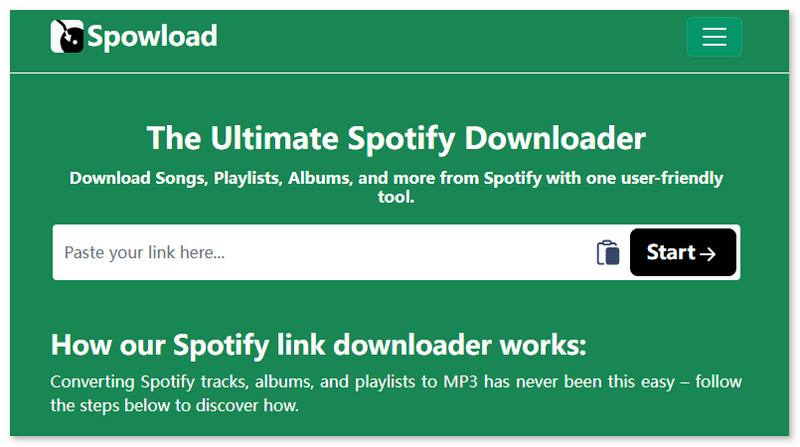
Step 1. Paste the link to the Spotify music into the interface.
Step 2. After that, click the Start > Convert button to begin converting the music.
Step 3. Hit Download to save the music on your computer.
Pros
- Works on Android, iOS, Windows, and Mac.
- Download Spotify songs, albums, and playlists with ID3 tags.
- Free to use.
Cons
- Remain pop-up ads.
- Don’t support batch download.
- Conversion speed is slow.
- Audio quality is limited.
User experience:
It can even offer a simple interface for fast navigation. Thus, if you want to achieve your main goal. But there are inevitable drawbacks, such as low speed/quality and interruptive ads, which may affect your downloading experience.
Spotiflyer [Android]
Spotiflyer is an excellent app you can download on your Android to convert Spotify music to MP3. With this app, you can get your favorite music in the best quality. It can even automatically convert the music to MP3, so you don't need to choose the MP3 format during the process.
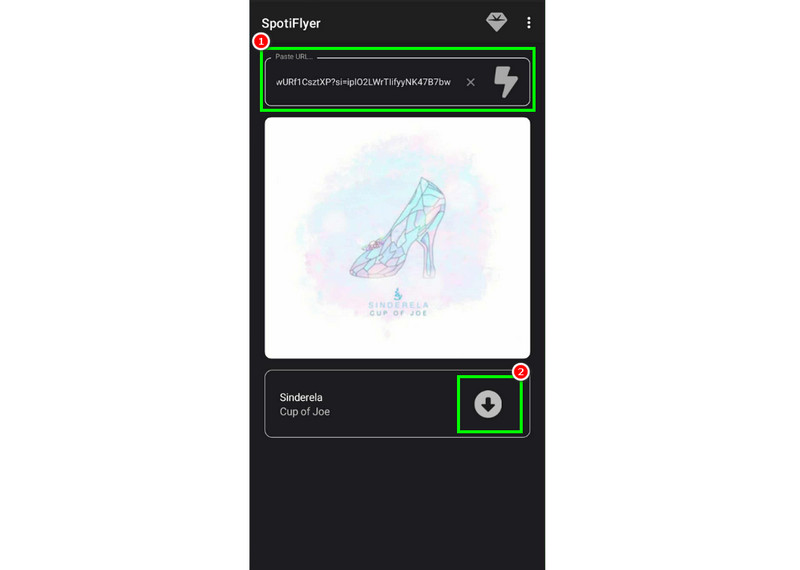
Step 1. Download the app or add the Trusted Filter Extension. Then, launch it to start the process.
Step 2. Copy and paste a Spotify link to prepare MP3 conversion.
Step 3. Click the Download symbol to start the Spotify to MP3 conversion.
Pros
- Works on Android, Windows, macOS, and Linux.
- Open-source on GitHub.
Cons
- Can’t control the audio quality during conversion.
- Original ID3 tags may be broken.
- Output format is only MP3.
- No support for the iOS system.
User experience:
When using this tool on an Android phone, you can complete the task quickly and efficiently. However, it runs unstably and frequently results in system crashes. Some user reviews from Google Play:
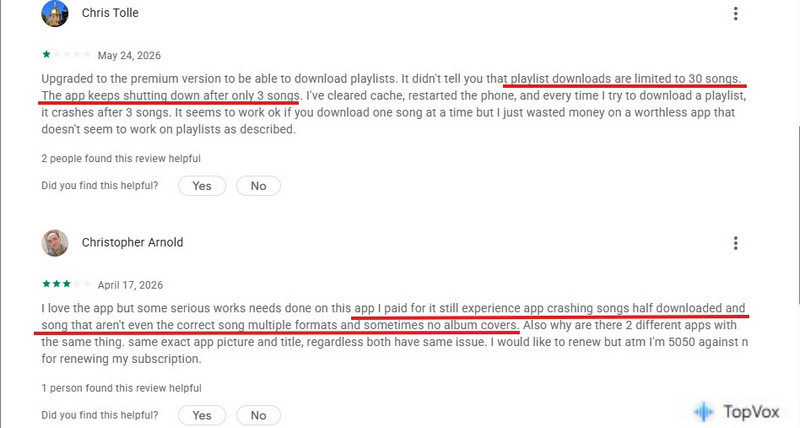
Spotify Save Bot [Telegram Bot]
For iOS and Android, you can ask a Telegram Bot for help in downloading your Spotify tracks to MP3. Spotify Save Bot is ideal if you prefer not to use downloaders on your mobile devices. The only drawback here is that the downloading process is time-consuming. Therefore, if you wish to start downloading your favorite Spotify songs, follow the steps below.
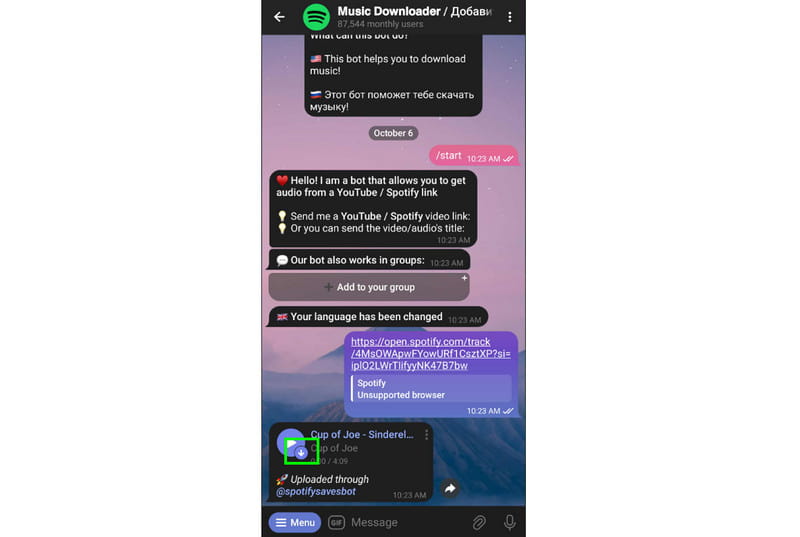
Step 1. Search for the Spotify Save Bot on your Telegram. In the bot’s page, you can type /start to communicate with it.
Step 2. Then, paste the music link from Spotify to the chat. The bot will start giving you related audio information.
Step 3. Hit the Save to Files to begin download. Once done, you can now start listening to your favorite music.
Pros
- Easy to use without engineering requirements.
- Supports high-quality downloading (up to 320kbps).
Cons
- The download success rate is unstable.
- Without advanced features.
User experience:
What we like here is that it consistently produces high-quality Spotify songs to MP3 once starting a conversation with the bot. But the experience of the bot is not as good as desktop software, like TopVox All Music Converter, which offers more customized tools and features for downloading Spotify songs and playlists to MP3.
FAQs on Spotify to MP3
Q: Is there a safe method to download Spotify music?
A: Yes. To download Spotify music, you must use a reliable converter, such as TopVox All Music Converter. With this tool, you can ensure a smooth process without encountering any issues.
Q: Where can I find the downloaded Spotify songs?
A: Using online tools, you can view all the downloaded Spotify music from the recent download history list in the browser. If you choose a desktop converter like TopVox, go to the Local Library in the app.
Q: Can I convert Spotify to MP3 for free without Premium?
A: Yes. Using a dedicated, professional audio tool like TopVox Spotify Music Converter bypasses the Spotify offline limitation. It enables both Spotify Free and Premium users to easily convert playlists, tracks, and albums into high-quality MP3 files for local playback.
Q: Will I lose audio quality when converting to MP3?
A: Depends on. You’d better choose desktop software to perform the Spotify-to-MP3 task – most of them support high-fidelity audio extraction at up to 320kbps (the maximum bitrate for MP3). Whereas other audio downloader sites will cut down the original bitrates to 192~256kbps.
Q: How to transfer converted MP3 to Android/iPhone?
A: For Android users, connect your phone to your computer via a USB cable, and simply drag and drop the downloads into your phone's storage folder. For iPhone users, you can sync MP3 files from Spotify to the Apple Music app or iTunes on your computer and listen to those songs on your phone.
Conclusion
To convert Spotify to MP3, you can use all the methods we have provided in this article to start downloading. Additionally, if you want the best tool to help you convert Spotify playlists to MP3 and other formats with the highest quality, it is better to use TopVox All Music Converter. It can even support batch conversion, allowing you to handle multiple Spotify songs simultaneously, making it the most powerful converter.
100% Secure. No virus.
100% Secure. No virus.
Luna Harper is a passionate music lover and an inspiring content sharer. She has explored most of the music converters available on the market, acquiring thorough knowledge of their features, usability, and differences. Luna enjoys using her professionalism to help fellow music lovers get superior audio quality.