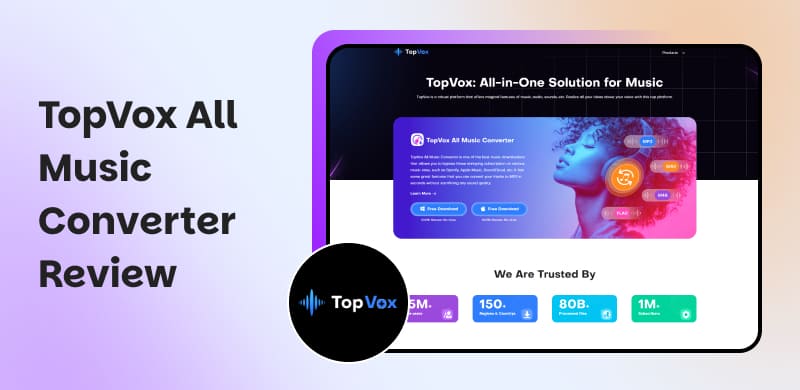
TopVox All Music Converter Review 2026: Listen to Music Offline
 by Owen Bannett | April 28, 2026 | Reviews/Knowledge
No pain, no gain. So is music. Most streaming platforms, like Spotify and Apple Music, don't allow users to download and listen to music offline with strict limitations. However, what if a tool can eliminate the lines between you and your music? TopVox All Music Converter supports you to save all types of music from different music apps as MP3s and other file formats at high quality in a matter of seconds. You can ditch the high subscription and DRM restrictions to enjoy your music wherever you go.
In addition, building a personal library in its service is seamless, with a clean interface and speedy conversion. Also, it does not just provide music downloads; it offers multiple advanced toolboxes to support all your audio needs. Let's take a look at this one-stop music platform.
Part 1. What is TopVox All Music Converter?
As an all-in-one solution for music, TopVox All Music Converter provides professional embedding features and performance to manage your favorite music. Follow its key features below to focus on what you are concerned about:
Multi-Platforms Supported
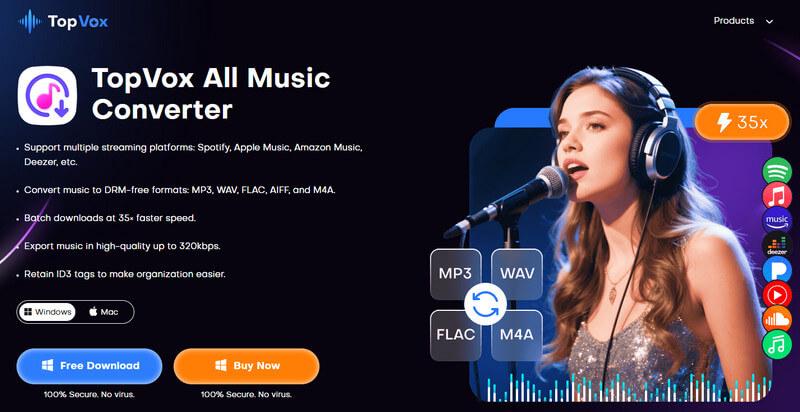
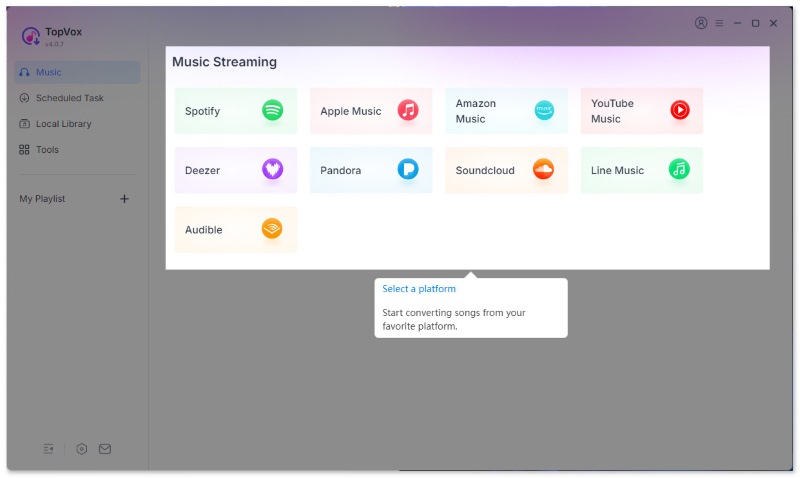
TopVox All Music Converter reaches almost all streaming services: Spotify, Apple Music, Amazon Prime Music, YouTube Music, Deezer, Pandora, SoundCloud, Line Music, and Audible. No matter whether you are a free user or a Premium user, you can access them in a few clicks. Also, it binds with the official platform and your account, which means it's responsive to the audio format, the tags, album art, and more, so you can stay music organized in your offline library.
High Quality Output
TopVox All Music Converter guarantees that the downloaded music will be identical to the original. With precise audio decoding technology, it will deliver bitrates from 128kbps/22050Hz to 320 kbps/48000Hz in MP3 and M4A formats. For other lossless formats like FLAC, the software supports 24-bit output and a Hi-Res listening experience. No distortion, no compression artifacts - merely clear playback on any device you wish. You will enjoy studio-grade Audio whether you're streaming it through headphones, speakers, or while in a car.
Bypass DRM Protection of Audio
TopVox All Music Converter is able to bypass DRM from any protected tracks. Within seconds, your preferred songs, playlists, albums, audiobooks, and podcasts will be downloaded and converted to your computer. That's it! You will have DRM-free files available for personal use on any device. There are no error messages or extra steps - just fast, consistently reliable access to all your music.
Cross-Platform Compatibility
TopVox All Music Converter supports both Windows and macOS (Intel and Apple Silicon). You can save the music to MP3, WAV, FLAC, AIFF, M4A (AAC), or M4A (ALAC) files, which work seamlessly with iTunes, VLC, or any media player. If you want to switch a computer or share music with friends on other devices, TopVox ensures your audio library stays unified and accessible everywhere.
Fast Batch-download Speed
The downloading speed is the most prominent feature of TopVox. The software speeds up to 35 times faster with GPU acceleration, compared to other music downloaders. You can bulk convert audio files in a short time. For example, it takes less than 15 minutes to download 100 songs using it under ideal hardware and network conditions.
Advanced Tools for Pro Needs
TopVox All Music Converter goes beyond simple conversion by offering other tools, like Tag Editor, Format Converter, and AA/AAX Converter for perfect library organization and maximum device compatibility. Playlist Transfer ensures a seamless experience for power users looking to move and manage their audio collections to another music platform.
Part 2. Pros & Cons and User Review of TopVox
Pros
- Bypass DRM protection from various music platforms: Spotify, Apple Music, etc.
- Convert music to dozens of formats like MP3, M4A (AAC), WAV, FLAC, and AIFF.
- Keep the highest audio quality up to 320kbps and 48000Hz.
- Convert and download your music at 35× faster speed.
- Simple and understandable UI without any ads.
- Preserve the ID3 tag while converting.
- The 99% Success rate of downloading.
Cons
- iOS and Android are not supported.
- Only the first 3 minutes of the download are allowed in the trial version.
User Review
Rating: ⭐⭐⭐⭐⭐ 4.7/5 from Softpedia
OS: Windows 7 or later (64-bit) and macOS 10.14 or above
"I found searching, selecting, and downloading tracks with TopVox All Music Converter to be a facile process, mainly thanks to the numerous, on-screen features that ensure an easy process when selecting single or multiple items. The same goes for having a certain degree of control across the output characteristics of the resulting files…" - Andrei Verdeanu.
Part 3. How to Use TopVox All Music Converter
Although the TopVox All Music Converter is simple enough to let users use without learning, we provide this tutorial for more precise operation. It merely needs 3 steps to accomplish. Just follow the steps below, and nothing will go wrong.Note that TopVox is designed for personal use only under the Fair Use principle. We do not encourage the commercial distribution of copyrighted material.
100% Secure. No virus.
100% Secure. No virus.
Step 1. Choose a platform and sign in to your account.
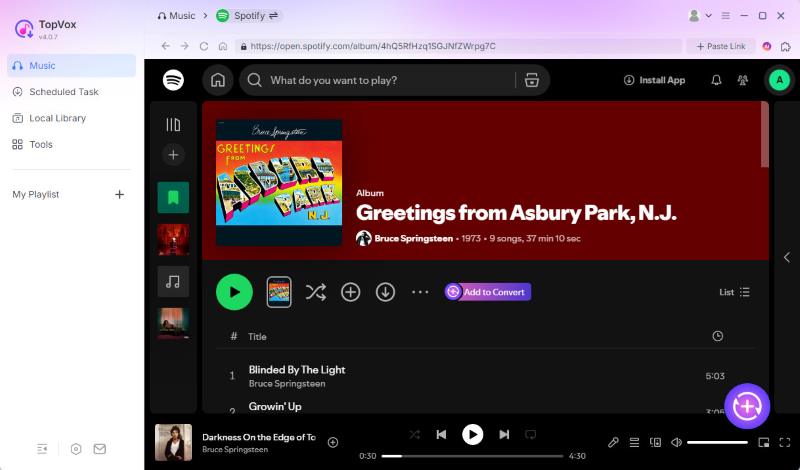
Step 2. Select the songs you wish to save and click Add to Convert.
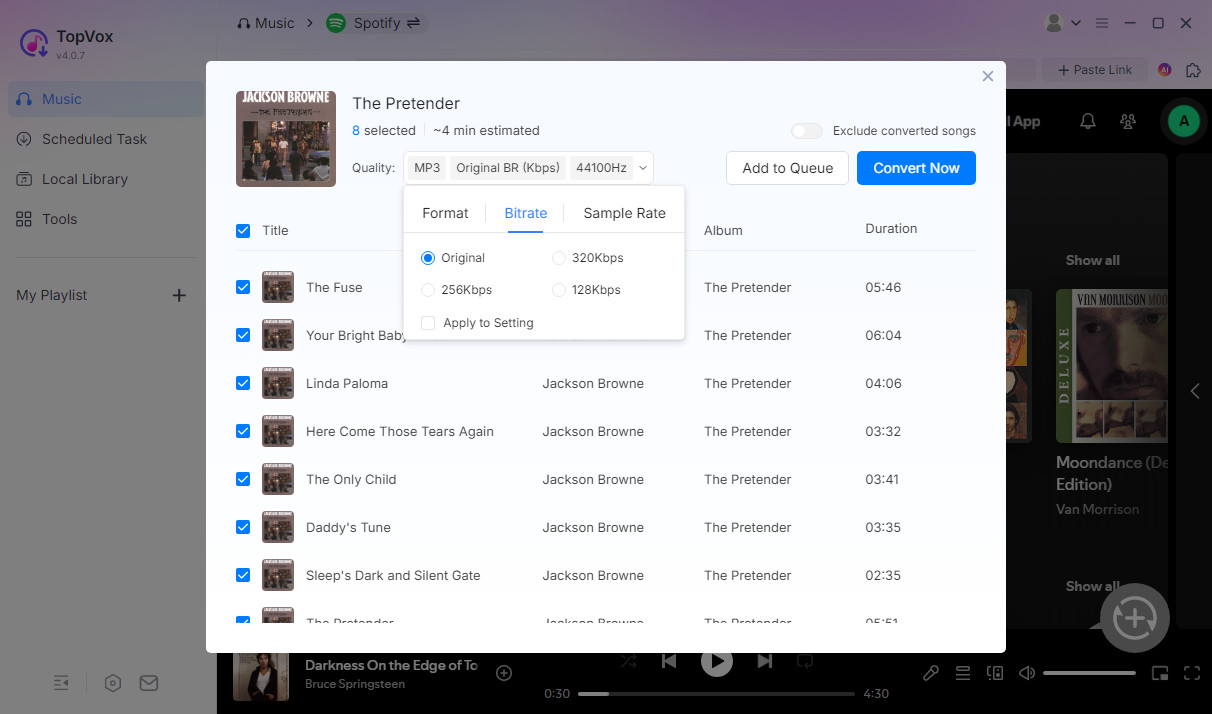
Step 3. You can change the output format and quality in the pop-up window and then click Convert Now.
Part 4. TopVox vs. Other Popular Music Downloaders
| Features | TopVox All Music Converter | Traditional Tools (e.g., Sidify/ AudiFab) | Online Tools (e.g., ffmpeg, APLMate) |
|---|---|---|---|
| Platform Integration | Ultra-High: 9+ platforms in one go | Medium: Usually needs separate software per platform | Low: Requires manual operation like copy-paste. |
| Audio Source | Official Web Player Parsing | Official Web Player Parsing | Third-party audio capture |
| Max Audio Quality | 320kbps/48000Hz or Original Lossless | 320kbps | 320kbps or lower |
| Batch Download | ✅️ | ✅️ | ❌️ |
| Speed | 35× (Highest) | 5~30× | Real-time |
| Output Format | MP3/ WAV/FLAC/AIFF/M4A (AAC/ ALAC) | MP3/AAC/WAV/FLAC/AIFF/ALAC | MP3 |
| Full ID3 Tags | Full metadata | Full metadata | May be incomplete |
| Advanced Tools | AA/AAx Converter, Tag Editor, Format Converter, Playlist Transfer | burn CD, edit ID3 tags, AI Audio Splitter, and AA/AAX Converter | ❌️ |
FAQs about TopVox All Music Converter
Q1: What is the success rate of downloading 500 songs in batches using TopVox?
A: It can reach to 99%. TopVox utilizes advanced multi-thread parsing technology designed for stability. In a stable network environment, batch processing a mass of tracks is seamless with minimal failure rates.
Q2: Is there any difference in the sound quality between a saved 320kbps MP3 file and the original music?
A: While 320kbps is technically lossless-like compressed Audio, it is the highest bitrate available for the MP3 format. Unless you are using professional-grade studio monitors in a soundproof room, the audio fidelity is virtually identical to the original streaming source.
Q3: Is there an alternative solution with a faster download speed than TopVox?
A: TopVox All Music Converter offers the fastest conversion speed currently. Its hardware-acceleration engine is at the forefront of the consumer market, reaching the maximum efficiency currently possible for high-quality conversion. However, the speed is also limited by the performance of the device and the internet.
Q4: Will my streaming media account be banned when I use TopVox?
A: All conversions are done locally on your computer - no uploading files to a server. For personal, noncommercial use, it is still within the copyright regulations. You can download the installer from the website when it needs to be updated, or enable automatic updates so that you get all the most recent features and fixes. The after-sales team will respond promptly to customer feedback.
Conclusion
To sum up, TopVox All Music Converter is a superb tool that can download from all major streaming services, hassle free and in high quality. Also, this product is easy to navigate through with a clean interface and batch processing capabilities. They are rather sensible for just about anyone from everyday listeners to master audio files. If you are looking to escape the boundaries of music streaming subscriptions and want to access and listen to your music, TopVox is the tool for you.
100% Secure. No virus.
100% Secure. No virus.
Owen Bannett is a music enthusiasm as well as a senior writer. He has paid close attention on the pros & cons of various audio formats, bitrate, sample rate and encoding methods. Always seeking the best listening experience, Owen has deep insights about lossless music and diverse music converters on the markets.