Top 10 Spotify Downloaders for Desktop/Mobile/Online [2026 Tested]
 by Luna Harper | July 23, 2026 | Spotify
TL;DR
Core Focus: a hands-on review of 10 tools to bypass premium limits and achieve permanent offline music backups.
Best Choice: Topvox All Music Converter offers 35x batch-download speeds to preserve lossless quality audio files across 10+ streaming platforms.
Web & Mobile Alternatives: Online tools like Spotidown are suitable for quick single-track downloading with no installation, while often suffering from compressed 128kbps audio, broken links, or zip file errors. Most mobile music downloaders work on Android and can’t batch process protected Spotify music. For stable, high-fidelity local playback, dedicated desktop software wins.
Offline listening on Spotify is only available to Premium users. If you’ve ever wished to download Spotify tracks without needing a subscription, there are 10 Spotify downloaders for you. We will review each downloader in detail based on their real performance. This way, you can safely and efficiently download Spotify music and enjoy it offline.
Comparison of the Top 10 Spotify Downloaders
| Windows 7 or later (64-bit), macOS 10.14~27 | Price | Supported Platforms | Built-in Web Player/Browser | Output Formats | Audio Quality | Speed | DRM Protection Removal | Batch Downloading | |
|---|---|---|---|---|---|---|---|---|---|
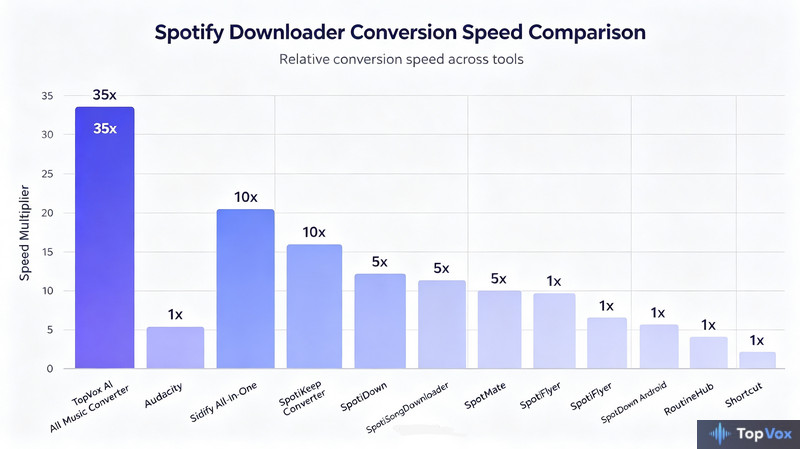
| TopVox All Music Converter | Windows 7 or later (64-bit) and macOS 10.14 or above | 14-day free trial available; Save $100 for Lifetime Plan Buy Now |  | ✔ | MP3, M4A (AAC), WAV, FLAC, AIFF, and M4A (ALAC) | Up to 320kbps | 35× | ✔ | ✔ |
| Audacity | Windows 11/10. macOS 11 or above, and Linux | Open-source | Spotify, YouTube Music, Apple Music, etc. | ❌ | WAV, AIFF, MP3, FLAC, Ogg, and M4A (AAC) | Up to 320kbps | 20× | ❌ | ❌ |
| Sidify All-In-One Music Converter | Windows 11/10/9/8 and macOS 11 or above | $79.90/yr, $159.90/Lifetime | Spotify, Apple Music, Amazon Music, and more. | ✔ | MP3, AAC, FLAC, WAV, AIFF, and ALAC | Up to 320kbps | 10× | ✔ | ✔ |
| SpotiKeep Converter | Windows / Mac | $19.95/month | Spotify | ✔ | MP3, M4A, FLAC, and WAV | 128/256/320 kbps | 5× | ✔ | ✔ |
| SpotiDown | Online | Free | Spotify | ❌ | MP3, M4A and OPUS | 128 kbps | Relies on the internet | ❌ | ❌ |
| SpotiSongDownloader | Online | Free | Spotify | ❌ | MP3, M4A and OPUS | Up to 320kbps | Relies on the internet | ❌ | ❌ |
| SpotMate | Online | Free | Spotify | ❌ | MP3 | 128 kbps | Relies on the internet | ❌ | ❌ |
| SpotiFlyer | Android | Free with in-app purchases | Spotify, YouTube, Gaana, Jio-Saavn and SoundCloud. | ❌ | MP3 | 128kbps | 1× | ❌ | ✔ |
| SpotDown | Android | Free | Spotify | ✔ | MP3 | 256 kbps or 320 kbps | 1× | ✔ | ❌ |
| RoutineHub Spotify to MP3 | iOS | Free | Spotify | ❌ | MP3 | Depends on your Spotify plan. | 1× | ❌ | ❌ |
Best All-in-One Spotify Downloader: TopVox
Best for: Multi-platform collectors who need a single tool to extract and convert audio from diverse streaming and video sources.
Rating: 4.8/5
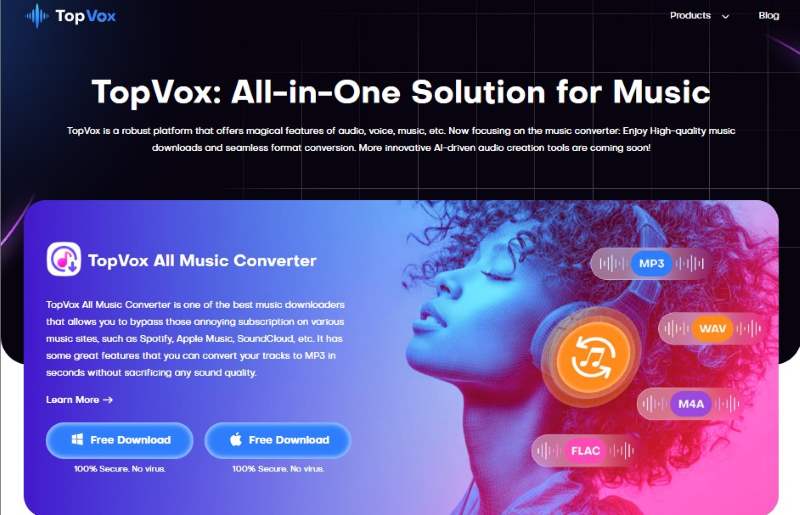
TopVox All Music Converter is a one-stop Spotify downloader and converter for Windows and Mac. This multiplatform bundle gives lifetime access to popular music streaming platforms without subscription limits. Beyond Spotify, it supports Apple Music, Amazon Prime Music, YouTube Music, Deezer, Pandora, SoundCloud, Line Music, and Audible.
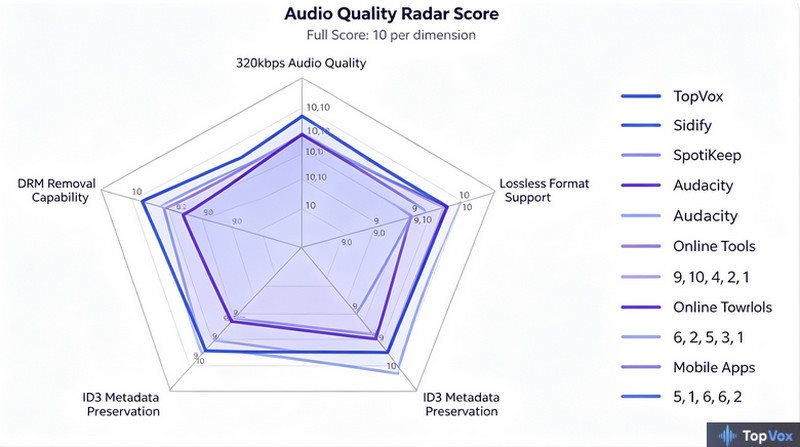
For good measure, it lets you download any music up to 48,000 Hz and 320 kbps. Additionally, you can save them as MP3, M4A (AAC), WAV, FLAC, AIFF, or M4A (ALAC) files. What makes it even more powerful is its ability to bypass DRM protection. It lets you enjoy downloaded songs on any device, anytime, forever.
100% Secure. No virus.
100% Secure. No virus.
Features:
- Boasts an exceptionally fast conversion speed, up to 35× faster.
- Compatible with major music streaming platforms, including Spotify.
- Gives full ownership of music downloads by removing DRM protections.
- Download multiple songs, full playlists, or entire albums simultaneously.
Pros
- It supports up to 320 kbps audio quality.
- It includes a built-in browser and player.
- It allows output to multiple audio formats.
Cons
- It has a limited free trial offer.
How to use TopVox to download Spotify music?
Step 1. Get started by downloading the software for free. Install the Spotify downloader and complete the setup process. Once finished, launch the software to start downloading Spotify.
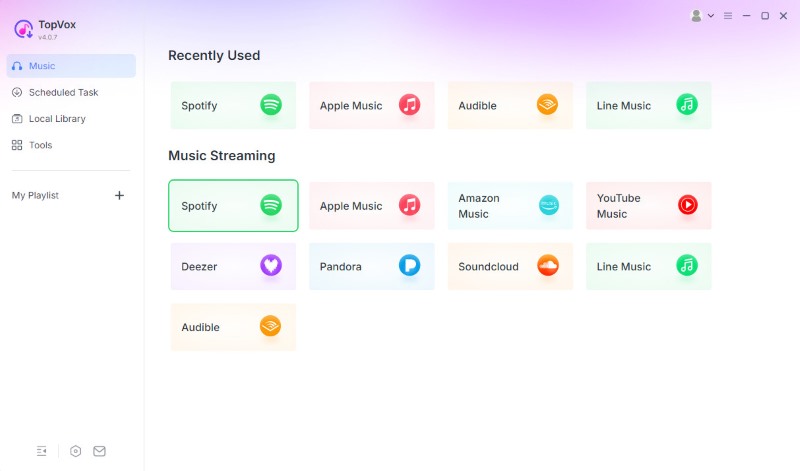
Step 2. On the main screen, you’ll see a list of supported streaming services. Click the Spotify tile to open the built-in browser. Log in using your account credentials to access your playlists, albums, or favourite tracks.
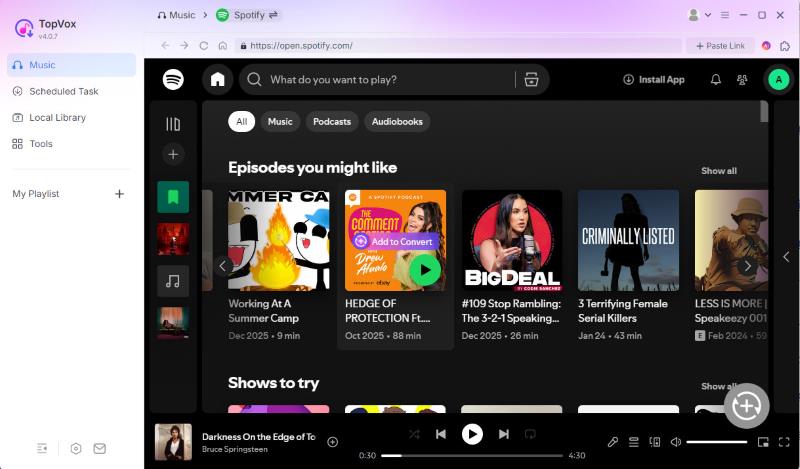
Step 3. Browse your library and choose the songs or playlists you want to download. You can click Add to Convert. You can also click the Add button (a plus icon at the lower right corner), and the program will automatically detect and load songs.
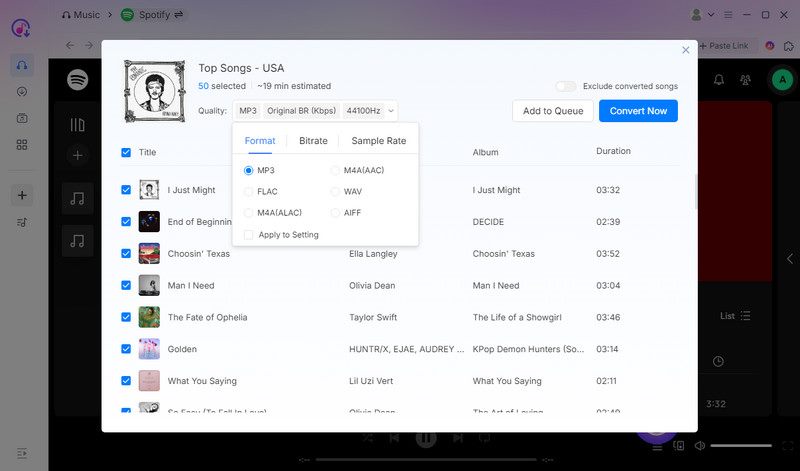
Step 4. By default, the software is set to MP3 (Original BR, 44,100 Hz), but you can easily modify it. Once all your songs are added and settings adjusted, click Convert Now to begin the process. It will automatically download and convert selected tracks or playlists at a fast speed.
User Testimonials:
“The desktop music downloader software, like TopVox All Music Converter, has more stable performance and advanced features…this software supports converting copyrighted Spotify tracks to 320kbps MP3 or lossless format files at super-fast speed”, Saad Ullah, a tech writer on TechBullion, commented. For me, after testing, I can confidently say that it’s the most reliable Spotify to MP3 converter I’ve used. Add multiple songs and convert in one time…A playlist of 50 songs took 14 minutes 39 seconds. Everything smoothly without lag!
Spotify Downloaders for Windows & Mac
Audacity
Best for: Advanced users who pursue long-term stability and ultimate listening experience in a music library.
Rating: 4/5
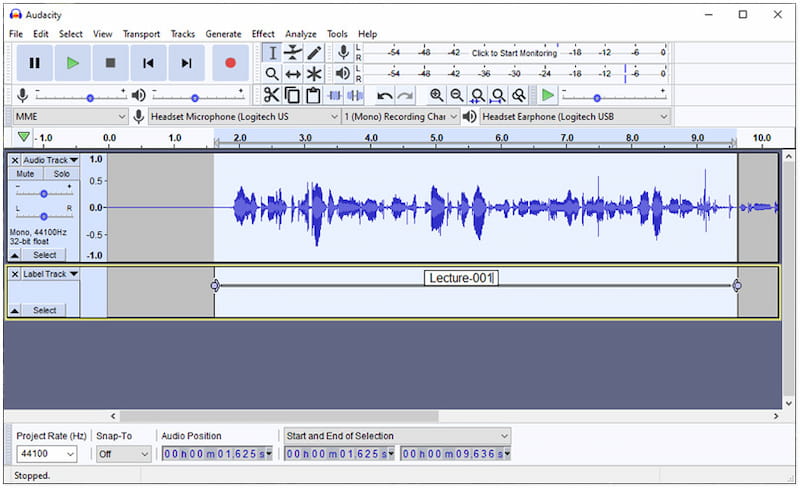
Audacity is primarily an open-source audio editor and recorder designed to capture audio from various sources. Beyond simple recording, it directly captures the sound signal from your computer instead of cracking Spotify's encrypted link. So, you can download the music effectively to bypass DRM restrictions. You can trim silence, normalize volume levels, and export files in lossless formats such as FLAC or 32-bit WAV. It transforms the downloading process into a high-quality recording workflow.
Pros
- It offers advanced audio editing tools.
- It is completely free to download and use.
- It supports multitrack recording and editing.
Cons
- It takes time to learn how to use it effectively.
- It doesn’t have a feature for downloading Spotify tracks.
User Testimonials:
Audacity is a capable tool for recording, editing, and enhancing Spotify tracks. But to be honest, since it lacks a built-in music downloader, I had to record the audio manually, which is wasting my time. Others thought of a variety of ways, such as creating a playlist of all the songs you want to download, maybe with some 5-second silent track or some distinct sound effect in between the songs, so you can easily see on the waveform in Audacity where one song ends and the next begins. Less productive! I have to edit and cut a long recorded file. Audacity should only be used when all else fails.
Sidify All-In-One Music Converter
Best for: Users who need a professional, all-in-one desktop suite to batch-convert high-fidelity Spotify music.
Rating: 4.6/5
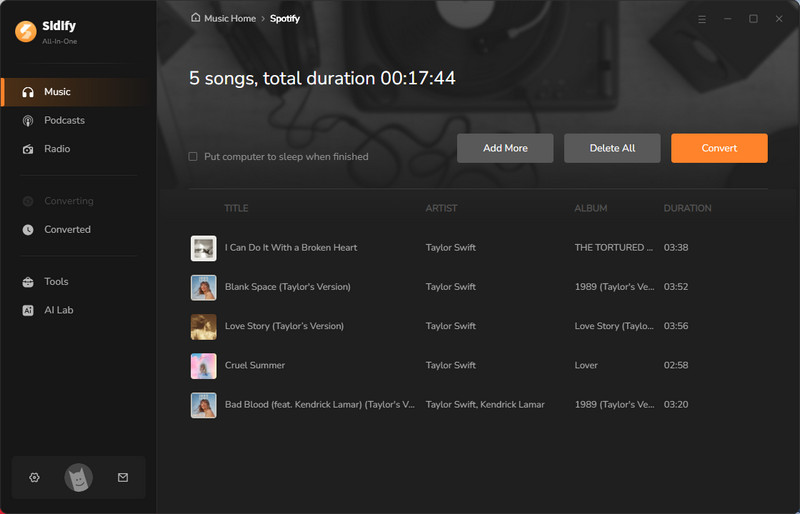
Sidify All-In-One Music Converter represents the ultimate professional-grade solution for users who demand a comprehensive tool for all their streaming needs. It offers the 10x ultra-fast conversion speed, combined with the ability to preserve original Hi-Fi audio quality, making it one of the most efficient tools for audiophiles.
It allows users to export music into various formats while retaining 100% of the metadata and lyrics. With its clean, ad-free interface and regular updates to bypass the latest encryption, Sidify provides a good experience for those who want to have a high-quality, permanent offline collection.
Pros
- Download Spotify tracks to MP3, WAV, AAC, FLAC, AIFF, or ALAC format.
- Preserve original audio quality with ID3 tags.
- Support batch conversion.
- Offers a 10 times faster speed.
Cons
- The free version only allows you to convert the first 3 minutes of each song.
- Lacks professional audio editing features.
Feedback:
Rating by Trustpilot: 4.2/5
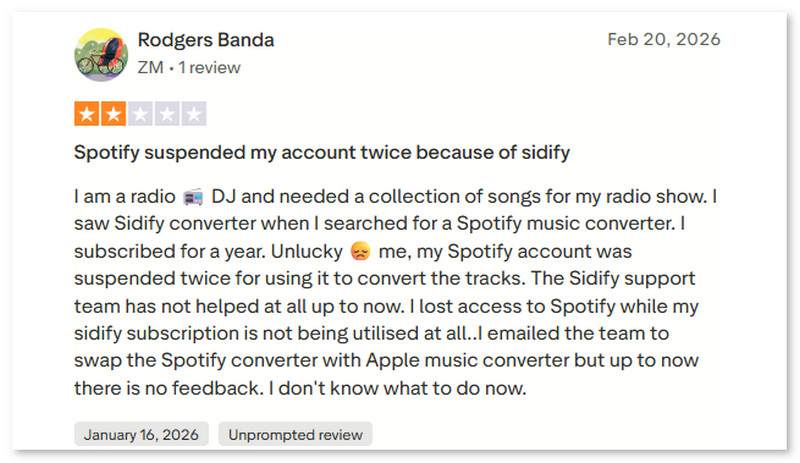
It’s an incredibly efficient tool for batch-converting Spotify playlists at 10x speed, saving me from the tedious task of recording tracks manually. Plus, Sidify can download entire playlists in their original order, so I don't need to manage them again. However, although I actually downloaded audio files from Spotify, well…it led to my test account being blocked. For many people, it's the same thing:
SpotiKeep Converter
Best for: Quickly batch-convert large Spotify libraries into high-quality local files with zero effort.
Rating: 4.5/5
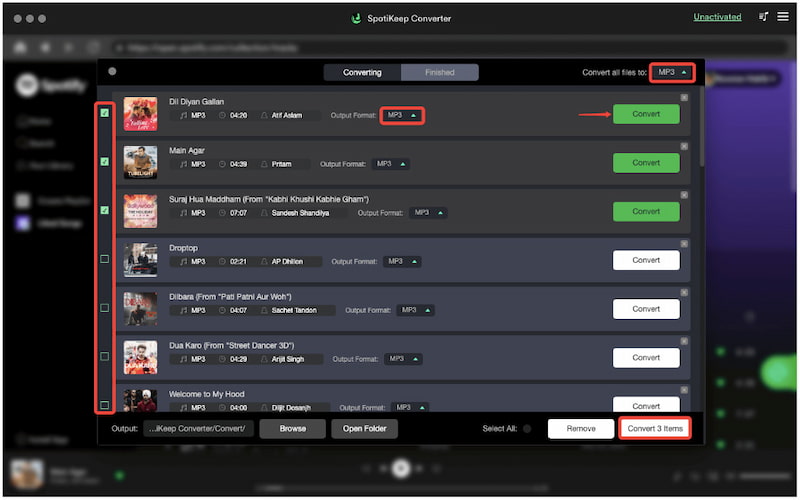
SpotiKeep Converter lets you download any Spotify song, album, or playlist without Premium while retaining the original data and ID3 tags. You can save lossless-quality music tracks for offline listening at a 5× conversion speed, allowing you to transform Spotify music into various audio output formats, like MP3, M4A, WAV, and FLAC in a very short time. The downloaded audio will keep a 320kbps high-bitrate, which means that the listening experience is indistinguishable from the original stream.
Pros
- It allows you to configure output quality and format.
- It supports batch conversion of playlists and albums.
- It can download Spotify tracks even without a premium.
Cons
- It does not support other music streaming platforms.
- Its trial version converts only the first 3 minutes of the track.
User Testimonials:
During my test, I converted a full playlist to MP3 format, and the audio quality is impressive. However, I needed to upgrade to the full version to download all the tracks. A good option for basic audio conversion, but I found that no further editing service is supported. TopVox, by contrast, has more pro tools to meet various needs, like Playlist Transfer, AA/AAX Converter, Tag Editor, and more.
Spotify Downloaders Online
SpotiDown
Best for: Download Spotify tracks to MP3s for occasional use without installing any software or apps.
Rating: 4.2/5
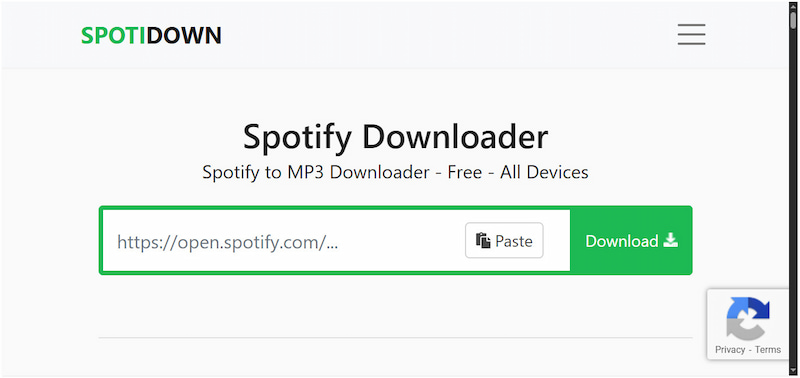
SpotiDown is an internet-based Spotify MP3 downloader for users who want a no-install solution. The Spotify playlist downloader lets you paste a Spotify URL to convert your favorite tracks and playlists, working seamlessly across Windows, macOS, Android, and iOS without a Spotify Premium account or registration. It can save your downloaded music in MP3 format with high quality for offline use, all through a clean, advertisement-light interface that prioritizes speed over technical configuration.
Pros
- It only requires copying and pasting Spotify links.
- It promotes 100% free, subscription-free use.
- It requires no Spotify login or account creation.
Cons
- It downloads playlists/albums as a ZIP file.
- It redirects you to ad pages during downloads.
User Testimonials:
When I tested the Spotidown app, I was drawn to how simple it was to use. However, I noticed that the audio quality wasn’t always consistent. Some tracks sounded slightly compressed. Besides, the program crashes sometimes. I’ve downloaded quite a good deal already, but one day Spotidown wasn’t working at all and showed “Track not found”.
SpotiSongDownloader
Best for: Users seeking a web-based solution to download Spotify tracks with full metadata retention on any device.
Rating: 4/5
Spotisongdownloader.to is a streamlined, web-based utility to convert any Spotify song to M4A and MP3 formats without paying any fees. The platform operates entirely within your browser, requiring only a simple copy-paste URL to start the download. For the playlist, you can save the entire playlist in one go via the ZIP downloader button. Instead of raw audio, the tool intelligently fetches and embeds essential ID3 tags for a complete audio-visual experience.

Pros
- It is fully compatible with modern browsers.
- It lets you save downloaded music up to 320 kbps for free.
- It supports downloading single tracks and even entire playlists.
Cons
- It doesn't download all songs properly.
- It cannot download protected Spotify songs.
User Testimonials:
I found Spotisongdownloader.to to be a convenient and straightforward tool for grabbing Spotify songs online. However, some links failed or resulted in broken files. Perhaps all songs are fetched from external sources like YouTube. So the audio quality is only reach to 128kbps always.
SpotMate
Best for: Paste Spotify links and download personal audio backups without losing track metadata.
Rating: 3.7/5
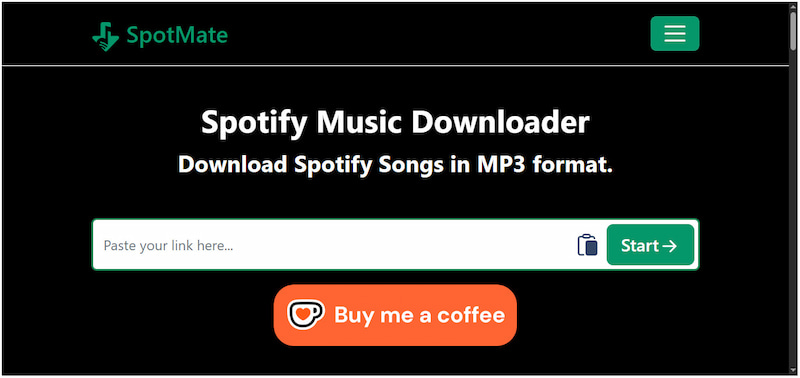
SpotMate is a free Spotify downloader available online to offer a universal solution for offline Spotify listening. It allows you to convert and download tracks, albums, or playlists from Spotify to MP3 with ID3 tags. Similar to other online tools, it doesn’t require creating an account or remembering your login credentials.
Pros
- It is completely free of charge.
- It requires no subscription or logins.
- It works on any device with a browser.
Cons
- It does not offer advanced audio output formats.
- It has a lower bitrate, compromising the output quality.
User Testimonials:
In my view, SpotMate is a hands-free option for quickly converting a few songs. You can find the Spotify song, album, or playlist you desire to download. However, it often redirects to ad-heavy pages or sites automatically…I didn’t click any strange icons at all. While advertised as 320 kbps, the audio quality typically maxes out at a lossy 128 kbps.
Spotify Downloaders for Android & iOS
SpotiFlyer [Android]
Best for: Mobile users needing a fast, zero-config way to batch-download playlists with full metadata.
Rating: 4.5/5
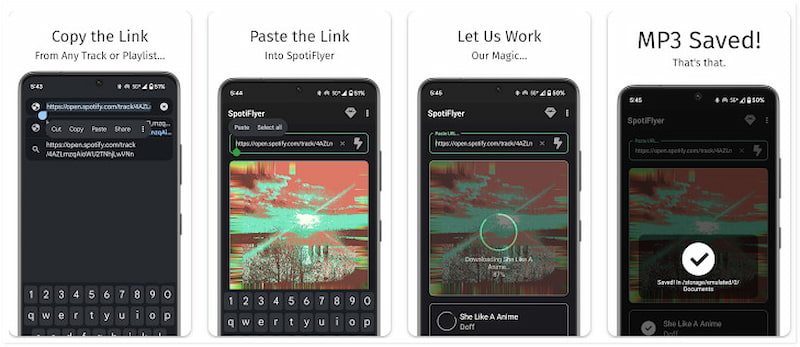
Spotiflyer is a versatile music downloader that supports multiple platforms. Apart from Spotify, it also operates as a Jio-Saavn, SoundCloud, Gaana, and YouTube Music downloader. It lets you save your favorite Spotify tracks as MP3s. It automatically embeds all metadata, including album art, lyrics, and ID3 tags, directly into your files, ensuring your offline library retains original information. Best of all, you don’t need to sign in to any music streaming account and paste a music link to fetch and download entire playlists at once.
Pros
- It supports multiple music streaming apps.
- It downloads tracks in high-quality MP3 format.
- It only requires pasting the Spotify URL.
Cons
- It is not affiliated with the official Spotify app.
- It does not support downloading DRM-protected tracks.
User Testimonials:
After using SpotiFlyer, I enjoy exploring various music sources. However, the maximum bitrate for Spotify tracks is capped at 128kbps. But then again, if you will, it is an open-source project and supports more than one single music platform. (SpotiFlyer won't be getting any new update from May, 2023.)
SpotDown [Android]
Best for: Android users who want a simple, mobile-native app to search, preview, and download individual Spotify tracks.
Rating: 4/5
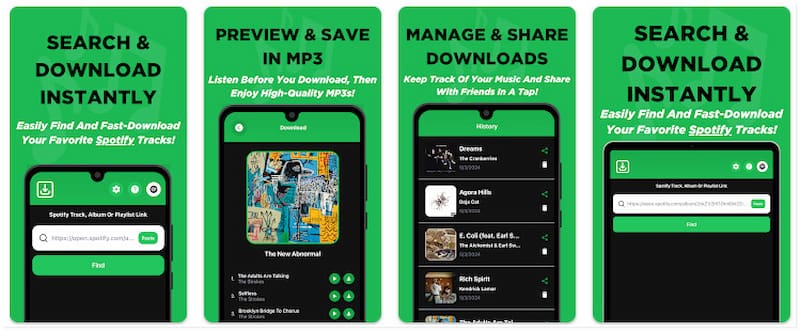
Spotdown is another dedicated Spotify downloader app for Android devices. It allows you to access Spotify’s collection of tracks, albums, and playlists and listen to snippets before downloading them in MP3 format. After that, you can access your history to easily manage tracks for future use. Besides local storage, you can share and send your favorite offline tunes to others.
Pros
- It reviews Spotify tracks before downloading.
- It supports downloading select copyright tracks.
- It offers a download management history for management.
Cons
- It is limited to Spotify only.
- It is only available in select regions.
User Testimonials:
No batch download support—it only allowed downloading one song at a time and struggles with large playlists. And it extracts same YouTube audio as the Spotify link you want. Intrusive ads are also inevitable.
Comments from Google Play:
“App doesn't even work for me, I keep trying to put in my playlist link but the loading icon keeps showing, I had it open for an hour one time.”—Patrick Maszczyk, April 17, 2026
“For only 2 adds, no money. it lets you download any song from Spotify…The only downside is that you have to click each song to download and only one at a time.” —Kain, August 3, 2024
RoutineHub Spotify to MP3 [iOS]
Best for: iOS users who prefer using Apple Shortcuts over traditional apps to download Spotify music.
Rating: 3/5
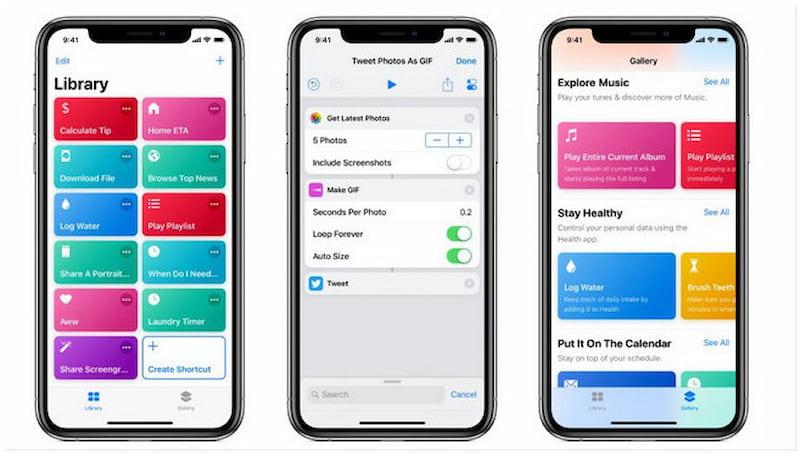
RoutineHub Spotify to MP3 is a shortcut rather than a standalone app, which is hosted on the RoutineHub community platform. You can directly send music in the Spotify interface to the shortcut and then save it as an MP3 file. Beyond tracks, albums, and playlists, you can use it as a Spotify podcast downloader to get your favorite podcast episodes. Operating within the secure environment of Apple's Shortcuts app, it remains incredibly lightweight and privacy-conscious.
Pros
- It is entirely free to use.
- It retains ID3 tags and lyrics.
- It is compatible with both iPhone and iPads.
Cons
- It requires manual copying of Spotify URLs.
- It limits users to 5 song downloads at a time.
- The downloaded audio quality is not perfect.
User Testimonials:
I tried the RoutineHub Spotify to MP3 on my iPhone, and it was a mixed experience. Within moments, the track was downloaded as an MP3 file. However, the audio quality was lower than expected.
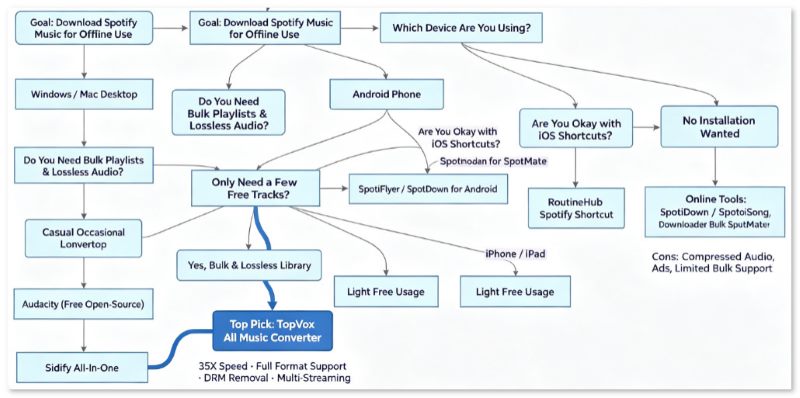
Tips: How to Choose a Right Spotify Downloader?
FAQs on Spotify Downloaders
Q1: Is it legal to use a Spotify downloader?
A: Depends on. If the download is only for personal offline listening in an MP3 player or car stereo, it usually does not cause legal problems. But those files are strictly prohibited from being used for commercial sharing or distribution.
Q2: Can I use these download tools without a Spotify Premium account?
A: Yes. Those online Spotify downloaders only need song URL. Most desktop Spotify downloaders support both Spotify Free and Premium accounts. Like TopVox All Music Converter, it can convert ad-free music into various formats and output max audio quality.
Q3: Will the downloaded audio quality reach lossless 320kbps?
A: If you use a web-based downloader, the answer is NO. Instead, these sites extract same audio from third-party sources, therefore the actual audio quality is usually only 128~192kbps. I recommend you use desktop software to export 320kbps files through built-in Spotify web player.
Conclusion
For those who want to enjoy their favorite Spotify tracks without subscription restrictions, a reliable Spotify downloader is the perfect solution. Whether you’re using desktop software, online services, or mobile tools, TopVox All Music Converter stands out as an all-in-one solution. You can effortlessly convert your Spotify to various formats with high quality and speed.
Luna Harper is a passionate music lover and an inspiring content sharer. She has explored most of the music converters available on the market, acquiring thorough knowledge of their features, usability, and differences. Luna enjoys using her professionalism to help fellow music lovers get superior audio quality.