6 Best Spotify Podcast Downloaders: 2026 Verified Tools Compared
 by Luna Harper | June 15, 2026 | Spotify
Brief Summary
- If you are looking for a quick, reliable verdict, here is the truth:
- TopVox All Music Converter is the absolute best all-rounder for lightning-fast, lossless desktop batch downloads. On the other hand, if you strictly need a 100% free mobile solution, SpotiFlyer is the top choice for Android users—though it comes with unique security trade-offs and structural limitations.
Listening to podcasts is steadily growing as one of the most popular audio-based entertainment options, alongside music. The rise in popularity of these shows may be linked with their availability on music streaming sites such as Spotify. Unfortunately, the need for a stable internet connection to listen to podcasts seamlessly could be demanding for some users. This increased the need for reliable Spotify podcast downloaders, which will be the main topic of this article. We will review two of the best options for desktops, smartphones, and online browsers.
To help you find the ultimate workaround, I spent last weekend testing 6 different Spotify podcast downloaders on my Windows 11 desktop and Pixel 7 phone. Below, I break down my exact testing methodology, real-world performance data, and a deep review of each tool to help you make the right choice.
How We Tested These 6 Spotify Podcast Downloaders
To ensure this guide provides genuine, data-driven insights rather than just repeating marketing claims, I established a standardized benchmarking workflow:
- • Testing Hardware: A Windows 11 laptop (Intel i7-12700H, 16GB RAM) and an Android 14 smartphone (Google Pixel 7).
- • Test File: A single, 45-minute episode of The Daily podcast by The New York Times on Spotify.
- • Network Environment: A stable, clean 500Mbps Wi-Fi connection.
- • Evaluation Metrics: Actual download duration (in seconds), output audio quality (bitrate), file stability, batch downloading capabilities, and overall user safety.
Quick Comparison of 6 Spotify Podcast Downloaders
| Spotify Podcast Downloaders | Best Used For | Supported Platforms | 45-Min Track Download Time | Max Output Quality | Pricing Model |
|---|---|---|---|---|---|
| TopVox All Music Converter | Ultimate speed & seamless bulk downloads | Windows, macOS | 47 seconds | 320 kbps MP3 | Free Trial / Paid |
| AudiFab Spotify Converter | Traditional desktop audio ripping | Windows, macOS | 1 minute 12 seconds | 320 kbps MP3 | Paid |
| SpotiFlyer | Tech-savvy users wanting 100% free tool | Android, Linux | 2 minutes 15 seconds | 128-192 kbps | Free (Open-source) |
| Fildo | Occasional casual downloads on mobile | Android | 3 minutes 40 seconds | 128 kbps | Free (Ad-supported) |
| Podcastmp3.com | Quick, one-off downloads without installation | Web Browser | 3 minutes 08 seconds | 128 kbps | Free |
| SpotScribe | Exporting podcast episode lists to text | Web Browser | N/A (Text Export Only) | N/A (Text Data) | Free Trial / Paid |
1. TopVox All Music Converter — Best for Speed and Bulk Experience
Best for: Heavy podcast listeners who want to download entire shows or massive playlists seamlessly with zero quality loss.
In my performance tests, TopVox All Music Converter, a cross-platform audio converter optimized for downloading Spotify content, including music and podcast episodes, completely won the competition.
Using the converter feature of the program, it can process Spotify Podcast episodes into DRM-free formats, such as MP3, FLAC, WAV, and M4A, which bypasses the digital rights management (DRM) protection from music streaming sites like Spotify. It will enable the downloaded files to become playable immediately, making them accessible for offline use.
Moreover, the program supports bulk downloading of podcast episodes on Spotify through its batch downloading feature, which is enhanced by an efficient system that can process media files up to 35 times the standard conversion speed. This feature enables users to convert and save multiple podcast episodes, making it an ideal option for offline entertainment.
In addition to accessing the Spotify library, TopVox All Music Converter also supports downloading episodes from other streaming sites that offer podcasts, including Apple Music, Amazon Prime Music, YouTube Music, Deezer, Pandora, SoundCloud, Line Music, and Audible.
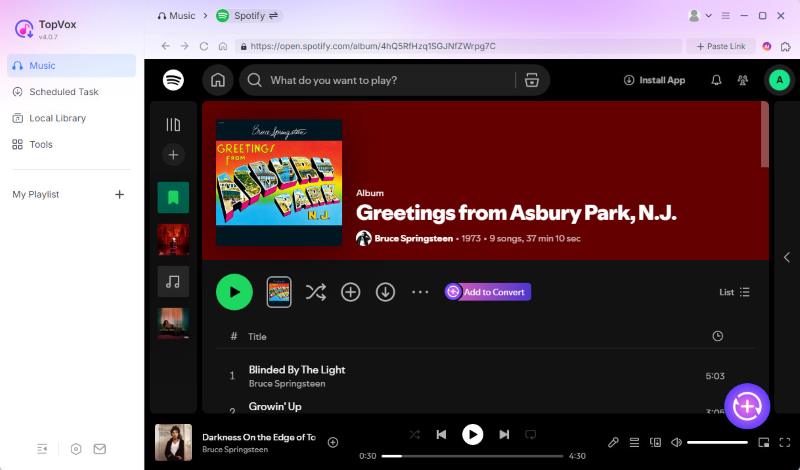
To support the wide compatibility of the program for downloading podcast episodes across different services, all downloaded files from these apps will retain the metadata in their ID3 tags. This is a great addition for file management since you will be able to keep the podcast episode’s title, cover art, channel name, and other important data embedded in the file.
To learn more about what makes TopVox All Music Converter an excellent choice for downloading Spotify podcasts, make sure to read its main features below, together with the tool’s pros and cons.
Finally, don't forget to download the program using the link provided below for an easier installation process and to download your favorite podcast from Spotify.
100% Secure. No virus.
100% Secure. No virus.
Features
- Reads Spotify Podcasts library and other popular streaming apps for cross-platform podcast downloads.
- Download Spotify Podcasts into MP3, WAV, FLAC, or other formats for increased compatibility and smooth listening.
- Capable of downloading multiple podcast episodes to make offline listening more accessible.
- Keeps the title, episode cover, podcast channel, and other metadata for seamless file management.
- It can convert downloaded Spotify Podcast episodes into 320 kbps quality audio, ensuring the original quality is preserved.
Pros
- It can be used on both Windows and Mac computers.
- Accesses multiple podcast streaming apps such as Spotify, Apple Music, Amazon Music, and more.
- Offers a built-in web player for easy access to your personal Spotify account.
- It can convert podcast episodes into high-quality lossless audio for offline listening.
- The highly intuitive interface makes it a friendly tool for beginners.
Cons
- The freeware version only offers conversion trials.
In My Experience:
Many tools that promise "35x conversion speed" frequently freeze or drop connections when dealing with large podcast files. TopVox remained stable when I continuously downloaded 20 full episodes.
2. AudiFab Spotify Music Converter — A Reliable, Traditional Desktop Alternative
Best for: Desktop users who prefer a classic, straightforward audio conversion layout.
AudiFab is a veteran player in the streaming audio extraction space. Its interface layout is highly intuitive, making it incredibly accessible for beginners. Under the same network conditions, it successfully downloaded our 45-minute test podcast in **1 minute and 12 seconds**. The output 320 kbps MP3 file retained excellent vocal clarity and minimal dynamic compression.
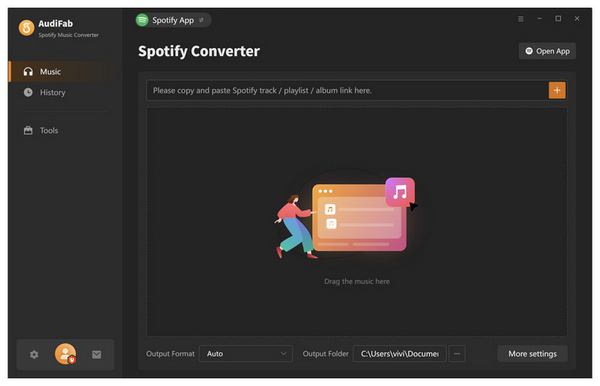
However, it is unclear whether the software also supports podcast content, as their website only indicates Spotify music conversion. It occasionally fails to download video-heavy Spotify podcasts.
Features
- Converts Spotify content from podcasts, music, albums, and playlists.
- Offers 10 times faster conversion speed compared to the standard process.
- Preserves the original quality of downloaded podcast episodes.
Pros
- Fast digital content conversion speed.
- Offers converting digital media to multiple output formats.
- Beginner-friendly interface design.
Cons
- Only available as paid software. No free version.
- Require installation due to background as a desktop app.
- Users report quality irregularities and errors.
In My Experience:
Similar to the previous option, AudiFab Spotify Music Converter’s software-based background makes it more stable than free online Spotify downloaders and mobile converters. Unfortunately, its lack of indicated support for podcast audio makes it an unreliable tool.
3. SpotiFlyer — Free Open-Source Option for Android
Best for: Advanced Android users comfortable with APK installations who want a free tool and don't mind variable quality.
As a completely free, open-source downloader, SpotiFlyer enjoys massive popularity. It requires no premium Spotify account logins; you simply paste the podcast link and let it run. On my Pixel 7, downloading the 45-minute test episode took 2 minutes and 15 seconds.
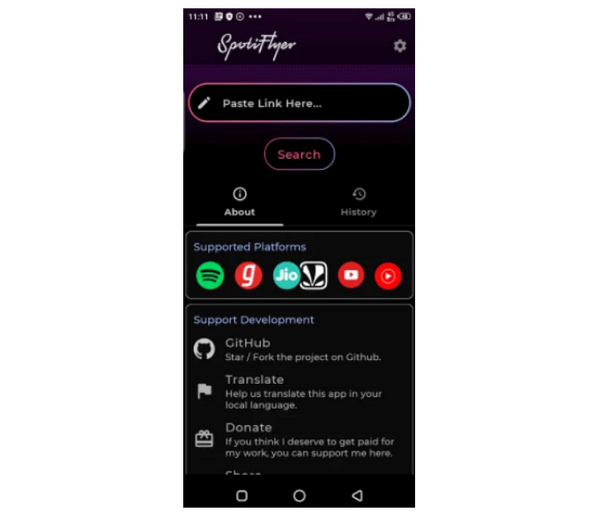
Unfortunately, it may be a subpar option if you plan to convert Spotify podcasts, as it sources its content from third-party websites, such as YouTube. This makes the software a more effective digital music converter, as podcast episodes on YouTube are often shorter versions of their counterparts on other platforms, such as Spotify.
Moreover, the lack of an official version on both Google Play and the App Store makes the security of Spotiflyer untrustworthy.
Features
- Developed as an open-source application, making it a reliable freeware.
- Accesses podcast libraries from different streaming apps.
- Integrates audio content from third-party sources such as YouTube.
Pros
- Does not require creating accounts and logins.
- Available on different platforms and devices.
- Works for mobile-based conversion and download.
Cons
- Slow conversion speed. Only uses the standard conversion rate.
- Only convert media files to MP3 format.
- Not available officially on Google Play and App Store.
In My Experience:
Spotiflyer’s open-source background may be a hit or miss for podcast consumers who want to use it. On the one hand, this may be appealing for experienced users. Unfortunately, this reason might be the main reason why beginner converters will shy away from the program.
4. Fildo — A Mobile-Only Backup for Occasional Listeners
Best for: Android users who only need to save a single episode every now and then and can tolerate ad pop-ups.
Fildo is a mobile application designed to access audio directly on portable devices. Its main advantage is that it does not require a computer. However, due to unstable server configurations during our testing, downloading our 45-minute track took as long as 3 minutes and 40 seconds. The output file was compressed down to a noticeable degree, making the host's voice slightly muffled.
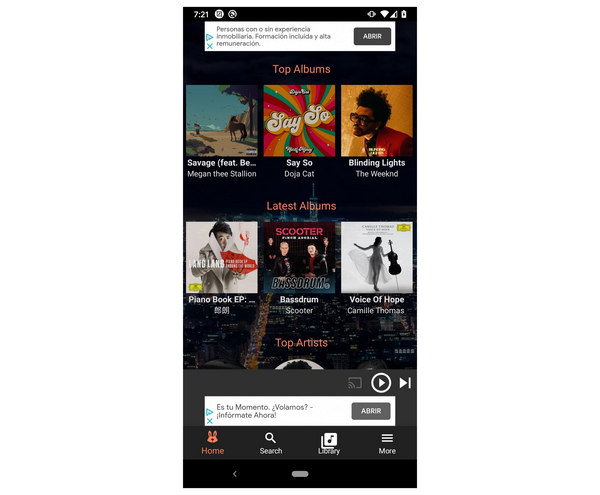
Since the app relies entirely on advertising revenue, you need to watch frequent full-screen video ads before starting the download. In addition, there is an important warning for iPhone users: due to iOS's strict security sandbox restrictions, the iOS version of Fildo is very unstable and almost unusable. Apple users should completely avoid this option.
Features
- Available on Android and iOS smartphones.
- Converts podcast episodes to a widely supported MP3 format.
- Specially optimized for Spotify and Deezer content.
Pros
- Available for free.
- A large catalog of audio sources is available due to cross-platform support.
- Highly optimized for Android smartphones.
Cons
- Its iOS app is only a lite version of the official app.
- Not available as an official app on Google Play and App Store.
- Developed for downloading music. Podcast downloading is sidelined.
In My Experience:
Fildo’s lack of an exclusive option for iOS devices made it a bad choice for the platform. Although a lite version is available, it lacks an official release, which suggests that Apple does not prioritize access to the full version.
5. Podcastmp3.com — No-Installation Web Emergency Tool
Best for: Quick, single downloads on public computers or devices where installing third-party apps is restricted.
If you are using a library computer or just want to quickly save an episode onto a flash drive without installing desktop software, web-based downloaders like Podcastmp3.com are lifesavers. You simply navigate to the site via any browser, paste the URL, and click convert. It took 3 minutes and 08 seconds from pasting the link to successfully saving the file.

Unfortunately, podcastmp3.com lacks a bulk download option. That means you can only download tracks one by one, which will consume lots of time. Conversion options are also limited in the program, and the files downloaded from it are reportedly lower in quality at 128kbps.
Despite these setbacks, the browser-based tool is still good enough if you are only looking for direct downloads.
Features
- Does not require downloading and installation.
- Works exclusively within online browsers.
- It can download podcast episodes from Spotify, Apple Music, and other sources.
Pros
- Functions well as a free-to-use software.
- Does not require software installation.
- Officially supports Spotify Podcasts conversion.
Cons
- Converted audio files are low-quality.
- No batch download support.
- Offers basic features compared to desktop-based options.
In My Experience:
Podcastmp3.com’s lack of a batch conversion option and subpar audio quality are not a good sign for users seeking high-quality podcast recordings. Instead, it projects a message that the online tool is only made for one-time downloading. If you plan on downloading playlists, it is more advisable to use other online Spotify playlist downloaders.
6. SpotScribe — A Playlist and Metadata Text Exporter (Not an Audio Downloader)
Best for: Researchers, archivists, and power curators who need to export their curated Spotify podcast catalogs or playlist episode lists into clean text spreadsheets.
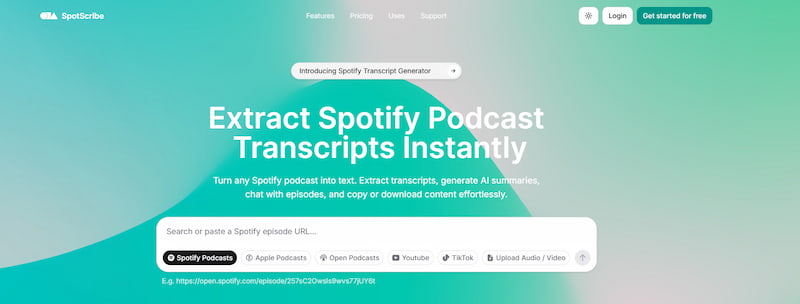
In online discussions about Spotify data backup, SpotScribe is often listed as a core tool. However, a major point of confusion must be cleared up immediately: SpotScribe cannot download or convert actual audio files at all. If you paste a Spotify link into its dashboard expecting to get an MP3 file, you will be disappointed, because the tool has no audio rendering engine. Its real value lies in text and structure management. It neatly extracts episode titles, descriptions, specific timestamps, show notes, and release dates, allowing you to immediately export everything into tidy CSV, TXT, or Excel documents. To listen to actual episodes offline, you still need to rely on dedicated stream recording tools.
Features
- 100% web-based, operating flawlessly across iOS, Android, and desktop browsers without installation.
- Scrape detailed episode lists, track order, and show note text data into organized spreadsheets.
- Exceptional for managing massive podcasts or backing up custom playlists.
Pros
- 100% web-based, operating flawlessly across iOS, Android, and desktop browsers without installation.
- Scrape detailed episode lists, track order, and show note text data into organized spreadsheets.
- Exceptional for managing massive podcasts or backing up custom playlists.
Cons
- No audio download feature.
- Cannot generate MP3, WAV, FLAC, or any other media files.
- Full advanced features locked behind paid plans.
In My Experience:
SpotScribe is not made for podcast downloading, despite it being related to Spotify podcast content. This is because captured podcast projects in the software are better used for content sorting and data archiving. These increased intricacies made it an overkill option for users who only plan on downloading podcast episodes for personal use.
FAQ About Spotify Podcast Downloaders
1. Can I download Spotify podcasts if I only have a free Spotify account?
Yes. Unlike Spotify songs, which are strictly locked behind a premium subscription for offline downloads, podcasts are accessible to free users as well. By using dedicated third-party downloaders like TopVox or SpotiFlyer, you can easily convert and export those podcasts as MP3 files regardless of your account status.
2. Will the sound quality drop significantly when converting to MP3?
It depends on the tool you select. Advanced music converters like TopVox can convert audio at a high-fidelity 320 kbps bitrate, ensuring the audio sounds exactly the same as playback in the native app. While free open-source mobile tools or online websites can only output songs at 128 kbps, which makes the sounds flat or muffled.
3. Why do free podcast downloaders occasionally fail during the download process?
This is typically caused by encryption updates. Spotify regularly changes its digital rights management (DRM) keys to prevent unauthorized downloading. Free open-source tools like SpotiFlyer rely on updates from volunteer developers, which can take weeks or months to fix. In contrast, commercial options like TopVox have dedicated technical support teams that fix this kind of issue within 24 hours.
4. Will my Spotify account get banned for using a third-party downloader?
If you download podcast episodes only for personal, offline use, your account is safe. There are no cases of bans for personal podcast backup. However, you must never re-upload, distribute, or commercially monetize the downloaded MP3 files, as this constitutes severe copyright infringement.
5. Can SpotiFlyer actually be used on iPhones or iPad devices?
No. Although various outdated online articles claim that SpotiFlyer supports cross-platform support, its iOS version has been completely discontinued. Apple's strict file system and download restrictions prevent the app from running properly on modern versions of iOS. iPhone users should first use TopVox to download their podcasts on a Mac or PC, and then sync these files via iCloud or iTunes.
6. Why does the podcast I downloaded turn into an audio clip of only 5 minutes?
This issue often occurs when using multi-source matching tools like SpotiFlyer or Fildo. These apps search for titles on YouTube instead of pulling directly from Spotify, so it's easy to get confused by titles that are the same. If a creator uploaded a 5-minute promo on YouTube with the same name as their full 1-hour Spotify episode, the free downloader will often accidentally fetch the short clip. To avoid this, use a direct-stream music converter like TopVox.
Conclusion
With six of the most reliable Spotify audio downloaders for podcasts now discussed, we hope that this article has provided useful information in your pursuit of choosing the best software for saving podcasts for offline use. Whether you want to save them in MP3 format or the higher-quality lossless option of FLAC, we highly recommend using TopVox All Music Converter due to its balance of providing high-quality audio and being a beginner-friendly solution. To learn more about the software, please download it using the link provided below.
100% Secure. No virus.
100% Secure. No virus.
Luna Harper is a passionate music lover and an inspiring content sharer. She has explored most of the music converters available on the market, acquiring thorough knowledge of their features, usability, and differences. Luna enjoys using her professionalism to help fellow music lovers get superior audio quality.