Listen to Deezer Offline: Official Way & Full Control Download
 by Luna Harper | September 24, 2026 | Deezer
Some users explore the official way to listen to Deezer music offline. This is possible with its premium and HiFi features. Yet some are frustrated because, even though they are already paying, a limitation still lingers in the service. That is because Deezer offline mode is still encrypted with digital rights management (DRM). You can't play downloaded music outside the app, and it may disappear if you cancel your subscription. That is why in this article, we'll explore a great method to listen to Deezer music without limitations. Start reading now to discover.
Official Way to Use Deezer Offline: Premium and HiFi Features
We'll start with the first method to listen to offline music in Deezer on your iOS or Android phone. This is the official way, so you'll need to subscribe to a paid plan. Also, remember that music downloaded in the app won't be saved to your local files and cannot be played with an external player. Also, make sure you have enough storage on your phone to avoid download issues.
Listen Offline on iOS and Android Phones
Step 1. First, open the Deezer app on your mobile phone. From there, you may access the Favorites tab.
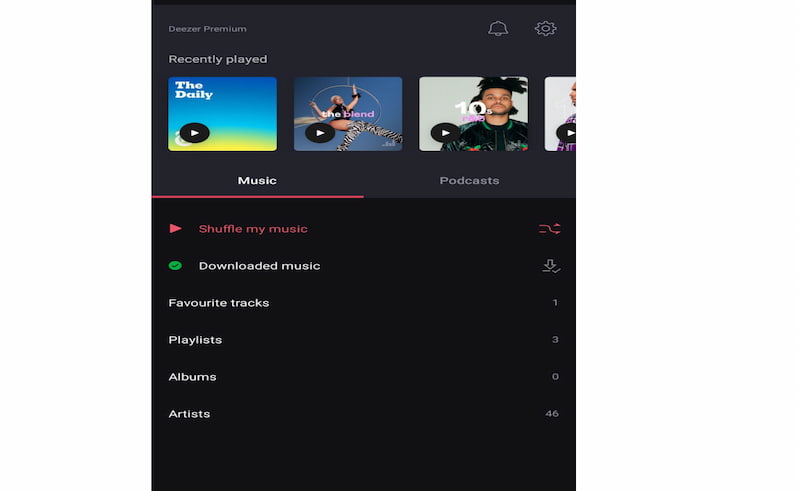
Step 2. It’s time to search for the music you want to download. Then, click the Download button on the chosen music. When you see the green icon, your Deezer music has downloaded successfully.
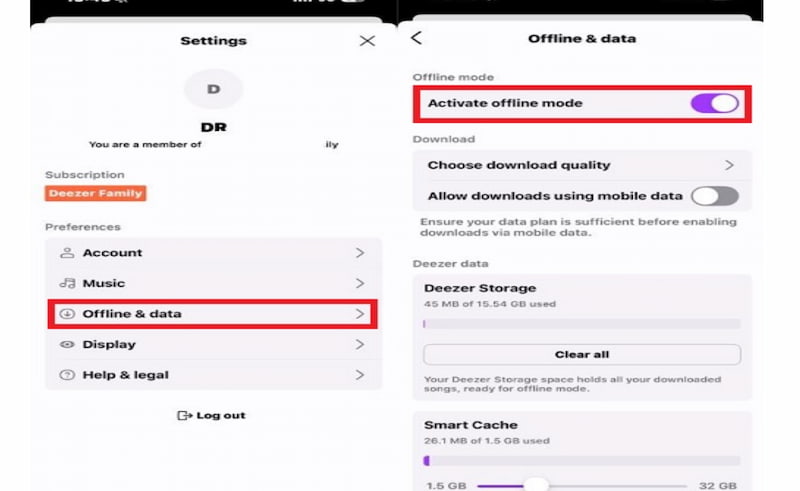
Step 3. Then, open the settings. From there, please navigate to the Offline Mode button and enable it.
How to Download Whole Albums and Playlists with a Single Tap
Now let's see how to download a whole album in a single tap. You already enabled offline mode on Deezer, as in step one of the previous method we showed. Then the next thing you need to do is the following:
Step 1. Open the Deezer app on your device. Then browse for an album or playlist you want to download.
Step 2. On the right side of the Album or Playlist, click the Download button.
Step 3. Wait for the process to be completed. Normally, you will see a green arrow indicating the process was successful.
Why The Official Deezer Offline Mode Fails Users
Deezer's official offline mode is convenient at first. Yet, you will realize that it has a lot of hidden restrictions:
Features
- 30-day Check: Deezer forces your device to connect online at least once every 30 days to validate your subscription license. If you're on an extended off-grid trip, your music locks up.
- Data Storage Tax: Lossless hi-fi tracks take up a lot of internal storage on smartphones. This can fill your mobile phone fast and might limit how many downloads you can do.
- Paywall Constraint: If you downgrade to Deezer free, your offline music instantly vanishes.
Listen to Deezer Offline Forever via TopVox Deezer Converter
We understand if the premium account frustrates you. Paying monthly to listen to music offline is a real waste of money. Good thing we have TopVox Deezer Music Converter, which lets you listen to your favorite music for free. This tool offers various features that can convert Deezer to common MP3. The best thing about it? It's free, and you can download it now and use it immediately.
100% Secure. No virus.
100% Secure. No virus.
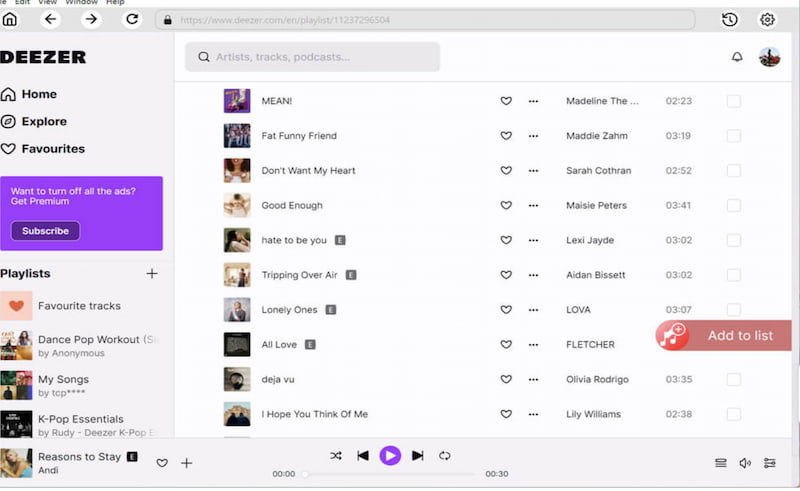
Step 1. Open TopVox Deezer Converter on your computer. Then select the Deezer platform from the options.
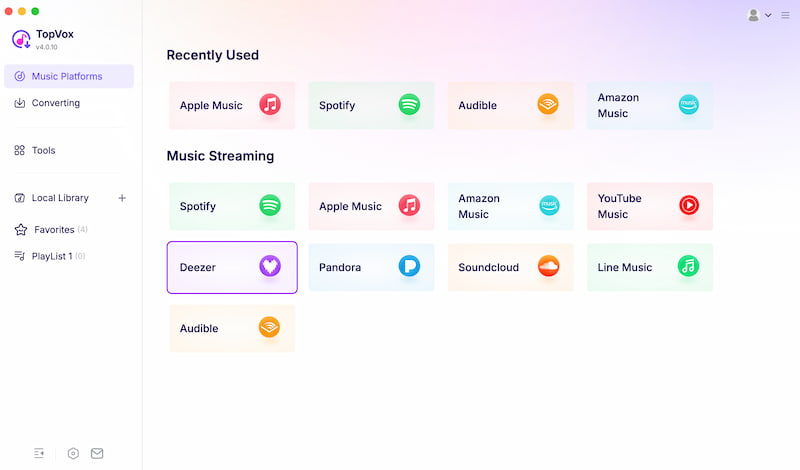
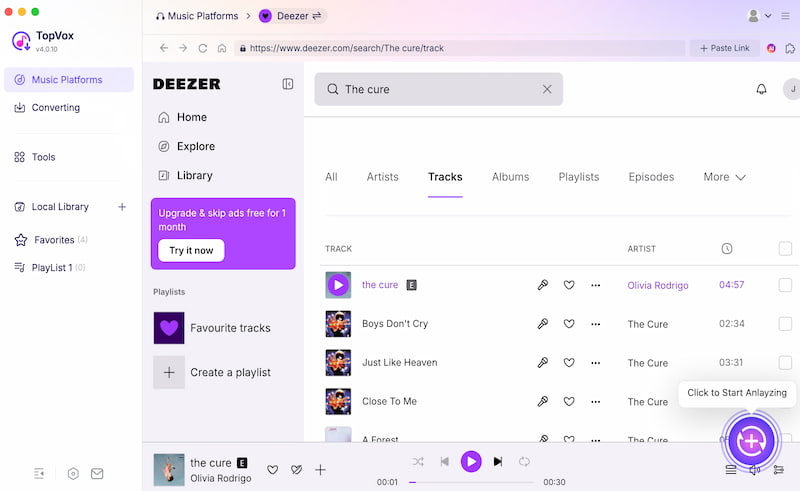
Step 2. The tool will now show you the interface. Search for the tracks, albums, or playlist you want to listen to. Then click the Add button.
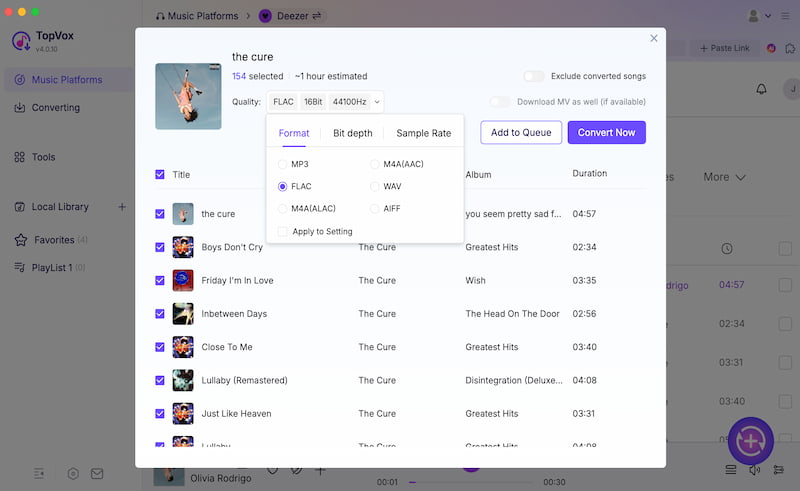
Step 3. On the new tab, choose the file format you need, then click the tracks you want to download for offline listening. Now, click the Convert button to continue.
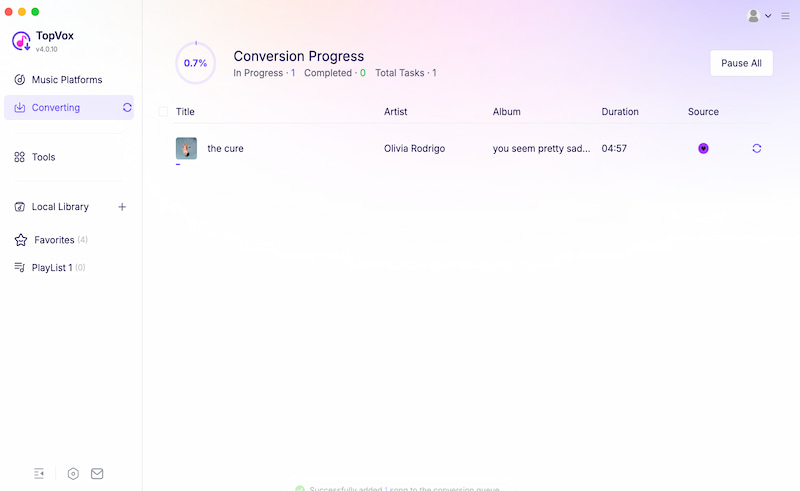
Step 4. The tool will now download your tracks from Deezer after a few moments.
Where Can You Play Your Local TopVox MP3 Files?
We all know the official way won't let you play downloaded Deezer music in an external player. But the version you downloaded with TopVox Deezer Converter will let you do it. Most likely, you can play the music on the following players:
Features
- Legacy Media Players: moving music to SanDisk clips, iPods, or fitness smartwatches such as Garmin or Fitbit without carrying a bulky phone.
- In-car Entertainment: Loading an entire music library onto a simple USB drive for remote road trips.
- DJ Software Compatibility: Importing unencrypted files directly into Serato, rekordbox, or Virtual DJ without needing an active internet connection.
Feature Comparison: In-app Download VS TopVox Conversion
| Feature | Deezer In‑App Download | TopVox Conversion |
|---|---|---|
| Format | Encrypted cache. Not usable outside Deezer. | DRM‑free MP3 (320kbps). FLAC (24‑bit). |
| Subscription | Requires Premium and HiFi. Files vanish if subscription lapses | One‑time conversion. No subscription dependency |
| Play Outside Deezer App | Not possible. Locked to Deezer player | Fully portable. Playable on any device or app. |
| Offline Verification | Must reconnect every 30 days to validate the license. | No verification needed. Files remain yours permanently. |
| Download Speed | Limited by app caching. Slower for large libraries. | Batch conversion up to 30 times speed. Minutes not hours |
FAQs about Listening to Deezer Offline
Q: Why do my downloaded Deezer tracks expire after 30 days?
A: The Deezer app will require your devices to reconnect online every 30 days at least. Your download stops because you might be off-grid longer than that. This can cause your cached tracks to lock up.
Q: Can I move my offline download from Deezer to another player?
A: No. Deezer is very strict in managing their files. All of the music you downloaded is encrypted with DRM. This prevents you from moving or playing music on an external player.
Q: Will I lose my downloads if I cancel my Deezer subscription?
A: Yes. You will lose all your downloaded music on Deezer. That means that once you start a subscription again, you'll have to download everything again.
Conclusion
In conclusion, offline listening on Deezer is convenient as long as you pay the subscription fee. Yet, this can be frustrating once you lose your subscription. You'll lose all your curated playlists for offline listening. Unlike with TopVox Deezer Converter, the music you download will be yours, with full control. The best part is that it is free and easy to use. Get it now and see all the features it offers.
Luna Harper is a passionate music lover and an inspiring content sharer. She has explored most of the music converters available on the market, acquiring thorough knowledge of their features, usability, and differences. Luna enjoys using her professionalism to help fellow music lovers get superior audio quality.