
How to Convert DRM-Protected Files to MP3: Full 2026 Guide
 by Ethan Carter | May 25, 2026 | How to
When it comes to listening to music for entertainment, downloaded MP3 files still have their own niche due to their superior reliability. Unfortunately, most accessible online music resources are heavily protected by Digital Rights Management (DRM), including music streaming apps. In this article, we will provide a viable solution to this problem by featuring some of the most reliable tools for converting DRM-protected files to MP3, including top-rated solutions such as TopVox All Music Converter and web-based tools.
100% Secure. No virus.
100% Secure. No virus.
Part 1. What is DRM Protection
Digital Rights Management is the system used to protect the copyright for media files shared for public consumption. Today, the most protected platforms with DRM active are streaming websites, for both video and music content. This makes the content very hard to download and restricts it for consumption only on the platform where it is officially released.
DRM-protected files often fail to operate once you try to access them outside the platforms where they are originally available. However, the most obvious indication of DRM protection is that they are very hard to download for offline use, making it challenging to convert these files to MP3, MP4, or other formats.
Part 2. Top-Rated Solutions to Convert DRM-protected Music to MP3
When converting DRM files to MP3 or other offline media, desktop-based solutions are the most reliable, as these tools are generally more stable thanks to the resources available on your desktop; as such, Topvox All Music Converter should be one of your go-to tools for downloading copy-protected MP3s.
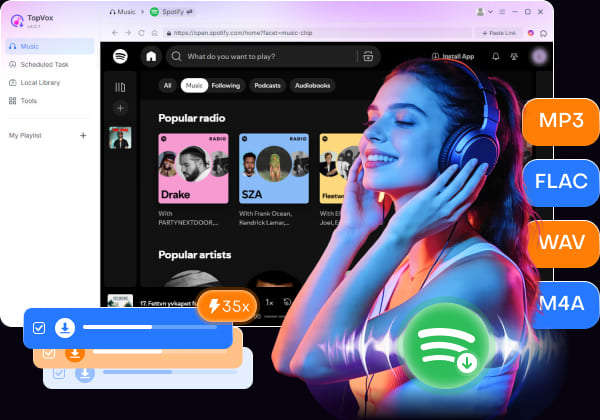
Capable of downloading media from Spotify, Apple Music, YouTube Music, Amazon Music, and more, this software is one of the most capable audio-focused DRM downloaders today, offering multiple format options from FLAC/ALAC, WAV, M4A, and the standard MP3.
Features
- Enables DRM removal for songs, podcasts, and audiobooks.
- Converted MP3 files will retain their original ID3 tags and metadata.
- Allows batch downloading of entire playlists.
- Includes integrated web players for convenient access to streaming platforms.
- Both format conversion and DRM bypass are fast and efficient.
100% Secure. No virus.
100% Secure. No virus.
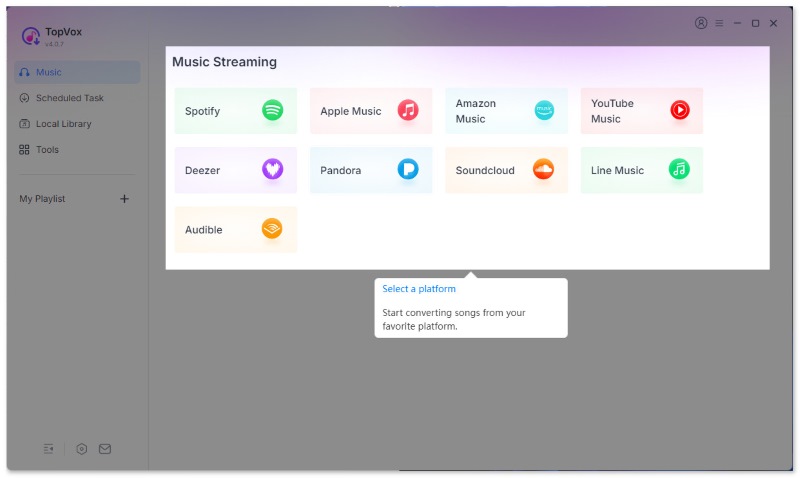
Step 1. Install TopVox All Music Converter on your desktop and open it. Then, select the streaming service you want to use as the source for DRM music.
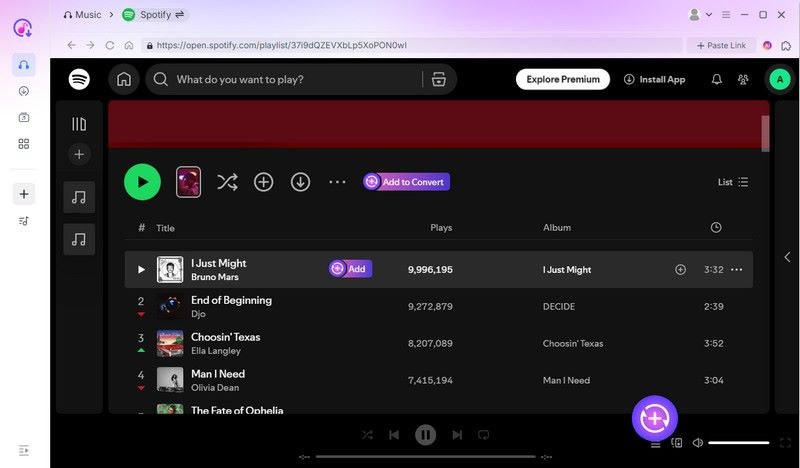
Step 2. Locate the playlist or song you want to download. To download playlists, select Add To Convert, or select the Add button next to a specific song to download a single music file.
Step 3. Once you have selected the music files you want to convert and download, go to the Scheduled Task tab to see your checklist. Finally, click Convert All to start converting the files to DRM-free MP3s on your desktop.
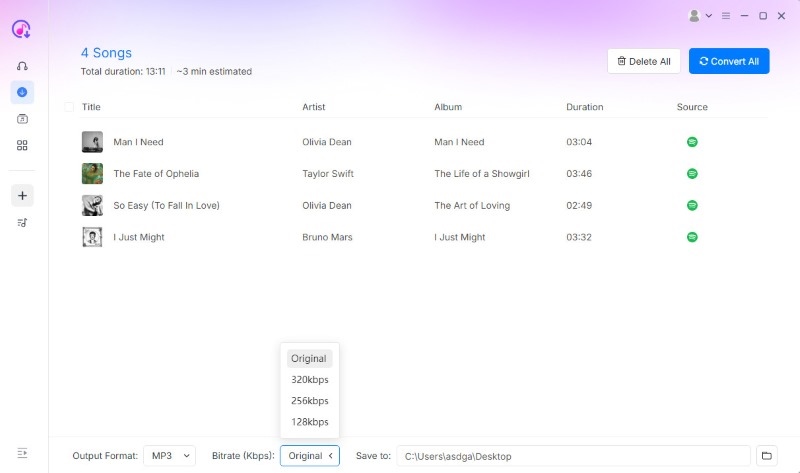
For users who prioritize software stability and reliable conversions, TopVox All Music Converter should be among your top considerations.
Part 3. Alternative Web-based Tools
When looking for an alternative to converting DRM music to MP3, web-based tools are viable if you highly value the benefit of no installation. This is a common and practical workaround for users who want to avoid the setup requirement for their programs.
With the benefits of using online audio converters now discussed, we have provided a list of reliable online audio converter tools.
Reliable Web-Based Audio Converter Tools
- • 123Apps Online Audio Convert
- • FreeConvert
- • Online Audio Converter
Unfortunately, these options are not the most reliable, and their drawbacks are hard to ignore. To start, most of these tools have poor audio quality; using them will also plague you with pop-up ads, and server timeouts are common when handling large files.
Part 4. At a Glance: TopVox vs. Web Tools
| DRM Music Downloaders | Output Quality | Batch Download | Full Metadata Preservation | Safety | Speed | Pricing |
|---|---|---|---|---|---|---|
| TopVox All Music Converter | 320kps – Lossless Quality | ✅ | Full ID3 Tags | Virus-free and desktop–based software. | GPU-accelerated (up to 35x faster than standard speed) | Free – $19.95 |
| Web Tools | 128kpbs – 300kpbs | ❌ | Inconsistent | Intrusive ads are common. Serious malware risks. | Reliant on internet connection quality. | Free |
Conclusion
If you are worried that Digital Rights Management will fully affect how you can consume your favorite music, podcasts, or audiobooks, fear not, since learning how to convert DRM-protected files to MP3 is not as complicated as you imagine. To overcome these limitations when listening to DRM-protected music, try using TopVox All Music Converter for free today to enjoy maximum accessibility to your music files via MP3 format conversion.
TopVox All Music Converter
Rated on Trustpilot >  4.8/5
4.8/5
- Download and convert songs, albums, playlists, etc., with a success rate of up to 99%.
- Keep original quality, retain ID3 tags, offer lightning-fast speed and lifetime updates.
100% Secure. No virus.
100% Secure. No virus.