3 Methods to Convert Pandora to MP3 for Offline Playback
 by Luna Harper | July 13, 2026 | Pandora
Summary
Converting Pandora music to MP3 is not difficult, and there are specific software tools available to do so. These include converters that allow direct downloads from the Internet and recorders that capture the music being played.
Option 1. TopVox All Music Converter
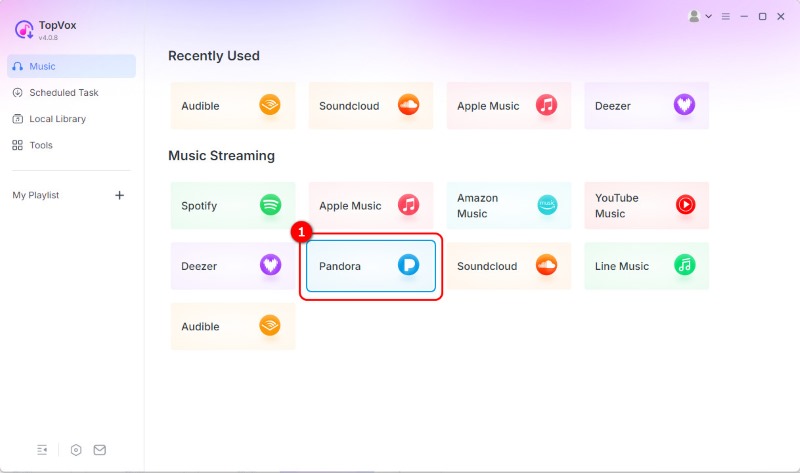
1. Open the software and select the Pandora tile.
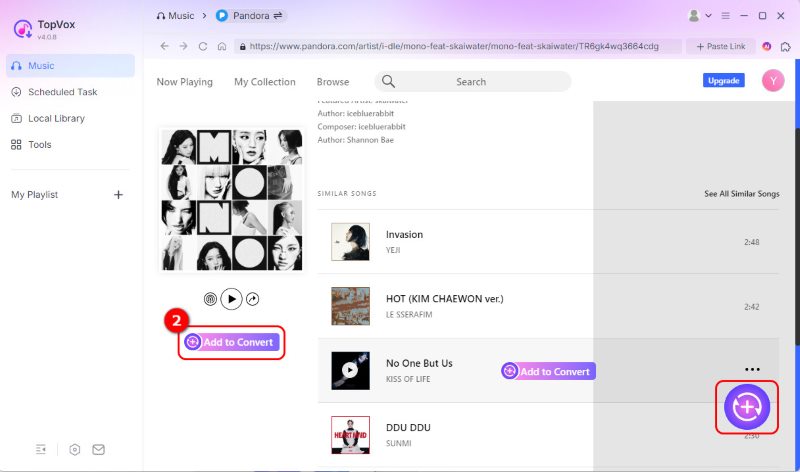
2. Click +Add to Convert to add the target Pandora music.
3. Select MP3 as the target format and click Convert Now.
Option 2. TunePat Pandora Music Converter
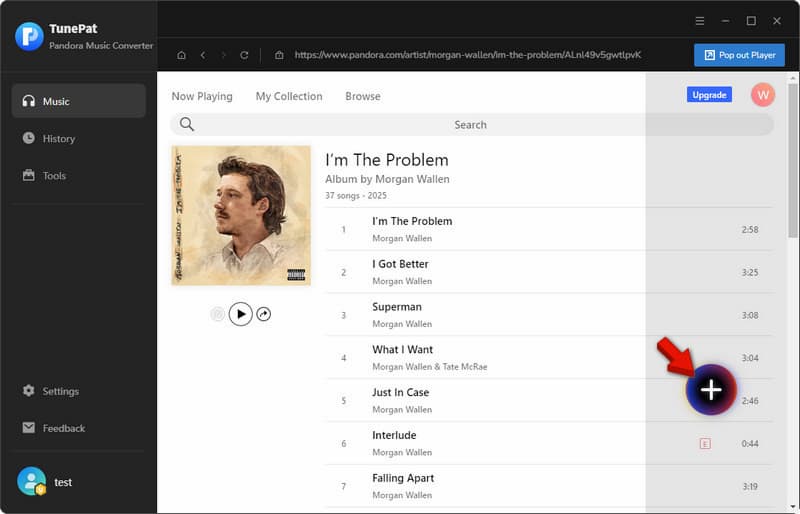
1. Open the software and click + to add Pandora Music.
2. Click Convert to download the music directly to your local files.
Option 3. Apowersoft Free Online Audio Recorder
1. Set the audio input to System Sound.
2. Open your Pandora player, then click Start Recording.
3. Click Stop when the song finishes.
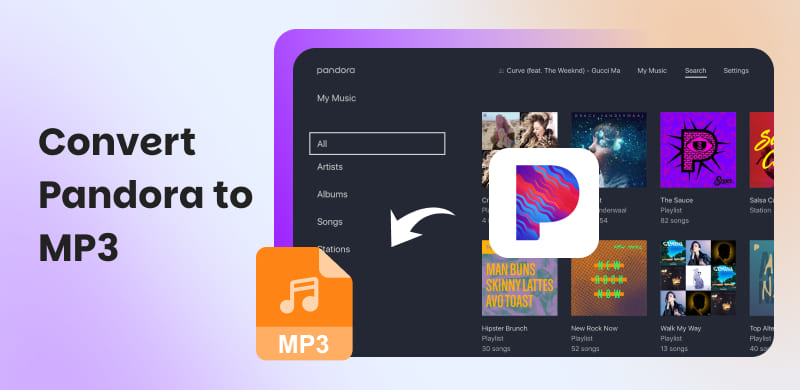
Pandora's official offline listening service is indeed convenient. However, you can only play the music within the Pandora app. It means you cannot enjoy them outside the app. To use Pandora music without limitations, converting it to MP3 files is the best option. You can listen to MP3 files on stand-alone MP3 players, old-school hardware such as Sony Walkmans and SanDisks, in-car systems with USB support, and any other media player. In this post, we will show you how to convert Pandora to MP3 using 3 methods. This way, you can enjoy your Pandora music on any device without being limited by app or platform restrictions.
Method 1. TopVox All Music Converter
TopVox All Music Converter is a multi-platform music streaming converter. It can convert Pandora to MP3, FLAC, M4A (ALAC/AAC), WAV, and AIFF formats. With it, you can download encrypted content and convert it to DRM-free formats. It can convert any songs, albums, and playlists even without a Pandora subscription. You can also adjust the default bitrate to 320 kbps and the sample rate up to 48 kHz. It is not limited to Pandora; it also supports Spotify, Apple Music, Amazon Music, YouTube Music, Deezer, SoundCloud, Line Music, and Audible.
Features
- Permanently save music for offline playback on any compatible device.
- Batch download multiple tracks simultaneously at up to 35× faster speed.
- Download songs, playlists, albums, and stations without a Premium subscription.
- Convert music to DRM-free formats: MP3, FLAC, M4A (ALAC/AAC), WAV, and AIFF.
Here's how to download Pandora to MP3
100% Secure. No virus.
100% Secure. No virus.
Step 1. Download TopVox All Music Converter and complete the setup. After installation, open the software and select the Pandora tile from the dashboard. Sign in to your Pandora account to access the For You feed.
Step 2. Browse Pandora and locate the songs you want to download. Click + Add to Convert to add them to the queue. If you do not want to sign in, copy the music link from the Pandora site. Then, click + Paste Link and paste the copied URL to convert it via link.
Step 3. By default, TopVox downloads and converts files in MP3 format. For better sound quality, you can adjust the bitrate and sample rate settings. After adjusting all settings, click Convert Now to convert your selected Pandora tracks to DRM-free MP3s.
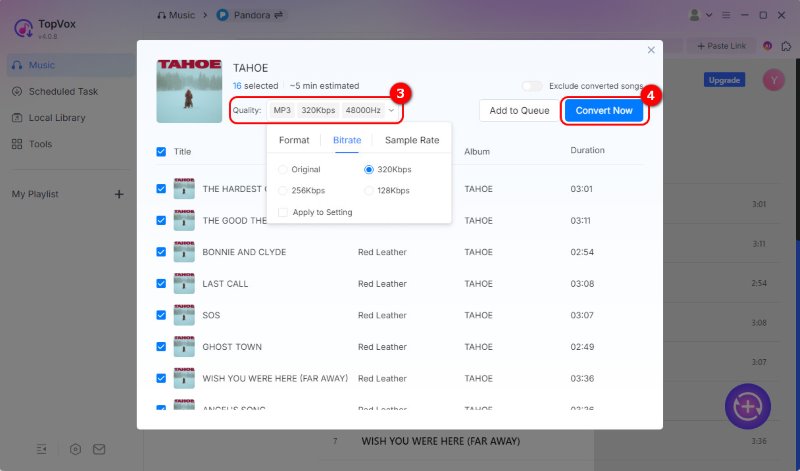
To assess TopVox's capabilities in terms of quality, speed, and batch conversion, we put it to the test. In our test, TopVox converts 16 songs from Pandora to MP3 in just 4 minutes and 18 seconds. Then, we set the bitrate to 320 kbps and adjust the sample rate to 48000 Hz to ensure better sound quality. Aside from songs, playlists, and albums, we also try TopVox to download stations on Pandora. Gladly, it works.
Method 2. TunePat Pandora Music Converter
TunePat Pandora Music Converter can download Pandora music to MP3 players and other compatible devices. It includes a built-in web player, allowing you to browse and convert music without switching to the Pandora app.
Features
- Saves DRM-free files for playback on various devices.
- Works with both Pandora Free and Premium accounts.
- Built-in Pandora web player for browsing and downloading music.
- Converts Pandora songs to MP3, AAC, WAV, FLAC, AIFF, and ALAC.
Step 1. On TunePat, click Load Web Player to open the built-in Pandora web player. Find the music you want to convert and click + to scan the selected music.
Step 2. Select all the music you want and click Add to queue them. Finally, click Convert to download music from Pandora and convert them to MP3 format.
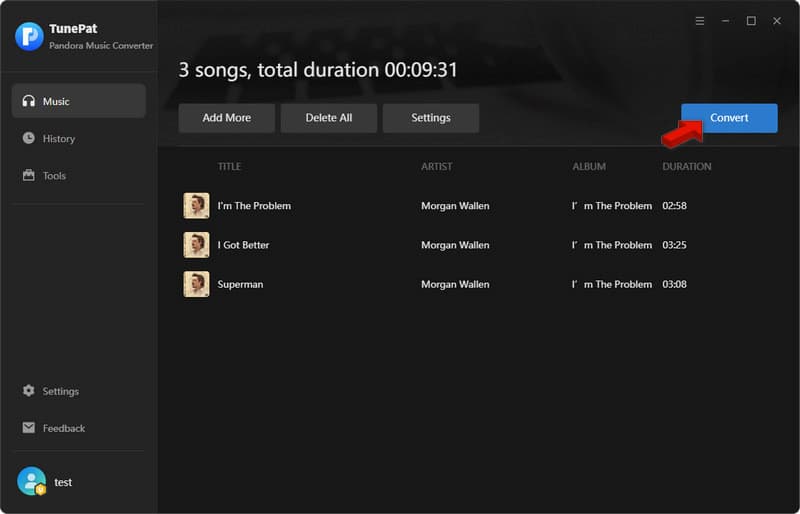
TunePat Pandora Music Converter easily converts Pandora songs, playlists, and albums to MP3 using its built-in web player. To test the software, we use the free version to see what it offers. Unfortunately, it can only convert the first 3 minutes of each music, and it is limited to 3 concurrent conversions.
Method 3. Apowersoft Free Online Audio Recorder
Apowersoft Free Online Audio Recorder takes a different approach to saving Pandora music. Instead of downloading and converting the track, it records Pandora music. It captures the system sound and lets you save Pandora to MP3 format directly on your local drive.
Features
- Export music recording in MP3 format for offline playback.
- Does not require installation of a dedicated music converter.
- Records Pandora songs directly from the computer's system audio.
- Runs completely within a web browser after installing a small launcher.
To record: If it is your first time using Apowersoft, you need to install the launcher first. Go back to the homepage, click Start Recording, and select System Sound as your recording source. Open Pandora in another tab and play the music you want. In Apowersoft, click Start Recording to start the recording, and once the music has finished, click Stop.
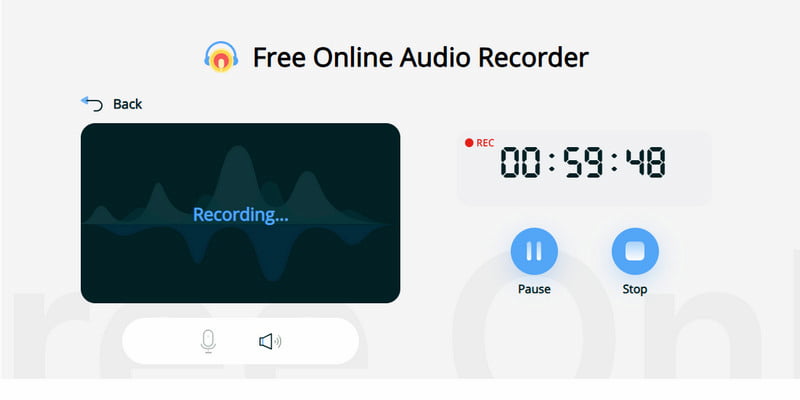
During testing, Apowersoft Free Online Audio Recorder didn’t capture the music the way we expected. Some lyrics were omitted from the recording, perhaps because the internet was unstable. After the recording, we find the output customization limited, as there is no option to adjust audio settings.
Where to Play Your New MP3s
Legacy Hardware
Converting Pandora music to MP3 lets you listen to your favorite tunes on portable devices that don't stream. This includes older MP3 players and Sony Walkmans. All you have to do is transfer your MP3 files to the player.
Car Audio
You can transfer MP3s to a USB drive to ensure smooth playback on the car's infotainment system. It comes in handy when you have to travel long distances or find yourself in areas with poor cellular network coverage.
Archiving at Home
By saving your Pandora playlists as MP3s, you will create a time capsule of your music preferences for 2025-2026. You will later be able to go back to the songs, artists, and playlists that were relevant to that time in your life.
FAQs about Converting Pandora to MP3
Can you transfer music from Pandora to an MP3 player?
It is not possible to directly transfer music from Pandora to an MP3 player due to licensing restrictions and the software's encryption. To transfer music from Pandora to an MP3 player, use a third-party streaming music converter such as TopVox.
Is it legal to convert music to MP3?
Although the conversion process is not illegal, downloading copyrighted songs from the Internet is illegal. Virtually all songs available on Pandora are copyrighted.
Which is the safest MP3 converter?
The safest MP3 converters are the reputable desktop programs rather than spammy online sites. To protect yourself from malware, automatic subscriptions, and annoying pop-ups, the safest options are TopVox and TunePat.
Conclusion
Pandora-to-MP3 conversion lets you listen to your favorite songs without Pandora restrictions. Although all three processes above will work for you, using TopVox All Music Converter will give you the easiest and fastest option. Get TopVox now to create your offline music collection with ease, but always remember to use your software responsibly and legally.
Luna Harper is a passionate music lover and an inspiring content sharer. She has explored most of the music converters available on the market, acquiring thorough knowledge of their features, usability, and differences. Luna enjoys using her professionalism to help fellow music lovers get superior audio quality.