[Update] Ways to YouTube Playlist to MP3: Convert & Play Offline
 by Owen Bannett | June 26, 2026 | YouTube
TL;DR
You can convert a YouTube playlist to MP3 across a computer, Android, iPhone, or browser using five proven methods. For high-speed batch processing with stable quality output, desktop software TopVox provides the most reliable experience. Depending on your daily device preferences, mobile workflows, verified online tools, and browser extensions offer quick alternative solutions to your specific setup.
While YouTube Music supports downloads for offline listening, these songs, albums, and playlists are protected and can only be played within the app. This means you can’t freely share, transfer, or play the downloaded tracks outside the app. If you want a permanent offline playback, we provide several methods for converting YouTube playlists to MP3s. Whether you’re using a computer or phone, there’s a suitable tool available for you, helping you easily download and convert your favorite YouTube music playlists into shareable MP3 files.
| Tool | You May Concern About | Overall Rating | |
|---|---|---|---|
| TopVox All Music Converter | ✅️Lossless audio quality, multi-platforms, fastest batch download, for free and Premium users | ❌️Provides a limited free trail | ⭐⭐⭐⭐⭐ |
| Shortcuts (iPhone) | ✅️Easier for Apple users, free | ❌️Low quality, single downloads, always crashes and stop work, drain battery quickly, slow speed… | ⭐⭐⭐ |
| Videoder | ✅️multi-platform, no ads | ❌️Unstable success rate, slow speed | ⭐⭐⭐ |
| YT1s.com.co | ✅️Use in any browser, up to 320kbps MP3, free | ❌️ Video to MP3 (not official YouTube Music), not support batch process | ⭐⭐⭐⭐ |
| Addoncrop YouTube MP3 Converter | ✅️free, 320kbps MP3 | ❌️more complex setup, lossy metadata, compressed audio, privacy red flag | ⭐⭐⭐ |
Part 1. How to Convert YouTube Playlist to MP3 in Batches [Windows/Mac]
TopVox All Music Converter, as the name suggests, is a comprehensive music downloader and converter bundle. It lets you download playlists from YouTube as MP3 with audio quality up to 48000 Hz at 320 kbps. In addition to MP3 format, it can also output M4A (AAC), WAV, FLAC, AIFF, and M4A (ALAC). Not to mention, this software can handle YouTube music protected by DRM. It can bypass such restrictions, enabling you to freely access your downloaded tracks offline. Beyond YouTube Music, it supports Spotify, Apple Music, Amazon Prime Music, Pandora, Deezer, SoundCloud, and Line Music.
What to Look Forward to with the TopVox All Music Converter:
- Built-in web player for browsing, searching, and playing any music.
- 35× faster speed to process, download, and convert music in batches.
- Queue up multiple songs, playlists, or albums for conversion in one go.
- Convert music from major music streaming platforms, including YouTube Music.
Here’s how to download a YouTube playlist in MP3 format:
Step 1. Start by obtaining the free download of TopVox All Music Converter. Install the YouTube playlist downloader and complete the installation. Once completed, open the software to begin downloading YouTube playlists.
100% Secure. No virus.
100% Secure. No virus.
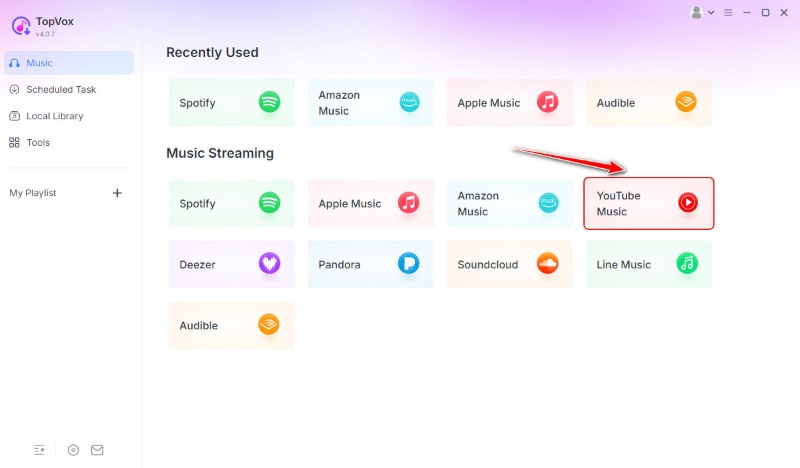
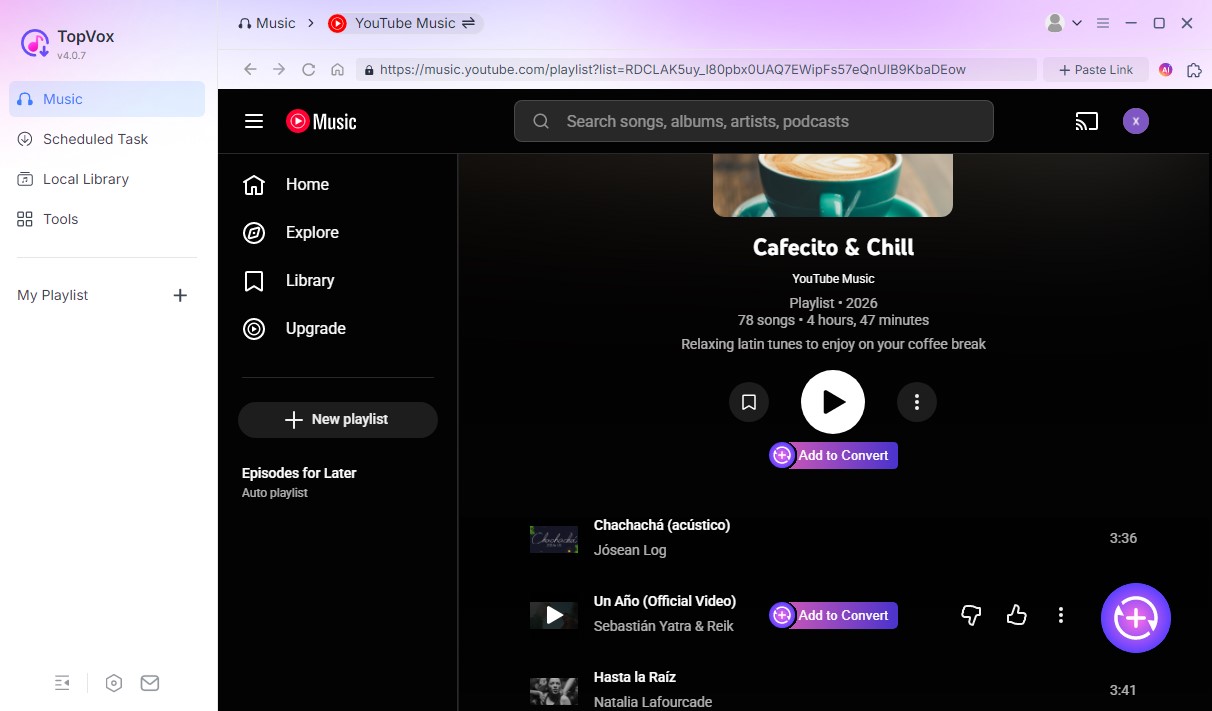
Step 2. Upon startup, you’ll see a list of supported streaming platforms. Click the YouTube Music tile to navigate to access YouTube’s built-in browser within the software. Log in to your YouTube (or Google) account to view your playlists.
Step 3. Once logged in, select the YouTube playlist you want to convert. You can choose entire playlists or individual tracks from your library. Click Add to Convert or the Add button (a plus icon at the lower right corner), and then you will see a pop-up window.
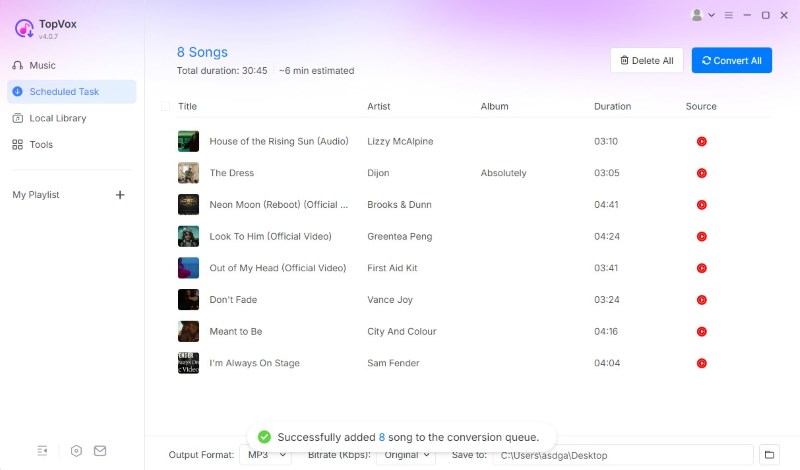
Step 4. Click Add to Queue. By default, the output is set to MP3 at 44100 Hz and Original BR (Kbps). Once all playlists are added and the settings are configured, go to the Scheduled Task and click Convert All to begin the batch downloading.
User Experience
TopVox All Music Converter offers a hassle-free way to convert YouTube playlists into MP3 format. It is the best YouTube Music downloader for Mac and Windows you could ever have. It ensures every track is preserved in premium quality without DRM restrictions. In my test of a 100-song playlist, this YouTube playlist to the mp3 player delivered 100% success rate. What’s more, it fully preserved all ID3 tags and lyrics. Comparing downloaded songs and the audio source, all file bitrates are the same.
Part 2. How to Download YouTube Playlist in MP3 [iPhone/Android]
iPhone
The Shortcuts app is an automation tool built into iOS that lets you perform complex tasks. It is initially designed to simplify routine actions like taking screenshots, sending messages, or launching apps. You can also use it for multimedia purposes, like a YouTube download playlist in MP3.
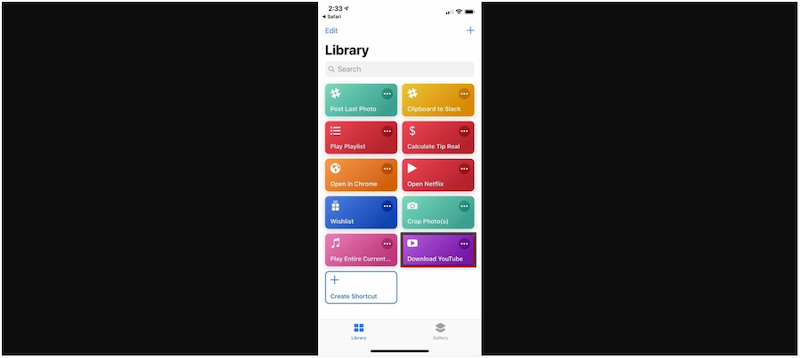
Step 1. Open Shortcuts, switch to the YouTube Downloader section, and tap it to enter. Open YouTube and navigate to the playlist you want to download.
Step 2. On the YouTube playlist page, tap the Share button and choose More. Next, scroll down and tap Shortcuts to send the playlist link to your YouTube Downloader.
Step 3. After selecting the videos, tap the Convert button. The app will automatically download the chosen videos and convert them into MP3 format.
The Shortcuts app offers a secure way to download YouTube playlists as MP3s on an iPhone. It uses iOS’s built-in automation capabilities, requiring no additional apps or external websites.
Android
Videoder is primarily an HD video downloader app that lets users save online videos directly to their mobile devices. Beyond video downloading, you can use it to download YouTube playlists to MP3 on Android. It features a built-in browser and player, where you can search, download, and watch.
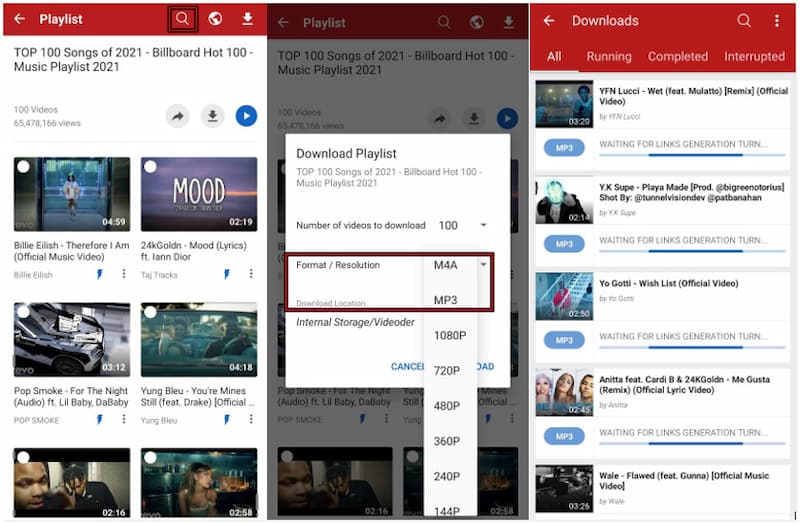
Step 1. In Videoder - HD Video Downloader, search for the YouTube playlist you want to download. You can also paste the playlist’s link directly into the search bar.
Step 2. After opening your desired playlist, tap the Download button to open the download menu. By default, Videoder allows you to download up to 100 videos at once.
Step 3. In the Format/Resolution selector, choose MP3 to extract only the audio from the videos. Tap the DOWNLOAD button to start converting YouTube playlists into MP3 files.
Note
Videoder makes downloading entire YouTube playlists to MP3 on Android simple. However, as Professional Jane Joe from WidsMob said, “because of the recent updates, you should find some crashes or no internet connection errors.” During my testing phase, it showed unstable downloading and worked very slowly to batch process large files.
Part 3. How to Download Playlist from YouTube as MP3 [Online]
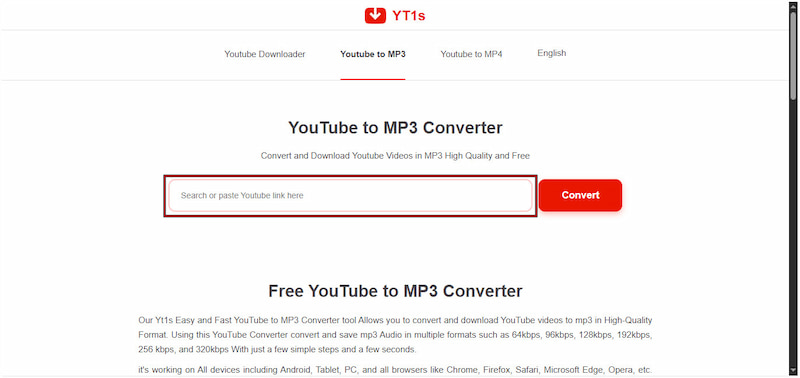
YT1s is an internet-based YouTube music downloader and MP3 converter. It lets you convert a YouTube playlist to MP3 in high quality. You can save and convert MP3 files in 64kbps, 96kbps, 128kbps, 192kbps, 256 kbps, or 320kbps.
Step 1. Open YouTube and navigate to the playlist or video whose audio you want to convert. Then, copy the YouTube playlist link from the browser’s address bar.
Step 2. In a new tab, go to the official YouTube to MP3 Downloader site for YT1s. Paste the YouTube playlist link into the text box to generate a download link.
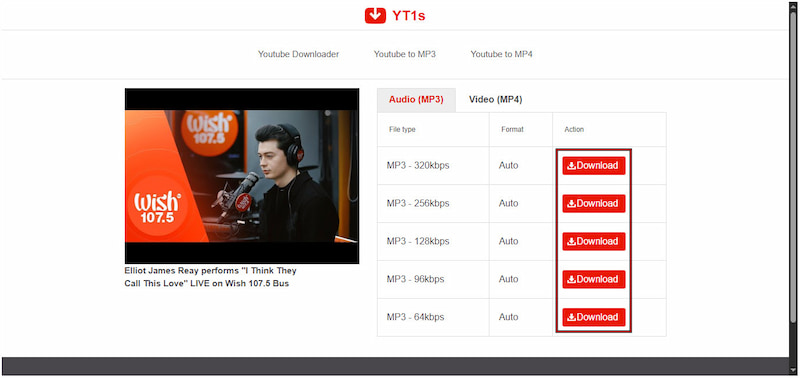
Step 3. Click each Download button to start saving. Wait a moment while the tool processes the video and extracts the audio; it can take a while.
User Experience
YT1s YouTube to MP3 Downloader does not require any external installation; it’s so convenient! I have used it to finish dozens of downloads successfully, while the quality of YouTube to MP3 was compressed a lot, from 320kbps to 256kbps. Likewise, many people did use it for quite a while or years, but all of us have doubts about its security…the website looks suspicious! It will redirect users to other unsafe websites with annoying advertising.
Part 4. How to Convert YouTube Playlist to MP3 Via Browser Extension
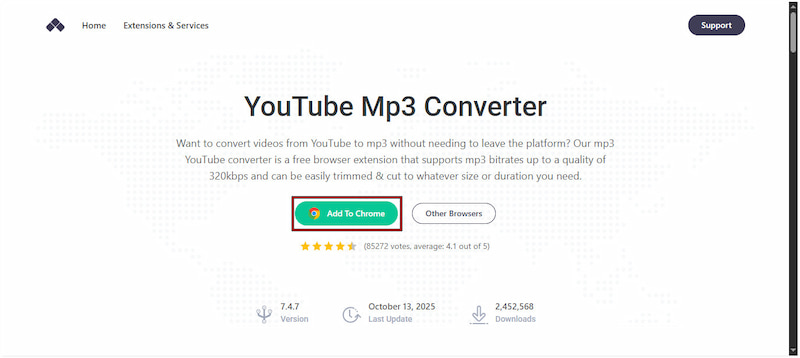
Addoncrop YouTube MP3 Converter is a convenient tool to convert a YouTube playlist to MP3. This free extension integrates directly into your browser; no additional software download required. It lets you download YouTube videos and convert them to MP3 files instantly.
Step 1. Open Chrome and reach the official page of Addoncrop YouTube MP3 Converter. On the homepage, click Add to Chrome to add the extension to your browser.
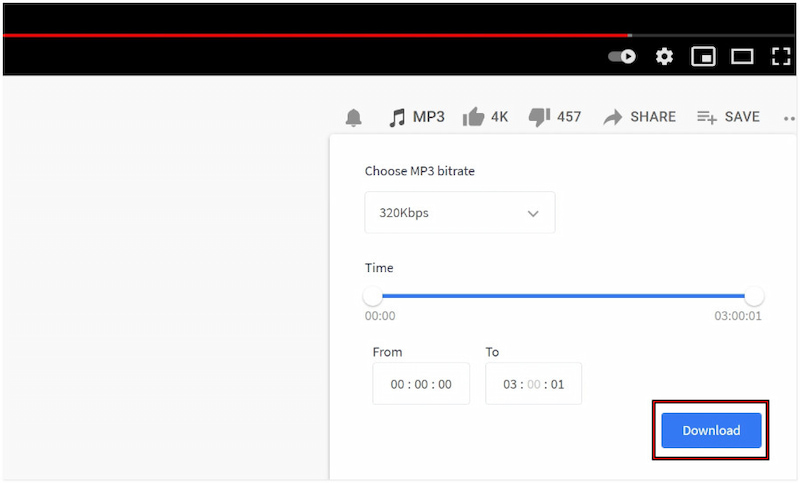
Step 2. Switch to the YouTube website and find the playlist you want to download. Click on any video, and once it plays, you’ll notice a download button.
Step 3. Click the Download button to open a list of available output formats. Select MP3 and click the Download button again to start the conversion process.
Addoncrop YouTube MP3 Converter integrates directly into your browser. However, it currently only supports downloading individual tracks. This means you cannot download the entire playlist in one click. You’ll need to manually download each video.
Part 5. FAQs About Converting YouTube Playlist to MP3
What is the safest way to convert YouTube to MP3?
The safest way to turn YouTube videos to MP3 is to use TopVox All Music Converter. Unlike many free online converters, it doesn’t redirect to unsafe pages or bundle unwanted programs.
Is it legal to extract the audio from YouTube?
Yes, as long as the music you’re downloading is copyright-free or used for personal purposes only. Downloading copyrighted songs for commercial use without permission is illegal.
Which is the best audio format for YouTube?
The best audio formats for YouTube are FLAC and WAV. Both formats preserve the full sound spectrum without compression, making them ideal for music production.
Conclusion
Converting YouTube playlists to MP3 is an excellent way to enjoy your favorite music offline. Whether you’re using a computer, mobile device, or browser extension, there’s always a convenient method available to suit your needs. However, to ensure safe, fast, and high-quality conversions, it’s best to rely on a trusted tool. For the most secure and efficient experience, TopVox All Music Converter is the ultimate solution. It offers a seamless way to convert entire YouTube playlists to MP3 or other audio formats with superior sound quality.
100% Secure. No virus.
100% Secure. No virus.
Owen Bannett is a music enthusiasm as well as a senior writer. He has paid close attention on the pros & cons of various audio formats, bitrate, sample rate and encoding methods. Always seeking the best listening experience, Owen has deep insights about lossless music and diverse music converters on the markets.