How to Convert Deezer to WAV for Archiving & Offline Use
 by Luna Harper | July 13, 2026 | Deezer
Summary
To convert Deezer music to uncompressed WAV files, the only option is to use an appropriate desktop audio converter, since Deezer encodes all its music.
Method 1: Using TopVox AllMusic Converter (Fastest Speed)
1. Open the software and select the Pandora tile.
2. Click +Add to Convert to add the target Pandora music.
3. Select WAV as the target format and click Convert Now.
Method 2: Using NoteBurner Deezer Music Converter (Best Organization)
1. Run NoteBurner, then click Settings to set the output to WAV.
2. Open any playlist and click +.
3. Click Convert to generate your uncompressed WAV.
Method 3: Using Sidify Deezer Music Converter (Easiest Interface)
1. Launch Sidify and set the output to WAV in the Settings.
2. Navigate to the tracks and click Add to add them to the queue.
3. Click Convert to start the 10× speed conversion process.
One of the very few music streaming services to offer lossless audio is Deezer. However, audio quality depends on your subscription type and the settings in the Deezer app. Additionally, even after download, songs will be restricted by DRM technology. To get an uncompressed, lossless audio file format in WAV without any limits, it's better to convert Deezer to WAV. In this post, we will present three tools that let you save Deezer songs in lossless audio format. This way, you can transfer your tracks to standard media players, create permanent backups, or edit your music in professional audio software without sacrificing sound quality.
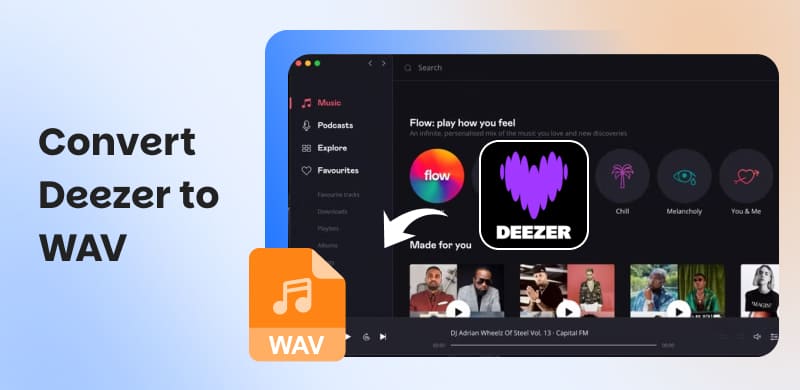
Part 1. TopVox All Music Converter
TopVox All Music Converter is a music box converter that supports top music streaming services. With it, you can download any content from Deezer to WAV, MP3, FLAC, M4A (ALAC/AAC), and AIFF. It can batch-convert multiple tracks simultaneously at 35× speed. You can also adjust the bitrate and the sample rate. Beyond Deezer, it also supports Spotify, Apple Music, Amazon Music, YouTube Music, Pandora, SoundCloud, Line Music, and Audible.
Features
- Remove DRM protection from Deezer tracks for unrestricted playback.
- Requires no Deezer Premium account to download and convert music.
- Download Deezer tracks, albums, playlists, and podcasts for offline listening.
- Support URL-based downloads by pasting Deezer song, album, or playlist links.
100% Secure. No virus.
100% Secure. No virus.
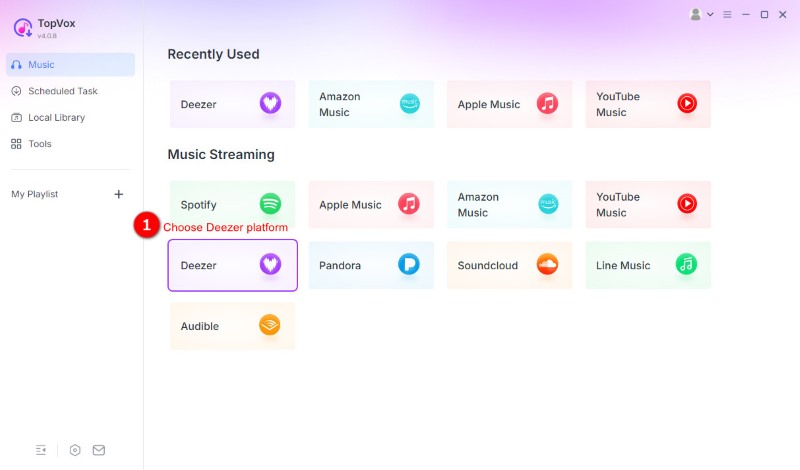
Step 1. Download TopVox All Music Converter and complete the setup procedure. After installation, open the software and select the Deezer tile from the dashboard. Sign in to your Deezer account to access the Home feed.
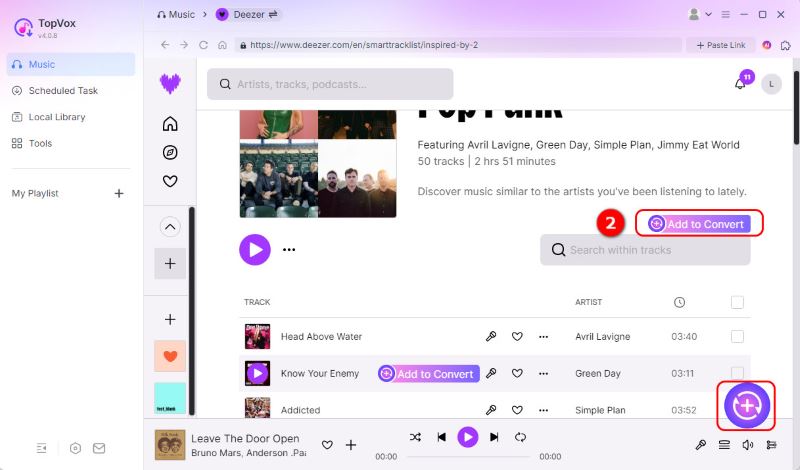
Step 2. Select the Deezer music you want to convert and click + Add to Convert to add it to the queue. Alternatively, copy the Deezer music link, click + Paste Link, and paste the URL to add the content directly without browsing.
Step 3. By default, TopVox saves music in MP3 format at 256 kbps/44,100 Hz. Click the Format picker and select WAV as your target output. Then, click Convert Now to start rendering the Deezer music and convert it to WAV.
We conduct a test to assess TopVox's capabilities in terms of quality, speed, and batch conversion. In our test, TopVox converts 6 tracks from Deezer to the WAV format in 1 minute and 17 seconds. To get high-quality audio, we set the bitrate to 320 kbps and 48000 Hz for sample rate. Indeed, it can download Deezer music for free, even without a Premium subscription.
Part 2. NoteBurner Deezer Music Converter
NoteBurner Deezer Music Converter can download Deezer to WAV, MP3, AAC, FLAC, AIFF, and ALAC. It also comes with a Deezer web player that allows you to access recommendations and new releases. It can preserve original HiFi audio quality, ID3 tags, and metadata.
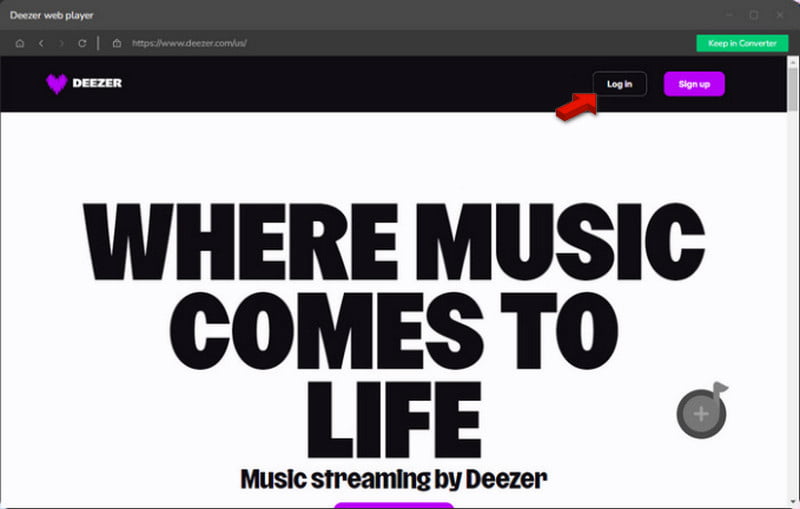
Step 1. Open NoteBurner and log in to your Deezer account to access the home landing page. Click Settings and go to the Music section to change the default output format to WAV.
Step 2. Go to the music you want to convert and click +Add to add it to the conversion queue. After selecting the songs, click Convert to download and convert the selected Deezer songs.
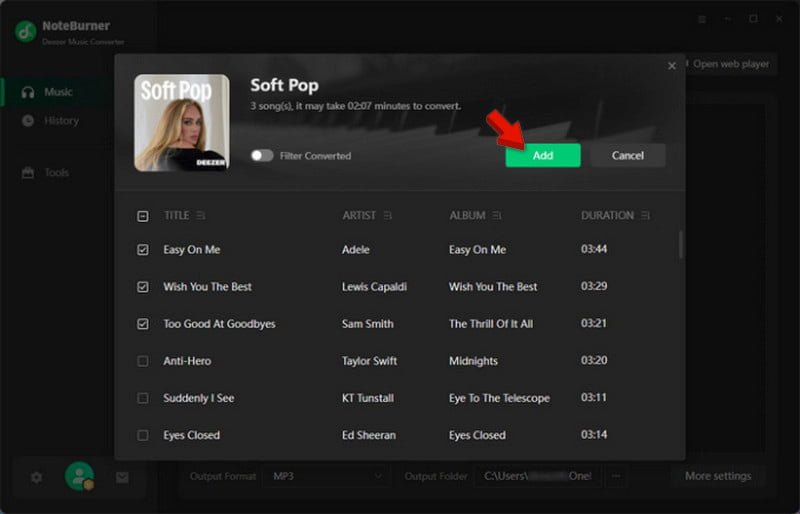
The same goes for the first tool, we put NoteBurner Deezer Music Downloader to the test. It converts 3 tracks totaling 9 minutes and 34 seconds of music into about 2 minutes and 7 seconds. In terms of quality, we hear no distortion or any degradation in our audit.
Part 3. Sidify Deezer Music Converter
Sidify Deezer Music Converter is a dedicated music converter for converting Deezer to WAV. It can handle up to 10× conversion speed and ensure the music you download is in lossless audio quality. It can also preserve important ID3 tags and metadata during conversion.
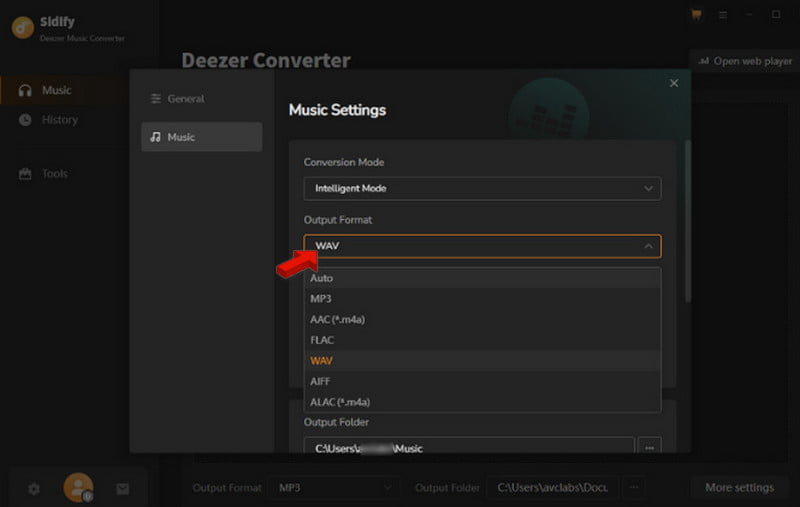
Step 1. In Sidify, click the Open web player to sign in to your Deezer account. Then, go to Settings and change the output format to WAV.
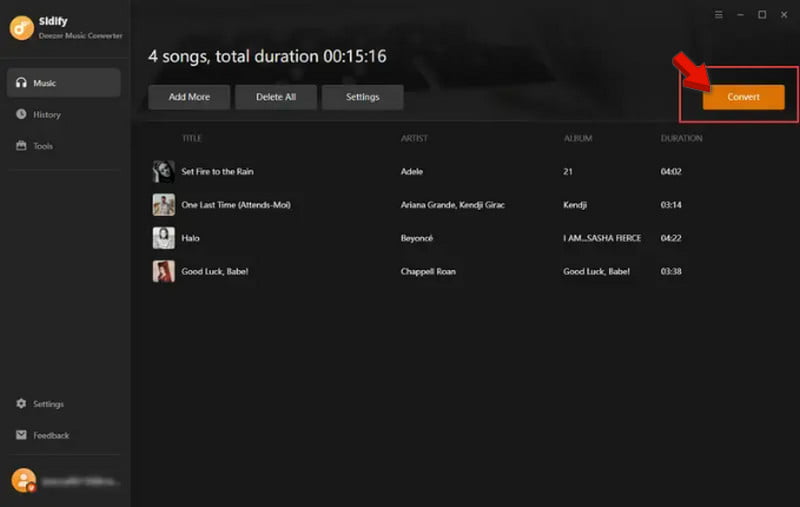
Step 2. Select the tracks you want to convert and add them to the interface by clicking +. Now click Convert to convert the selected music to WAV.
To evaluate the efficiency of Sidify compared to the other two applications, we ran another test. The tool performed very well, completing the conversion process quickly and producing high-quality sound. However, the free version converts only the first minute of each song.
| Platform | Price | Music Services | Transfer Speed | Batch Transfer | Match Accuracy |
|---|---|---|---|---|---|
| TopVox All Music Converter Windows and Mac | Starts at $19.95 with a free trial available | Deezer, SoundCloud, Spotify, Apple Music, Amazon Music, Pandora, YouTube Music, Line Music, and Audible | Up to 35× faster | ✅ | 99% |
| NoteBurner Deezer Music Converter Windows and Mac | Starts at $44.95; free trial can only convert the first 1 minute of the song. | Deezer | Up to 10× | ✅ | 94% |
| Sidify Deezer Music Converter Windows and Mac | Starts at $3.75; free trial can only convert the first 1 minute of the song. | Deezer | Up to 10× | ✅ | 92% |
FAQs about Deezer to WAV Conversion
Does Deezer allow downloads?
Yes, Deeze-downloading songs for offline use, though the method varies depending on your preferences. The thing is, if you have a Deezer subscription, you can download any music for offline playback. If you plan to use them for other players, you will need specialized music converters such as TopVox.
What audio format does Deezer use?
Deezer uses MP3 for standard lossy streaming, while FLAC is used for its lossless audio streaming services. Premium/HiFi Subscription uses FLAC streams at 1,411 kbps (16-bit / 44.1 kHz). For a free subscription, it streams MP3s at 128-320 kbps.
Where is Downloaded Deezer Music Stored on Android Phones?
When downloading music via Deezer on your Android phone, the path is Data stored in - storage - emulated - 0 - Android - data - deezer. However, when you use converters like TopVox, you can specify the destination for the downloaded files.
Conclusion
The best way to ensure that music on Deezer is saved in an uncompromised, lossless format is to convert Deezer to WAV. It eliminates the need to stream the music to listen to it. With the right Deezer converter, you can easily convert music from Deezer to any format you like without worrying about losing quality. Of all the software discussed above, TopVox All Music Converter is the best choice for quality and performance.
Luna Harper is a passionate music lover and an inspiring content sharer. She has explored most of the music converters available on the market, acquiring thorough knowledge of their features, usability, and differences. Luna enjoys using her professionalism to help fellow music lovers get superior audio quality.