Top 4 MP3 to FLAC Converters [With Quick Tutorial]
SUMMARY
No matter which MP3-to-FLAC converter you choose, remember that the best audio quality always comes from converting directly from an original lossless source rather than an MP3 file.
- TopVox All Music Converter has the fastest batch conversions, complete metadata preservation, unlimited local processing, and a beginner-friendly interface.
- FFmpeg is an excellent free alternative for advanced users.
- Audacity is best for editing-focused workflows.
- CloudConvert is suitable for occasional online conversions.
Is MP3 convertible into FLAC? Yes, you can convert MP3 to FLAC. However, it won't improve the original audio quality because MP3 is already a lossy format. Instead, you can use the converted FLAC files for archiving, maintaining compatibility with FLAC-supported players, or avoiding additional quality loss during future editing. In this post, we will compare the best MP3-to-FLAC converters. We put each converter to real hands-on testing to evaluate its capabilities. We will also explain what actually happens during MP3-to-FLAC conversion.
Part 1. First Look: Comparison of 4 MP3 to FLAC Converters
How We Tested:
Testing Device: Windows 10 Pro (64-bit), powered by AMD Athlon 3000G with Radeon Vega Graphics processor, 12 GB RAM, and an AMD Radeon(™) Vega 3 Graphics.
Files Tested: 100 MP3 files with full metadata and varying bitrates.
Evaluated Metrics: speed, batch conversion, metadata preservation, primacy, file size, and usability.
| Speed | Batch | Metadata Kept | Privacy | Max File Size | Price | Ease of Use |
| TopVox All Music Converter | Fast speed (Up to 35×) | ✅ | ✅ Full | ✅ | No file size limit | Starts at $35.96 with a 30-day free tier available | 4.5/5 |
| FFmpeg | Normal speed | ✅ | ✅ Limited | ✅ | No file size limit | Free | 3/5 |
| Audacity | Average speed | ✅ Limited | ✅ Limited | ✅ | No file size limit | Free | 3.5/5 |
| CloudConvert | Slow | ✅ 10 concurrent conversions | ❌ | ❌ | 1 GB | Starts at $10 for 500 credits, with a free tier available | 4/5 |
Part 2. 4 MP3 to FLAC Converters
TopVox All Music Converter
TopVox All Music Converter is a music downloader that, by default, includes a Format Converter feature. With it, you can convert MP3 to FLAC, M4A (AAC), WAV, M4A (ALAC), and AIFF. You can import multiple files and convert them simultaneously without crashing the software. It uses hardware acceleration to achieve up to 35× faster batch conversion speeds when handling multiple audio files. Better yet, TopVox performs all the conversions locally, meaning you don’t need to upload the MP3 files to the server.
Features
- Convert one or more files simultaneously without lag or crashes.
- Transcode MP3 to a lossless format without losing the original quality.
- Uses hardware acceleration to speed up batch conversion by up to 35×.
- Keeps complete metadata/ID3 tags, including song title, artist name, and album details.
Pros
- Processes conversion offline.
- Fast batch conversion speed.
- No file size limit for conversion.
Cons
- Fixed audio settings.
- Convert only the first 3 minutes in the free trial.
Step 1. Download TopVox All Music Converter and complete the installation procedure.
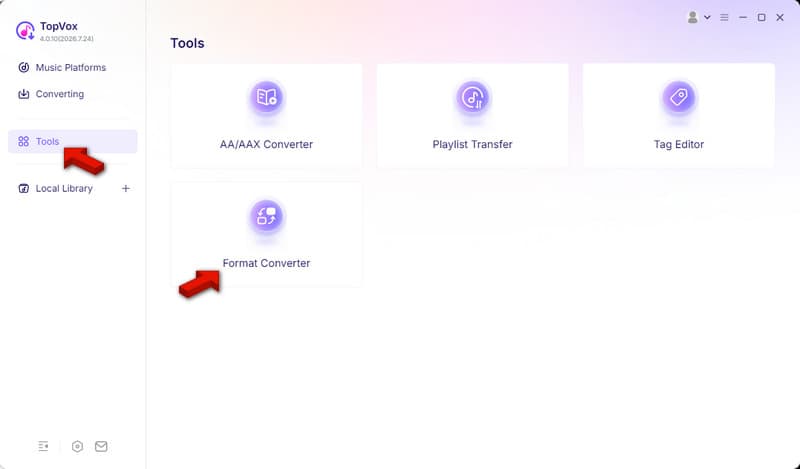
Once the software launches, navigate to the Tools tab and select Format Converter.
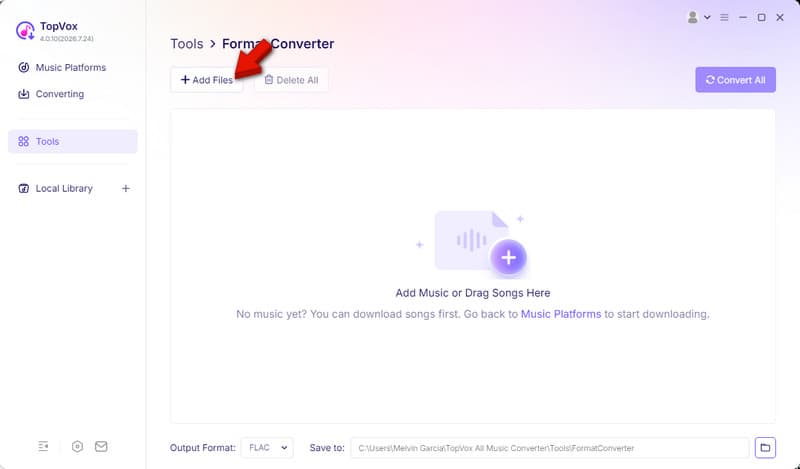
Step 2. Drag the songs or click +Add Files to import MP3 files from your computer. Remember, this MP3-to-FLAC converter lets you add more than one file for batch conversion.
Step 3. Go to the Output Format picker and select FLAC as your target format. Set the destination folder, then click Convert All to start the conversion.
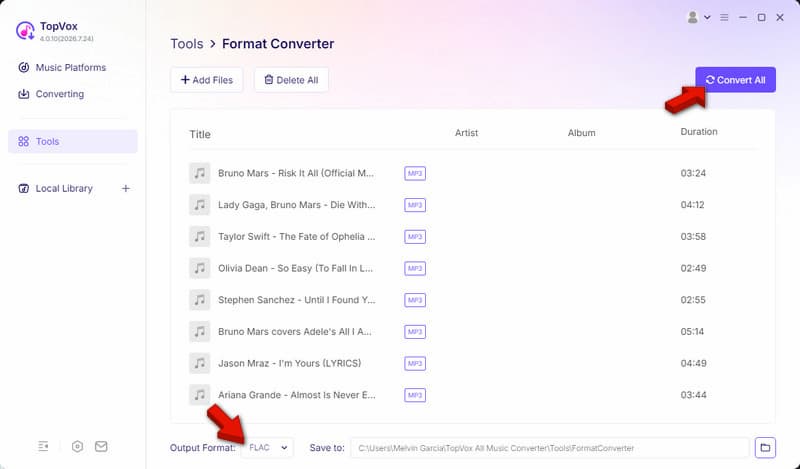
We convert 100 MP3s totaling 1.2 GB to FLAC format with default settings. In our test, TopVox completed the batch conversion in just 1 minute and 8 seconds with 0 failed conversions. Although it cannot restore audio information lost during MP3 encoding, it still preserves the original audio and all metadata. TopVox can also do the reverse, meaning you can convert FLAC to MP3 again.
FFmpeg
FFmpeg is the choice of professionals for its unmatched MP3-to-FLAC conversion. With it, you only need to type commands that instruct FFmpeg which file to convert and what format to use. FFmpeg decodes the compressed MP3 and re-encodes it into lossless FLAC format. However, like any software, it cannot restore audio data that was removed during MP3 conversion.
Pros
- Can configure audio settings.
- Batch processing through commands.
- Fast conversion with low system usage.
Cons
- No GUI (graphical user interface).
- Wrong commands result in conversion errors.
How it Works:
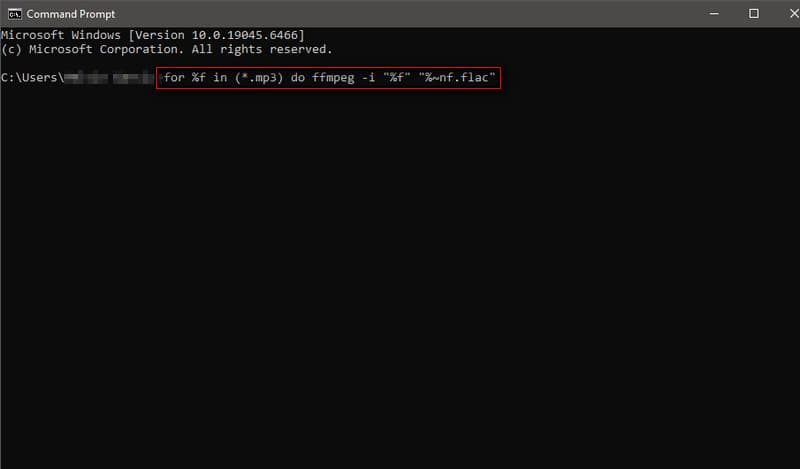
We put FFmpeg to the test using the same files on Windows 10 Pro. In our test, the average conversion time was 2 minutes and 45 seconds. For metadata retention, it only saved the basic tags. To be real with you, the process is less approachable for beginners.
Audacity
Audacity is a highly popular audio editor that has been around for more than 2 decades. Apart from being an audio editor, you can also use it as a free MP3-to-FLAC converter. Unlike traditional converters, the conversion process is simpler. You only need to import the MP3 files and export them as FLAC. You can also export M4B to MP3 with Audacity.
Pros
- No charge with no subscriptions involved.
- Used by most professional editors and audiophiles.
- Comes with waveform editing and audio restoration tools.
Cons
- Slower than real audio format converters.
- Requires plugins or manual editing to preserve metadata.
How it Works:
In Audacity, go to File and click Open to select the MP3 file on your computer. When the files load, return to the File again and click Export Audio. In the Export Audio window, select the FLAC Files option as your export format.
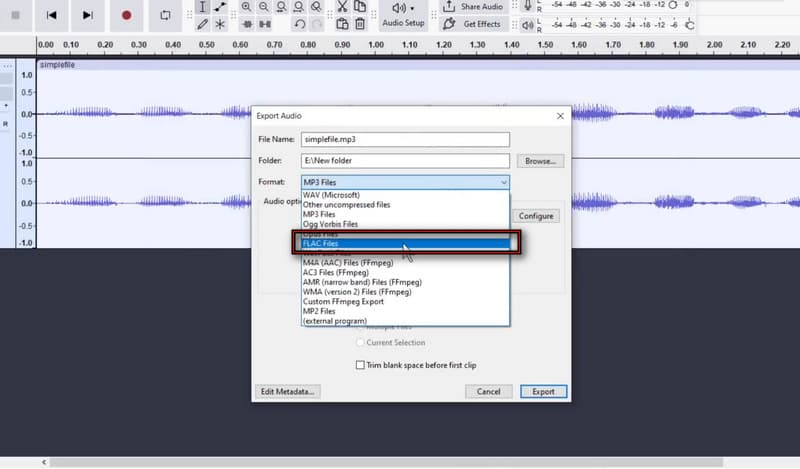
We conduct hands-on testing to evaluate Audacity’s file-conversion capabilities. We used a different file of the same size, and the conversion took 9 minutes and 35 seconds. If you need to convert hundreds of MP3 files, this tool is definitely a hard pass.
CloudConvert
CloudConvert is an online file conversion service that supports 200+ formats. In a web browser, you can transcode MP3 to FLAC without installing anything. Since the conversions are done remotely, you can use it on any device with an internet connection. Also, it is best to use when you only need to convert one or two files. You can also convert WAV to MP3 with it.
Pros
- No need to install any software.
- Accessible on any modern web browser.
- Works on any device, be it a mobile phone or a desktop.
Cons
- Limited batch conversion in the free plan.
- Conversion speed depends on the server/internet.
How it Works:
Go to the CloudConvert site, then set the Input to MP3 and the output to FLAC. Then, click Select File to import the MP3 source from your computer. After selecting your target format, click Convert to process the videos, then download them afterward to save them locally.
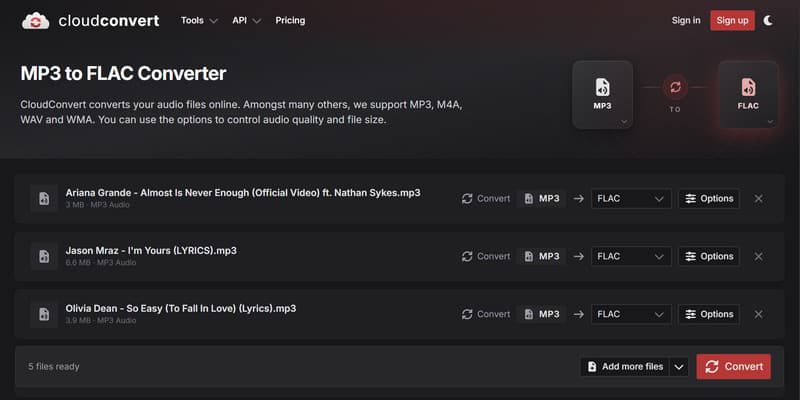
We tested CloudConvert using 10 MP3s totaling 68 MB to stay within the tool’s free limit. It took 14 minutes and 20 seconds to complete the conversion, even though the internet is stable. If you plan to convert more than 10 MP3s, we suggest TopVox for unlimited processing.
Part 3. MP3 to FLAC: What Actually Happens?
Many people assume that converting MP3 to FLAC improves the sound quality. To be real with you, this myth is a hoax. The conversion is possible, but it cannot recover audio data discarded during MP3 compression. It is because MP3 is lossy and FLAC is lossless.
Note: if the source is already an MP3, FLAC will only store the existing compressed audio in a lossless container. It will not recreate the missing details.
When Does Converting MP3 to FLAC Make Sense?
- • If you plan to keep or organize your existing MP3 collection.
- • If you need to perform audio editing or multiple format conversions.
- • Some audio players, media servers, or professional applications work better with FLAC.
FAQs about MP3 to FLAC Conversion
Do FLAC files lose quality?
FLAC is a lossless audio compression format. When you use FLAC, you can reduce file size while retaining the full detail and quality of the source file.
Does FLAC take up more storage than MP3?
FLAC takes up more storage than MP3 files because it preserves all the audio data. Unlike MP3, it discards unnecessary audio to make the file size smaller.
Can humans hear the difference between FLAC and MP3?
In actuality, hearing the difference between a high-quality MP3 and a FLAC file is impossible. Blind tests show that even trained experts struggle to tell them apart.
Conclusion
MP3-to-FLAC conversion can be done with an MP3-to-FLAC converter. However, you cannot restore lost audio information during compression or enhance the quality of the original sound. When archiving hundreds of music tracks, converting from MP3 to FLAC is necessary to prevent future quality losses from editing or re-conversion processes. Our experience shows that the best tool for this task among available converters is TopVox All Music Converter. It lets you convert multiple MP3s simultaneously without crashing or lag. Besides, you can ensure that the metadata is kept.
Ethan Carter
Ethan Carter creates in-depth content, timely news, and practical guides on AI audio, helping readers understand AI audio tools, making them accessible to non-experts. He specializes in reviewing top AI tools, explaining the ethics of AI music, and covering regulations. He uses data-driven insights and analysis, making his work trusted.




 by
by