How to Move Playlist from Spotify to Apple Music with the Best Tools
 by Owen Bannett | June 11, 2026 | Playlist Transfer
Quick Summary
In short, TopVox All Music Converter guarantees 100% metadata accuracy of titles, artists, album art, and playlist order. It also offers secure offline backups. Web-based tools such as Soundiiz or FreeYourMusic are less reliable and can cause metadata loss or privacy issues.
Spotify and Apple Music have been undeniably the leading music streaming platforms for a long time now. Each platform already has an audience and user base. Yet many users constantly switch between Spotify and Apple Music for various reasons. Thus, if you are a Spotify user who wants to use Apple Music but can’t because you are worried about your playlists, we are here to guide you. In this article, you will find four methods on how to transfer Spotify playlists to Apple Music with ease. Exciting details await if you start reading now.
Part 1. Why Most People Switched to Apple Music in 2026: Spotify VS Apple Music
Spotify VS. Apple Music
People often compare Spotify and Apple Music. According to users, each tool has both advantages and disadvantages.
Spotify’s users love the great algorithm for music taste you love. They highlight that creating a playlist and managing your tracks are super. In addition, Spotify’s free ad-supported account is a top-tier feature not available in Apple Music. However, this is not suitable for people who want to be really into the sound quality. For context, Spotify uses 320 kbps and Lossless FLAC with 24‑bit or 44.1kHz. On top of that, their subscription costs are high.
Apple Music, on the other hand, wins its users mostly for its high sound quality over Spotify. The platform uses AAC at 256 kbps standard or ALAC Hi‑Res Lossless with 24‑bit or 192kHz. This quality is available across most catalogs. Moreover, you will also notice that Apple Music’s premium offers are more affordable. Ultimately, this platform has a deep integration with iOS, macOS, HomePod, and Apple Watch. Best for users already invested in Apple devices.
| Feature | Spotify | Apple Music |
|---|---|---|
| Catalog | 100M+ songs, podcasts, audiobooks. | 100M+ songs, curated exclusives. |
| Sound Quality | Lossless FLAC 24‑bit or 44.1kHz. | Hi‑Res ALAC 24‑bit or 192kHz. |
| Discovery | AI DJ, Wrapped, and Daylist. | Human curation and AutoMix. |
| UI | Dynamic and content‑rich feed. | Minimalist Liquid Glass. |
| Price | $11.99 to $12.99 | $10.99. |
| Ecosystem | Cross‑platform. | Deep Apple integration. |
Can You Import Playlists from Spotify to Apple Music?
Yes. Migrating a Spotify playlist to Apple Music is possible. However, the process does not yet have an official way. Therefore, the entire process to make it will require you to use a third-party tool. Recommend a conversion tool for your playlist. We prepare the four best tools you can use in the next part of this article.
Part 2. Migrate Spotify to Apple Music: Topvox All Music Converter
Why is TopVox All Music Converter Superior?
Starting this guide by introducing you to the superior option. TopVox All Music Converter ranked as the number one option because it is an all-in-one tool. Everything you need to export a Spotify playlist to Apple Music is available here. First of all, it helps you transfer Spotify playlists to Apple Music quickly and uninterrupted. The batch conversion feature helps you manage all of your tracks with ease. Moreover, it can preserve all metadata from your Spotify tracks in Apple Music, giving you an easy way to manage your playlist even if you are new to the platform.
Features
- Transfer your Spotify playlist to Apple Music.
- Support wide options for streaming platforms like Spotify, Apple Music, Amazon Music, etc.
- Batch conversation is available for one-at-a-time transfer.
- High-quality output.
How to Use
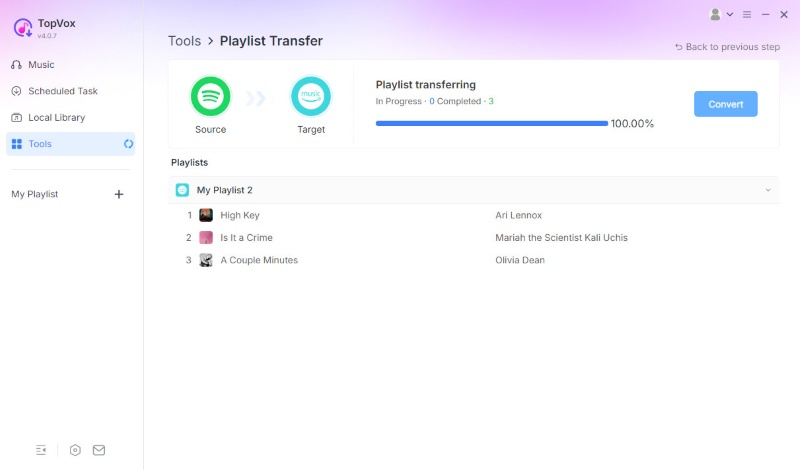
Step 1. Download and install TopVox All Music Converter for free. Open the tool on your computer. From there, go to the Tool feature and choose Playlist Transfer.
100% Secure. No virus.
100% Secure. No virus.
Step 2. Then you need to select Spotify as the source and set Apple Music as the destination. From there, select your playlists which are presented in the options. Click Next to continue.
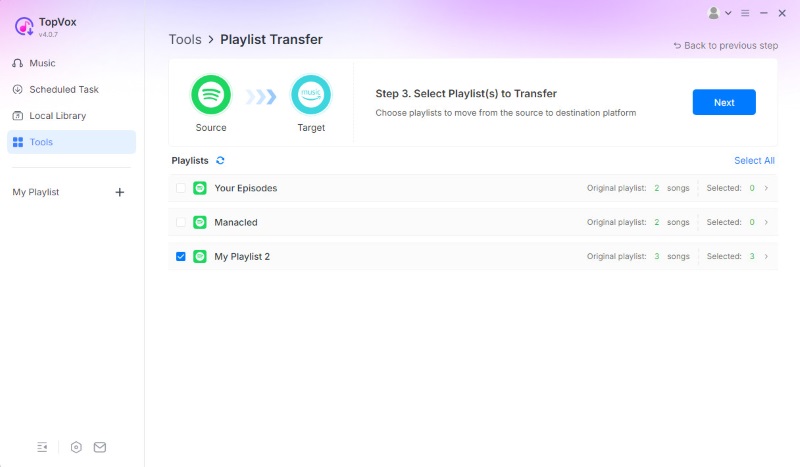
Step 3. Proceed with clicking the Convert button and let the tool do the conversion process.
User Review
Users highlight three main features in using TopVox All Music Converter from iLounge Review and Softpedia Test. These three are the fast batch conversation, lossless audio-quality, and the amazing feature for preserving ID3 tags.
Part 3. Official Way to Convert Spotify Playlist to Apple Music
Way 1: Use the Apple Music Mobile App
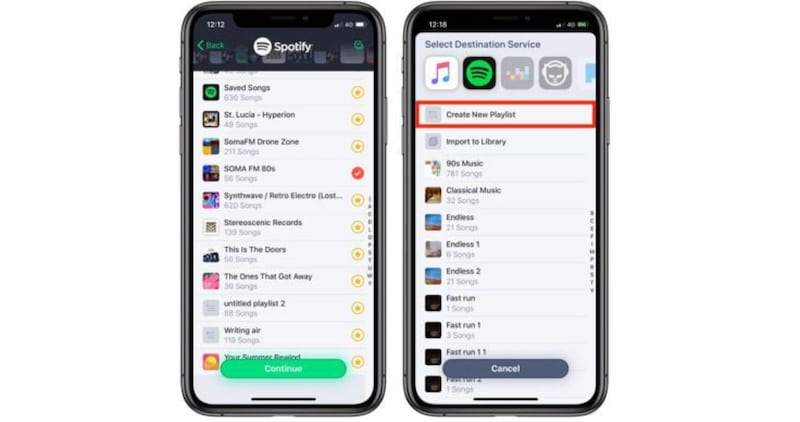
Step 1. Start this process by opening your Apple Music app on your iPhone. Then navigate to the Library and select the Playlist you want to transfer.
Step 2. Please, click the Import Playlist button, then choose Spotify as your source platform.
Step 3. You shall now sign in with your Spotify account. This is an important step to authorize the transfer.
Step 4. Finally, please confirm the playlist you want to move and wait for the sync process.
Way 2: Using the Apple Music Web App
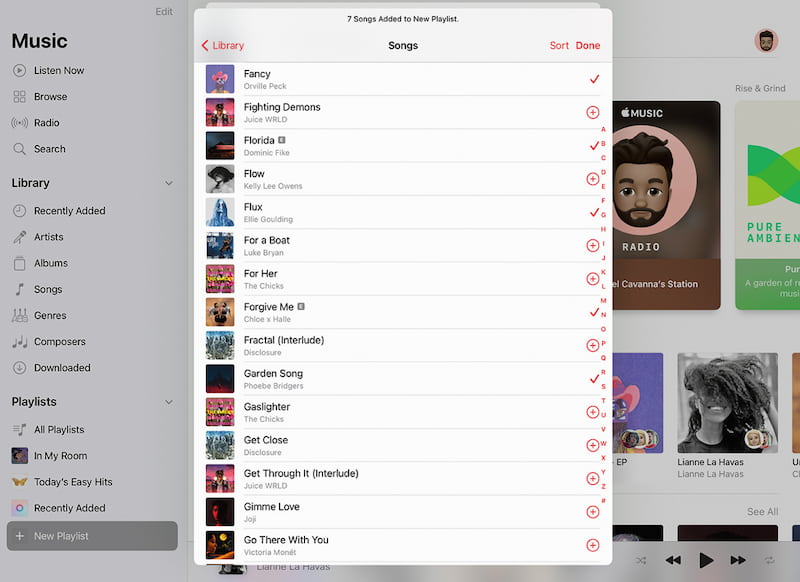
Step 1. Start by opening the Apple Music web player in Safari browser.
Step 2. Then please log in with your Apple ID. From there, you will see the Settings when you click Import Playlist and select Spotify. After that, you can now authorize access to your Spotify account.
Step 3. After those few steps, please select the playlist and start the transfer.
Pros
- It is a direct integration with no third‑party tools required.
- Uses official Apple and Spotify APIs.
- Works on both mobile and web.
Cons
- Each playlist requires a 30‑day review period before it can be completed.
- Only playlists you personally created in Spotify can be transferred.
- You must finish one review before starting another.
Important Note
Using this method also means you cannot transfer the playlists you did not create in Spotify, such as curated or collaborative lists. In addition, Apple enforces a 30‑day review period for each playlist transfer. That means it will always take a while before it proceeds.
Part 4. Export Spotify Playlists to Apple Music with Soundiiz
Soundiiz
Soundiiz is another that you can use as a web‑based playlist manager. This tool connects multiple streaming platforms and lets you export Spotify playlists directly into Apple Music. It is an online tool with straightforward features. That means you cannot expect advanced features on this tool.
How to Use
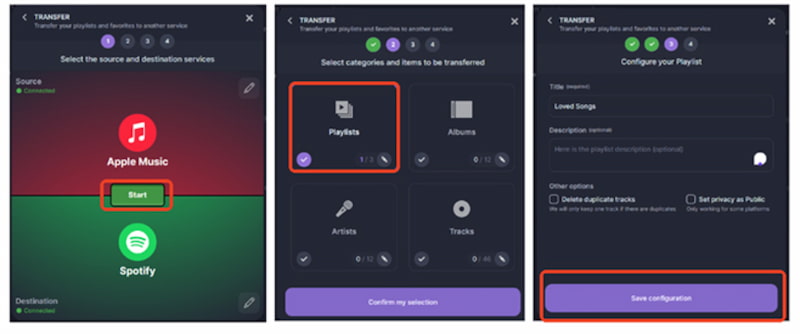
Step 1. Go to the Soundiiz website and create an account there. This will let you connect both your Spotify and Apple Music accounts, which we need to make the transfer possible.
Step 2. After that, please select the Spotify playlist you want to transfer. Then, select Apple Music as the destination.
Step 3. Finally, confirm and start the export process.
Pros
- It supports a wide range of streaming platforms.
- There are playlist management tools that you can also use.
- It is a flexible transferring option.
Cons
- Requires a stable internet connection.
- Advanced features are locked behind a premium subscription.
- May slow down with very large playlists.
Part 5. Transfer Playlist from Spotify to Apple Music via FreeYourMusic
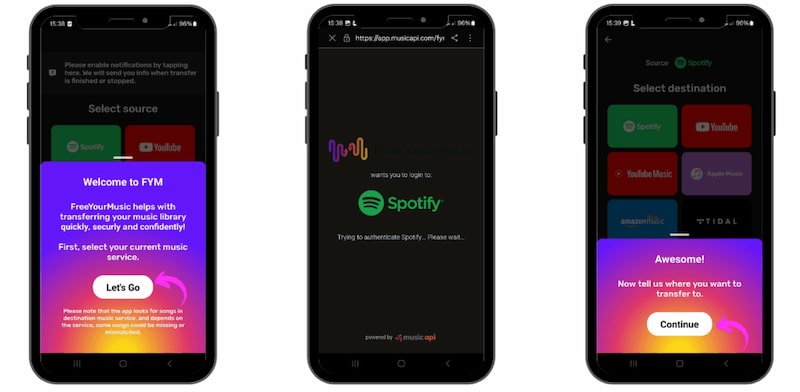
FreeYourMusic also made it to our list. This tool is a cross‑platform app available for Windows, macOS, iOS, and Android. It is primarily designed to transfer playlists between Spotify, Apple Music, Amazon Music , and other streaming services.
How to Use
Step 1. Download and install the FreeYourMusic app. Then immediately launch the app and select Spotify as the source.
Step 2. Choose Apple Music as the destination.
Step 3. Pick the playlists you want to transfer from Spotify.
Step 4. After that, please start the transfer. You also need to wait a few minutes for it to finish.
Pros
- It is available across your desktop and mobile devices.
- Supports many streaming platforms.
- Provides versatile transfer options.
Cons
- The free version limits the number of transfers.
- Premium subscription required for full features.
- May miss some metadata during conversion.
Part 6. Comparison of 4 Ways to Turn Spotify Playlists to Apple Music
| Tool | OS Compatibility | Batch Conversion | Transfer Speed | Metadata Retention | Data Security |
|---|---|---|---|---|---|
| TopVox All Music Converter | Windows and macOS. | Yes, up to 35 times faster. | Very fast and capable of handling large playlists. | Preserves ID3 tags, cover art, order. | Offline, ad‑free, privacy‑focused. |
| Soundiiz | Browser. | Yes, premium unlocks. | Moderate speed. | Retains playlist order, some metadata. | Web‑based, requires login. |
| FreeYourMusic | Windows, macOS, iOS, Android. | Yes, with premium. | Fast on desktop and mobile. | Retains most metadata, occasional gaps. | Cloud‑based, depends on the internet. |
| Official Apple Method | iOS, macOS, and Web. | No. | Slow, requires 30‑day review per playlist. | Limited metadata often lost. | Secure. |
FAQs on Migrating Spotify to Apple Music
Q: Which playlists from Spotify can be transferred to Apple Music?
A: Only playlists you personally created in Spotify are allowed to be moved to Apple Music. That simply means that curated, collaborative, or editorial playlists cannot be moved using any tools.
Q: How long does the official Apple transfer take to move a playlist from Spotify to Apple Music?
A: Apple enforces a 30‑day review period per playlist. This is a required process, and you must wait for it to be completed before you can start another. This is why many users say it is a slow process for the large libraries we have.
Q: What happens if Apple Music cannot match a song from your Spotify playlist?
A: You will see a Some Music Needs Review message if Apple Music does not match a song from your Spotify playlist. Once it happens, Apple Music will suggest alternate versions, and you must manually approve them before adding them to your library.
Q: Do I need an Apple Music subscription to transfer from Spotify?
A: Yes. You must have an active Apple Music account to import playlists from Spotify to Apple Music. With subscriptions, you will not have access to your playlist.
Q: Can I transfer playlists on Android?
A: Yes. The Apple Music app for Android includes a Transfer Music from Other Services option that supports Spotify imports.
Conclusion
As we reach the conclusion, we can confidently move from Spotify to Apple Music without having to start over with our playlist. There are options that help you transfer a Spotify playlist to Apple Music with ease. In this post, you discover four amazing methods that can make the process possible. If you are still looking for recommendations, then many users say TopVox All Music Converter is the one to choose. It is a quick, real-time, high-quality process that does not require waiting 30 days for completion. Use it now for free!
Owen Bannett is a music enthusiasm as well as a senior writer. He has paid close attention on the pros & cons of various audio formats, bitrate, sample rate and encoding methods. Always seeking the best listening experience, Owen has deep insights about lossless music and diverse music converters on the markets.