2 Best YouTube M4A to MP3 Converters (A How-to Guide)
Summary
Online converters can pose security, privacy, and corruption risks. Topvox All Music Converter is an offline software that allows you to save YouTube M4A directly to MP3. Most importantly, remember that converting 126 kbps to 320 kbps cannot restore lost quality. However, using a higher bitrate can minimize additional compression.
Converting a YouTube M4A to MP3 sounds simple, but not every tool is trustworthy or reliable. Many free online converters come with privacy and security concerns. Understanding these risks can help you choose a safer and more reliable way to convert audio files. In this post, we will introduce two of the safest YouTube M4A-to-MP3 converters. We will explain the red flags of using online converters and teach you how to convert YouTube M4As to MP3 safely. We will also cover common bitrate misconceptions.
The Red Flags of Free Online YouTube Converters
Searching for a free YouTube M4A to MP3 Converter produces countless online services. Although free online converters are convenient to use, they can introduce several red flags. Remember, nothing free is truly without limitations.
Security and Malware Threats
A suspicious website displays pop-ups and redirects that track your browsing activities. We are not saying all online converters contain malware. However, you need to treat this as a warning sign if it repeatedly redirects you to unknown sources.
File Corruption
A common misconception is that converters actually converts audio. Please note that simply changing the extension name does not convert the audio. M4A and MP3 use different container/codec, so changing only the extension will result in a corrupted file.
Aggressive Compression Loss
When audio is stored using lossy compression, converting it to another lossy format introduces generation loss. Uploading and processing M4A, then downloading it as a newly encoded MP3, reduces quality. We suggest keeping the source if it's suitable for your intended device/player.
Premium Solution: TopVox All Music Converter
YouTube Music primarily uses M4A (AAC) as its native audio format. Most of the time, when downloading tracks from YouTube Music, users obtain M4A files. M4A (AAC) files have very high sound quality and efficient file compression. However, these formats aren’t supported by legacy playback devices and software, resulting in high demand for MP3.
TopVox All Music Converter is the best YouTube M4A-to-MP3 converter. It lets you directly convert tracks saved in M4A (AAC) from YouTube Music to MP3, FLAC, M4A (ALAC), WAV, and AIFF. With it, you can process an entire playlist, albums, or multiple tracks at 35× speed. Better yet, you can export the track in premium quality at 24-bit/320 kbps/48 kHz.
FEATURES:
- Exports all YouTube Music tracks at 24-bit/320 kbps/48 kHz.
- Uses advanced hardware-accelerating to achieve 35× speed.
- Simultaneously convert individual tracks or playlists with no lag.
- Download YouTube Music M4A (AAC) and save it directly as MP3.
Step 1. Download the TopVox All Music Converter and complete the setup.
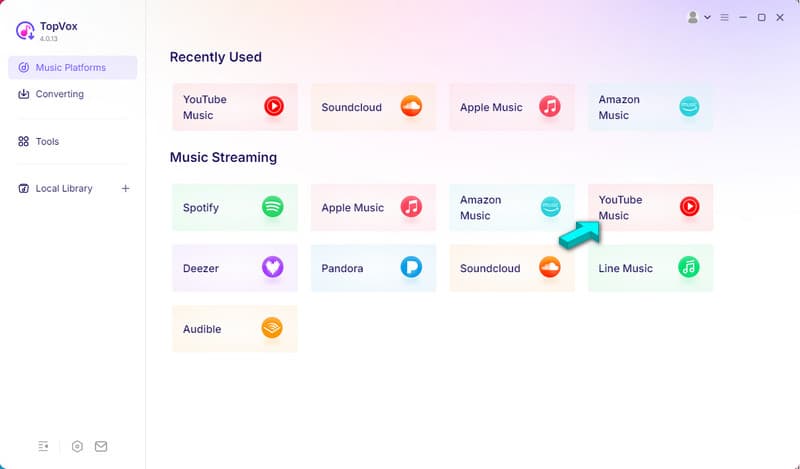
After installing the YouTube M4A converter to MP3, it will open to the Music Platforms tab. Click the YouTube Music tile to open the YouTube Music web player, then sign in.
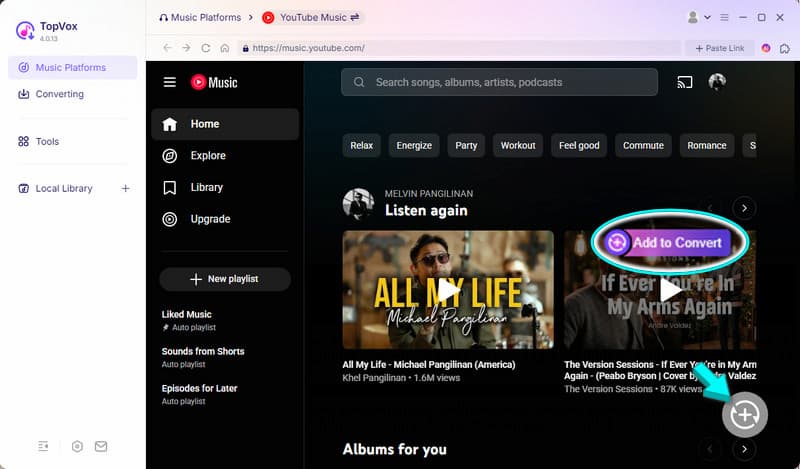
Step 2. Select the M4A (AAC) music you want to download and click +Add to queue. If you’re converting an entire playlist, use the +Add to Convert instead.
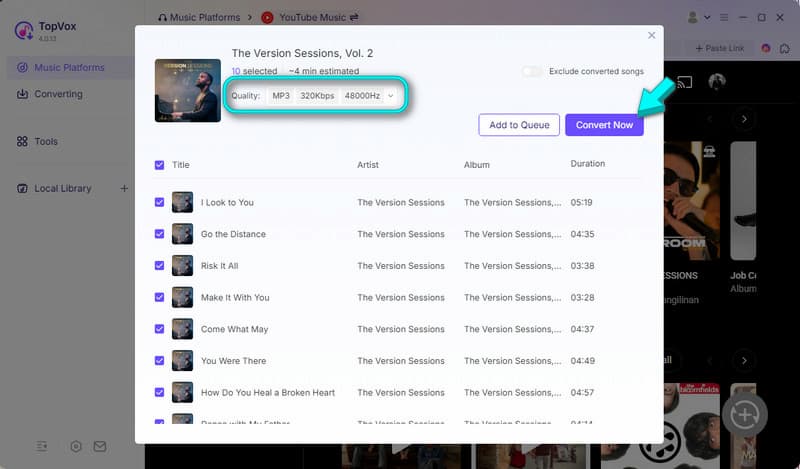
Step 3. Go to the Quality picker and set the settings to MP3/320 kbps/48 kHz. Click Convert Now to start downloading and converting YouTube Music M4A (AAC) to MP3.
If you need to download music from YouTube and you're worried that it might be saved in M4A (AAC) format, worry no more. TopVox All Music Converter can download a track from YouTube Music and save it as an MP3. As a result, you no longer need to re-convert the music, which would degrade its quality.
The 126kbps vs. 320kbps Bitrate Misconception
The common misunderstanding when converting audio is that converting a low-bitrate M4A to a 320 kbps MP3 somehow restores lost quality. Well, it doesn’t.
The Truth About YouTube Audio Quality
AAC is around 126 kbps, while higher-quality service tiers can provide higher bitrates. However, the important point is not the exact number. The output bitrate cannot restore information that was already discarded from the source.
Reality Check: 126 kbps to 320 kbps
Suppose you have an M4A (AAC) file encoded at 126 kbps. You then convert it to 320 kbps MP3. Technically, the resulting file will have a 320 kbps, but that doesn’t mean it contains the same audio information as the original 320 kbps recording.
Why Choose 320 kbps Anyway
If 320 kbps cannot improve the original source, why select it? The reason is to minimize additional quality loss during the MP3 encoding stage. Choosing a higher MP3 bitrate gives the encoder more data to work with and can reduce the amount of additional compression.
Free Desktop Alternative: Using VLC Media Player
Surely you only use VLC to listen to music and play video files. Many didn’t know that it has a hidden Convert/Save tool that can convert M4A to MP3. With it, you can turn your saved YouTube M4A into a format that is universally compatible with most devices.
Step 1. Open VLC and press Ctrl+R to open the free YouTube M4A converter to MP3. Click + Add to import the downloaded M4A files, then click Convert/Save to continue.
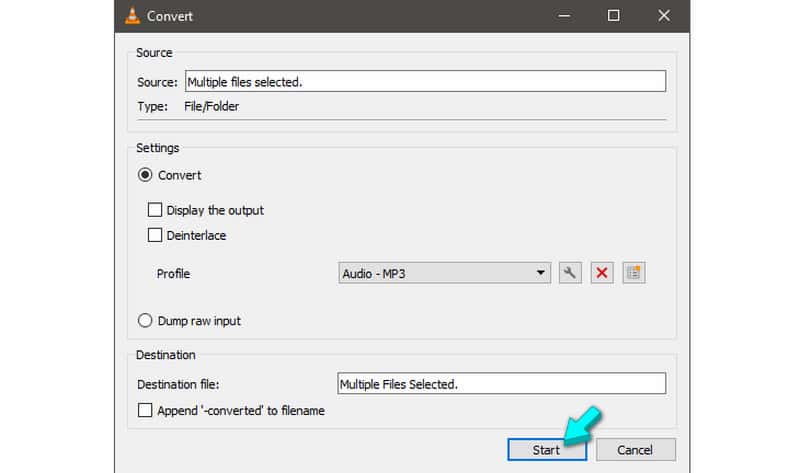
Step 2. In the Convert window, click the Profile picker and select Audio - MP3. After setting your new profile, click Start to re-encode your M4A to MP3.
VLC Media Player isn’t limited to media playback; it can also convert files. While VLC is free and safe, it requires manual configuration of profiles and destination settings for each track. Also, you cannot rely on its batch conversion as it crashes when processing large files.
FAQs about YouTube M4A to MP3 Converters
Does converting M4A to MP3 lose quality?
Yes, converting M4A to MP3 loses audio quality. M4As use AAC, a lossy compression format, and MP3 is also a lossy format. Therefore, changing a lossy format to another lossy format only drops the quality.
Is it legal to download YouTube Music to MP3?
To be real with you, the answer is yes. Downloading copyrighted music from YouTube Music to MP3 is illegal. It is only legal when you have permission from the rights holder.
How to convert M4A to MP3 safely?
You can safely convert M4A to MP3 using trusted offline tools like TopVox All Music Converter. Avoid using online converters as they expose you to malware.
Conclusion
Only convert YouTube Music using an offline YouTube M4A-to-MP3 converter. Online converters are convenient to use, but they can introduce privacy risks. TopVox All Music Converter is a safe and secure tool that can help you directly export YouTube M4A to MP3. By using it, you can avoid redirects and pop-ups that are common on online converters.
Luna Harper
Luna Harper is a passionate music lover and an inspiring content sharer. She has explored most of the music converters available on the market, acquiring thorough knowledge of their features, usability, and differences. Luna enjoys using her professionalism to help fellow music lovers get superior audio quality.




 by
by