Amazing M4B to MP3 Converter: Audiobook to Universal Format
 by Ethan Carter | June 24, 2026 | Format Converter
Audiobooks can come as M4B as a file format. That means this kind of file is not always playable with your device. Although iOS supports playing it, not everyone is using iOS. Therefore, if you want to make it more universal and playable with any kind of devices you have. Then converting M4B to MP3 is a must. Good thing it is now easy to use with these amazing tools. In line with that, allow us to present to you six of the amazing converters you can use to make the process possible.
Part 1. What is M4B & Why Convert it to MP3
What is M4B?
M4B is a file format commonly used in the Apple ecosystem for their audiobook. This format supports chapters, bookmarks, and rich metadata such as author, narrator, and cover art. All of these elements that are present in audiobooks and ideal for long‑form spoken content. In addition, it has an AAC compression that ensures smaller file sizes with good audio quality. However, the problem is in playback which is often limited to Apple devices and apps.
M4B VS MP3: A Quick Comparison
| Feature | M4B | MP3 |
|---|---|---|
| File Size | ●Smaller at the same bitrate. ●AAC compression. | Larger at the same bitrate. |
| Audio Quality | Better quality for speech at lower bitrates. | Good quality but less efficient. |
| Metadata | Supports chapters, bookmarks, cover art, author, narrator. | Basic tags like title, artist, and album. |
| Compatibility | Limited to the Apple ecosystem. Only for iTunes, Apple Books, and iOS. | Universal support across all devices and platforms. |
| DRM Protection | ●Often DRM‑protected. ●Restricting playback. | ●Rarely DRM‑protected. ●Widely shareable. |
| Best Use Case | Audiobooks, podcasts, lectures with chapters. | Music, general audio, cross‑platform playback. |
The DRM Barrier
Another reason why we need to convert M4B to MP3 is because of the DRM barrier. Because most of the M4B files are DRM‑protected that leads us to restricted playback to authorized apps. Thus, converting them to MP3 can remove these limitations for personal use.
Benefits of MP3
In line with that, there are a lot of benefits that we can get in MP3. These include universal compatibility, simple file sharing, and flexible editing options. More than that, MP3 also ensures smooth playback across multiple operating systems without requiring specialized software.
Part 2. TopVox All Music Converter : Ultimate M4B to MP3 Converter
TopVox All Music Converter
Let us now start with the best tool to use in turning M4B to MP3 with ease. TopVox All Music Converter is an all-in-one tool that can help you get M4B as MP3. This tool is dedicated to serving users when it comes to getting their file format to an universal format like MP3. More than its ability to convert, the tool also supports a wide platform where we can get audiobooks such as Audible, Spotify, Amazon Music, and more. That is why it is an all-in-one tool that you can use now for free!
Features
- Convert a wide file format like M4B to MP3.
- Batch conversation feature is available.
- Support wide platforms where to download M4B files.
Step-by-step Tutorial: How to Convert M4B to MP3 with Ease
Step 1. Get the amazing TopVox All Music Converter for free and install it immediately on your computer. Open it and access the Apple Music feature and M4B format audio book.
100% Secure. No virus.
100% Secure. No virus.
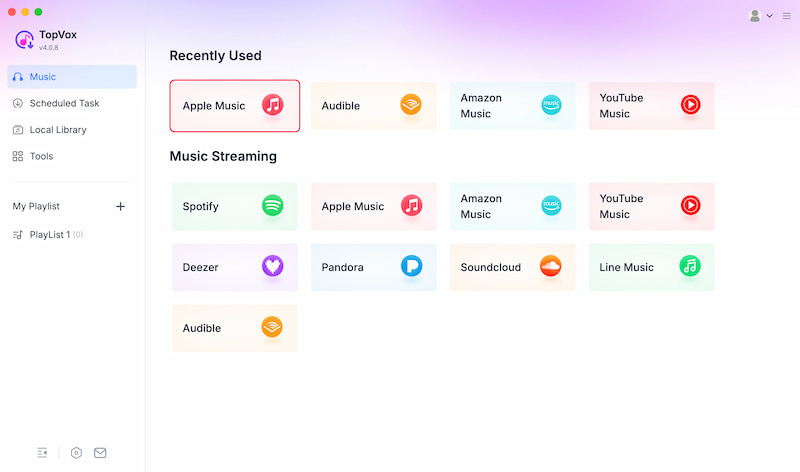
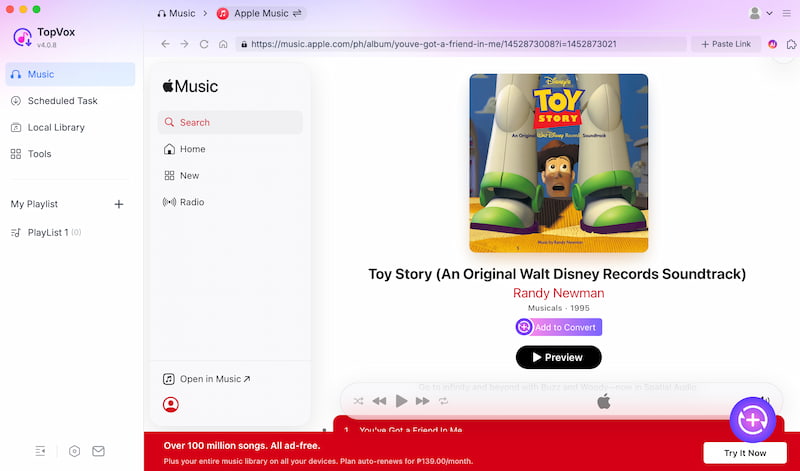
Step 2. After that, select the song you want to download and convert as MP3. Click the Add to Convert.
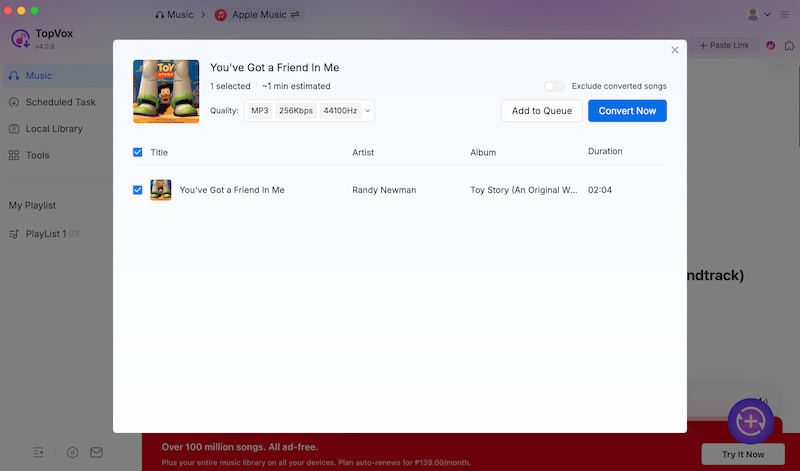
Step 3. On the new tab, select MP3 and proceed with Convert Now.
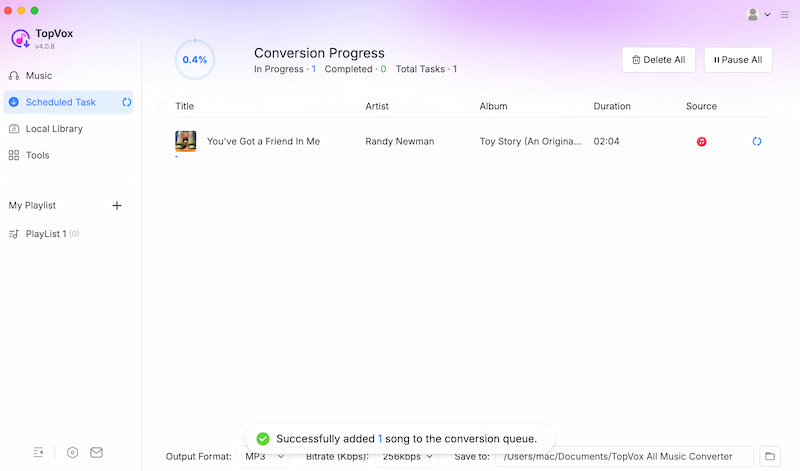
Step 4. Wait for a while and your music will be now available as MP3 on your library.
Part 3. Official Way to Turn M4B into MP3 [for Unprotected M4B]
Moving forward with the official method to convert unprotected M4B files. The process is possible with the use of Apple Music on your macOS Catalina and later. Also, this is possible with your iTunes for Windows and older macOS versions. All of these apps on your device can allow you to import M4B audiobooks and then export them into MP3 format. Here is the general process to do it.
Turn M4B to MP3: Official Way
Step 1. You need to open Apple Music/iTunes and go to Preferences to see Files. Now, click Import Settings.
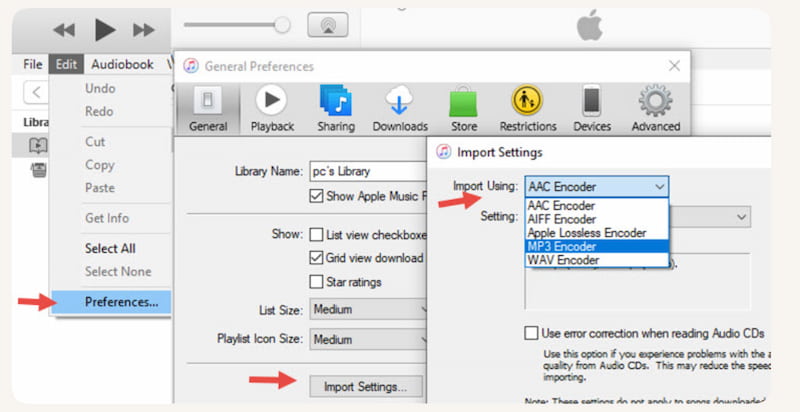
Step 2. After that, please change the import format to MP3 Encoder.
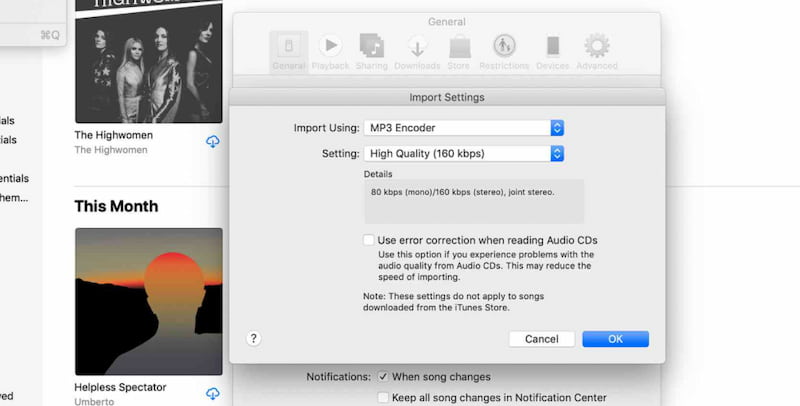
Step 3. You can now select the M4B file in your library.
Step 4. Now, from the menu, choose File and click Convert as you Create MP3 Version.
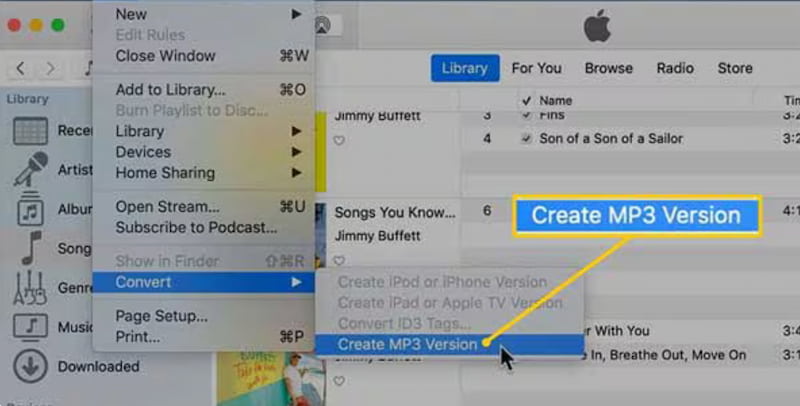
Step 5. The software will generate an MP3 copy while keeping the original M4B intact.
Pros
- No third‑party tools required.
- It is directly supported by Apple.
- This can retain basic tags like title and artist.
Cons
- Works only for unprotected files.
- Loses chapters and bookmarks during conversion.
- Not as fast as specialized converters.
Part 4. 4 Open-source & Free M4B to MP3 Converters
VLC Media Player
Overall Rating: 3.5
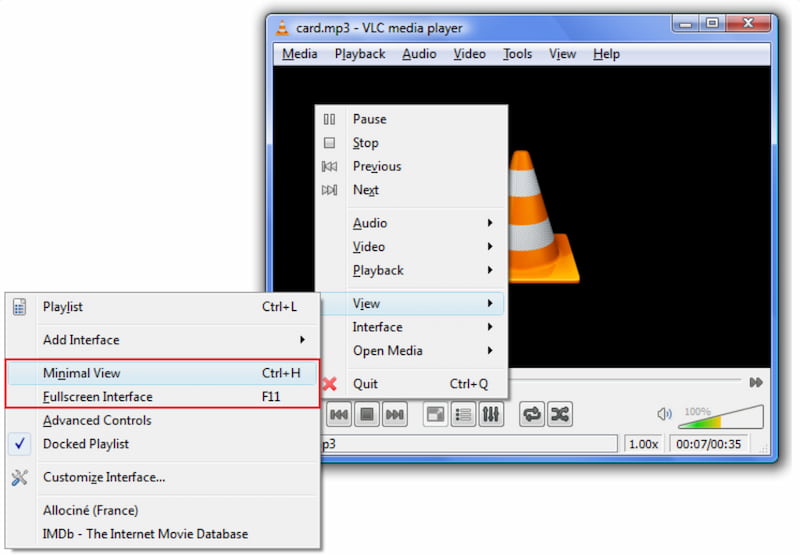
VLC Media Player is a free and open‑source multimedia player that supports audio/video playback and basic file conversion, including M4B to MP3. However, this has a limited feature in converting your audiobook. Some users say that it also often loses the chapters and bookmarks.
Pros
- Cross‑platform support across Windows, Mac, Linux.
- No cost, fully open‑source software.
- Handles multiple audio/video formats.
Cons
- Limited audiobook conversion features.
- Often loses chapters/bookmarks.
- Slower conversion compared to dedicated tools.
Zamzar
Overall Rating: 4.0/5.0
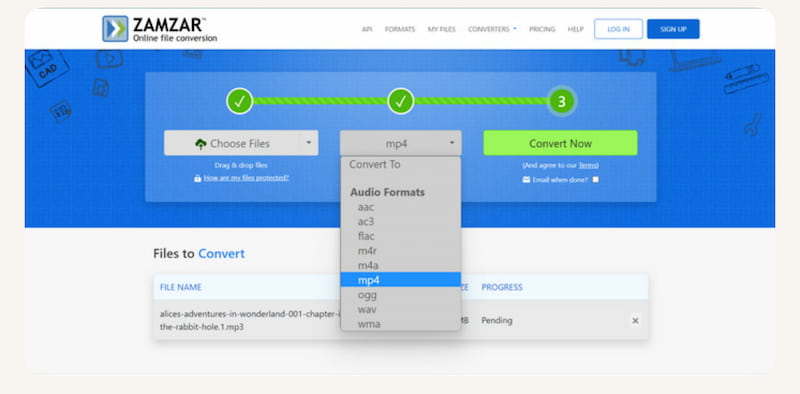
Another online file conversion service supporting more than 1,000 formats. This includes M4B to MP3, accessible directly through a web browser.
Pros
- Easy drag‑and‑drop interface.
- Works on any device/browser.
- Trusted by major global brands.
Cons
- Free limit of 50MB per file.
- Slower conversion speeds online.
- Requires account for larger files.
Freeconvert
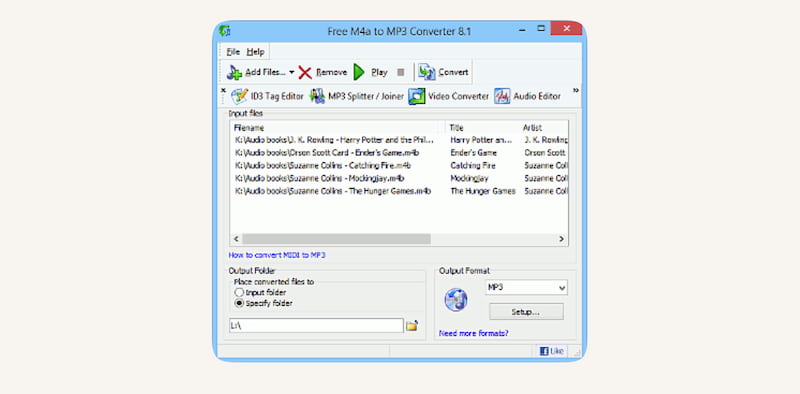
The third beb‑based converter is cal;ed Freeconvert that can offer an advanced settings like codec choice, trimming, and batch conversion for M4B to MP3.
Pros
- Free up to 1GB per file.
- Batch conversion supported.
- SSL encryption ensures security.
Cons
- Occasional upload failures.
- Ads and redirects present.
- Processing speed inconsistent.
DigitalOfficePro Online Converter
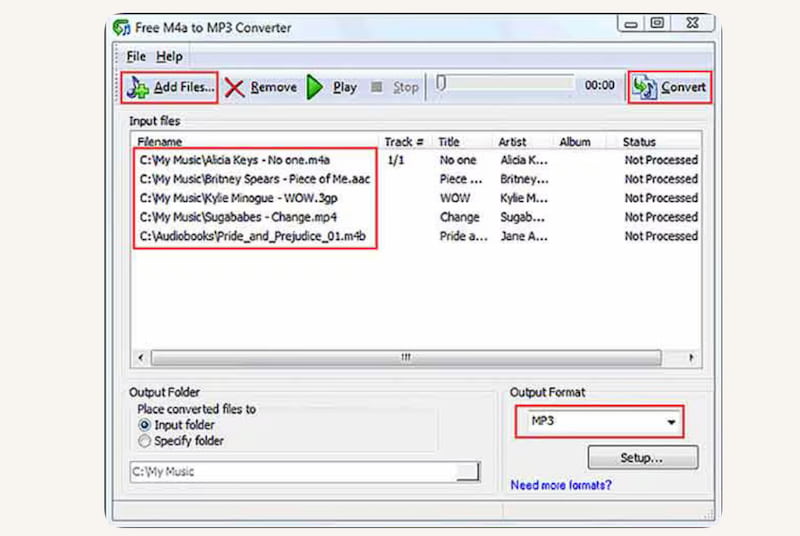
The fourth tool for the free online tool that has the ability to support more than 200 formats is DigitalOfficePro Online Converter. This tool can enable quick conversion of M4B audiobooks into MP3 without registration.
Pros
- Fast and simple interface.
- No registration required.
- Works across all devices.
Cons
- No DRM removal capability.
- Limited audiobook metadata support.
- Conversion speed inconsistent.
Part 5. Comparison of 6 M4B to MP3 Converters
| Converter | Supports DRM | Keeps Chapters | Conversion Speed | Audio Quality | Multi‑Platform Support |
|---|---|---|---|---|---|
| TopVox All Music Converter | Yes | Yes. | Up to 35 times faster batch conversion. | Lossless, multiple formats like MP3, WAV, FLAC, AIFF, and M4A. | Windows & Mac. |
| VLC Media Player | No. | No. | Slow, manual conversion. | Decent but not optimized. | Windows, Mac, Linux. |
| Zamzar | No. | No. | Moderate, depends on upload speed. | Adjustable bitrate or sample rate. | Web‑based. |
| FreeConvert | No. | No. | Moderate, batch supported. | High quality with advanced settings. | Web‑based. |
| DigitalOfficePro | No. | No. | Fast online conversion. | Good quality, but metadata limited. | Web‑based. |
FAQs on M4B to MP3 Converter
Q: Does conversion affect audio quality?
A: Depends. Because if done properly, the audio quality will remain lossless. On the other hand, poor converters may compress too much, reducing clarity. Thus tools like TopVox can really preserve original quality if you use them now
Q: Do MP3 files keep chapters and bookmarks?
A: No. MP3 does not have the capacity to support chapter navigation or bookmarks. These features are unique to the M4B file format.
Q: Are online converters safe?
A: Yes. Because tools like Zamzar, FreeConvert, and CloudConvert are safe and browser‑based. That is possible because these tools use SSL encryption and auto‑delete files, but have size limits from 50 MB to 1 GB only.
Conclusion
As we get to the conclusion, we can now say that converting M4B to MP3 is possible with the use of proper tools. This process allows users to play their audiobooks in any device that is why it is indeed an important process to do. Tools like TopVox All Music Converter can help us do the process with ease, use it now for free!
Ethan Carter creates in-depth content, timely news, and practical guides on AI audio, helping readers understand AI audio tools, making them accessible to non-experts. He specializes in reviewing top AI tools, explaining the ethics of AI music, and covering regulations. He uses data-driven insights and analysis, making his work trusted.