How to Download Music From YouTube for Free: Full Effective Guide
 by Ethan Carter | May 26, 2026 | YouTube
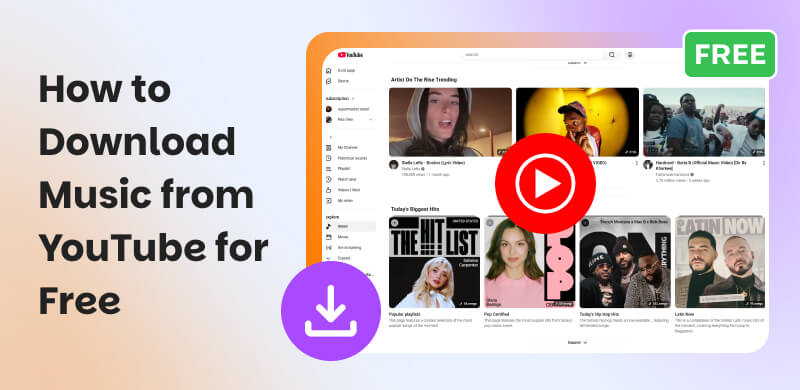
We all know that YouTube is a leading site that offers wide entertainment media for everyone. People know that streaming music is made simpler and reachable by YouTube. That is why many users love to use it whenever they want to listen to their favorite music. Yet, all of these amazing experiences of listening to music are now interrupted by ads for non premium users. That is why, downloading the songs for offline music is a great thing to do. In line with that, this article exists to show you how to download music from YouTube for free in three effective ways. You can read this post now to discover more of it.
Is It Legal to Download Music from YouTube for Free?
YouTube’s Terms of Service
When talking about YouTube’s terms of service, the platform explicitly prohibits downloading music without using their feature under a subscription. That means, the platform allows users to have an offline playing only through YouTube Music Premium. Moreover, using third-party downloaders to save copyrighted tracks violates these terms.
Copyright-Free Music VS Commercial Tracks
In this matter, it is important to know the difference between copyright-free music and commercial tracks. First, copyright-free music is safe to download as you use in projects like videos, podcasts, and more without legal issues. On the other hand, Commercial Tracks are songs created by artists, labels, or publishers. These songs are protected under copyright law. That means, downloading these songs without permission is illegal.
Safe Alternative Tools to Download
Good thing, there are plenty of professional tools and services like YouTube Music Premium and licensed music platforms that can offer you a legal, safe, and sometimes free downloading process of the music you want to listen offline. These tools can assure you of high-quality audio, and protect users from malware risks common in free download sites.
Method 1: Ultimate Way: TopVox All Music Converter
Best For: Smooth and fast process of downloading music from YouTube.
Platforms: Windows and macOS
Price: Free and $19.95 per month.
As we reached the first method, it is important to get to know TopVox All Music Converter. That is because this tool is the best tool you can use to download music from YouTube without paying any subscription. This tool supports YouTube and other platforms in making it. One thing for sure about this tool is its safety, smooth, and fast process of downloading your music for offline playback. Check out the key features it offers and some easy steps to follow in using the tool:
Key Features
- The tool can support YouTube and other major platforms.
- You can expect a fast and smooth downloading process.
- It is safe and secure for downloading for offline playback.
- You can get a high-quality audio output.
- User-friendly interface with minimal setup.
Step-by-step to Use TopVox All Music Converter
Step 1. Get TopVox All Music Converter for free and immediately install it on your Windows or MacBook.
100% Secure. No virus.
100% Secure. No virus.
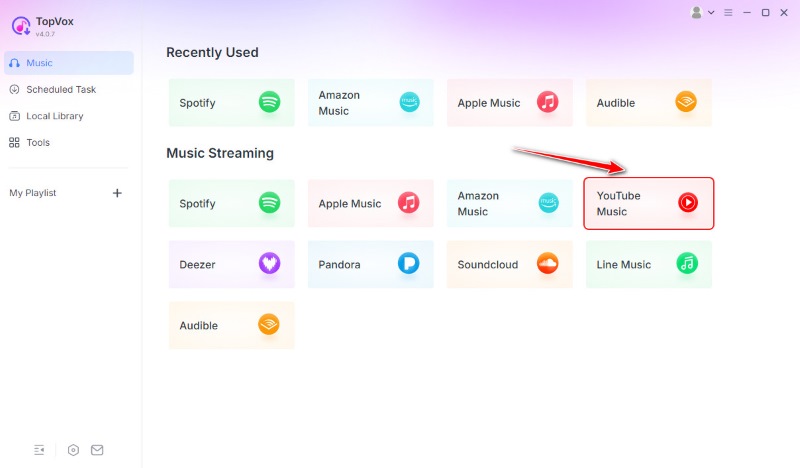
Step 2. Access its main interface and click the YouTube platform among the options it supports.
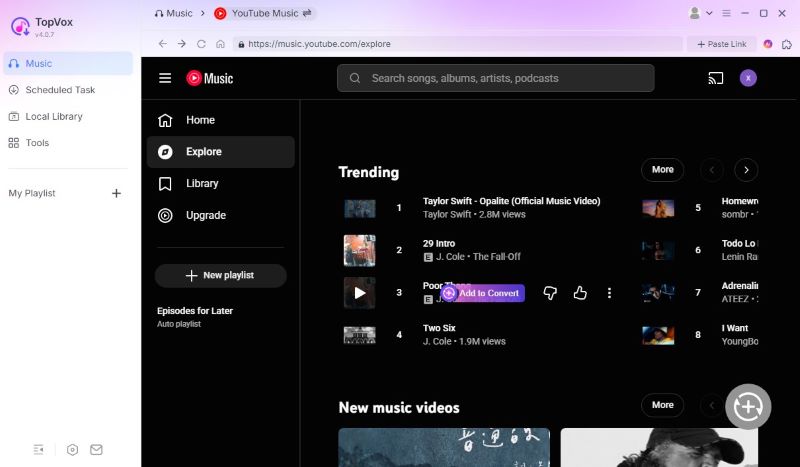
Step 3. After that, you can now see the main interface of YouTube. Search the music you love to listen offline. On the right side of the track, click the Add to Convert button. Wait for a while and your songs will be downloaded quickly.
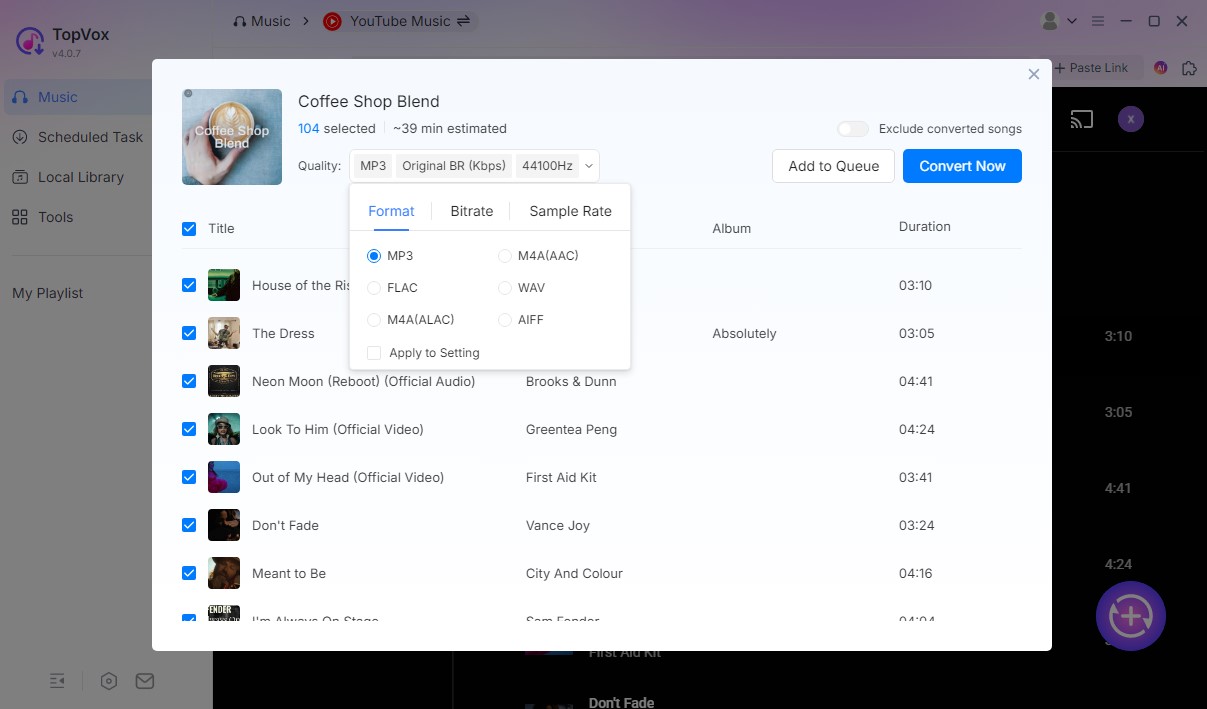
Step 4. Adjust the output format and audio quality, and click Convert Now. Wait for a moment and enjoy the YouTube music offline.
We can now see how TopVox All Music Converter is easy to use and effective in downloading the music you want to listen offline. Get the tool now for free and enjoy its free account! Download it now!
Method 2: YTMP3: Free Online YouTube Downloaders
YTMP3 and Y2Mate
Best For: One-off Downloads.
Platform: Online
Price: Free
Aside from a desktop tool, we also have YTMP3 and Y2Mate. These tools share the same sentiments which helps us download music from YouTube for free using an online tool. All of these tools are a non-installation process. All you need to do is access their websites. Moreover, these tools use the URL of the YouTube songs you want and convert it mainly as MP3 for offline playback. See how to use it below:
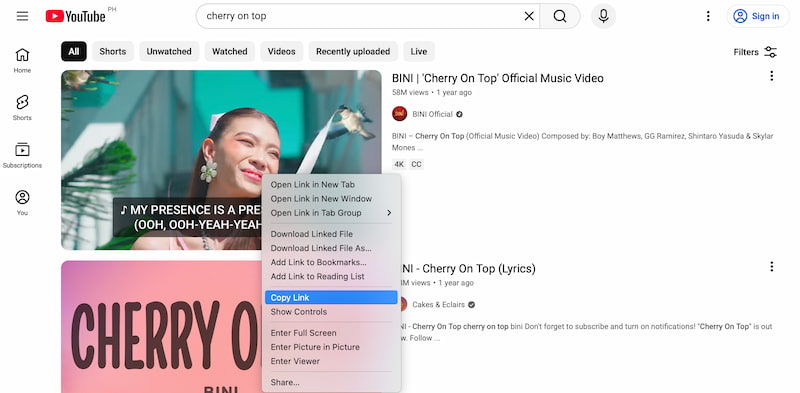
Step 1. Go to YouTube and get the URL of the music you want to download.
Step 2. Access the main website of YTMP3. Paste the URL on the bar. Then click the Convert button to continue.
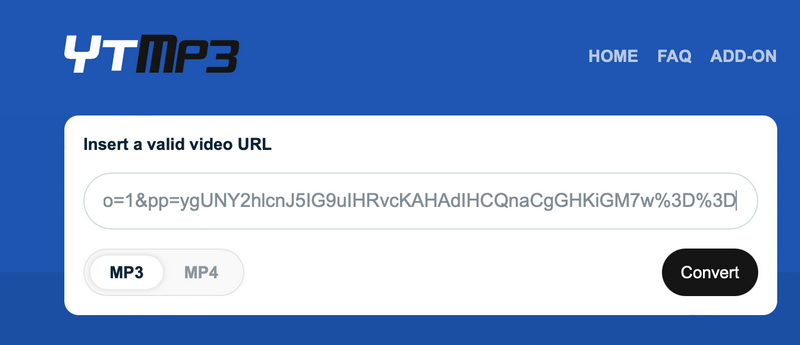
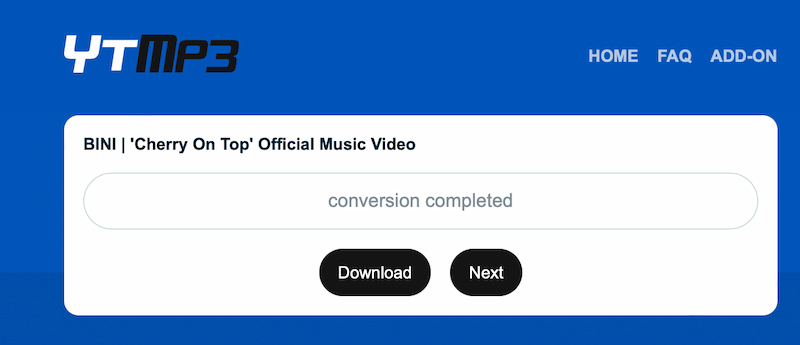
Step 3. Once the tool finishes the process of conversion, you can now click the Download button. Wait for a few minutes until your music is fully downloaded.
Method 3: Using Mobile Apps to Download
App 1: TubeMate
Best For: Android Solution
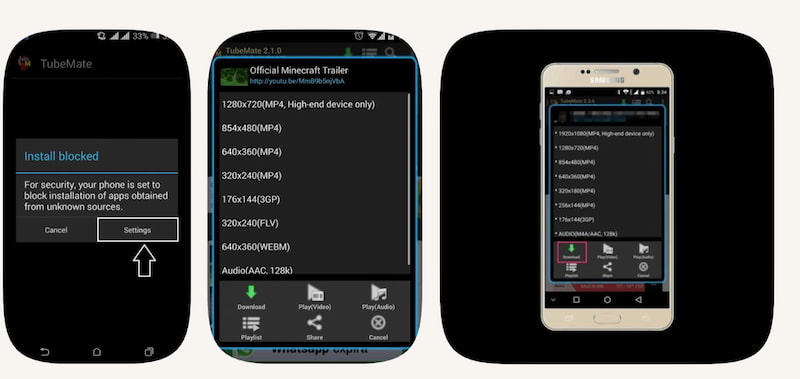
First on the list is TubeMate. This tool is a classic Android app that offers a built-in browser that allows its users to stream and download YouTube songs directly.
Pros
- It offers a simple interface.
- Integrated browser available.
- It supports multiple resolutions and formats for outputs.
- Allows background downloading process.
Cons
- It is not available on Google Play. APK is needed.
- There might be various ads that may appear in the app.
- Requires extra steps for installation and updates.
How to Use TubeMate
Step 1. We need to download the TubeMate APK from its official site.
Step 2. Proceed with the installation process on your Android device. Remember that you need to enable Install from Unknown Sources.
Step 3. After that, please open TubeMate’s browser and search for your YouTube video.
App 2: NewPipe
Best For: Android solutions too.
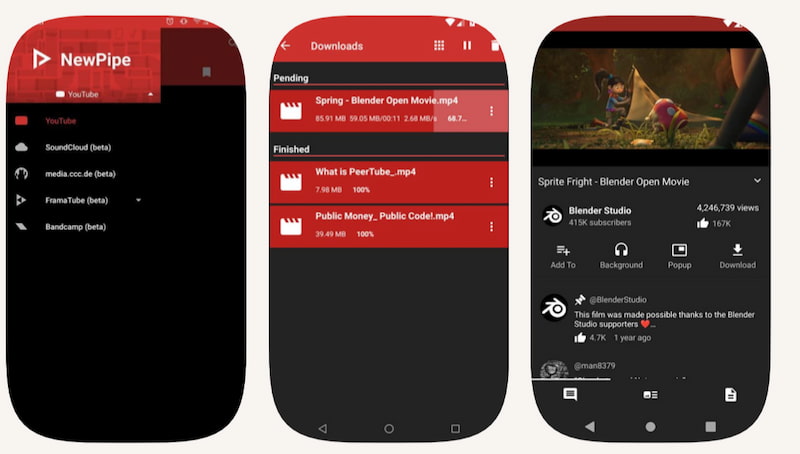
Another application we can use in our Android mobile phone is the app of NewPipe. This is an open-source which has a privacy-focused YouTube client. In this tool, you are allowed to have ad-free streaming and downloading.
Pros
- The tool is completely free and open-source to use.
- There are no ads or Google services required.
- Supports background playback and audio-only mode.
Cons
- You must install it via F-Droid, not on Google Play.
- The interface is simpler compared to mainstream apps.
- There are updates but, depend on community development.
How to Use NewPipe
Step 1. Please install F-Droid on your Android device. Then you can now search for and install NewPipe.
Step 2. After that, you need to open NewPipe. From there, you can browse or paste the link of the music you want from YouTube.
Step 3. Finally, choose Download and select audio or video format.
Comparison Chart of 3 Ways to Download Music on YouTube for Free
| Method or Tool | Audio Quality | Batch Download | Output Format Options | Speed | Safety and Ads | OS Support |
|---|---|---|---|---|---|---|
| TopVox All Music Converter | High-quality for MP3, AAC and FLAC. | Yes. | MP3, AAC FLAC, and more. | Fast and smooth. | ●Super safe. ●Its premium is ad-free. | Windows and macOS. |
| YTMP3 / Y2Mate | Moderate for MP3 only. | No. | MP3 only. | Moderate. | ●With ads. ●Safety risks. | Online. |
| TubeMate (APK) | Good. | Yes. | MP3, MP4, others. | Moderate to fast | ●With ads. ●APK risks. | Android. |
| NewPipe | High-quality audio. | Limited. | MP3, OGG, M4A. | Fast | ●Safe. ●Open-source. ●No ads. | Android for F-Droid. |
Expert Tips for High-quality Audio Extraction
Many experts are saying that we must know the difference between different file formats:
- • MP3. This is an audio format that is most common, smaller file size, good for casual listening.
- • FLAC. A lossless format with larger files. This is best for audiophiles.
- • WAV. Uncompressed file format with very large file and ideal for professional editing.
Verdict: It is recommendable to choose MP3 for everyday use. Yet, you can use FLAC for high-quality collections. Finally, you can have WAV for studio projects.
FAQs about Downloading YouTube Songs for Free
Q: Is it legal to download music from YouTube for free?
A: It is not legal to download music for commercial tracks. Because downloading copyrighted songs without permission can violate copyright terms and conditions of YouTube’s services.
Q: What does YouTube’s Terms of Service say about downloads?
A: YouTube's terms of services do not allow users to download songs. You need to use its features it provides to make it possible. For example, YouTube Music Premium. This makes the process of using third‑party YouTube downloaders to get music breaches those terms.
Q: Can I use YouTube Music Premium to download songs?
A: Yes. YouTube Music Premium is the official paid option that allows offline downloads inside the app, ad‑free playback, and higher reliability than third‑party tools
Conclusion
We can now end this article by saying that downloading songs from YouTube is possible whenever we are using a computer, browser, or mobile device. However, it is safe to use the desktop software for a safer and smoother process. Use TopVox All Music Converter so that you will not encounter any problem.
Ethan Carter creates in-depth content, timely news, and practical guides on AI audio, helping readers understand AI audio tools, making them accessible to non-experts. He specializes in reviewing top AI tools, explaining the ethics of AI music, and covering regulations. He uses data-driven insights and analysis, making his work trusted.