3 Ways to Transfer Apple Music Playlist to SoundCloud
Users who value community-driven music discovery, have free-tier access to music, and support thriving independent artists will tend to switch from Apple Music to SoundCloud. These users often describe Apple Music as polished but closed in terms of its ecosystem. In simple words, Apple Music is considered a premium curated service. Yet, SoundCloud is your option for the open frontier of music. In line with that, this article will help you learn how to transfer your Apple Music Playlist to SoundCloud using these incredible tools. Read now as you discover all about it.
Part 1. Syncing VS Uploading
It is common knowledge that the songs from Apple Music are also protected by copyright. That means you cannot download a song from it and then upload it directly to SoundCloud. The process is also not possible with your offline music. All of the songs are meant to play inside the ecosystem of Apple Music. Thus, it breaks the rules of copyright if you upload the file to SoundCloud. This might lead to a copyright strike on your account. Most of the time, people are confused about the syncing vs uploading terms. They think that transferring your playlist means uploading it to another platform. But this is a misconception.
Transferring a playlist from Apple Music to SoundCloud does not mean you are copying the actual songs from it. Instead, the tool only reads the playlist information, like the song titles and artists. Then it will look for the same songs uploaded on SoundCloud. In simple words, the tool will only recreate your playlist using the matching songs.
Part 2. TopVox All Music Converter
Best for: Streamlined and High Accuracy Transfer.
First on the list is the amazing TopVox All Music Converter. This tool leads the way in giving users a streamlined and highly accurate way to transfer their playlist from Apple Music to SoundCloud. In fact, it supports various music platforms. Yet, all of the processes are easy and effective. See more of its features and the simple steps you can follow below:
Features
- It supports various music platforms like Apple Music, SoundCloud, Spotify, and more.
- Metadata scanning is quick and has high matching rates.
- This tool is cloud-based.
- No huge installation required.
- Batch transfer is possible.
Steps to Use TopVox All Music
Step 1. Get TopVox All Music Converter for free on their website. Then install it immediately on your computer.
Step 2. On the interface, access the Tool, and under it, click Playlist Transfer.
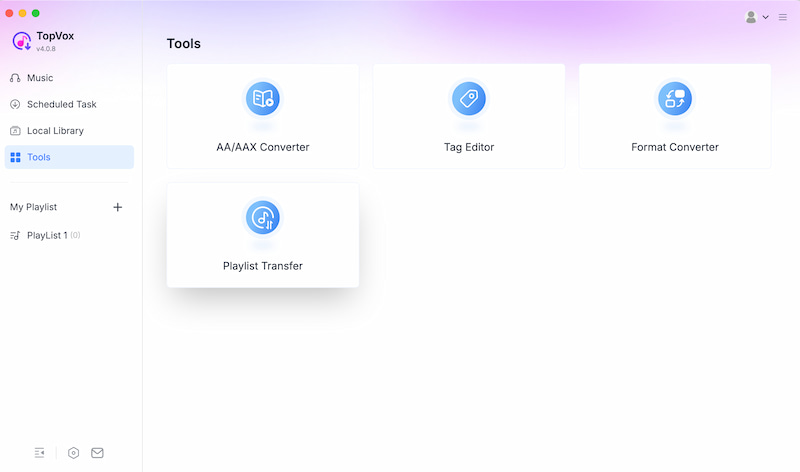
Step 3. Set the Source to Apple Music, then set the Target to SoundCloud.
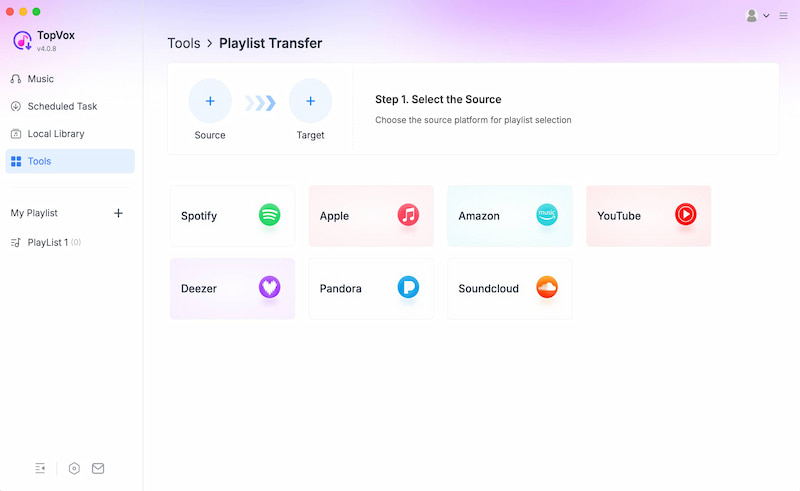
Step 4. You will now have the chance to select your playlist. The tool will show you the current playlist you have. Select then click the Next button. Wait for the tool to finish transferring, and your playlist will be ready on SoundCloud after you click Convert.
Part 3. MusConv
Best for: Advanced Controls.
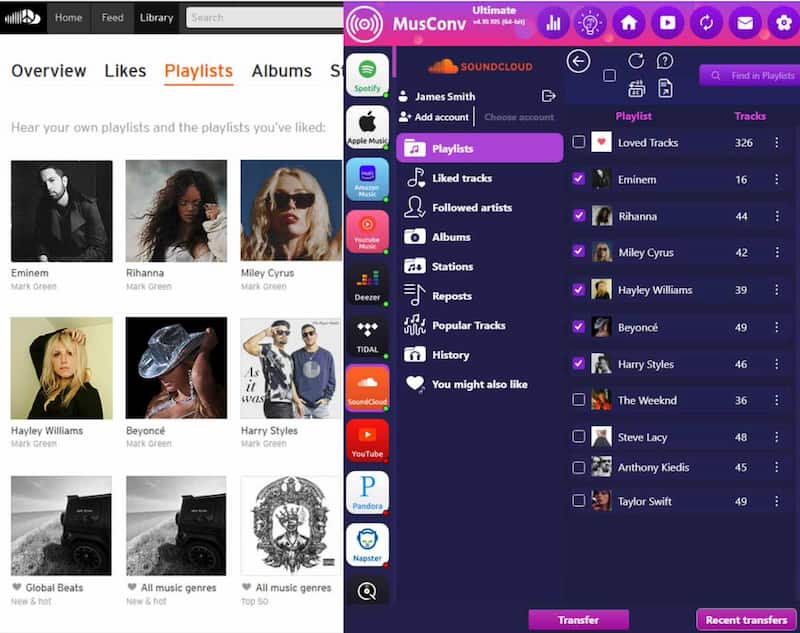
The next tool we have is called MusConv. This is another powerful all-in-one transfer tool for your Apple Music playlist to SoundCloud. This tool exists to help advanced users who need flexible control and a tool that supports more than 100 services. That means this tool is also good for managing a huge playlist that you have.
Features
- Compatible with 125+ music services.
- Filtering and customization options.
- CSV backup available.
Steps to Use MusConv
Step 1. Sign up for an account on the MusConv tool. Then sign in with your Apple Music and SoundCloud accounts.
Step 2. Select the playlist you want to transfer.
Step 3. Allow the tool to process all of the metadata. Then you will have the option to export your playlist for archival purposes.
Part 4. Free Your Music
Best for: Beginners and Casual Listeners.
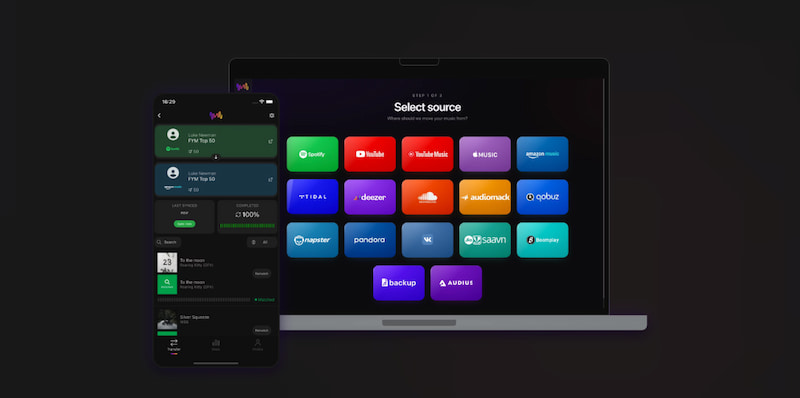
Suppose you are one of the casual listeners out there who wants to move the playlist from Apple Music to SoundCloud. Then, Free Your Music can offer you a simple and mobile-friendly process. This tool is suitable for people who want a quick process without so many technical matters. This is compatible with iOS, Android, and desktop. Yet, you may sometimes encounter mismatched tracks when using it.
Features
- Compatible with iOS, Android, and Desktop.
- Simple to use.
- Various music platforms are available.
Steps for Using Free Your Music
Step 1. Install the Free Your Music app. Then, connect Apple Music and SoundCloud to your Free Your Music account.
Step 2. Among the options, select the playlist you want to move.
Step 3. Let the app match all of the songs on your playlist to SoundCloud.
Comparison table
| Best For | Features | Ease of Use | Platforms |
| TopVox | Modern interface and fast transfers. | Cloud-based and batch sync. | Very easy. | Web. |
| MusConv | Advanced users and multi-platform. | 125 plus services, CSV export. | Moderate. | Windows and Mac |
| Free Your Music | Beginners and mobile users. | Mobile app and simple steps. | Very easy. | Windows 7 or later (64-bit),
macOS 10.14~27 |
FAQs about Apple Music to SoundCloud
Is it safe to connect my Apple Music to SoundCloud with a third-party tool?
Yes. Connecting your Apple Music and SoundCloud to any third-party tool to transfer your playlist is safe. The main purpose is to give them the ability to help you manage your playlist easily.
Can I move my playlist again from SoundCloud to Apple Music?
Yes. There are tools that can offer bi-directional features, like the TopVox All Music Converter and Free Your Music. The SoundCloud ability to import can only support moving into SoundCloud.
What limitations should I expect in the process of transferring?
A common limitation you can expect is the mismatch of tracks. Because not every song on Apple Music is available on SoundCloud, different versions might exist.
Do I need to pay to do the process of transferring?
No. We have tools that offer a free version that is already jam-packed with features you need. TopVox All Music Converter is one of them, and you can use it now for free.
Can I move my playlist from Apple Music to SoundCloud using my Phone?
Yes. Applications like Free Your Music can help you do the process using your iOS or Android phone. This is a cross-platform tool suitable for new users.
Conclusion
We can now conclude that transferring an Apple Music playlist to SoundCloud is easy to do as long as you have the right tool for it. Good thing in this article, we gave you three of the amazing tools you can use, namely TopVox All Music Converter, MusConv, and Free Your Music, among these options. Many users recommend TopVox All Music Converter due to its versatility and high accuracy in the process. You can use it now to discover more about it.
Owen Bannett
Owen Bannett is a music enthusiasm as well as a senior writer. He has paid close attention on the pros & cons of various audio formats, bitrate, sample rate and encoding methods. Always seeking the best listening experience, Owen has deep insights about lossless music and diverse music converters on the markets.




 by
by