3 Ways to Move SoundCloud to Apple Music [Online & Offline]
 by Ethan Carter | July 2, 2026 | Playlist Transfer
Summary
You can easily transfer your music from SoundCloud to Apple Music using specialized migration apps. The procedures described below will help you migrate your playlists and liked songs with minimal clicks.
Using TopVox All Music Converter’s Playlist Transfer Tool
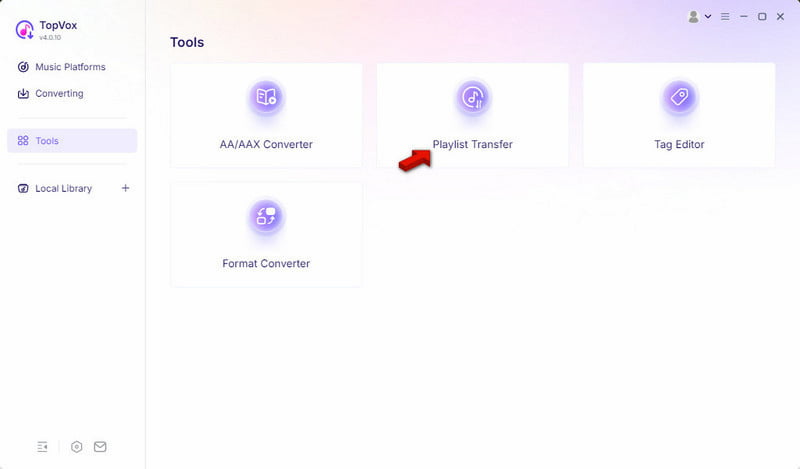
1. Open the software and access the Playlist Transfer feature.
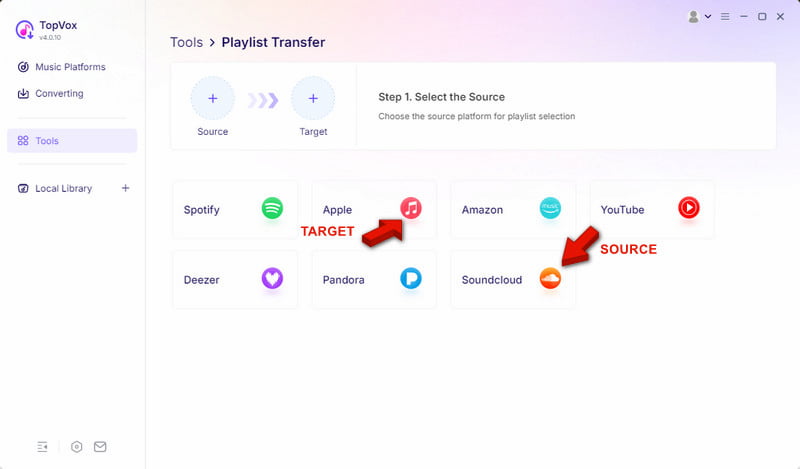
2. Select SoundCloud as your source and select your target music.
3. Set Apple Music as the destination and execute the migration.
Using Tune My Music
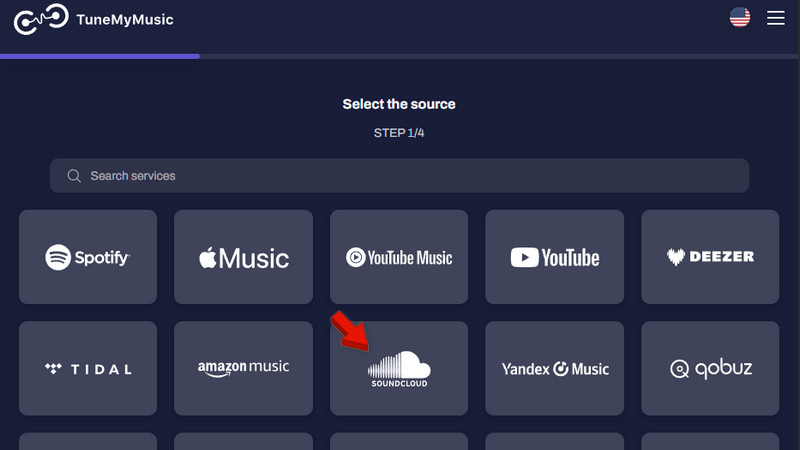
1. Open the Tune My Music and select SoundCloud as your source.
2. Choose Apple Music as your destination, connect your account, and transfer.
Using Soundiiz
1. Click the Transfer tab and select SoundCloud as your source platform.
2. Choose Apple Music as your destination and select the specific playlists.
Don't you get excited when you discover something new on SoundCloud, then switch to Apple Music? Frequently switching between music apps disrupts your listening flow. It also makes it hard to keep all your favorite tunes in one place. SoundCloud offers many independent artists, remixes, DJ mixes, and user-generated content. However, Apple Music provides a more comfortable experience for mainstream music, albums, and recommendations. If you don’t want to switch between apps but still want to listen to your favorite tunes, migrating from SoundCloud to Apple Music is the easiest solution. In this post, we’ll provide you with a couple of methods for transferring SoundCloud to Apple Music by means of playlist transfer tools. We will analyze their advantages and disadvantages and provide useful information to help your playlist transfer succeed.
| Platform | Price | Music Services | Transfer Speed | Batch Transfer | Match Accuracy | |
|---|---|---|---|---|---|---|
| TopVox All Music Converter | Windows and Mac | Starts at $19.95 with a free trial available | SoundCloud, Spotify, Apple Music, Amazon Music, Deezer, Pandora, YouTube Music, Line Music, and Audible | Up to 35× faster | ✅ | 99% |
| Tune My Music | Web browser | Starts at $2; no free trial available | 20 music services, including SoundCloud and Apple Music | Depends on the server | ✅ | 92% |
| Soundiiz | Web browser | Starts at €3.25; no free trial available | 45 music services, including SoundCloud and Spotify | Depends on the server | ✅ | 94% |
Method 1. TopVox All Music Converter
Best for: Fast, reliable playlist transfer solution.
TopVox All Music Converter goes beyond downloading and converting music from major music streaming services. With the Playlist Transfer feature, you can transfer music from SoundCloud to Apple Music in seconds. It uses the most advanced hardware-accelerating media processing to batch-transfer music at 35× speed. This program can preserve playlist structure, song order, ID3 tags, and metadata. It creates replicas of your playlists on Apple Music, and once the migration is complete, you’ll have a music library that feels like yours.
Features
- Save the exact playlist ordering and all track data and ID3 metadata.
- The built-in web player lets you log in, search, and manage your music library.
- Playlist transfer support from SoundCloud, Apple Music, YouTube Music, and more.
- Transfer SoundCloud playlists, albums, and songs without recreating them manually.
100% Secure. No virus.
100% Secure. No virus.
Step 1. Download the SoundCloud-to-Apple Music converter and complete the setup. After installation, open the software, go to the Tools tab, and select the Playlist Transfer tool.
Step 2. Click SoundCloud to select it as your source platform. Then choose Apple Music as your target platform for moving the SoundCloud music.
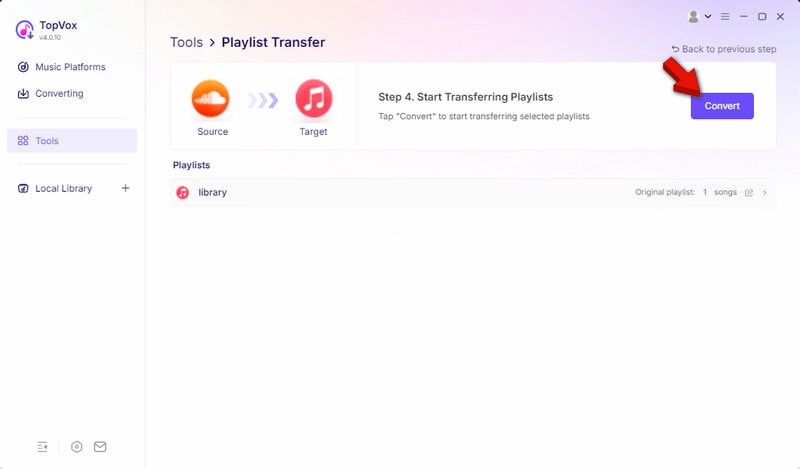
Step 3. Select the music you want to move, then click Next to continue. In the final window, click Convert to start transferring the selected music to Apple Music.
The Playlist Transfer feature makes transferring music more convenient. With it, you don’t need to download songs individually. Instead, it analyzes the music, matches it to available tracks on Apple Music, and automatically recreates them. If you want an offline copy of the transferred music, you can download Apple Music to an MP3 player.
Method 2. Tune My Music
Best for: Transfer a few playlists or move local files to music services.
Tune My Music is an online SoundCloud-to-Apple Music playlist downloader. Apart from Apple Music, you can also upload a file or paste a URL and transfer it to 20 music services. The best offer from Tune My Music is that you can create a shareable link accessible on all platforms.
Step 1. Open a browser and navigate to the Tune My Music site. Select SoundCloud as your source music service and authorize it to access your music.
Step 2. Select the music you want to move from your source platform. Then, click Choose Destination and select Apple Music as your destination service.
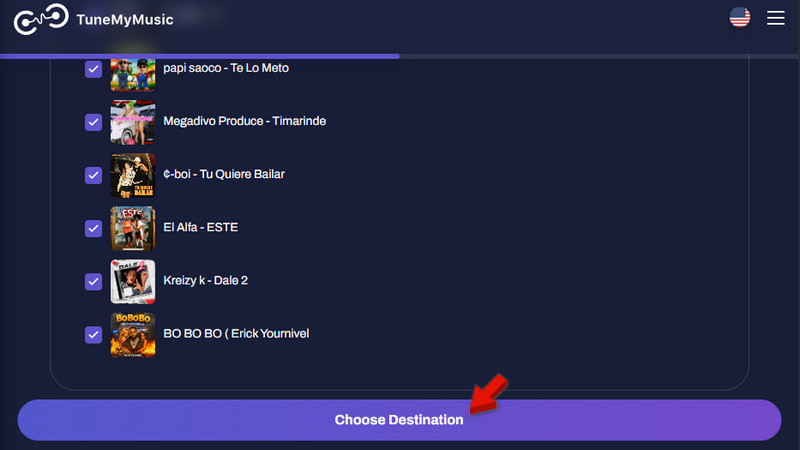
Tune My Music can also generate a report of unmatched songs to help you identify tracks that couldn't be found in Apple Music. However, it can only transfer songs from Apple Music's catalog, and they may appear as missing after the migration. If you want, you can download SoundCloud tracks as MP3s. This method does not require a transfer and lets you play it offline.
Method 3. Soundiiz
Best for: Transferring playlists with perfect synchronization.
Soundiiz supports 45 music services to transfer music, including SoundCloud to Apple Music. It does not download songs; instead, it analyzes the SoundCloud playlist and matches the track with the Apple Music catalog. Then, it will create the playlist in the Apple Music library.
Step 1. Go to the Soundiiz site using a browser and select Transfer. Click +Select Source to set SoundCloud as your source. Then, set Apple Music as your destination platform by clicking +Set Destination.
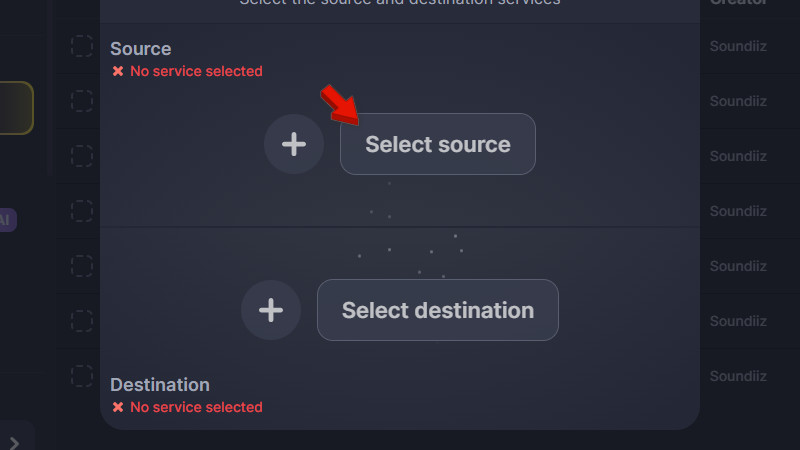
Step 2. Click Start to allow Soundiiz to search Apple Music’s catalog for matching tracks. Review the playlist you want to move, confirm the selection, and start the transfer.
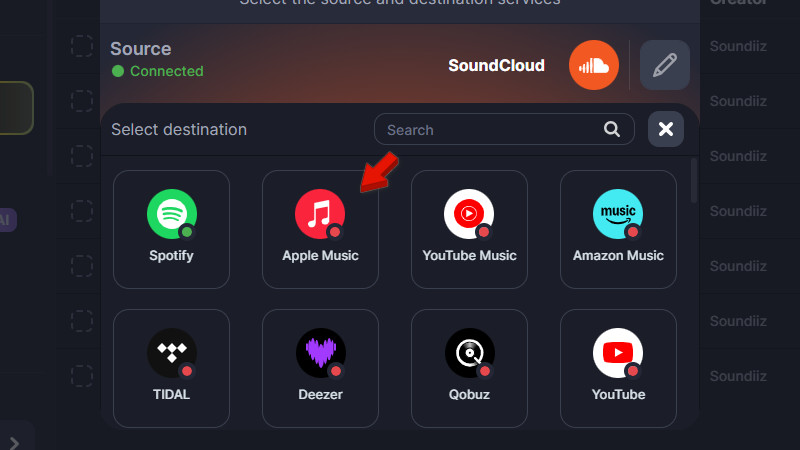
Soundiiz does a much better job of matching tracks than other websites for transferring songs. You can also transfer multiple playlists simultaneously, provided you’re a Premium subscriber. However, you cannot match some SoundCloud content during the transfer.
Troubleshooting: Why Some Songs Won’t Move
Locked Sorting/Filtering
If you cannot move songs manually, your playlist may have been sorted by Artist, Album, or Date Added. Change the playlist to Manual Sort or Custom Sort to enable moving songs around.
Smart Playlists (Apple Music/iTunes)
Smart Playlists are automatically sorted based on criteria. Therefore, you cannot manually customize the sorting order. In case you want to arrange your songs in any way you like, you can create an ordinary playlist and copy your songs into that playlist.
You Don't Own The Playlist
You cannot drag-and-drop songs on other people’s or shared playlists unless you have the rights to modify the content of the playlist. On Spotify and Apple Music, you will need to create a separate playlist, transfer the songs to it, and re-order them.
UI Or Sync Issues
Sometimes, technical glitches can temporarily stop you from moving the songs around. You can update the app to the latest version and restart it.
FAQs about Transferring SoundCloud to Apple Music
Q: Can SoundCloud distribute to Apple Music?
A: Yes, Soundcloud does provide distribution straight to Apple Music from within its platform. Provided that you have subscribed to Artist Pro, you can distribute your original content on Apple Music, iTunes, and more than 60 other platforms using just your dashboard.
Q: How to connect SoundCloud and Apple Music accounts?
A: It is not easy to transfer your music from SoundCloud to Apple Music since the platforms have different ecosystems. However, you can connect the two by using playlist-transfer services that handle your metadata, or by downloading your songs manually and uploading them to your Apple Music Library.
Q: Is converting SoundCloud to MP3 legal?
A: It all depends on the track you want to download. Official downloads from SoundCloud via their button or a SoundCloud Go+ subscription are legal. Downloading via a browser converter on a public track is somewhat illegal, since it goes against SoundCloud’s terms and services.
Conclusion
Moving your SoundCloud to Apple Music is a simple way to store your favorite tracks in one place. This action ensures a seamless experience across all your Apple devices. Using either online playlist transfer services or specialized software, you'll get access to the most suitable solution that will help you avoid building your playlists anew. The best choice, offering all the required features and delivering the best results, is TopVox All Music Converter. Its Playlist Transfer tool provides batch mode and playlist order preservation capabilities. Moreover, this software allows you to work with other streaming platforms.