Get to Know Viwizard Spotify Music Converter: Features and Alternative
Listening offline on Spotify might not be ideal for people who cannot afford to subscribe for Spotify’s premium account. That is why some people may think of using the Viwizard Spotify Music Converter so that they can get their favorite music in the file format that supports their device and keep it forever. Good thing, you are now in an article where you will learn more of its features and capabilities to get music from Spotify with ease. More than that, we also prepared you the best alternative you can use other than Viward. Let us now start discovering about the tool.

Part 1. Deep Dive: Viwizard Spotify Music Converter Review
Features
- Wide support for Input and Output Format. The tool is specially designed for converting Spotify music tracks to MP3 as an input format. Yet, when it comes to the output formats it supports, Viwizard provides a wide range that include MP3, M4A, M4B, AAC, WAV, and FLAC. For that, the flexibility of the tool enables you to choose the format that you prefer.
- Convert Music Effectively. Using this tool can allow you to convert Spotify music at a rapid pace without compromising on quality.
- Satisfying Audio Quality. It has a feature that maintains high audio quality. This tool can guarantee you a great sound after downloading it.
- Maintain ID3 Tags. Viwizard has the capability to retain important metadata. This includes all the title, artist, album, and art cover through ID3 tags. More than that, with this feature you can now easily organize your music library efficiently and ensure that all relevant information is preserved.
Pros
- The tool has a great interface.
- You can use it with ease and no complications.
- Keeping ID3 tags effectively.
- There are timely updates for the tools.
Cons
- Lacks of advancements with audio quality.
- The conversation speed with this tool is a bit slow.
- Expensive premium account.
Pricing Plan of Viwizard Spotify Music Converter
| Price | Description |
| Monthly Plan | $19.95 per month. | • This is best for short-term use or testing.
• Includes full conversion features. |
| Yearly Plan | $47.95 per year. | • More affordable than monthly if used long-term.
• Includes updates and support. |
| Lifetime License | $87.95 for one-time purchase. | • One-time payment, permanent access, free lifetime updates, and support.
• Most popular option. |
How to Use the Viwizard Spotify Music Converter?
Step 1. You can now download ViWizard Spotify Music Converter from the official website.Then immediately, install it on your computer and open the application.
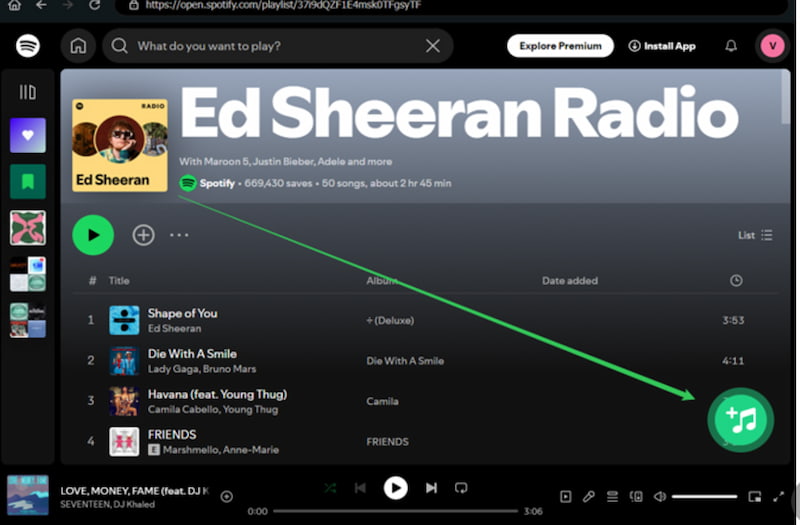
Step 2. Open the tool and you can now drag and drop songs you love directly from the Spotify app into ViWizard.
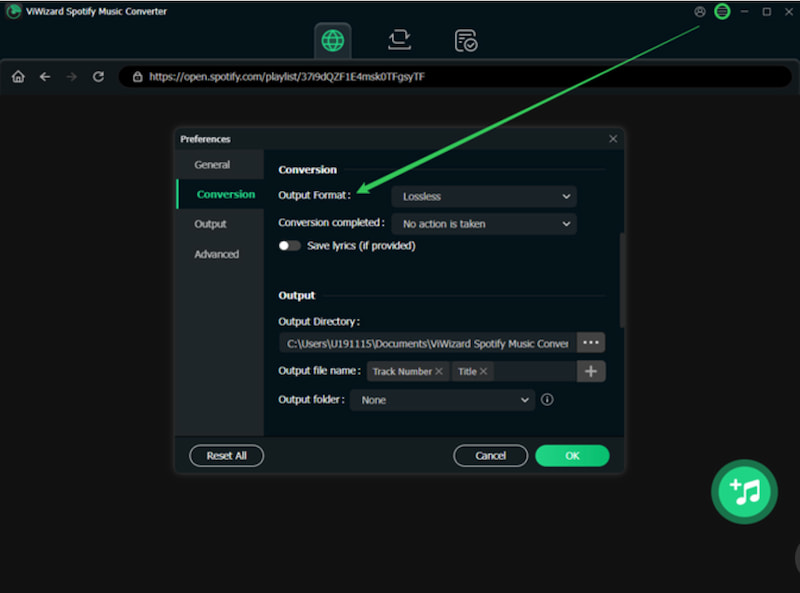
Step 3. After that, we need to go to the settings panel. From there, you can select your preferred format like MP3, FLAC, WAV, AAC, M4A, or M4B. In the panel, you can also adjust audio quality, sample rate, and bit rate if needed.
Step 4. Now, start the conversion by clicking the Convert button. Then you will notice that the tool will process the song quickly.
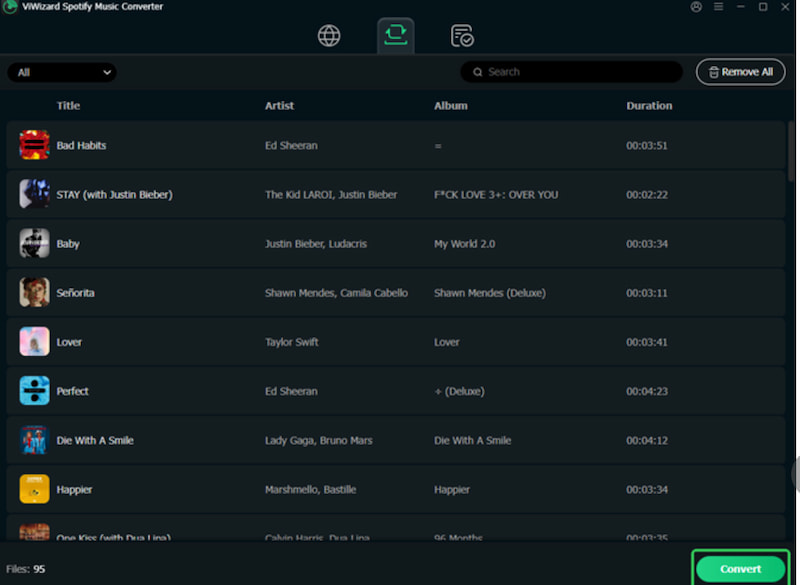
Step 5. Finally, you can now open the output folder. Your Spotify songs are now saved as standard audio files, ready to play on any device.
Part 2. Is Viwizard Safe to Use ?
In terms of the question if Viwizard safe to safe. Well we cited some reviews from its users and here are what they say about this tool.
Scam Detector Says It Is Suspicious
"I bought it and it never want to register me even with everything and called customer service and they never helped me it is a scam 20 my 20 dollar went bye bye and they gained a free 20 dollars"
Suspending Spotify Account
"Worked perfectly well for downloading songs from Spotify but then Spotify suspended my account a couple of days later for misuse. Had no idea it would be an issue since Viwizard is a paid-for software but suppose it makes sense in hindsight. Be aware"
It Cannot Convert Songs
"What's the point of converting all my Spotify songs into files that have a 30 second duration? I waited 2 hours for this and I can't even listen to the songs I downloaded because it has converted only the first half minute of each song."
Very Slow Conversation Speed
"Bought this a few minutes ago. On my Mac, I have been converting 200 songs in the last 25 minutes. So far, 4 songs have been converted. I guess I’ll transfer my songs to my watch, in about 21 hours, when it is done converting them. Waste of money."
Not Worth the Money
"Somebody paid to have these positive reviews written. This product is extremely slow and not very intuitive. Not worth the money at even a tenth of the current cost. You should be ashamed of yourselves."
Part 3. Best Alternative: TopVox All Music Converter
We can see that Viwizard kind of has a bad reputation online from its users. That is why, we totally understand if you are now having a double mind in using it. That is why this part will show you the best alternative you can use. This is a tool that possesses great features with much safer usage.
We are talking about the great TopVox All Music Converter. This tool is simple to use and can help you download music from Spotify with ease. One great thing that users love about it is its speed when downloading. More than Spotify, this tool also supports wide platforms like Apple Music, Amazon Music, and more. Let us see more advantages and the simple way to use it.
Features
- Downloads high-quality audio files with ID3 tags.
- Supports various formats, including ALAC, AIFF, FLAC, and more.
- Built-in web player is compatible with 9 streaming platforms.
- Support advanced features and tools.
How to Use TopVox All Music Converter
Step 1. Get the amazing tool of TopVox All Music Converter for free. Then install it immediately on your computer.
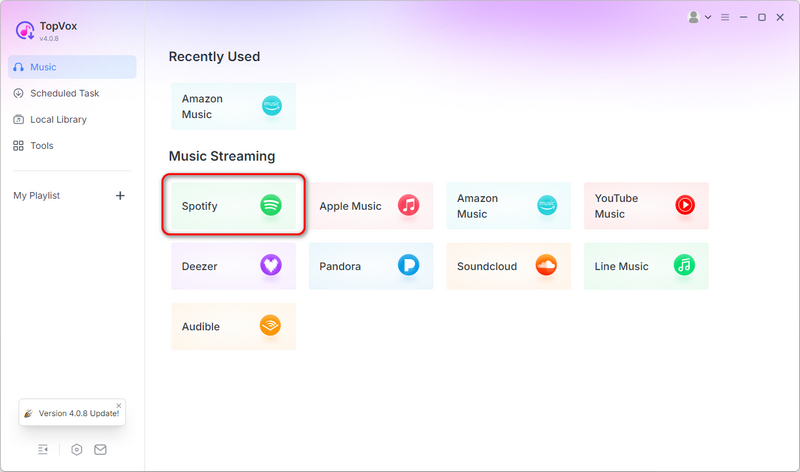
Step 2. Open the tool and from the main interface, choose Spotify among the options of the platforms it supports.
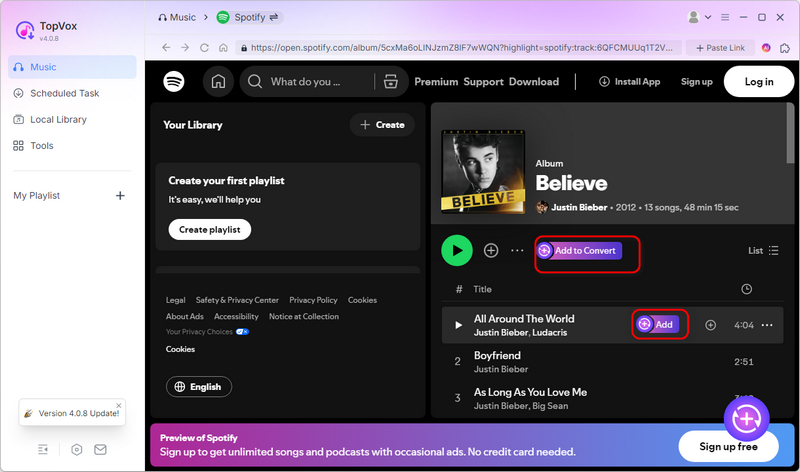
Step 3. From there, you can now see the main interface of Spotify. That means, you can now search the music you love to download from Spotify. Click the Add button.
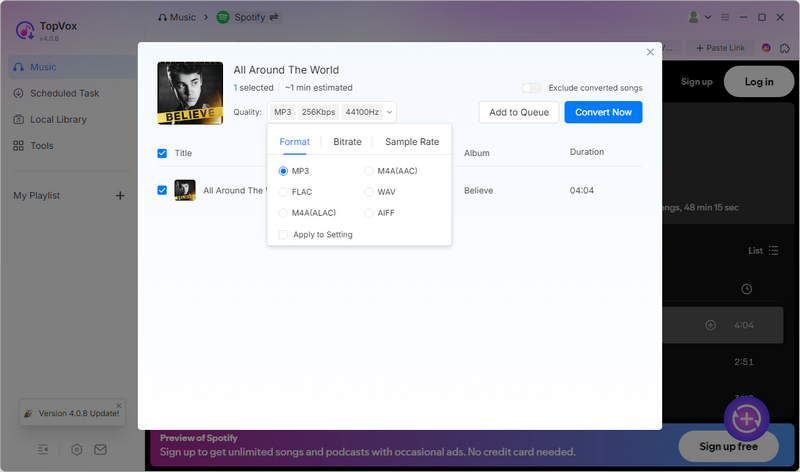
Step 4. Select your preferred Output Format, Bitrate and Sample Rate. Once finished, click Convert Now to download Spotify to MP3.
Part 4. Comparison Between TopVox and Viwizard
Let us now compare TopVox and Viwizard in a simple way. We prepared a table for you that showcases every features they posses:
Comparison Table of TopVox and Viwizard
| Viwizard Spotify Music Converter | TopVox All Music Converter |
| Supported OS | Windows and macOS. | Windows and macOS. |
| Supported Platforms | Spotify only. | Spotify, Apple Music, Amazon Music, and more. |
| Output Formats | MP3, M4A, M4B, AAC, WAV, and FLAC. | MP3, AAC, WAV, and FLAC. |
| Conversion Speed | Slow. | It is praised for quick downloads. |
| Audio Quality | Retains ID3 tags, but limited audio enhancements. | High-quality conversion with stable performance. |
| Free Trial Limitation | Converts only partial tracks. | Full-featured trial with limited conversions. |
| Pricing Plan | Expensive pricing plan. | Cost-effective for multiple platforms supported. |
| Reputation | There are scam reports and account suspension risks. | • Positive reviews.
• Positive reviews. |
Verdict
For the verdict, you can choose TopVox if you want speed, safety, and multi-platform support tools. Yet, you can choose Viwizard instead only if you need broader output formats. It is important that you also do not mind slower performance or higher risk.
FAQs on Spotify Music Converter
Q: Is it legal to use Spotify converters like Viwizard?
A: Technically speaking, the process of downloading Spotify music without a premium subscription can violate Spotify’s terms of service. That is why tools like Viwizard work but they carry risks such as account suspension.
Q: Which converter is safer to use?
A: As we can see on the user reviews, TopVox All Music Converter is safer and less likely to cause account issues. We can see above that Viwizard has various reports of account suspensions and poor customer support.
Q: Does Viwizard really keep ID3 tags?
A: Yes. The tool of Viwizard has the ability to retain metadata such as artist, album, and cover art. Many users say this feature helps them organize their library. Yet, conversion speed and reliability remain concerns up until this day.
Conclusion
Therefore we can conclude that downloading music from Spotify is possible as long as we have the right tool. Among the tools shown above, we can see that the Viwizard Spotify Music Converter can do the task but is not too efficient for it. Meanwhile, TopVox All Music Converter remains effective and efficient in all aspects. You can use it now to discover more of the features.
Luna Harper
Luna Harper is a passionate music lover and an inspiring content sharer. She has explored most of the music converters available on the market, acquiring thorough knowledge of their features, usability, and differences. Luna enjoys using her professionalism to help fellow music lovers get superior audio quality.




 by
by