TunesKit Apple Music Converter Review & Alternatives
Summary:
TunesKit can work with Apple Music. However, it works more like an audio capture tool than a real converter. It’s ideal for occasional single-track recording, but the playback-dependent process makes it inefficient for playlists or albums. For a better experience, TopVox offers true Apple Music conversion by directly decrypting tracks. It supports fast batch processing for full playlists, albums, and artists, making it far more efficient and closer to a real one-click Apple Music downloader.
Apple Music lets you stream anytime you're online and have an active subscription. However, there are moments when you want to keep your favorite tracks for offline playback. That's where Apple Music converters come in, and many tools claim they can do the job. Some even promise lossless conversion, ultra-fast workflows, and simple one-click use. This makes it hard to tell which ones truly deliver and which have hidden limits. One name that often comes up in searches is TunesKit. But how does it really perform in real-world use? Is it a true converter, or something else entirely? In this TunesKit Music Converter review, we'll test it in detail to see where it shines and where it falls short. We'll also introduce a better alternative for a more direct Apple Music conversion experience.

Part 1. Overview of TunesKit Apple Music Converter
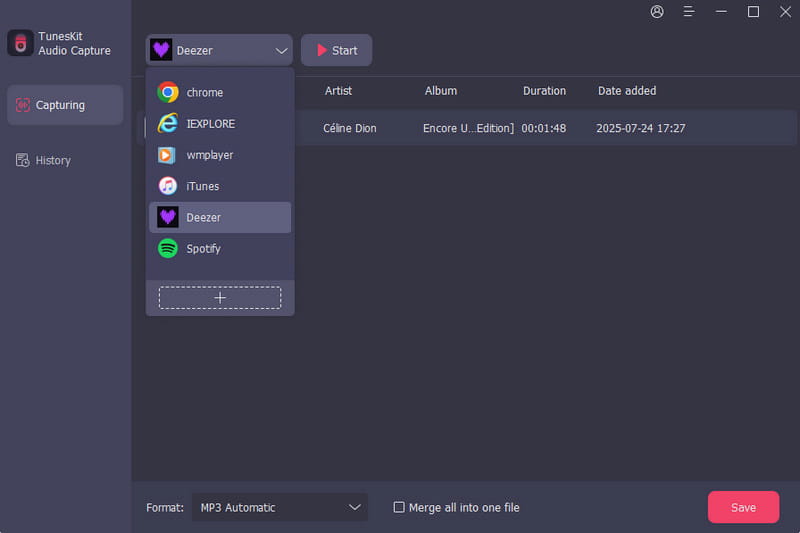
You might find the name misleading. Many people expect it to convert Apple Music to MP3, but that's not exactly what this tool is. In reality, TunesKit Audio Capture, also known as TunesKit Apple Music Converter, works in a completely different way. Instead of directly converting Apple Music tracks, it records whatever audio is playing on your system. On the surface, this is similar to converting. But under the hood, it's a completely different process, and that difference shows up quickly when you start using it.
What to Know More about TunesKit:
- Record any sound playing on your operating system.
- Detects silent parts and splits recordings for cleaner output.
- Record multiple audio tracks simultaneously and save them separately.
- Captures sound from apps, browsers, streaming platforms, and media players.
- Saves any recordings in AAC, FLAC, MP3, M4A, M4B, WAV, and 10 more formats.
Part 2. Pros/Cons of TunesKit Apple Music Converter
Before jumping in, it's worth taking a step back and looking at both sides of the tool. Knowing the pros helps you see what TunesKit does well and where it can actually fit into your workflow. Just as important, understanding the cons helps you avoid surprises, especially if you're expecting a fast, direct Apple Music converter.
Pros
- It offers ID3 tag editing for better file organization.
- It offers ID3 tag editing for better file organization.
- It captures audio from almost any app or platform.
- It includes a built-in editor for trimming and splitting.
- It can record streaming music, calls, and even video audio.
Cons
- It is less efficient for batch conversion.
- It requires manual playback for every track.
- It loses quality compared to direct conversion.
- It offers ID3 tag editing for better file organization.
- It doesn't directly access or convert Apple Music files.
Part 3. Pricing of TunesKit Apple Music Converter
| Annual Plan | Perpetual Plan |
| $29.95 | $69.95 | $109.95 (1 PC) to $159.95 (5 PCs) |
| 1 PC per month | 1 PC per year | One-time purchase |
30-day money-back guarantee
1-year software upgrade
Customer support | 30-day money-back guarantee
1-year software upgrade
Customer support | 30-day money-back guarantee
1-year software upgrade
Customer support |
Part 4. My Experience with TunesKit Apple Music Converter
I tested TunesKit Apple Music Converter on Mac to see how it handles Apple Music. The process is easy enough once everything is in place, but it's not what you'd expect from a typical converter. Please note that this isn't a one-click Apple Music converter tool; it's more hands-on.
Step 1. In the Capture Source selector, add Apple Music as your target app. Before recording, you can choose your output format and configure audio quality.
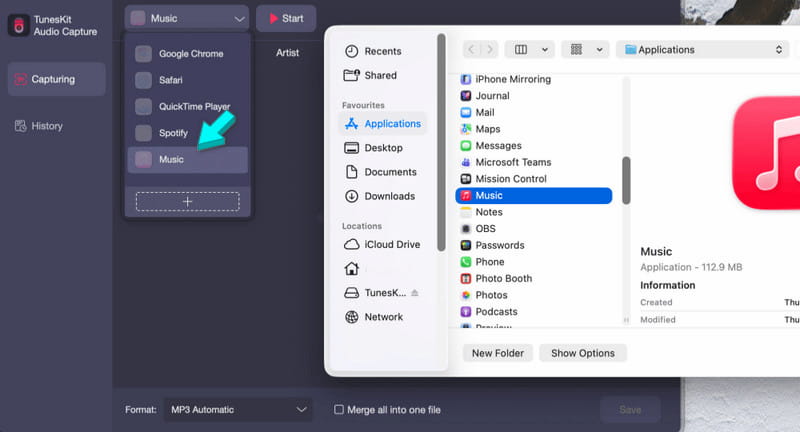
Step 2. The Apple Music app opens automatically. From here, play the track yourself. Once the music starts, TunesKit detects it and begins recording.
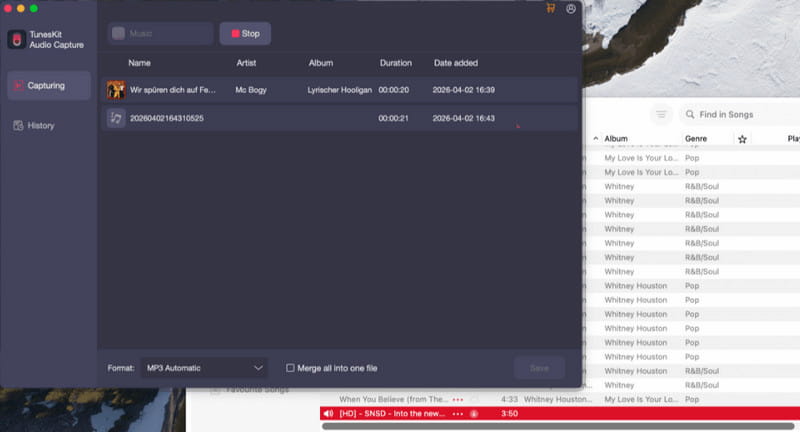
Important Note: It runs in real time, so a 4-minute song takes 4 minutes to record.
Step 3. When you finish, click Stop to open the Capturing Panel. Click Save, and the file moves to the History section. From there, you can play it or open the folder to find it.
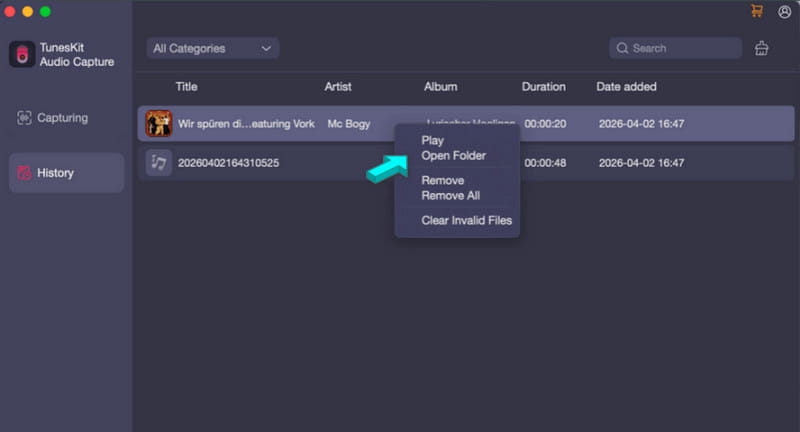
In practice, TunesKit records Apple Music audio reliably and keeps things organized with minimal effort. But the real-time process is hard to ignore. It works fine for a few songs, but when you scale up to large playlists, the time investment quickly adds up.
| Result | Format |
| Single Song (3:25) | 3 minutes and 25 seconds | MP3 automatic |
| Album (12 tracks) | 43+ minutes | MP3 automatic |
| Batch (100 tracks) | 6 hours and 23 minutes | MP3 automatic |
Part 5. Best Alternative: TopVox All Music Converter
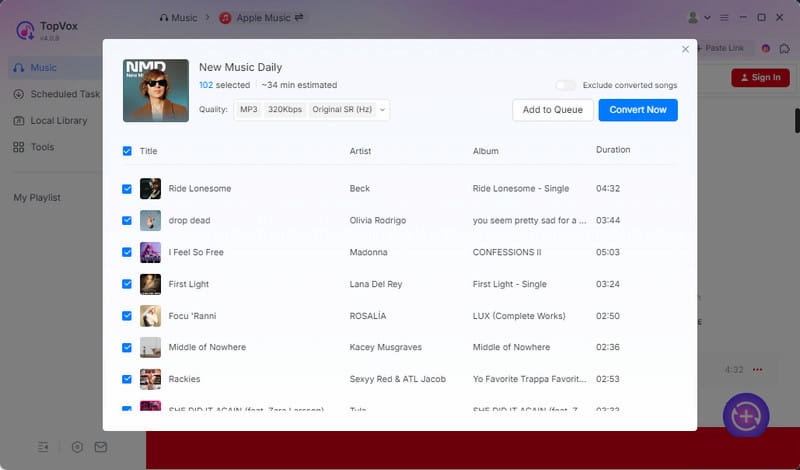
If the real-time recording approach of TunesKit feels limiting, there's a much more efficient option worth considering: TopVox All Music Converter. It does not rely on real-time recording. Instead, it works at the source level by directly decrypting music files and converting them into DRM-free formats. This alternative to TunesKit Apple Music Converter for Windows and Mac requires no playback, no waiting, and no real-time recording delays.
This one-stop music converter lets you download any music. It supports direct downloads from Apple Music and goes further by allowing simultaneous downloads of entire artists, albums, singles, and playlists. It can output MP3, FLAC, M4A (ALAC/AAC), WAV, and AIFF with audio quality of up to 320 kbps and 48,000 Hz. In addition to Apple Music, it supports Spotify, Amazon Music, YouTube Music, Deezer, Pandora, SoundCloud, Line Music, and Audible.
What to Look Forward to with the TopVox All Music Converter:
- It can process downloads up to 35× faster than real-time methods.
- It removes DRM protection so you can play songs freely on any device.
- It decrypts and converts tracks instead of recording system audio in real time.
- It allows browsing, searching, and downloading music from a single interface.
- It automatically preserves song ID3 tags, such as title, artist, album info, and artwork.
Part 6. TunesKit Vs. TopVox
| TunesKit | Versus | TopVox |
| Records audio | Conversion method | Decrypts and converts music files |
| Any app | Supported Services | Apple Music, Spotify, Amazon Music, YouTube Music, Deezer, SoundCloud, Pandora, Line Music, and Audible |
| MP3, AAC, FLAC, WAV, M4A, and M4B | Output Formats | MP3, FLAC, M4A (ALAC/AAC), WAV, and AIFF |
| 256Kbps/41kHz | Audio Quality | 24-bit/320Kbps/48kHz |
| In the same amount of time, you can finish 100+ tracks with a total duration of 6 hours and 23 minutes. | Download Speed | Up to 35× faster. You can finish 100+ tracks (totaling 5 hours and 38 minutes) in only one hour. |
| ✅ Limited and time-consuming | Batch Downloading | ✅ Fully supported |
| ❌ Not supported | DRM Removal | ✅ Fully supported |
| Windows and Mac | Platform | Windows and Mac |
| $29.95 (Monthly Plan) to $159.95 (Perpetual Plan) | Price | $19.95 (1 Month License) to $139.95 (Lifetime License) |
| Occasional recording | Best For | Fast, large-scale music downloading |
Part 7. FAQs about TunesKit Apple Music Converter
Q: Is TunesKit Audio Capture legit?
A: Yes, TunesKit Audio Capture is a legitimate software. It is a real, widely used program that records system audio from your computer and saves it in playable digital formats. It doesn't modify system files or install anything harmful, so from a software standpoint, it's safe to use.
Q: Is TunesKit Audio Capture free?
A: No, TunesKit Audio Capture is not fully free. It offers a trial version that lets you test the recording feature. However, it has limitations, such as a 1-minute recording limit. To unlock unlimited recording, you need to purchase a plan.
Q: Is it illegal to convert Apple Music to MP3?
A: Apple Music tracks are DRM-protected, meaning that converting them to MP3 violates Apple's Terms of Service. Converting Apple Music for personal use is safe, but distributing or sharing those files is illegal.
Conclusion
In this TunesKit Apple Music Converter review, it's clear that TunesKit Audio Capture works more like a real-time recorder than a true converter. This limits its speed and convenience. While it can get the job done, it feels slow for large libraries. If you want a smoother, faster, and truly direct conversion experience, TopVox All Music Converter is the better choice. It delivers speed, quality, and full DRM-free output in one tool.
Luna Harper
Luna Harper is a passionate music lover and an inspiring content sharer. She has explored most of the music converters available on the market, acquiring thorough knowledge of their features, usability, and differences. Luna enjoys using her professionalism to help fellow music lovers get superior audio quality.




 by
by