A Complete User Review of TuneFab Apple Music Converter
Summary:
TuneFab Apple Music Converter supports basic Apple Music conversion, but its limited support for DRM and slower batch processing limit its usefulness. TopVox All Music Converter offers a more complete solution with multi-platform support, faster performance, broader format options, and better flexibility for downloading full tracks, albums, and playlists.
Apple Music provides access to millions of songs, but there is a catch: you never truly own the music you stream. Once your subscription lapses, you will lose access to your library. It is due to DRM, which restricts downloaded content to the platform. Because of this widespread limitation, many users online have turned to Apple Music converters that bypass these restrictions and create permanent offline copies of their tracks. One tool that has been making a name in this space is TuneFab. But does it really have what it takes? This TuneFab Apple Music Converter review will take a closer look at its features, performance, and pricing. We will help you decide whether TuneFab is worth using or if there's a more reliable option available.

Part 1. Features of TuneFab Apple Music Converter
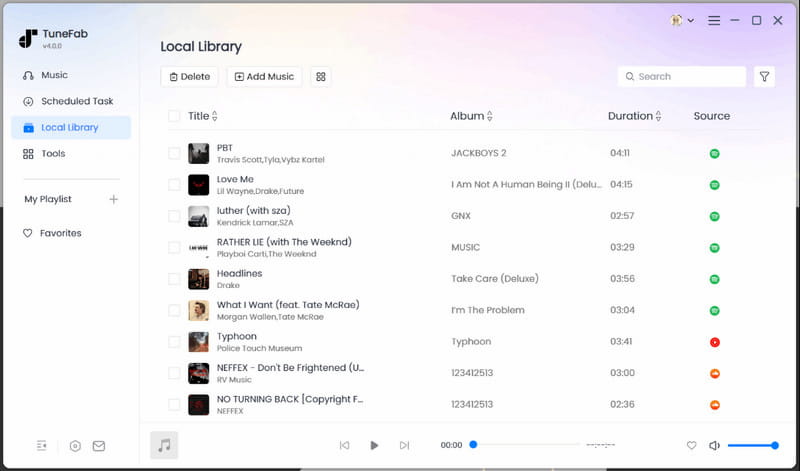
TuneFab Apple Music Converter is a tool that helps users remove DRM from Apple Music tracks. It converts Apple Music to MP3, M4A, ALAC, FLAC, WAV, and AIFF formats. It makes it easier to play music offline on any device that doesn't support Apple Music. TuneFab's performance is stable, though large batch conversions may take longer because it processes tracks sequentially.
What to Know More about TuneFab:
- Preserves original audio quality and metadata information.
- Configurable output settings such as bitrate and sample rate.
- Built-in Apple Music web player for easy browsing and selection.
- Stable conversion process with organized output file management.
- Removes Apple Music DRM restrictions for offline playback flexibility.
Part 2. Pros/Cons of TuneFab Apple Music Converter
It is important to understand the pros and cons of TuneFab because no software is perfect. Knowing both sides helps you decide whether it truly fits your needs before committing.
Pros
- It supports converting Apple Music tracks to digital formats.
- It supports batch conversion of songs, albums, and playlists.
- It preserves original audio quality and keeps metadata intact.
- It removes DRM restrictions, allowing playback on various devices.
- It includes a built-in Apple Music web player for easy access and selection.
Cons
- It depends on an active Apple Music login to access the library.
- The free version only converts the first 3 minutes of each song.
- It processes tracks sequentially, which slows down large batch conversions.
Part 3. Pricing of TuneFab Apple Music Converter
| Yearly Subscription | Perpetual License |
| $35.95 | $79.95 | $99.95 |
| Monthly subscription | Yearly subscription | One-time purchase |
Each plan includes full access to the software and its features, a single-computer license, updates, and a money-back guarantee. Some users online search for TuneFab Apple Music Converter crack to avoid paying for the software. However, cracked versions are unsafe, unstable, and expose your device to security risks. So, it's always safer to use the official licensed version for updates and support.
Part 4. My Experience with TuneFab Apple Music Converter
I used the TuneFab Apple Music Converter free version to test how it works in real use. Even in the free mode, the workflow stays simple and beginner-friendly.
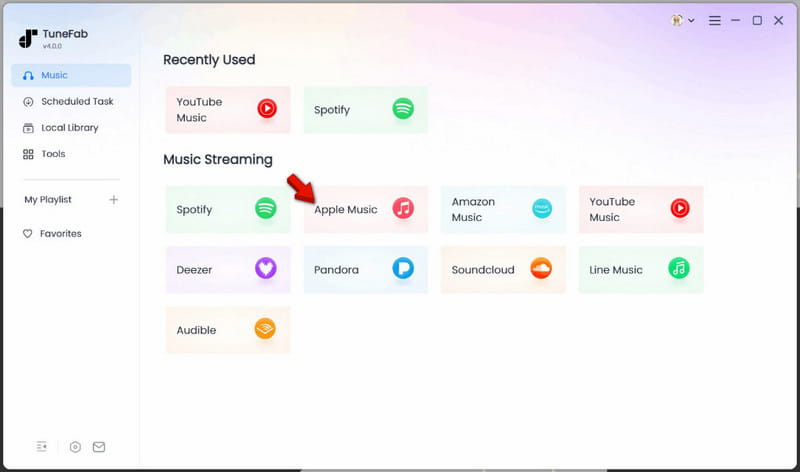
Step 1. On TuneFab's Music tab, select Apple Music to open the built-in web player. From there, log in directly using your Apple Music account to access your full library.
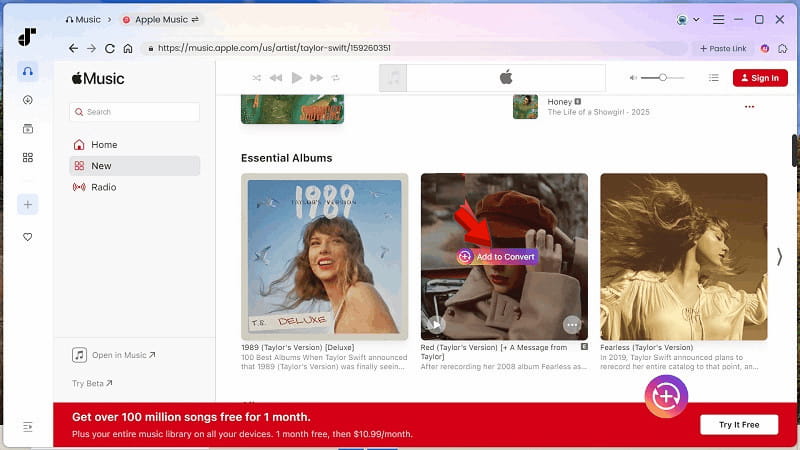
Step 2. Select the tracks you want to convert, then click Add to Convert to add them to the queue. You can add multiple songs simultaneously, or even entire albums and playlists.
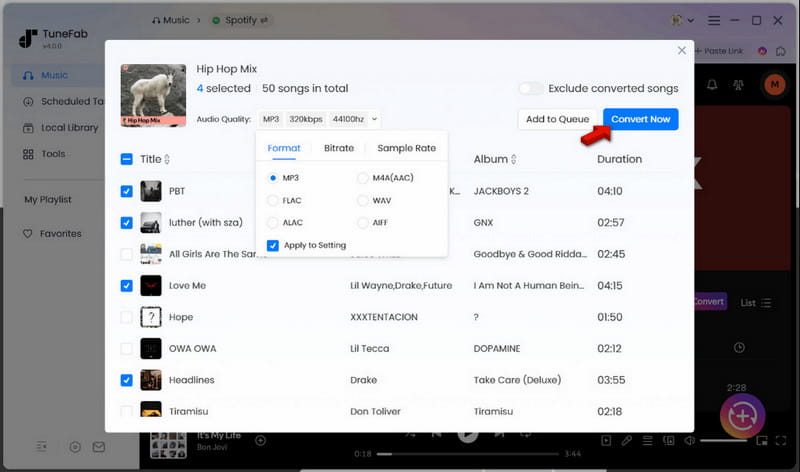
Step 3. In the Scheduled Task tab, choose your preferred format and adjust audio quality if needed. Click Convert Now to start the conversion.
The free version of TuneFab is best viewed as a trial tool rather than a complete solution. You can also use it to convert iTunes to MP3. However, upgrading is necessary to achieve full playlist conversion and unrestricted use.
| Result | Format |
| Single Song (4:11) | 1 minute and 29 seconds | MP3/320Kbps/44.1kHz |
| Album (15 tracks) | 11 minutes and 40 seconds | MP3/320Kbps/44.1kHz |
| Batch (102 tracks) | 1 hour and 18 minutes | MP3/320Kbps/44.1kHz |
Part 5. Best Alternative: TopVox All Music Converter
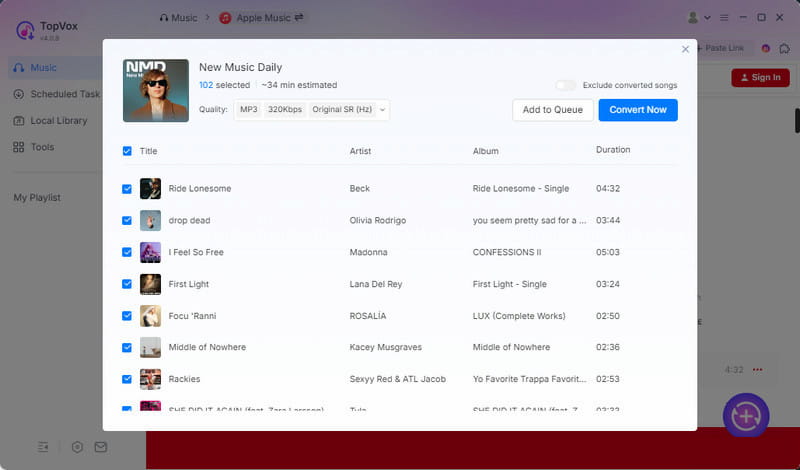
If you've ever run into the TuneFab Apple Music Converter not working issue, you're not alone. Many users start looking for a more stable and flexible solution when Apple Music downloads fail, and conversion stops mid-process. That's where TopVox All Music Converter steps in as a stronger alternative.
TopVox All Music Converter can decrypt and convert Apple Music tracks into fully DRM-free formats. It gives you true offline ownership of your music files. It supports downloading single tracks, entire artists, full albums, and complete playlists with ease. In terms of output, it covers MP3, FLAC, M4A (ALAC/AAC), WAV, and AIFF. You can also fine-tune audio settings, with support for up to 320 kbps bitrate and 48,000 Hz sample rate. Remarkably, it also works with Spotify, Amazon Music, YouTube Music, Deezer, Pandora, SoundCloud, Line Music, and Audible.
What to Look Forward to with the TopVox All Music Converter:
- Offers fast conversion speed up to 35× faster processing.
- Converts music to MP3, FLAC, M4A (ALAC/AAC), WAV, and AIFF.
- Built-in web player for browsing, searching, and downloading in one place.
- Preserves ID3 tags like artist, album, and track details for better organization.
- Maintains high audio quality with support for up to 320 kbps and 48,000 Hz output.
Part 6. TuneFab Vs. TopVox
| TuneFab | Versus | TopVox |
| ✅ | True Ownership of Music | ✅ |
| Apple Music, Amazon Music, Audible, Deezer, Line Music, Pandora, SoundCloud, Spotify, and YouTube Music | Supported Services | Apple Music, Spotify, Amazon Music, YouTube Music, Deezer, SoundCloud, Pandora, Line Music, and Audible |
| MP3, M4A, WAV, FLAC, ALAC, and AIFF | Output Formats | MP3, FLAC, M4A (ALAC/AAC), WAV, and AIFF |
| 320kbps/48kHz | Audio Quality | 320Kbps/48kHz or lossless FLAC/WAV |
| High-speed local conversion | Download Speed | Up to 35× faster |
| ✅ | Batch Downloading | ✅ |
| ✅ | DRM Removal | ✅ |
| ✅ | ID3 Tag Preservation | ✅ |
| $35.95 (Monthly Plan) | Price | $19.95 (1 Month License) |
| Windows and Mac | Platform | Windows and Mac |
Part 7. FAQs about TuneFab Apple Music Converter
Q: Is it safe to use TuneFab?
A: TuneFab is safe to install if you download it from the official website. However, safety also depends on how you use it. It works by accessing and converting streaming content, which may raise legal and copyright concerns.
Q: Is it illegal to convert Apple Music to MP3?
A: In most cases, converting Apple Music tracks to MP3 is not legal. These songs are protected by DRM, which prevents unauthorized copying and redistribution. While converting for personal use is common, it remains a legal gray area and a direct violation of Apple's Terms of Service.
Q: Why does the TuneFab Apple Music Converter not working?
A: TuneFab may stop working due to several common reasons. Changes in Apple Music's system and DRM updates can temporarily break conversion access. It can also fail if you did not log in to your Apple ID properly.
Conclusion
In this TuneFab Apple Music Converter review, we've seen that the tool offers a simple way to convert Apple Music tracks into playable audio formats. However, it still has clear limitations, such as DRM requirements, subscription requirements, and limited free use. If you're looking for a more powerful, all-in-one solution, TopVox All Music Converter is a better alternative. It supports multiple streaming platforms, offers wider format compatibility, better audio control, and a more complete downloading experience.
Luna Harper
Luna Harper is a passionate music lover and an inspiring content sharer. She has explored most of the music converters available on the market, acquiring thorough knowledge of their features, usability, and differences. Luna enjoys using her professionalism to help fellow music lovers get superior audio quality.




 by
by