What is a Noteburner YouTube Music Converter? Is It Worth Trying?
 by Owen Bannett | April 16, 2026 | Reviews/Knowledge
We all know that YouTube Music became the latest platform that offers users a great listening experience with their favorite music. However, many users are disappointed because its offline listening feature is kind of limited. Because those offline downloaded music are not really yours. When the subscription ends, then the music will also disappear. In that case, Noteburner YouTube Music Converter is a tool that you need for unlimited offline music experience for free. Let us now review its key features and the simple way to use it. Read now to discover.
Part 1. What is a NoteBurner Youtube Music Converter?
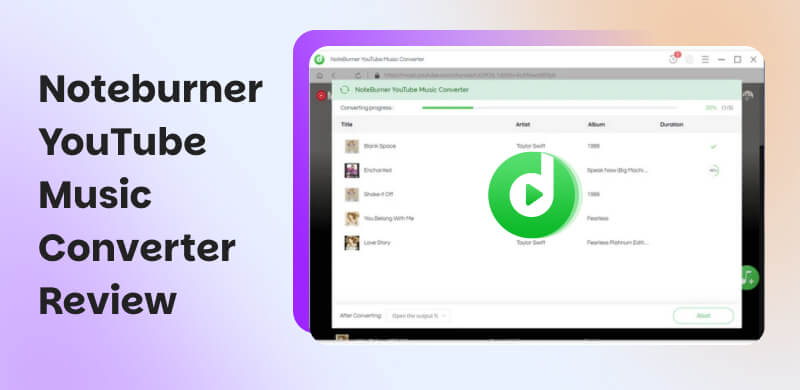
To start, let us first define NoteBurner YouTube Music Converter and its main purpose. This tool is a desktop software tool that works on your Windows and Mac computers. This amazing technology can give you access to YouTube Music through a built-in web player. That means, you can now search for songs or playlists and download the Youtube music as audio files that can be stored on your computer. All of these are free and no subscriptions are needed. In addition, these files can then be transferred to other devices such as smartphones, tablets, USB drives, MP3 players, or media servers. To elaborate its usefulness, here are some points to answer the question of when to use NoteBurner YouTube Music Converter?
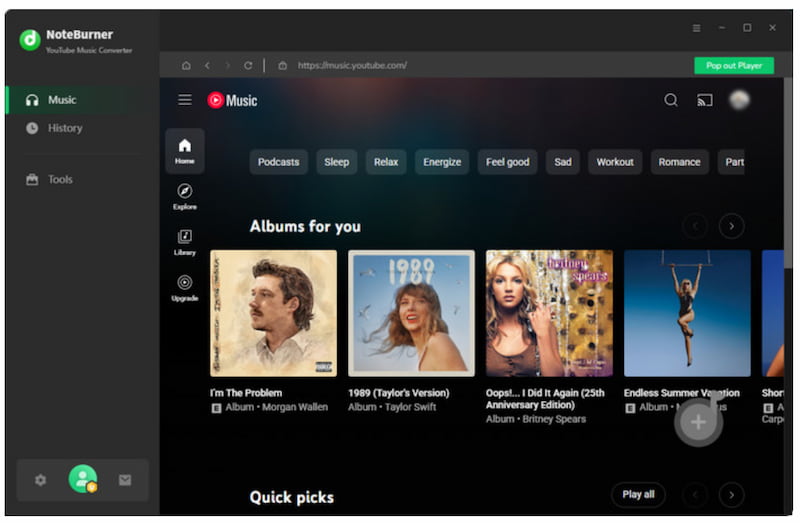
Well, as we read the details above this converter is useful in several everyday situations. For example are the following:
- Creating your personal offline music collection.
- Playing YouTube Music tracks on devices that do not support the YouTube Music app.
- Transferring music to other audio systems, MP3 players, or external storage.
- Backing up favorite songs or playlists for long-term access.
Part 2. Key Features of NoteBurner Youtube Music Converter
As we proceed with its key features, NoteBurner YouTube Music Converter includes a wide range of features, tools, and options that you can use to make the downloading and converting music from YouTube Music simple and flexible. All of these features are here to give a versatile NoteBurner YouTube Music Converter. This is a great way for users who want more control over their YouTube Music library offline. Please take a look at the features you can enjoy with this tool:
- Effective with both YouTube Music Free and Premium accounts.
- Allows you to download songs, albums, playlists, and music videos from YouTube Music for an instant offline listening party.
- Supports saving content as different file formats like MP3, AAC, WAV, FLAC, AIFF, ALAC. Not only as audio files, but also comes with MP4 videos saving feature.
- Easy conversion of YouTube Music up to 10 times faster than real‑time playback.
- Also download the complete and accurate ID3 tags, including artist, album, and artwork.
- Customize audio or video quality while preserving the original details.
- Offer built‑in tools such as an ID3 Tag Editor, Format Converter, CD Burner, and Audio Editor.
Part 3. How to Use NoteBurner YouTube Music Converter
Let us now discover how we can use those key features for an actual process of using NoteBurner YouTube Music Converter. Take a look on the simple steps that you can follow below:
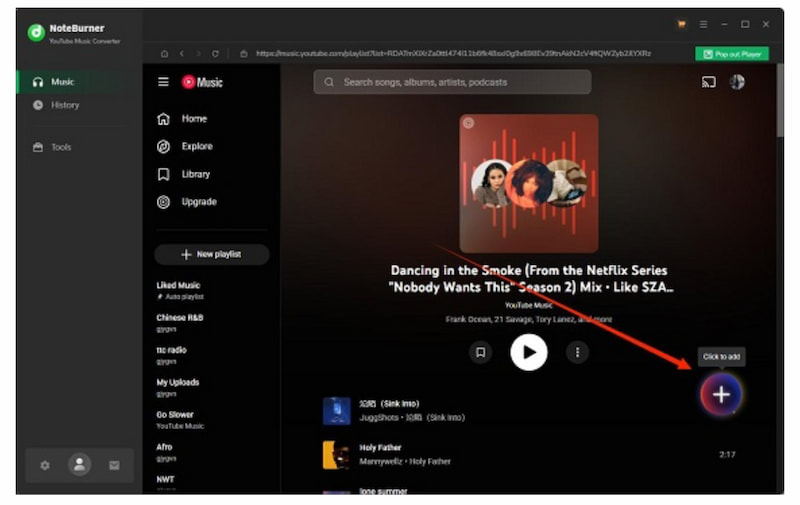
Step 1. First, install the tool on your computer. Then by then, please use the built-in player to browse for the music you want to download. After that, you will see the Add button.
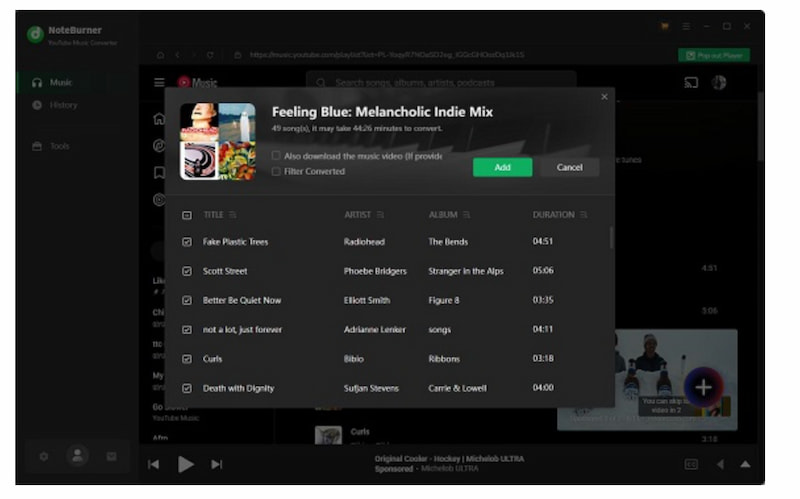
Step 2. You will notice a pop‑up window will appear that will show all available tracks. At this moment, you can choose specific songs or Select All option. Please proceed by clicking Add to confirm.
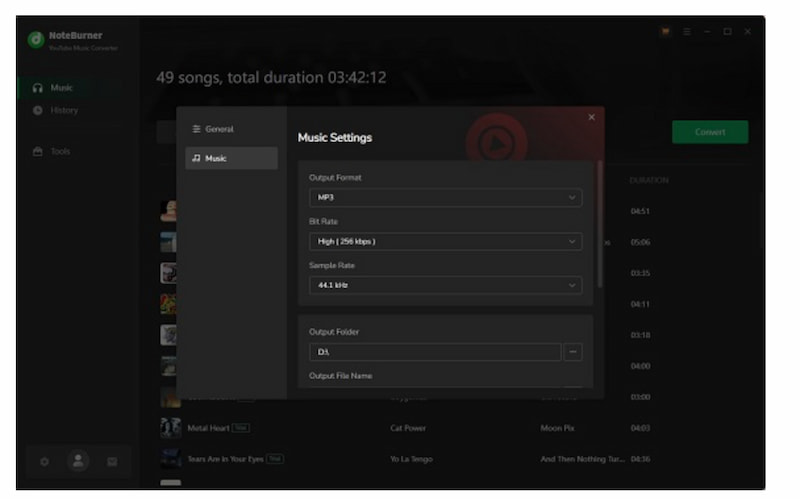
Step 3. Next, please click the Settings icon on the bottom‑left corner. This will let you open the Music tab. From there, you can now choose the output format. In addition, you can also select the audio bitrate from 128 kbps to 320 kbps.
Step 4. After that, we can now start the conversion. Kindly click Convert. When the conversion finishes, you can go to the History tab. From there, you can play the music directly in NoteBurner or click the Folder icon to locate the files on your computer.
Part 4. Performance Test of NoteBurner YouTube Music Converter
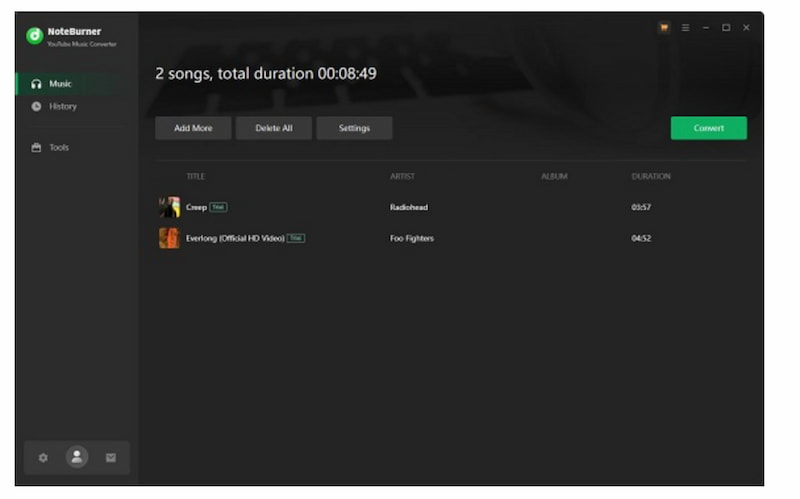
After we tested the tool we found out that NoteBurner YouTube Music Converter is a great tool for downloading your YouTube Music tracks for your offline listening experience. It can really convert music quickly and delivers excellent audio quality. However, we are only aware that you might need to retry a download if an error occurs. From our experience, converting songs one at a time or in smaller batches usually gives the best results. Also, some users say the process is a bit complicated and they cannot afford to pay the subscriptions for it.
Speed: 8.5/10
Stability: 8/10
Easy-to-use: 7.5/10
Overall Rating: 8/10
Part 5. Pricing Plan of NoteBurner YouTube Music Converter
If you are now curious if NoteBurn YouTube Music Converter is free, then the answer is no. The tool is not completely free. But, it offers a free trial where you can only convert the first one minute of each track. To unlock the full features of this YouTube Music downloader, you'll need to subscribe to its premium accounts. Here are the price list details:
| Plan | Price | Features |
|---|---|---|
| Monthly | $14.95 per month. | Auto-renewing subscription, full access to all features, cancel anytime. |
| Annual | $59.95 per year. | Auto-renewing yearly subscription, full access, 5-day money-back guarantee. |
| Lifetime | $129.90 one-time. | One-time payment, lifetime updates, 30-day money-back guarantee. |
Part 6. Best Alternative vs. NoteBurner: Which is the Best YouTube Music Converter?
TopVox All Music Converter
We saw the capabilities of NoteBurner YouTube Music Convert. Many users say it is complicated to use and the free version is not given because of its limitations. Good thing we prepared a great alternative for you. Allow us to also TopVox All Music Converter. This is a versatile tool that supports using YouTube Music for free and downloading the music we love without limitation. Another great thing about it is its ability to support many platforms such as Spotify and Apple music. Most importantly, it is free and very simple to use. Take a look as we prove the ability of this tool for you. Take a look at the process below;
Step 1. Get the amazing TopVox All Music Converter for free and immediately install it on your computer.
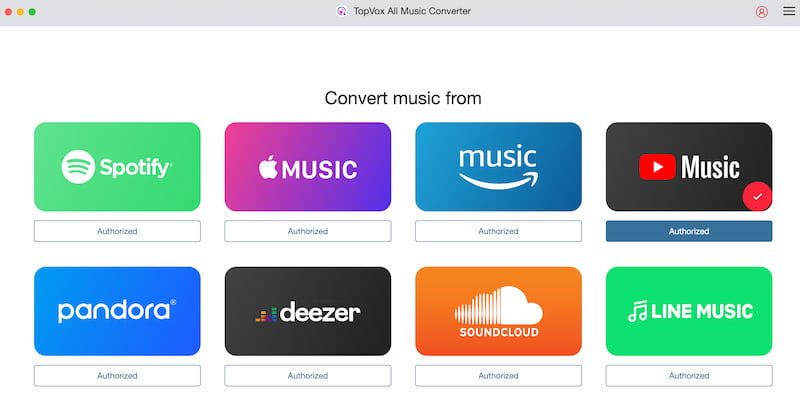
Step 2. After that, please open the tool and access its main interface. From there you will see the various platforms it supports. Kindly select YouTube Music among the options.
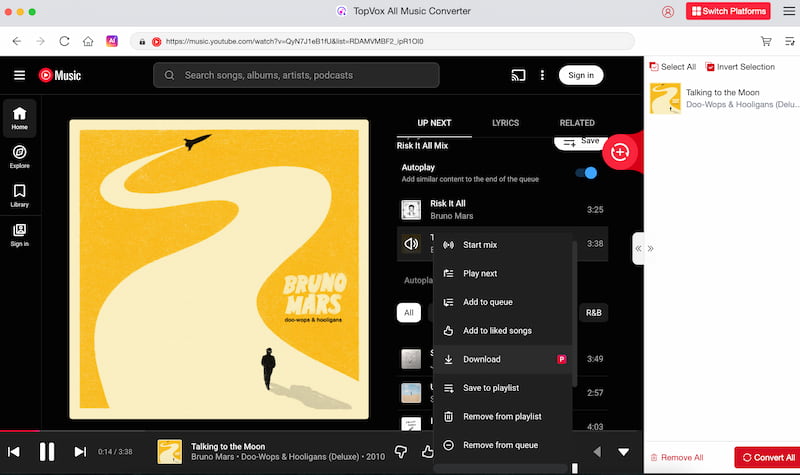
Step 3. At this moment, you have no access to YouTube Music. That means, you can play music you love. Search for any music you want to listen to.
Step 4. To download the music for offline listening, you just need to click the Download button on the right side of the music. Then after a few seconds, your music is ready to play offline.
TopVox All Music Converter VS Noteburner YouTube Music Converter
| Feature | TopVox All Music Converter | NoteBurner YouTube Music Converter |
|---|---|---|
| Platforms | Spotify, Amazon, Deezer, Apple, and YouTube. | YouTube Music only. |
| Audio Quality | MP3 and more common formats. | MP3, AAC, FLAC, WAV, AIFF, and ALAC. |
| Speed | Faster. | Standard. |
| ID3 Tags | Partial. | Full support. |
| Stability | Basic and varies by platform. | Stable, frequent updates. |
| Pricing | Lower and cheaper. | $14.95 per month, $59.95 per year, and $129.90 lifetime. |
FAQs on YouTube Music Converter
Q: Is NoteBurner legal?
A: Yes, NoteBurner is legal for personal use. However, downloading or sharing converted music may violate YouTube Music streaming service terms.
Q: Is there a NoteBurner Youtube Music Converter Chrome Extension?
A: No, NoteBurner does not provide a Chrome extension. The tool only comes and is available as desktop software for Windows and Mac.
Q: Does NoteBurner work on Mac?
A: Yes, NoteBurner supports both Windows and macOS. This tool is compatible with offering full YouTube Music conversion features across both operating systems.
Q: Can I convert playlists?
A: Yes, NoteBurner allows batch conversion of entire playlists and albums, preserving order, metadata, and audio quality during conversion.
Conclusion
As we end this article, we can see that NoteBurn YouTube Music Converter tool is a great way to download music from YouTube Music. However, you will need a subscription to fully use it. Making the free version very limited. Good thing, you can also use TopVox All Music Converter, providing you a wider feature for free. Making your offline listening on YouTube Music possible with ease.
Owen Bannett is a music enthusiasm as well as a senior writer. He has paid close attention on the pros & cons of various audio formats, bitrate, sample rate and encoding methods. Always seeking the best listening experience, Owen has deep insights about lossless music and diverse music converters on the markets.