AudFree Spotify Music Converter Review of Real Performance
Editor’s Verdict:
- Performance: 8/10 (Stable 13× speeds on Windows).
- Audio Quality: 320kbps (Verified lossless output).
- Safety: 100% Clean (Note: Windows SmartScreen triggers due to unsigned drivers, not malware).
- Best For: Bulk playlist conversion for MP3 players or car audio
Have you ever tried downloading songs from Spotify? You've noticed one thing: they don't belong to you. You can listen offline inside the app, sure, but once you step outside the platform, those files are basically locked. That's exactly the gap tools like AudFree aim to fill. AudFree is designed to turn Spotify tracks into usable audio files you can keep and play anywhere. In this AudFree Spotify Music Converter review, we'll cover its key features, real performance, pros/cons, and how it works. This way, we can help you decide if AudFree is the right tool for your needs or if you're better off considering other alternatives.

Part 1. What is AudFree Spotify Music Converter
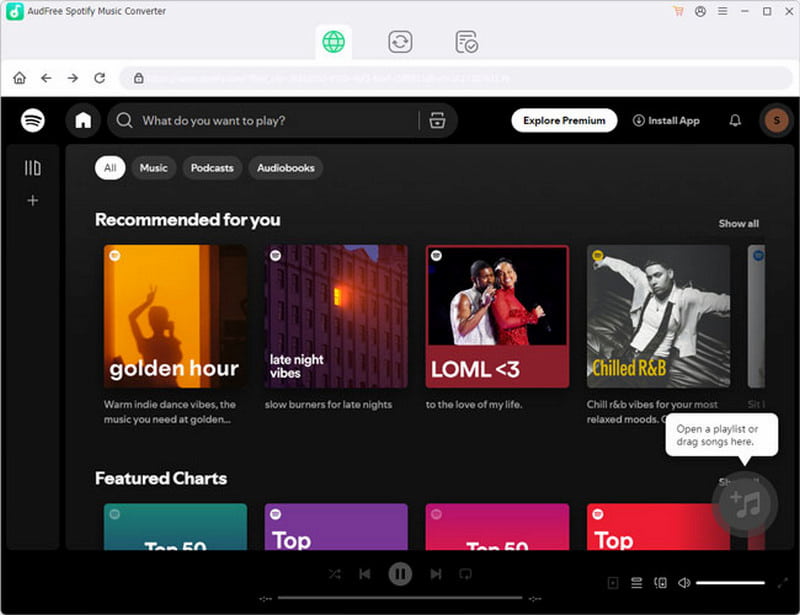
AudFree Spotify Music Converter is a well-designed Spotify downloader and converter for Windows and Mac. It lets you convert Spotify tracks to MP3 and other standard audio formats. It uses a faster conversion process that preserves the original sound quality while removing Spotify's DRM restrictions.
| Description |
| System Requirements | Windows 7-11 and macOS 10.13-26 Tahoe |
| Input | Singles, Podcasts, Playlists, Albums, and Audiobooks |
| Output | MP3, FLAC, AIFF, WAV, M4A, M4B, or ALAC |
| Audio Quality | 24-bit/320Kbps |
| Batch Conversion | Converts multiple tracks simultaneously |
| ID3 Tag Preservation | Release data, album cover, title, artist, track number, and more |
| Speed | Up to 13× faster. |
| Subscription Requirements | Spotify Free and Premium accounts |
| Success Rate for Large Batch Conversion | 80% (Tested on 100+ track batches) |
| Legal Status | For personal, non-commercial use only |
Part 2. Pros/Cons of AudFree Spotify Music Converter
Before jumping into whether AudFree Music Converter for Spotify is worth your time, it helps to look at both sides of the coin. The pros tell you what the tool does well and why people keep recommending it. But the cons? That's where you see the trade-offs. No software is perfect, and understanding the limitations upfront saves you from surprises later.
Pros
- It helps create a fully offline, portable music library.
- It downloads songs on Spotify without DRM restrictions.
- It offers faster conversion speeds than real-time recording.
- It preserves original audio quality, including high-bitrate output.
- It supports batch conversion for handling large playlists/albums.
Cons
- It requires a paid license to operate without limitations.
- It cannot stream music directly; it only downloads and converts.
- It does not always retain 100% perfect quality in every format setting.
- It depends on Spotify updates, which can affect performance over time.
- It takes time to convert large playlists/albums, even with batch support.
Part 3. My Experience of AudFree Spotify Music Converter
Using AudFree Music Converter felt surprisingly straightforward. It doesn't try to overwhelm you with too many options upfront. Instead, it walks you through the process in a way that makes sense, even if you're new to this kind of tool.
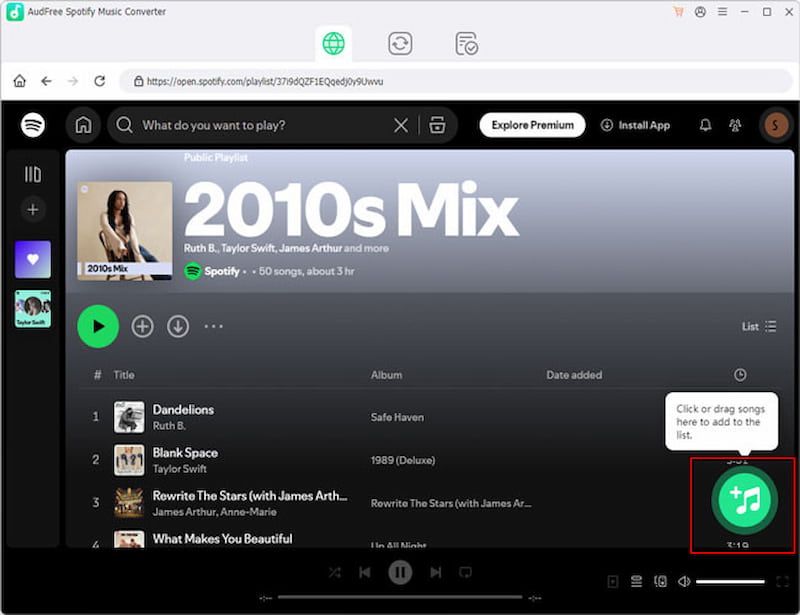
Step 1. Open AudFree on your system, then log in to your Spotify account. From there, browse your library and find the songs or playlists you want. Drag and drop them into the converter.
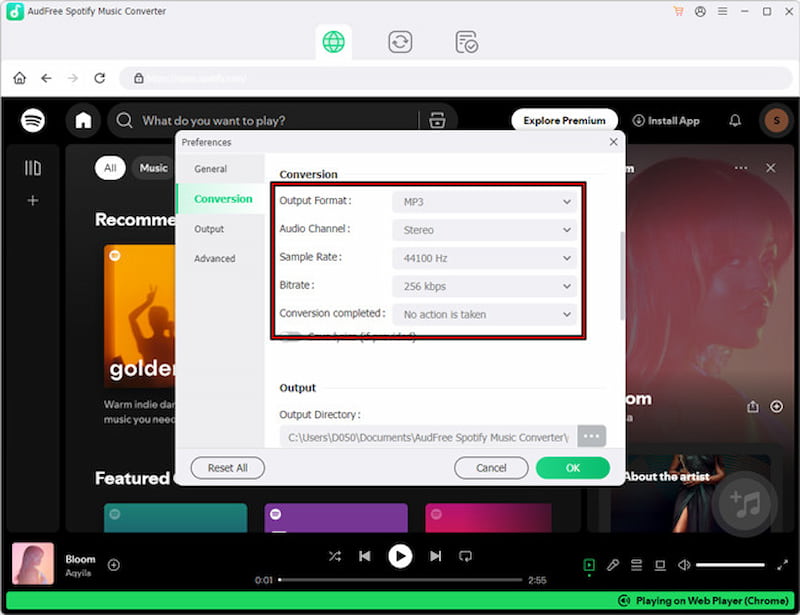
Step 2. Move to the Preferences section to select an output format like MP3. If you want more control, you can adjust the bitrate and sample rate to match your preferred audio quality.
Step 3. Once everything looks good, click the Convert button to begin processing your selected tracks. Depending on how many files you added, this can take a few minutes.
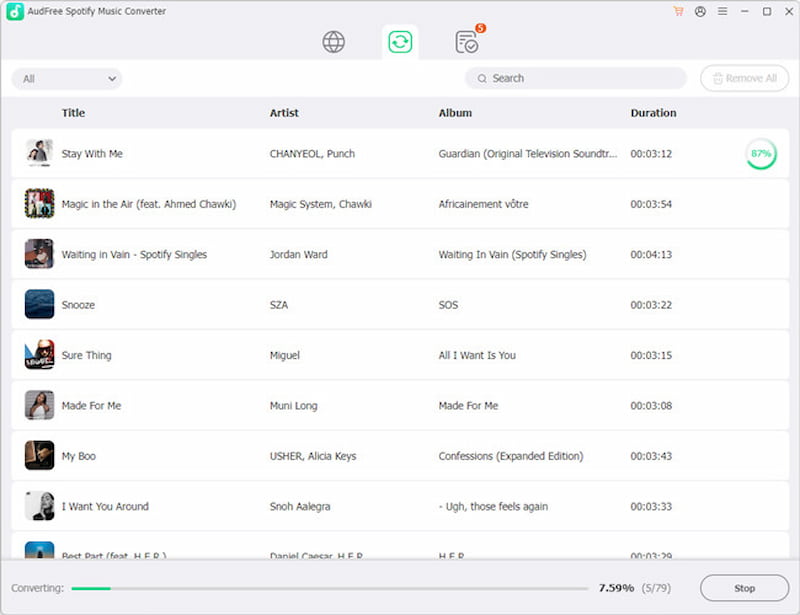
AudFree Music Converter is a simple tool that does exactly what you need. For everyday use, it is a great tool to turn Spotify tracks into usable audio files. It runs smoothly for the most part, keeps decent audio quality, and handles multiple tracks without much effort.
- Testing Device: Windows 11 / 16GB RAM.
- Test Subject: A 150-track Discover Weekly playlist.
- Result: Conversion completed in 3 hours and 12 minutes.
- Success Rate: 123/150 tracks (27 tracks failed due to regional licensing).
Part 4. Best Alternative: TopVox All Music Converter
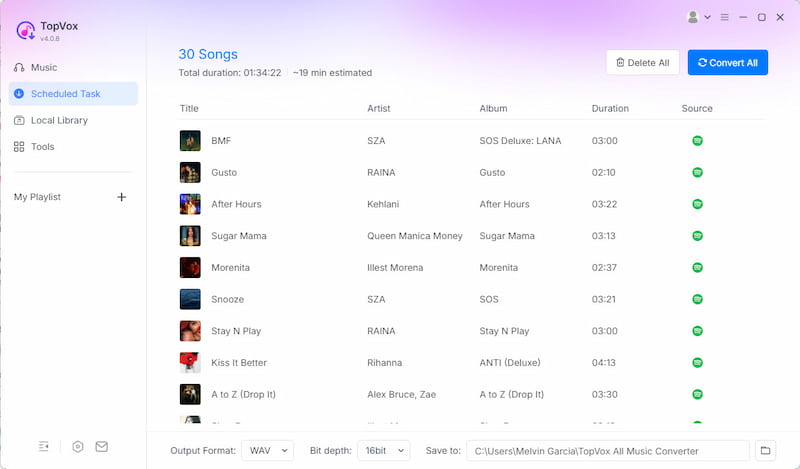
While AudFree Spotify Music Converter is reliable for building an offline music library, it isn't the only option. For a much faster, more flexible solution, TopVox All Music Converter is a strong alternative. It is a multiplatform music converter and downloader software for Windows and Mac. It lets you grab and convert tracks directly from Spotify without needing a Premium account/subscription.
Not to mention, it allows you to download artists, albums, singles, playlists, and even podcasts in batches, at speeds up to 35× faster. It also provides multiple output formats, supporting MP3, FLAC, M4A (ALAC/AAC), WAV, and AIFF. Additionally, it allows configuring the bitrate (128Kbps to 320Kbps) and the sample rate (22050Hz to 48,000Hz). Beyond Spotify, it works with Apple Music, Amazon Music, YouTube Music, Deezer, Pandora, SoundCloud, Line Music, and Audible. Best offer? It includes a built-in player that removes ads and can bypass DRM restrictions.
What to Look Forward to with the TopVox All Music Converter:
- Preserves original sound quality with no quality loss during conversion.
- Processes entire playlists/albums simultaneously with speeds up to 35× faster.
- Supports downloading from Spotify and 9 other major music streaming services.
- Bypasses DRM protection so downloaded music can be accessible on any device.
- Delivers consistent downloads with a 98% high success rate and stable performance.
Part 5. AudFree vs TopVox
| Versus | TopVox |
| Spotify | Supported Streaming Services | Spotify, Apple Music, Amazon Music, YouTube Music, Deezer, SoundCloud, Pandora, Line Music, and Audible |
| MP3, FLAC, AIFF, WAV, M4A, M4B, or ALAC | Output Formats | MP3, FLAC, M4A (ALAC/AAC), WAV, and AIFF |
| 24-bit/320Kbps/22.05 kHz | Audio Quality | 24-bit/320Kbps/48kHz |
| Up to 13× speed | Download Speed | Up to 35× faster |
| ✅ | Batch Downloading | ✅ |
| ❌ | Built-in Player | ✅ |
| ❌ | Premium Requirement | ❌ |
| ✅ | DRM Removal | ✅ |
| ✅ | Safety | ✅ |
| Windows and Mac | Platform | Windows and Mac |
| $14.95 (Monthly License) to $89.95 (Lifetime License) | Price | $19.95 (1 Month License) to $139.95 (Lifetime License) |
Part 6. FAQs about AudFree Spotify Music Converter
Q: Is AudFree Spotify Music Converter safe?
A: In my experience, it triggers a Microsoft Defender SmartScreen warning during installation. It occurs because AudFree uses a virtual sound driver to record the digital stream. Since Microsoft's expensive developer registry does not sign this driver, it triggers a generic warning.
Q: Is AudFree Spotify Music Converter free?
A: No, it's not completely free. AudFree offers a free trial, but with limitations. You can test its features and see how it works for free. However, for unlimited conversions and full functionality, you'll need to upgrade to a paid version.
Q: Is AudFree Spotify Music Converter any good?
A: Yes, but mainly if you're using the paid version. It performs well in terms of audio quality, ease of use, and overall reliability when converting Spotify music. However, the free trial is quite restricted, which makes it less useful beyond basic testing.
Conclusion
To wrap up this AudFree Spotify Music Converter review, the tool delivers a straightforward way to download and convert Spotify music into playable audio files. It works well for basic needs, keeps decent sound quality, and is easy enough to use. However, the limitations in speed, platform support, and overall flexibility may not suit more advanced users. If you're looking for a more powerful alternative, TopVox All Music Converter is a strong option. It offers faster downloads, broader platform support, more output control, and a more complete all-in-one experience.
Luna Harper
Luna Harper is a passionate music lover and an inspiring content sharer. She has explored most of the music converters available on the market, acquiring thorough knowledge of their features, usability, and differences. Luna enjoys using her professionalism to help fellow music lovers get superior audio quality.




 by
by