TuneBoto Amazon Music Converter Review: Worth It or Not?
Summary:
TuneBoto handles Amazon Music downloads with decent quality and customization. However, it slows down significantly with large batches (100+ tracks), often taking hours. Additionally, it is limited to Amazon Music only. In contrast, TopVox offers ultra-fast processing even for large playlists. Notably, it supports multiple streaming platforms, offering a more flexible, efficient all-in-one solution.
If you're looking for the best way to download music from Amazon Music, it's important to know what a good converter should offer. An ideal tool should provide secure and reliable performance, efficient downloads, DRM removal, and high-quality audio output. TuneBoto is a popular option in this space, but the real question is, does it truly meet these expectations? In this TuneBoto Amazon Music Converter review, we'll take a closer look at everything it offers. This includes its features, pricing, pros, cons, and how it works in real use. We'll also introduce a strong alternative in case TuneBoto feels limited. It is especially useful if you need broader platform support, faster performance, or more flexible output options.

Part 1. What is TuneBoto Amazon Music Converter
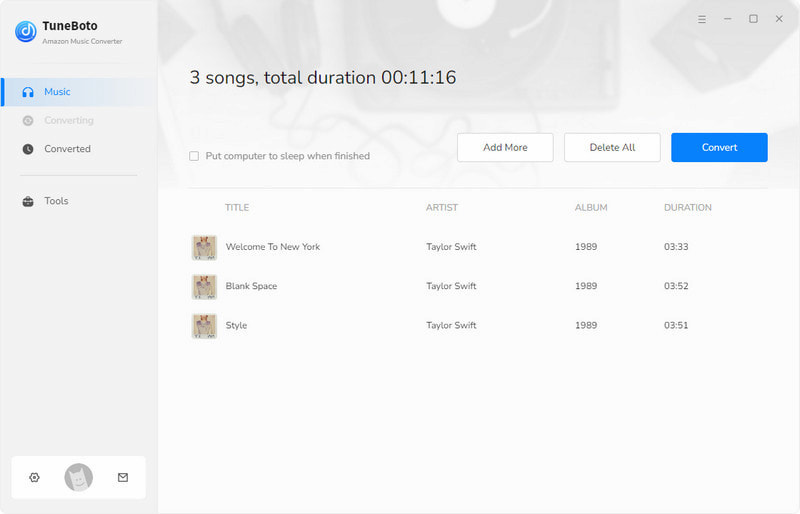
TuneBoto Amazon Music Converter is built to download Amazon Music to a PC for offline listening outside the app. It allows you to turn songs, albums, playlists, and podcasts into standard audio formats. It works through a built-in Amazon Music web player that supports both Prime and Unlimited accounts. During conversion, it preserves ID3 tags like song title, artist, album, and even cover art. On the performance side, it supports batch conversion, meaning you can process full playlists or albums in one go.
What to Know More about TuneBoto:
- Includes a built-in Amazon Music web player for easy access and selection.
- Converts Amazon Music to WAV, FLAC, MP3, AAC, AIFF, and ALAC formats.
- Works with both Amazon Music Prime and Amazon Music Unlimited accounts.
- Offers batch conversion for downloading multiple tracks or full playlists at once.
- Supports downloading songs, albums, playlists, and podcasts from Amazon Music.
| 1-Year Plan | Lifetime Plan |
| $29.95 | $59.95 | $129.90 |
License for a single computer.
Free updates.
5-day money-back guarantee. | License for a single computer.
Free updates.
5-day money-back guarantee. | License for a single computer.
Free updates.
30-day money-back guarantee. |
Part 2. Pros/Cons of TuneBoto Amazon Music Converter
Before looking at any Amazon Music downloader, it's important to understand what it does well and where it falls short. Knowing both sides helps you decide if it actually fits your listening habits or if you'll run into limitations later.
Pros
- It offers up to 10× faster conversion speed.
- It supports offline playback on multiple devices.
- It converts Amazon Music to multiple open formats.
- It keeps ID3 tags such as title, artist, album, and cover art intact.
- It allows batch conversion to process entire playlists simultaneously.
Cons
- It relies on a web-player interface.
- It does not support other streaming platforms.
- It is not free, and full features require a paid license.
- It requires a stable internet connection during conversion.
- It does not always guarantee a perfectly stable batch conversion.
Part 3. My Experience with TuneBoto Amazon Music Converter
If you want to keep your Amazon Music tracks offline in a format that actually works everywhere, TuneBoto Amazon Music Converter gives you that flexibility. You can either use the App mode or the Web Player mode, depending on how you prefer to browse and select music.
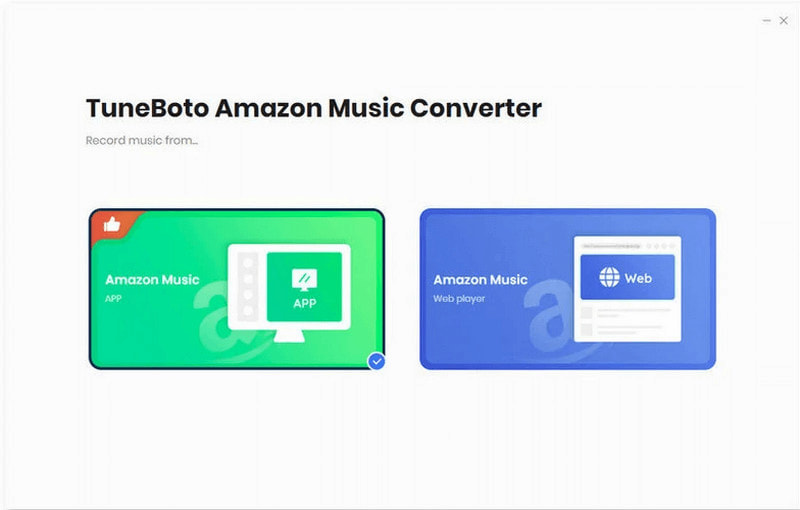
Step 1. As soon as TuneBoto launches, choose a working mode: Amazon Music App Mode or Amazon Web Player Mode. For this guide, we will use the Amazon Music App Mode.
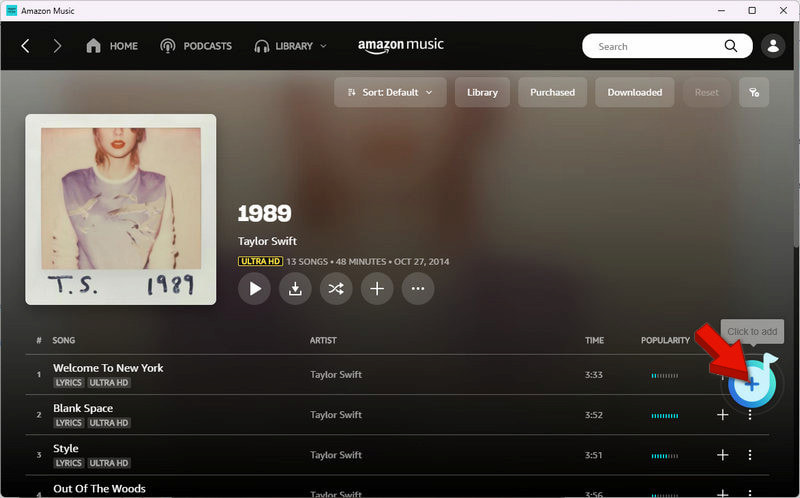
Step 2. Log in using your Amazon Music account and browse your music library. Click the blue Click to add button to add from a playlist or album.
Step 3. Before converting, set your output settings so you get exactly the audio quality and format you want. Then, click Convert to begin downloading.
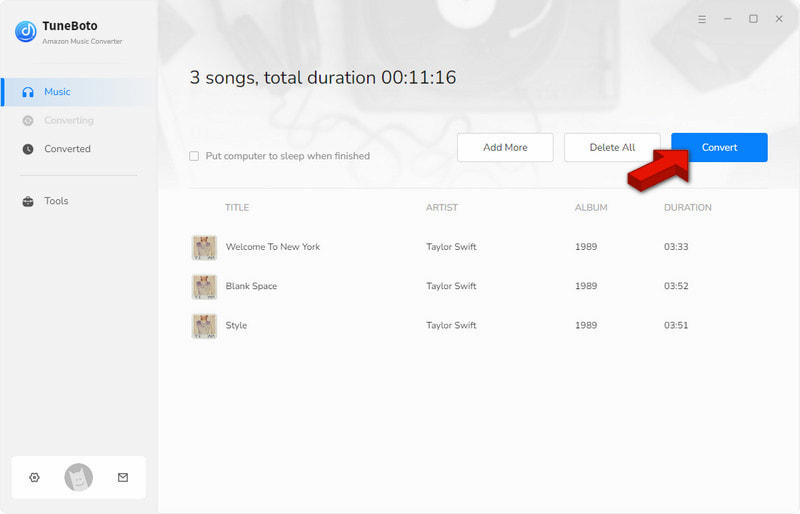
TuneBoto performs reliably for everyday Amazon Music conversion tasks. It delivers stable output quality and keeps audio at 320 kbps without noticeable degradation. Additionally, it handles batch conversion without breaking mid-process. However, it takes over a minute even for a single short track, which may feel slow compared to newer tools.
| Result | Format |
| Single Song (3:21) | 3 minutes and 8 seconds | MP3/320Kbps/44.1kHz |
| Album (10 tracks) | 38 minutes and 57 seconds | MP3/320Kbps/44.1kHz |
| Batch (102 tracks) | 3 hours and 46 minutes | MP3/320Kbps/44.1kHz |
Part 4. Best Alternative: TopVox All Music Converter
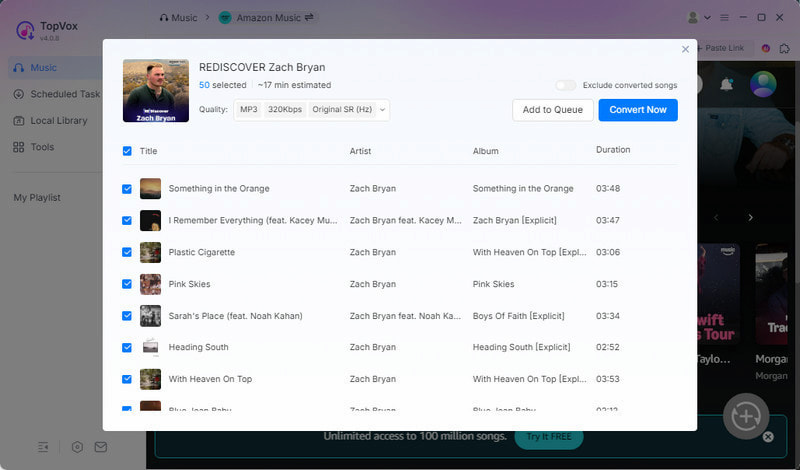
TuneBoto is not the only option available when it comes to turning Amazon Music into usable audio files. If you're looking for something more flexible and broader in scope, TopVox All Music Converter stands out as a strong alternative worth considering.
TopVox All Music Converter is designed to handle multiple music services while still keeping the conversion process simple and high-quality. It can convert Amazon Music to DRM-free formats, including MP3, FLAC, M4A (ALAC/AAC), WAV, and AIFF. In terms of export quality, it saves music in high-quality output up to 24-bit, 320 kbps, and 48kHz. Additionally, it supports simultaneous downloads with speeds up to 35× faster. It retains full ID3 tags, including song titles, artists, album details, and metadata organization. Remarkably, it supports multiple major streaming platforms beyond Amazon Music. It includes Apple Music, Spotify, YouTube Music, Deezer, Pandora, SoundCloud, Line Music, and Audible.
What to Look Forward to with the TopVox All Music Converter:
- Converts music into MP3, FLAC, WAV, AIFF, and M4A (AAC/ALAC) formats.
- Removes DRM protection, allowing you to use tracks offline on different devices.
- Supports converting music from Amazon Music and 8 major streaming platforms.
- Delivers up to 35× faster download and conversion speed for improved efficiency.
- Retains full ID3 tags, including title, artist name, album information, and metadata.
Part 5. TuneBoto Vs TopVox
| TuneBoto | Versus | TopVox |
| Amazon Music | Supported Services | Amazon Music, Apple Music, Spotify, YouTube Music, Deezer, SoundCloud, Pandora, Line Music, and Audible |
| WAV, FLAC, MP3, AAC, AIFF, and ALAC | Output Formats | MP3, FLAC, M4A (ALAC/AAC), WAV, and AIFF |
| 320kbps/44.1kHz | Audio Quality | 24-bit/320Kbps/48kHz or lossless FLAC/WAV |
| Up to 10× | Download Speed | Up to 35× |
| ✅ | Batch Downloading | ✅ |
| ✅ | DRM Removal | ✅ |
| ✅ | ID3 Tag Preservation | ✅ |
| $29.95 (3-Month Plan) | Price | $19.95 (1 Month License) |
| Windows and Mac | Platform | Windows and Mac |
Part 6. FAQs about TuneBoto Amazon Music Converter
Q: Is TuneBoto Amazon Music Converter safe to use?
A: TuneBoto is safe to use for personal use as long as you download it from the official website. It is a desktop application that installs locally on your computer and contains no malware or harmful components.
Q: Is TuneBoto Amazon Music Converter legal?
A: The software itself is legal to install and use, but how you use it determines the legality. You can use TuneBoto for personal tasks, such as offline listening or creating backups. However, converting streamed Amazon Music content into downloadable files may fall into a gray area.
Q: Is it legal to convert Apple Music to MP3?
A: Converting Apple Music to MP3 is also a legal gray area. Apple Music tracks are protected with DRM, which restricts how files can be copied or converted. Bypassing DRM protections can violate Apple's terms of service and may be considered copyright infringement.
Conclusion
In this TuneBoto Amazon Music Converter review, TuneBoto proves to be a decent tool for downloading Amazon Music. It performs well for everyday use, offering good audio quality and supporting common formats. However, it offers limited platform support and slower performance. If you're looking for a more powerful, all-in-one solution, it may not fully meet your long-term needs. For a better experience with faster performance, broader platform support, and higher flexibility, it's worth switching to TopVox All Music Converter.
Owen Bannett
Owen Bannett is a music enthusiasm as well as a senior writer. He has paid close attention on the pros & cons of various audio formats, bitrate, sample rate and encoding methods. Always seeking the best listening experience, Owen has deep insights about lossless music and diverse music converters on the markets.




 by
by