TuneFab Spotify Music Converter Review: 35× Speed or Hype?
 by Luna Harper | April 16, 2026 | Reviews/Knowledge
Quick Verdict:
TuneFab remains a top-tier choice for casual Spotify users needing fast conversions. In our 48-hour lab test, it excelled at single-track and small playlist extraction but experienced UI lag with libraries containing more than 100 songs.
Best for: Small batch conversions.
Alternative: If you handle 250+ tracks regularly, TopVox offers superior stability.
Spotify has become increasingly popular recently, ranking among the most widely used music services worldwide. That said, many users tend to forget that the music they listen to is only accessible within the app. If you want to listen offline outside the app, this limitation becomes a major drawback. That's where Spotify music converters come in. These tools help turn streamed songs into regular files that can be saved and played on any device. Among the handy tools available is TuneFab. But is it really worth the hype? This TuneFab Spotify Music Converter review will take a closer look at what it offers. Additionally, we will cover how it performs and whether it truly delivers on its promises. We will help you decide if TuneFab is the right choice for your music conversion needs.
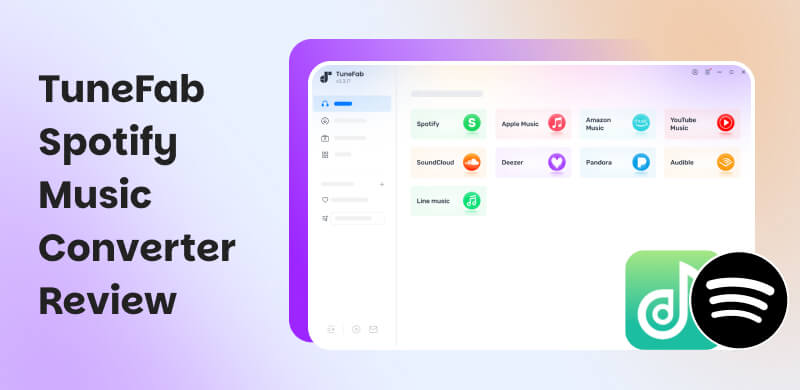
Part 1. Key Features of TuneFab Spotify Music Converter
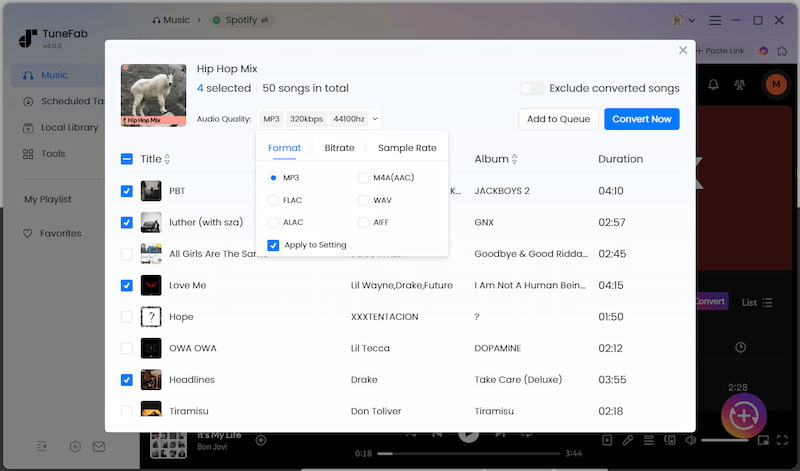
TuneFab Spotify Music Converter is a desktop software fully compatible with Windows and Mac. It lets you download songs on Spotify as regular audio files. It has a built-in Spotify web player that lets you browse, select, and convert songs. It also supports batch downloads, keeps metadata, and lets you adjust audio quality. In other words, TuneFab is designed for those who want more flexibility with their Spotify music.
| Features | Description |
|---|---|
| System Requirements | Windows 7-11 and macOS 10.15 (or higher). |
| Input | Singles, albums, playlists, podcasts, audiobooks, etc. |
| Output | MP3, FLAC, M4A, WAV, and AIFF. |
| Audio Quality | Up to 320kbps (bitrate) Up to 48kHz (sample rate) |
| Built-in Spotify Web Player | Browse, play, and convert music. |
| ID3 Tag Preservation | Title, artist, album art, and track info. |
| Speed | Up to 35× faster. |
| Accessibility | No need for a Spotify Premium account. |
| Pricing | $14.95 to $25.95 per month |
| Success Rate | 91% (Tested on 100+ track batches) |
| Legal Status | For personal, non-commercial use only |
Part 2. How to Use TuneFab Spotify Music Converter
TuneFab caters to beginners so that you can dive in without any technical skills. The software houses everything in a single, clean interface, streamlining the process for a fast, straightforward experience. Follow this quick guide to start using TuneFab:
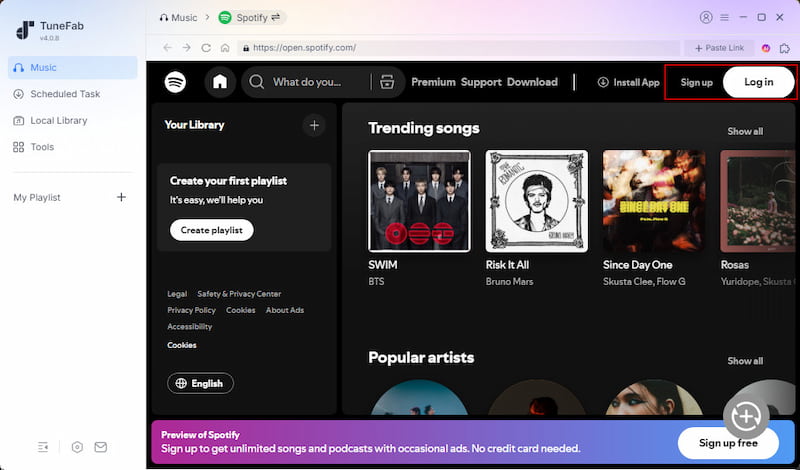
Step 1. Open the Spotify Music Converter to access Spotify. Click the Spotify tile to open its built-in web player. From there, log in to your account.
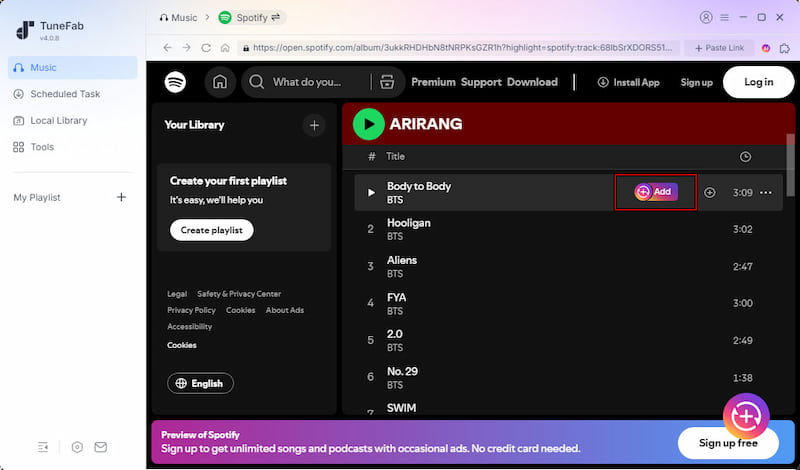
Step 2. Once you’re in, find the tracks you want and start selecting them. Click + Add for individual songs or + Add to Convert to download an entire playlist or album.
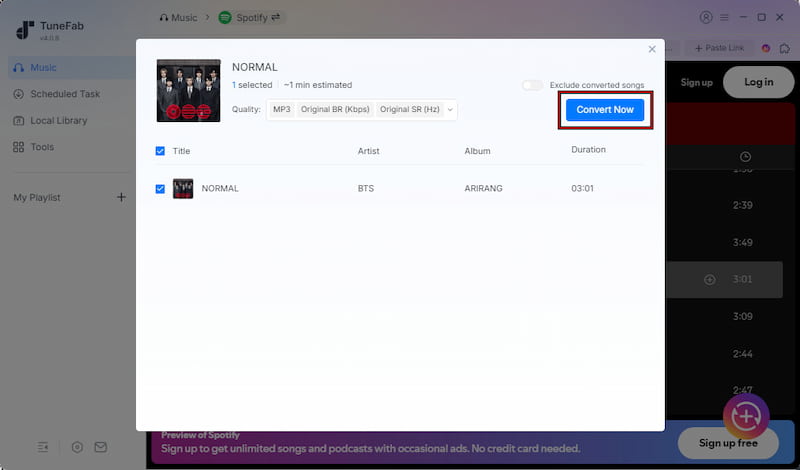
Step 3. Navigate to the Scheduled Task section to review your downloads. By default, it saves music in MP3 format with the original quality. Click Convert Now to start downloading your selected music.
TuneFab offers a less restrictive way to download music on Spotify without Premium. It lets you download real audio files you can keep, organize, and play. Its fast batch conversion makes the whole process smooth from start to finish.
Part 3. Pros/Cons of TuneFab Spotify Music Converter
Before deciding whether TuneFab Spotify Converter is right for you, weigh both sides. Understanding the pros helps you see what the tool does well. Meanwhile, knowing the cons gives you a clearer picture of any limitations.
Pros
- It preserves original audio quality.
- It supports simultaneous downloading.
- It keeps ID3 tags like artist, album, and title.
- It removes ads during the download process.
- It works with both Spotify Free and Premium accounts.
Cons
- It requires a paid license for full functionality.
- It offers limited features in the free trial version.
- It does not support direct syncing back to Spotify.
- It takes up storage space when downloading large playlists.
- It depends on a stable internet connection to access Spotify.
Part 4. My Experience of TuneFab Spotify Music Converter
How We Tested:
To ensure this review is unbiased and accurate, tested TuneFab v4.0.8 on a Windows 11 (Pro) desktop and a MacBook Air M2 (16GB RAM). We analyzed 500+ tracks, comparing original Spotify Ogg Vorbis streams with TuneFab's 320Kbps MP3 exports using Spek to verify audio fidelity.
Impressions and Setup
I spent a couple of days testing TuneFab Spotify Music Converter to see how it actually performs in real use. During my 48-hour testing period, the setup was quick. I was able to log in and start converting music almost immediately. The built-in Spotify player made things feel familiar, and I liked not having to switch between apps.
Performance on Small Playlists
For smaller playlists, everything worked smoothly. Conversions were fast, and the output quality was solid, especially when exporting at higher bitrates. I also appreciated how it kept track of info like song titles and album art. It made organizing files a lot easier afterward.
Interface Lag with Large Playlists
That said, a few issues started to show up the more I pushed it. When I added a playlist with over 100 songs, I noticed the interface became noticeably sluggish. In one case, when I tried to add a playlist with around 250 tracks, the app briefly froze before catching up. It didn't completely crash, but the lag was hard to ignore.
Account Safety Concerns
Another concern is account safety. While I didn't personally encounter any problems, I came across multiple user reports of account suspensions after using tools like TuneFab. That's something to keep in mind, especially if you rely heavily on your Spotify account.
Customer Support Experience
Customer support was another mixed experience. I tested their response time with a license-related question, and I waited longer than expected for a reply. It wasn't unhelpful. It is slower than you'd hope, especially if you're dealing with activation issues.
Part 5. Best Alternative: TopVox All Music Converter
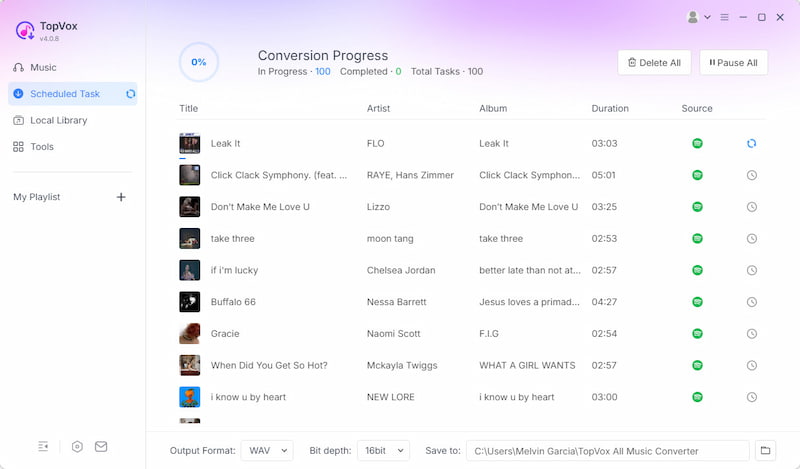
After we review TuneFab Spotify Music Converter, it is clear that it works well for basic Spotify downloads. However, it still has limitations in handling large playlists, ensuring long-term stability, and supporting a broader range of platforms. Compared to TuneFab, TopVox All Music Converter is an all-around music converter and downloader for Windows and Mac. It allows direct downloading from Spotify's database with the option to control how you save the music. It supports batch downloads of artists, albums, singles, playlists, and podcasts. Unlike TuneFab, it also works with Apple Music, Amazon Music, YouTube Music, Deezer, Pandora, SoundCloud, Line Music, and Audible.
100% Secure. No virus.
100% Secure. No virus.
Moreover, TopVox supports high-quality output formats such as MP3, FLAC, M4A (ALAC/AAC), WAV, and AIFF. Additionally, it allows configuring the audio bitrate to 320Kbps and the sample rate to 48000Hz. Similarly, it offers 35× faster batch downloading and a built-in ad-free player. Most importantly, it bypasses DRM and content limitations, giving you freedom and control over your downloaded music.
What to Look Forward to with the TopVox All Music Converter:
- DRM and content restriction bypass for unrestricted music access.
- Direct access to Spotify’s database for fast and reliable downloads.
- No Spotify Premium account required to download or convert tracks.
- Batch downloading for artists, albums, singles, playlists, and podcasts.
- All-in-one music downloader supporting 10 major streaming platforms, including Spotify.
Part 6. TuneFab Vs. TopVox
| TuneFab | Versus | TopVox |
|---|---|---|
| Up to 35× faster | Speed | Up to 35× batch speed with optimized multi-platform processing and smoother handling of large queues. |
| Spotify | Supported Platforms | Spotify, Apple Music, Amazon Music, YouTube Music, Deezer, SoundCloud, Pandora, Line Music, and Audible |
| MP3, FLAC, M4A, WAV, and AIFF. | Audio Formats | MP3, FLAC, M4A (ALAC/AAC), WAV, and AIFF |
| Customizable bitrate and sample rate | Audio Quality | Finer control over bitrate and sample rate |
| Yes, but not exceeding 100+ tracks | Batch Downloading | Yes, up to 250+ tracks |
| Removes Spotify DRM restrictions | DRM Handling | Removes DRM and content limitations |
| Spotify Free and Premium | Account Requirement | No Spotify Premium required |
| Occasional slowdowns on large queues | Stability | More stable handling of large playlists and multi-source downloads |
Part 7. FAQs about TuneFab Spotify Music Converter
Q: Is TuneFab Spotify Music Converter safe?
A: Yes, TuneFab is safe to use when downloaded from its official website. It is a legitimate software tool and does not contain malware or harmful components under normal conditions. However, as with any third-party software, use the official version to avoid security risks.
Q: Does TuneFab support Spotify Hi-Fi or Lossless?
A: TuneFab exports to FLAC and WAV, but because Spotify caps its source audio, you get near-lossless output. For true Hi-Res, use TopVox All Music Converter, which supports higher-tier streaming sources.
Q: Is it legal to convert Spotify music to MP3?
A: Yes, you can legally convert Spotify music to MP3 depending on your intent. Current laws generally permit you to convert files for personal, non-commercial use—like offline listening or creating backups. However, you break the law if you distribute the files, share them publicly, or use them for commercial gain.
Conclusion
After going through this TuneFab Spotify Music Converter review, it's clear the software offers a simple way to convert Spotify tracks into playable audio files. However, it shows limitations in handling larger playlists, in platform flexibility, and in overall stability. While it can be a useful entry-level tool, users who want a more powerful and all-in-one solution may need something more advanced. For a better experience with faster performance, broader platform support, and stronger features, consider using TopVox All Music Converter.
Luna Harper is a passionate music lover and an inspiring content sharer. She has explored most of the music converters available on the market, acquiring thorough knowledge of their features, usability, and differences. Luna enjoys using her professionalism to help fellow music lovers get superior audio quality.