Download SoundCloud to WAV via Desktop/Online Tools [Tested]
 by Owen Bannett | July 3, 2026 | SoundCloud
Quick Summary
To bypass streaming limitations of SoundCloud, you can try various SoundCloud to WAV downloaders to find the ideal solution:
🥇TopVox All Music Converter – Top-tier tool ensures 1:1 lossless music conversion with up to 35x batch download speed.
🏅ConverterFactory – A website for quick format conversion that supports output audio files to WAV.
🏅Soundcloudrips – Converts SoundCloud links to MP3 files quickly but falls short of delivering the 1:1 lossless quality and robust stability.
We all know that SoundCloud users can only listen to music when they are online. So, how to listen to various music offline? The answer is downloading music from SoundCloud as a local file. This guide will show you 3 SoundCloud to WAV converters to finish the task. With that, you can access all your music without relying on an internet connection.
How We Tested
I was trying to find a handy tool to download SoundCloud to WAV and finally picked 3 methods that have certainly gotten a lot of hype. Each SoundCloud music converter was focused on five key criteria: actual download speed, audio fidelity, process stability, conversion success rate, and ID3 tags organization. Here’s a table providing benchmark results.
| Method | TopVox All Music Converter | ConverterFactory | Soundcloudrips |
|---|---|---|---|
| Audio Quality | WAV 24bit/48kHz (Lossless) | 16bit (Compressed) | Compressed |
| Batch Download | ✅️ | ✅️(manually upload) | ❌️ |
| Download Speed | 35x | Slow | Very Slow |
| Full ID3 Tags | ✅️ | ❌️Lossy | ❌️ |
| Success Rate | 98.78% | Always failed | Poor |
| Security | ✅️Ad-free and stable | ✅️Ad-free | ❌️(Jump to unsafe websites and automatically download unfamiliar programs) |
Verdict:
After I have tried each one out, I’m sure that TopVox is the best product to download SoundCloud to WAV. All my official SoundCloud music has been seamlessly backed up to my Windows 11 Pro computer. The output quality shows that the system is reliable and stable. Keep reading this blog to see how these music converters go.
Part 1. Best Methods to Download and Convert SoundCloud to WAV
Want the best SoundCloud to WAV downloader? If so, we suggest using TopVox All Music Converter. When it comes to downloading and converting music from SoundCloud, we can tell that this software is perfect, thanks to its engaging features. It can provide a smooth conversion process, a simple user interface, and improved compatibility. You can convert your music up to 35 times the conversion speed. You can also convert multiple music files at once, allowing you to get the final output while saving more time. What I like most here is that it can produce high-quality WAV audio files at up to 24bit and 48000Hz with original metadata. Additionally, WAV is not the only format supported; you can also convert SoundCloud music to other video formats, including MP4, FLAC, AAC, AC3, OGG, and more. Thus, if you are looking for the best software that can download SoundCloud to WAV, consider using TopVox.
Features
- The music converter can offer a fast conversion process.
- It supports various audio formats, including MP3, AC3, FLAC, OGG, and more.
- It supports the batch conversion feature.
- The program is accessible to both Mac and Windows.
- The software produces high-quality audio output.
Step 1. Download and launch TopVox All Music Converter on your Windows or Mac. You can use the buttons below to easily access the software.
100% Secure. No virus.
100% Secure. No virus.
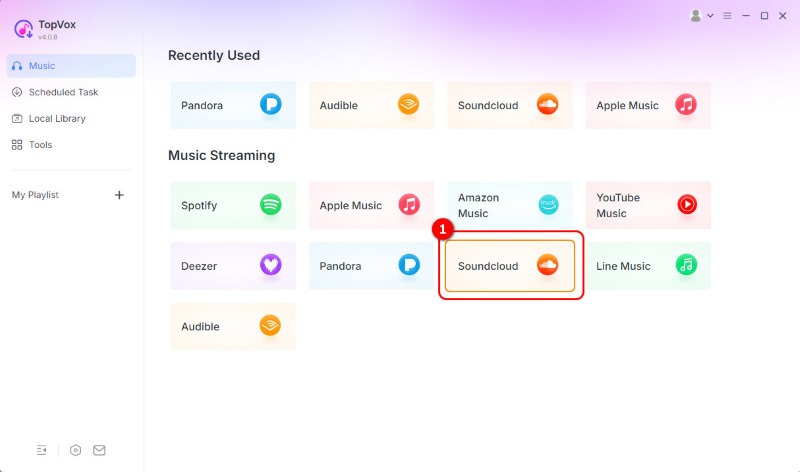
Step 2. Once the mini interface appears, select the SoundCloud platform. Then, you can start creating your account.
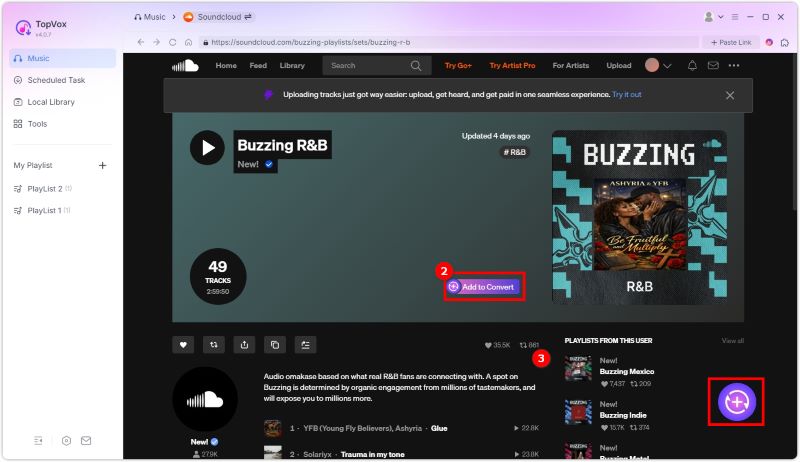
Step 3. After the loading process, go to the Search section and browse the music you want to download. Then, after finding the music, click the Add to Convert button.
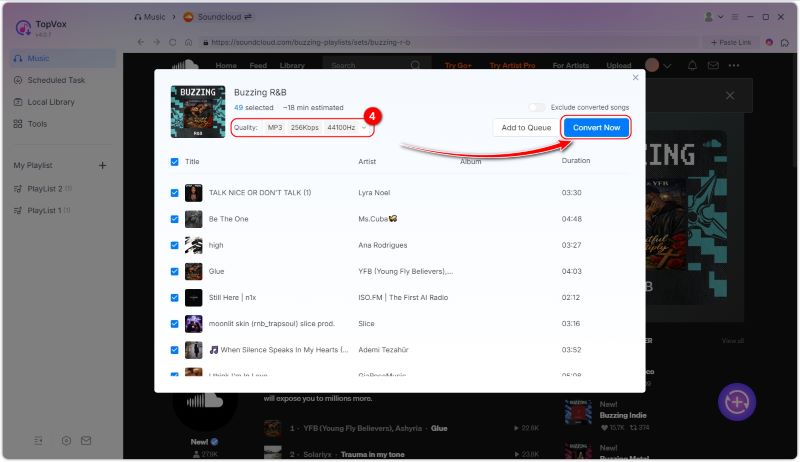
Step 4. Go to the Format section and select the WAV format. Finally, click the Convert Now to start the SoundCloud to WAV conversion process.
Expert Review:
FileCR, a trusted source for software downloads, their team thoroughly evaluated TopVox All Music Converter and concluded that it acts like a bridge between streaming platforms and offline listening, making it easy to save tracks in different formats. There is no distortion or loss of detail, so you get the same experience as with streaming. In my test, the conversion process is fast and efficient. Even when working with a large playlist, it converts SoundCloud to WAV files like turning water into ice without any delay.
Pay a visit: The best methods to convert Spotify to MP3.
Part 2. Download SoundCloud to WAV Online
Do you want an online SoundCloud to WAV converter? If so, you can check this section, as we provide you with the best online tools to access for an effective conversion process.
Method 1. Convert SoundCloud to WAV Using ConverterFactory
Another helpful online tool that is capable of converting your favorite music from SoundCloud is ConverterFactory. This tool is ideal, especially for non-professional users, due to its easy-to-operate layout. Aside from that, the tool can also offer a fast conversion process, allowing you to save more time. What's more, ConverterFactory ensures that you can get the best quality for a satisfying listening experience. The only drawback here is that some ads appear on the PC screen, which can be annoying. However, to achieve the desired result, follow the methods we have provided.
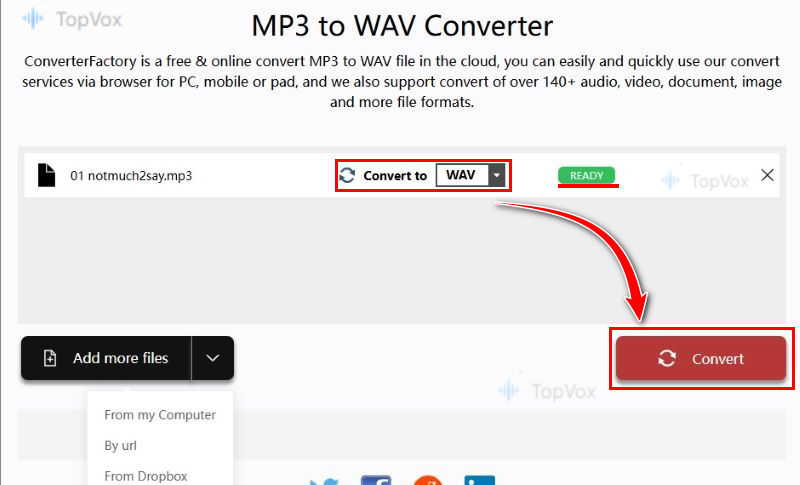
Step 1. First, you have to access the site on your browser. After that, click Choose Files from your computer. You can also tap the down arrow to change file uploading: By URL or From Dropbox.
Step 2. Pick audio files in the local folder and select WAV output format. When it shows green READY, just click on Convert.
Step 3. When it finishes uploading, you can click on Download to save the SoundCloud WAV track.
Testing Experience
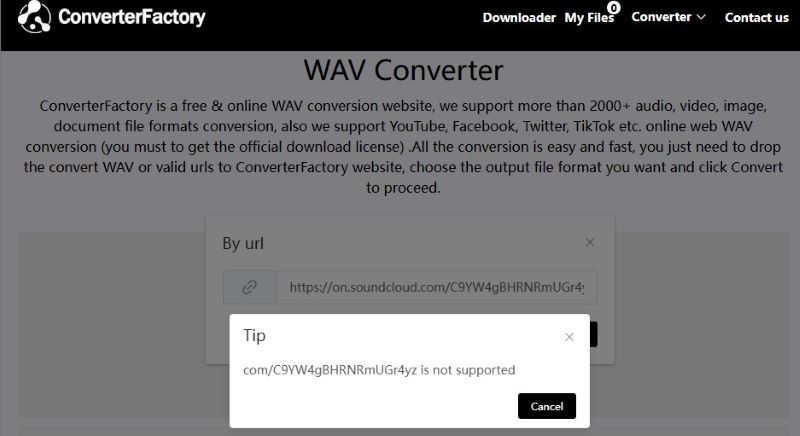
In my test, after pasting a song URL from SoundCloud, the prompt says, “xxx (my URL) is not supported”! Every time, the outcome is the same. There’s a reasonable doubt that it doesn't support downloading SoundCloud-protected songs!
Method 2. Download SoundCloud to WAV Using Soundcloudrips
Another SoundCloud to WAV downloader, Soundcloudrips features a seamless conversion process through all web browsers, ensuring you receive the music with the best possible audio quality and convenient for all users. You can download SoundCloud to FLAC, MP3, AAC, AC3, OPUS, FLAC, OGG, and more. The drawback here is that you must have a stable internet connection to get the tool's overall performance.
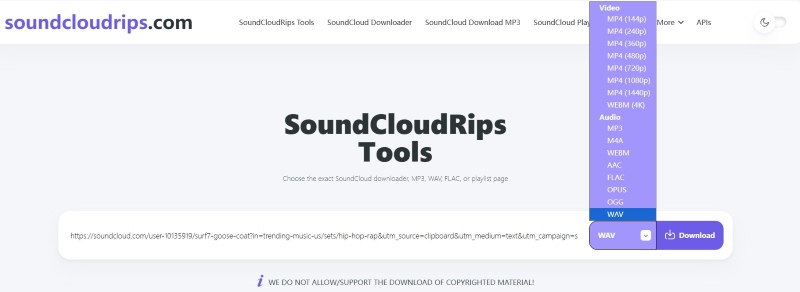
Step 1. After you open your browser, you can access the main SoundCloudrips website. Then, before proceeding to the next step, ensure that you have already obtained the music link from SoundCloud.
Step 2. After that, paste the link from the tool's interface. From the Format section, select the WAV format.
Step 3. Finally, you can now hit the Download button to start the conversion and saving process.
User Experience
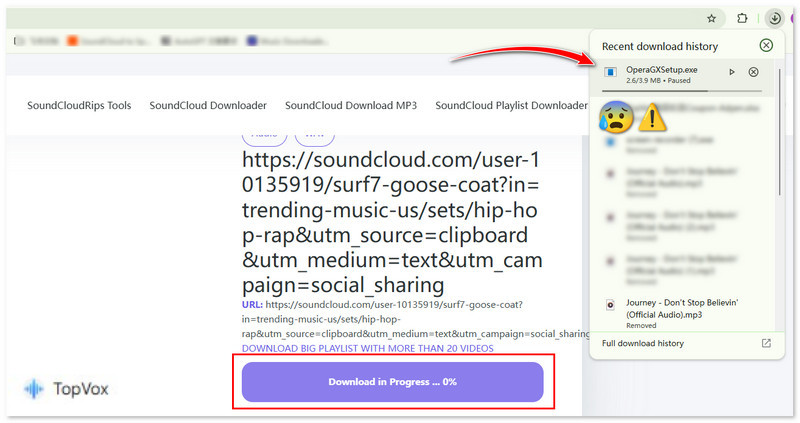
Honestly, I failed to download any SoundCloud songs using this downloader site! It was fine before! When I filled in the target URL, the interface showed no response at all. Worse, it led me to a webpage and automatically downloaded a program! So strange! It claims “WE DO NOT ALLOW/SUPPORT THE DOWNLOAD OF COPYRIGHTED MATERIAL”, which may be why it can’t recognize the song link.
Part 3. FAQs about SoundCloud to WAV
Why Convert SoundCloud to WAV?
Converting SoundCloud to WAV is the best choice if you want to obtain an audio file with the highest quality. The good part here is that the format is perfect for editing and long-term preservation.
What is the disadvantage of WAV files?
Since the WAV format offers exceptional audio quality, you can expect the audio’s file size to be significantly larger than that of other audio formats. Therefore, if you intend to store numerous WAV files, ensure that you have enough storage space.
Is WAV better for music?
Absolutely, yes. If your main goal is to listen to any audio with the best quality, then using WAV is ideal. With this format, you can get a satisfying quality during the audio playback.
Conclusion
To download and convert SoundCloud tracks to the WAV format, you need the right tool to do so. Thanks to this tutorial, you have learned how to convert SoundCloud to WAV smoothly and effectively. Additionally, if you want the best converter available for your Windows and Mac, it is recommended to use TopVox All Music Converter. This program ensures a fast conversion process with the best audio quality.
100% Secure. No virus.
100% Secure. No virus.
Owen Bannett is a music enthusiasm as well as a senior writer. He has paid close attention on the pros & cons of various audio formats, bitrate, sample rate and encoding methods. Always seeking the best listening experience, Owen has deep insights about lossless music and diverse music converters on the markets.