NoteBurner Apple Music Converter Review: Speed+Quality Test
Summary:
NoteBurner Apple Music Converter offers flexible output formats and clear customization settings. However, it remains limited to Apple services. While it works well for basic Apple Music conversion, users seeking a more flexible and transparent experience may prefer TopVox All Music Converter. This tool offers broader platform support and greater freedom for managing music files.
For many Apple Music users, a converter becomes less of a luxury and more of a necessity. It lets you keep music offline, move tracks to other devices, and escape app lock-in. That's where NoteBurner, known as iTunes Audio Converter for Windows or Apple Music Converter for Mac, comes in. It promises to turn your playlists into open formats. This way, you can keep and use them more freely across different platforms. But before committing, what really matters is how it performs in real use. This NoteBurner Apple Music Converter review takes a closer look at its actual performance. If it doesn't fully meet your expectations, we'll also offer an alternative with a simpler experience.
Part 1. Overview of NoteBurner Apple Music Converter
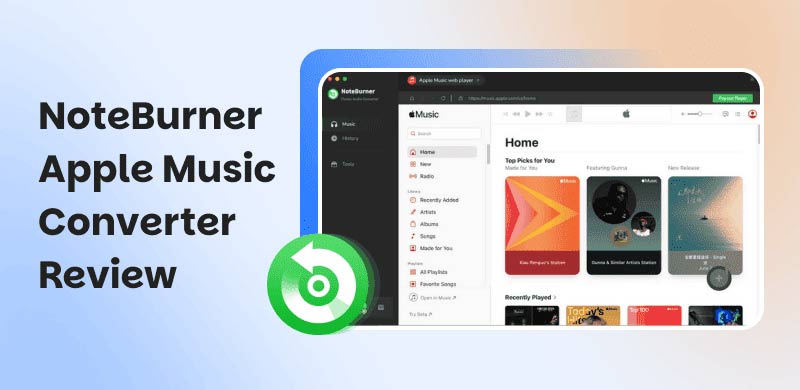
At first glance, the naming can throw you off a bit, and honestly, it's not just you. When you download NoteBurner, the Mac version appears as NoteBurner Apple Music Converter for Mac. Meanwhile, the Windows version labels it as iTunes Audio Converter. It feels like two different tools, but they're the same software under the hood. Once you get past that confusion, what you're dealing with is a fairly versatile audio converter. It can convert Apple Music and iTunes to MP3 and other standard audio formats.
What to Know More about NoteBurner:
- Supports batch conversion for entire playlists or libraries.
- Preserves original quality, including Hi-Res Lossless output.
- It exports tracks in MP3, AAC, M4A, WAV, FLAC, AIFF, and ALAC.
- Up to 10× faster conversion speed compared to real-time recording.
- Converts Apple Music, iTunes, audiobooks, and podcasts into audio files.
Part 2. Pros/Cons of NoteBurner Apple Music Converter
It matters to understand the NoteBurner Apple Music Converter pros as they tell you what you're actually getting. It includes how well the tool performs, how much time it saves, and whether it fits your workflow. It's just as important to know the cons, since they reveal the limits, trade-offs, and frustrations you might run into.
Pros
- It preserves ID3 tags like artist, album, and artwork.
- It handles DRM-protected Apple Music files effectively.
- It enables you to play Apple Music on non-Apple devices.
- It works with both Apple Music streams and iTunes libraries.
- It keeps original sound quality, including high-bitrate output.
Cons
- It requires a paid license for full, unrestricted use.
- It can occasionally fail to sync or detect certain tracks.
- It requires an active Apple Music or iTunes subscription.
- It does not always maintain true lossless quality despite claims.
- It relies on recording-based conversion rather than direct file extraction.
Part 3. My Experience of NoteBurner Apple Music Converter
It helps to understand how NoteBurner actually works in real use. It doesn't work like a typical Apple Music converter tool. Instead, it follows a structured conversion process that runs inside your iTunes or Apple Music environment.
Step 1. Start by getting the NoteBurner Apple Music Converter free download. Install it and be sure to complete the setup process. As soon as it launches, it prompts you to choose the iTunes app or the Apple Music web player. For this method, we will take the Record from the iTunes App.
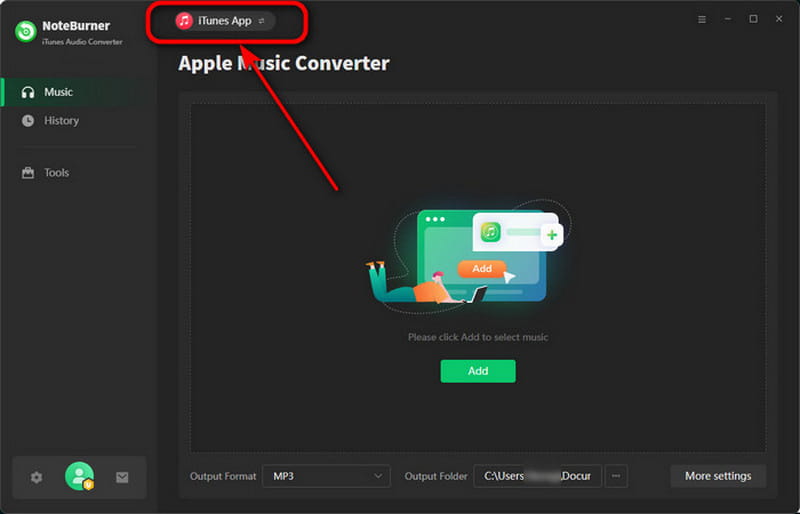
Step 2. Inside the Settings menu, choose a Conversion Mode and specify your output format. You can also adjust the bitrate and sample rate. Click Add to open the iTunes library. From here, pick an Apple Music track, audiobook, podcast, or M4P-protected audio files.
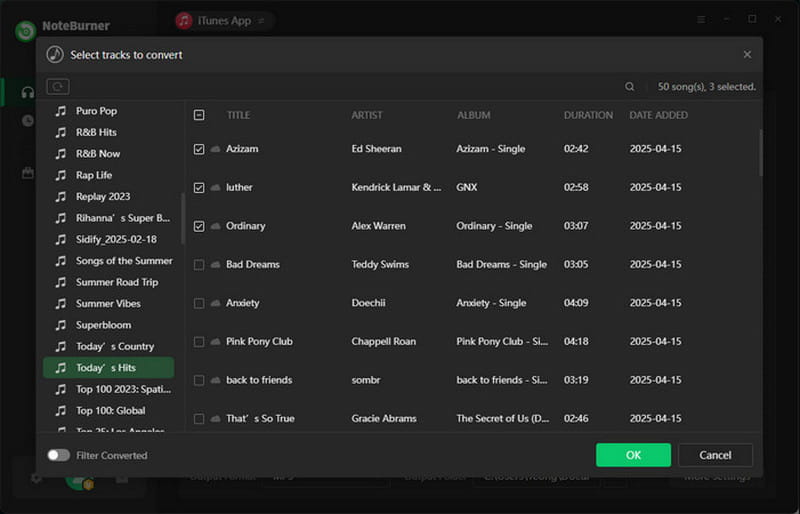
Step 3. Click Convert to begin the actual conversion. At this point, NoteBurner plays and records the selected tracks and converts them. After processing, it saves files locally, ready for offline use on any compatible device.
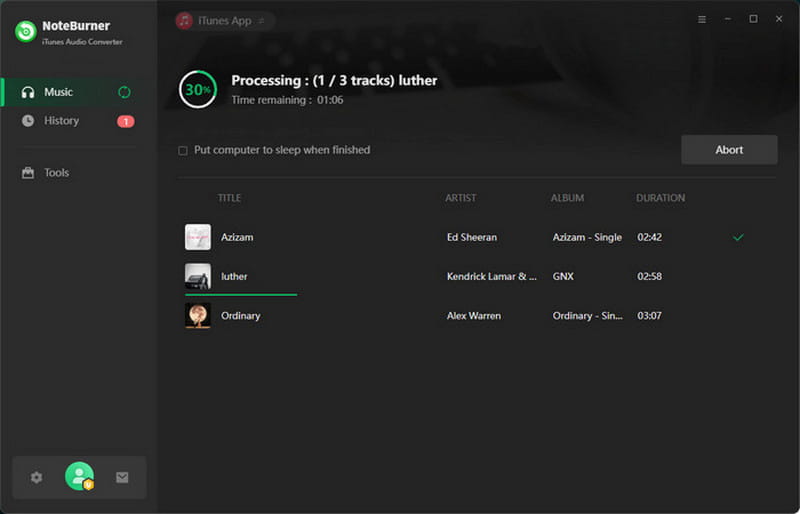
NoteBurner performs steadily in real Apple Music conversion tasks. It delivers consistent audio quality while keeping processing times reasonable across different workloads. It handles both small and large music libraries without sacrificing output quality, making it perfect for everyday use.
| Result | Format |
| Single Song (2:42) | 1 minute and 6 seconds | MP3/320Kbps/44.1kHz |
| Album (15 tracks) | 19 minutes and 15 seconds | MP3/320Kbps/44.1kHz |
| Batch (50 tracks) | 1 hour and 50 minutes | MP3/320Kbps/44.1kHz |
Part 4. Best Alternative: TopVox All Music Converter
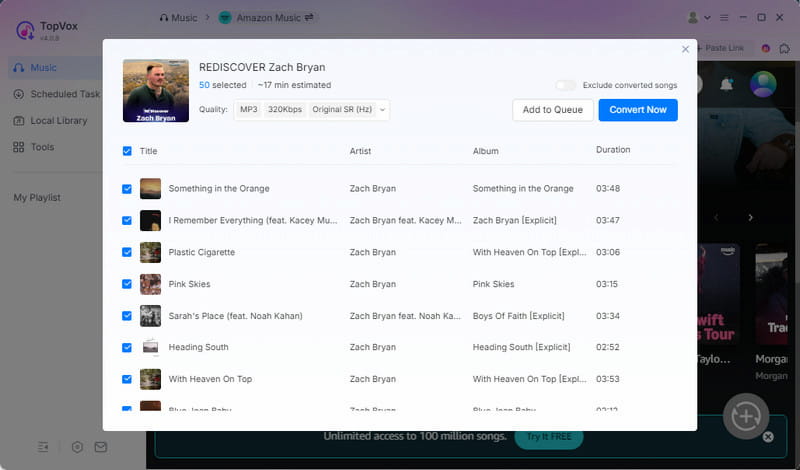
It might be tempting to search for a NoteBurner Apple Music Converter crack to get full access without limitations. However, that usually leads to unstable tools, security risks, and broken features that don't really solve the core problem. That's where TopVox All Music Converter comes in, offering a functional approach without relying on patched or unsafe versions.
TopVox All Music Converter is a one-stop music converter that fully decrypts and converts Apple Music tracks into DRM-free audio files. It gives you genuine offline ownership of your music library. Instead of just capturing audio, it focuses on delivering stable, high-quality outputs. It supports downloading single tracks, entire artists, full albums, and complete playlists with ease. It exports music in MP3, FLAC, M4A (ALAC/AAC), WAV, and AIFF. It also allows you to adjust audio settings, supporting up to 320 kbps bitrate and 48,000 Hz sample rate. Beyond Apple Music, it works with Spotify, Amazon Music, YouTube Music, Deezer, Pandora, SoundCloud, Line Music, and Audible.
What to Look Forward to with the TopVox All Music Converter:
- Offers flexible output settings for customized audio conversion.
- Allows offline playback across different devices without restrictions.
- Decrypts Apple Music tracks and converts them into DRM-free audio files.
- Works as an all-in-one converter for multiple platforms, not just Apple Music.
- Enables batch downloading for large playlists with up to 35× conversion speed.
Part 5. NoteBurner Vs. TopVox
| NoteBurner | Versus | TopVox |
| Apple Music and iTunes | Supported Services | Apple Music, Spotify, Amazon Music, YouTube Music, Deezer, SoundCloud, Pandora, Line Music, and Audible |
| MP3, AAC, M4A, WAV, FLAC, AIFF, and ALAC | Output Formats | MP3, FLAC, M4A (ALAC/AAC), WAV, and AIFF |
| 320kbps/44.1kHz | Audio Quality | 320Kbps/48kHz or lossless FLAC/WAV |
| Up to 10× | Download Speed | Up to 35× |
| ✅ | Batch Downloading | ✅ |
| ✅ | DRM Removal | ✅ |
| ✅ | ID3 Tag Preservation | ✅ |
| $129.9 (Lifetime Plan) | Price | $139.95 (Lifetime License) |
| Windows and Mac | Platform | Windows and Mac |
Part 6. FAQs about NoteBurner Apple Music Converter
Q: Does NoteBurner work with Apple Music?
A: NoteBurner works with Apple Music through two modes: the App Mode and the Web Mode. In practice, it captures and converts Apple Music tracks into standard audio formats. This allows offline use outside the Apple services.
Q: Is NoteBurner legit and safe?
A: Yes, NoteBurner is a legitimate software tool when downloaded from its official website. It operates as a desktop-based tool rather than a cracked or modified app. Additionally, it does not require suspicious installations.
Q: Why can't I convert Apple Music to MP3?
A: Apple Music uses DRM to prevent you from converting tracks to MP3 or other open formats. You can only listen to older Protected AAC purchases or stream music directly from their service.
Conclusion
This NoteBurner Apple Music Converter review shows that NoteBurner works well for basic Apple Music conversion. Additionally, it delivers stable open-format output for offline use. However, its limitations in flexibility and platform support become noticeable with heavier use. For a more complete solution, TopVox All Music Converter is a stronger alternative. It offers faster performance, broader compatibility, and greater freedom.
Luna Harper
Luna Harper is a passionate music lover and an inspiring content sharer. She has explored most of the music converters available on the market, acquiring thorough knowledge of their features, usability, and differences. Luna enjoys using her professionalism to help fellow music lovers get superior audio quality.




 by
by