Ways on How to Download SoundCloud Songs on iPhone
 by Owen Bannett | April 10, 2026 | SoundCloud
Can you download music on SoundCloud? Well, the answer is yes. If you are using the SoundCloud Go+, the platform will provide a download button, allowing you to download your favorite music effectively. However, there are various limitations you might experience. The downloaded songs will only be saved on the SoundCloud app, not on your device. So, if you want to permanently download your music, check this post. We are here to teach you how to download SoundCloud songs on an iPhone for offline listening. You will also explore various methods you can follow to achieve your main objectives. Thus, read this post and get more ideas on how to obtain the music from SoundCloud successfully.
Part 1. Official Way to Download SoundCloud Songs
If you want to download SoundCloud songs officially, you must access the SoundCloud Go+. This platform is perfect since it can give you all the music you need in the best quality. With its Download feature, you can effectively save and download your favorite songs to the SoundCloud app, ideal for offline listening. You can even create your own playlist if you want to. With that, if you want to start with the process, you can use the simple instructions we have provided below.
Step 1. First, download the SoundCloud app on your iPhone. After that, you can start purchasing the Go+ version to begin the downloading process.
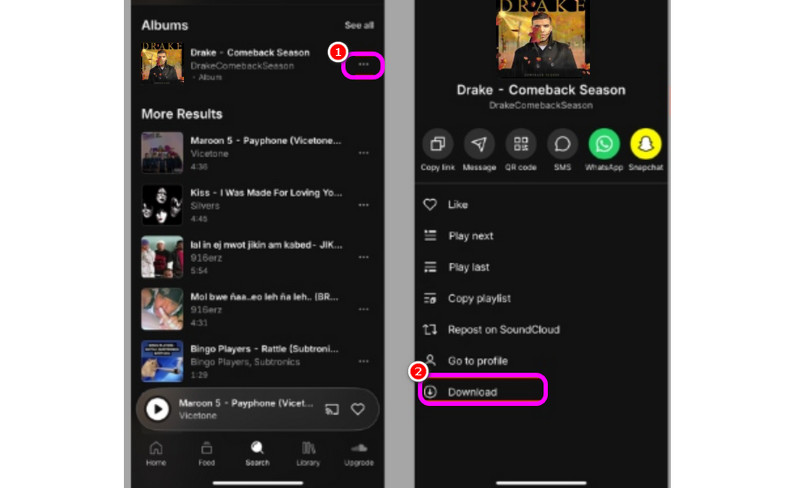
Step 2. After that, go to the Search section to start browsing the songs you want to download.
Step 3. Then, from the music, press the three-dot button and tap the Download button. With that, the downloading process will begin.
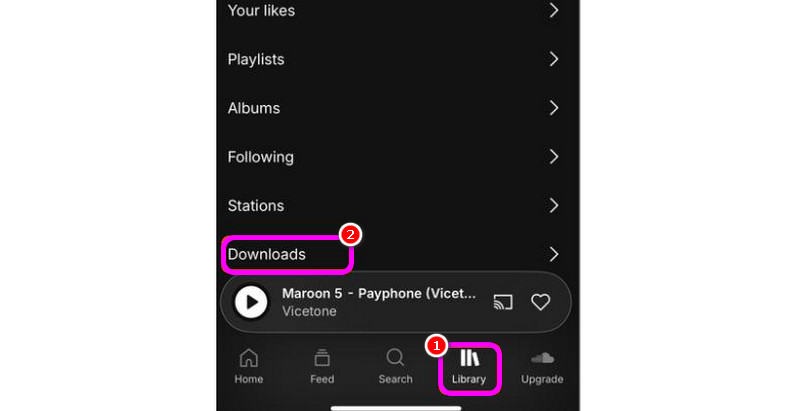
Step 4. To see your saved music, you can go to the Library > Downloads section. With that, you can now begin listening to the downloaded songs offline.
Pros
- The pro version can give you an ideal audio quality for up to 256 kbps, resulting in a better listening experience.
- You can create your playlist for an organized set of music.
- The tool has an understandable layout, making it easy to browse and download songs.
- There are no disturbing ads during the streaming.
- You can sync/connect your account to any device, making it ideal for users.
Cons
- You have to pay the subscription monthly.
- Files are only considered rented since they are saved inside the app.
- When the subscription expires, the saved and downloaded songs will also disappear.
- There are no MP3 files since the music won't be saved on your device.
Part 2. Online Ways to Download SoundCloud Songs to iPhone
Want the best online SoundCloud song downloaders? In that case, you must read all the details in this section, as we offer the best online tools you can use that can offer an effective downloading process.
1. KlickAud
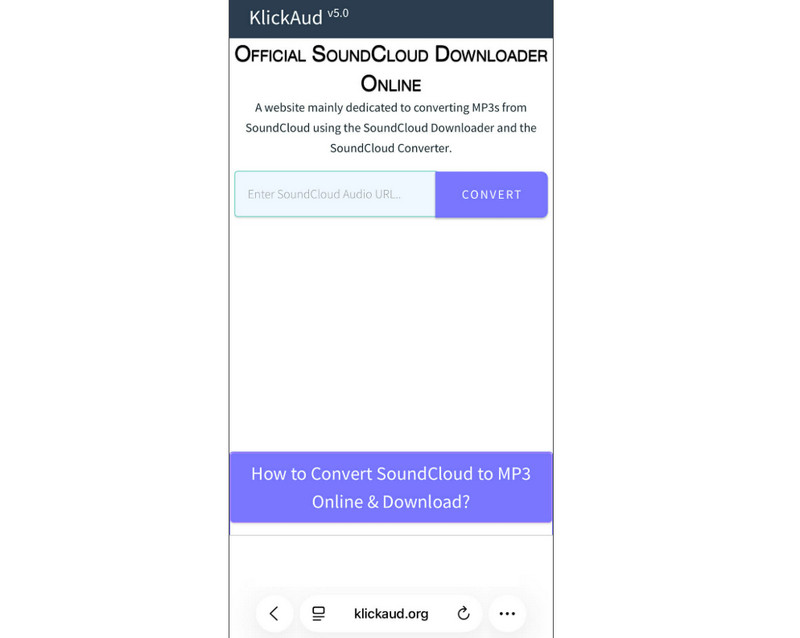
One of the most reliable online-based tools you can access that can help you convert and download SoundCloud songs is KlickAud. With this tool, you can ensure that you get the result you need after the conversion process. What we like here is that it can give you a neat and simple user interface, allowing you to use all the necessary functions easily and instantly. Plus, the tool can save music with high fidelity, resulting in a better and more satisfying listening experience. You can even use this to download SoundCloud to PC, making it more ideal for all users. With that, we can tell that this downloader is reliable and effective.
2. MusicVerter
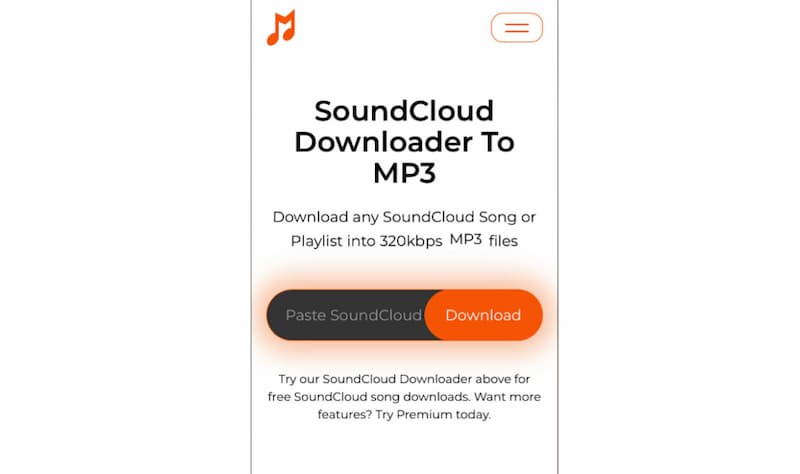
Another tool you can access online that can effectively download SoundCloud songs on iPhone is MusicVerter. This tool is capable of saving any SoundCloud music with the best audio quality for up to 320 kbps. The best part here is that there are no ads showing up, so you can smoothly operate the tool and obtain all the music you want. It can even download a SoundCloud playlist by inserting the link. What's more, it supports various audio formats, including MP3, FLAC, WAV, and AAC. Thus, if you need a powerful web-based SoundCloud songs downloader, feel free to access MusicVerter.
The good part about these tools is that they use the same workflow, so you can convert and download your songs without getting confused. To learn how to download a song from SoundCloud on an iPhone , use the steps below.
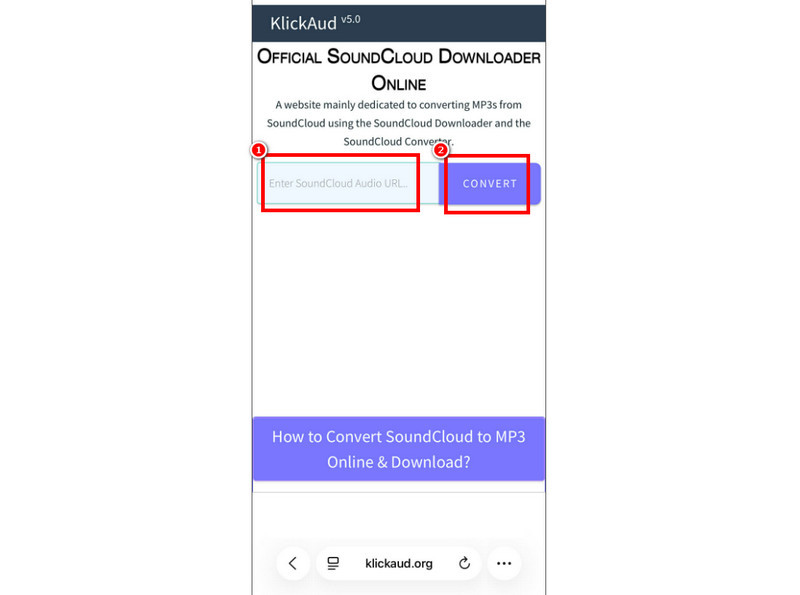
Step 1. Access your preferred online tool. Then, go to the SoundCloud platform and copy the link of the music you want to download.
Step 2. After that, go back to the online tool and paste the link to the Box section.
Step 3. Finally, you can start hitting the Convert or Download button to start the downloading process. Once done, you can now enjoy the music on your device.
Pros
- There is no necessary installation required.
- The tools are accessible to all web platforms.
- They can offer an ideal and high audio quality for better audio playback.
- There is no need to create an account.
- The tool's main interface is comprehensive.
Cons
- The tool's free version has various restrictions.
- They require a fast internet connection for a smooth conversion and downloading process.
- They might have potential malware that can damage your device.
Part 3. Download SoundCloud Songs for iPhone via Software Downloader
Do you want to download and convert SoundCloud to MP3 and other formats on your desktop? Then, we suggest using TopVox All Music Converter. When it comes to converting SoundCloud music, there is no doubt that this program is the best since it can give you the various features you need. It can give you a straightforward user interface, making it perfect for non-professional users. Plus, with its batch conversion feature, you can download as many songs as you want in just a single go. What makes it more powerful is that it can convert and download songs 35× faster. It can even save the music with high fidelity for up to 320 kbps. With that, if you want to download songs from SoundCloud when using your desktop, always rely on TopVox All Music Converter.
The program has more features to offer, making it the best tool you can use. Some of them are:
• It can support various audio formats, such as M4A, MP3, AAC, FLAC, WAV, AC3, and more.
• It can download music from different platforms, such as Apple Music, Spotify, Deezer, Pandora, YouTube Music, etc.
• The program can play various music, thanks to its built-in web player.
To download SoundCloud files, you can check the instructions below.
Step 1. Download and launch TopVox All Music Converter on your desktop. After that, you can start the downloading process.
100% Secure. No virus.
100% Secure. No virus.
Step 2. From the primary user layout, tap the SoundCloud platform and add your account.
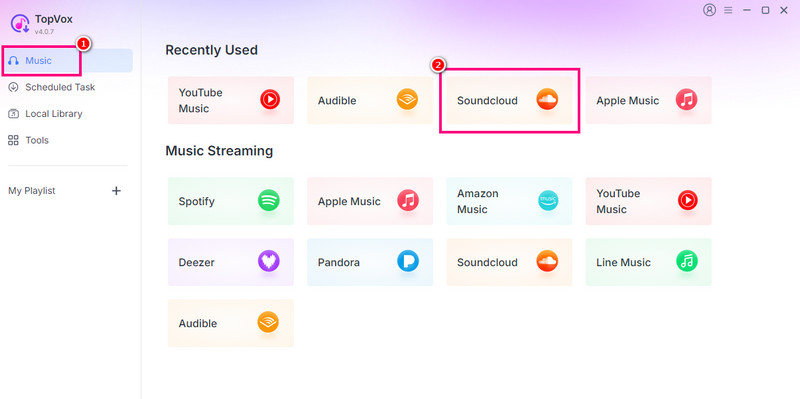
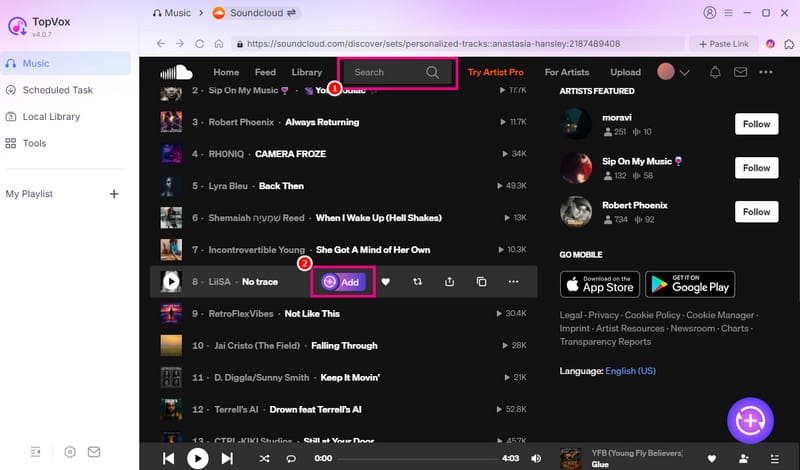
Step 3. Then, go to the Search section above to browse all the music you want to convert and download. Then, click the Add button.
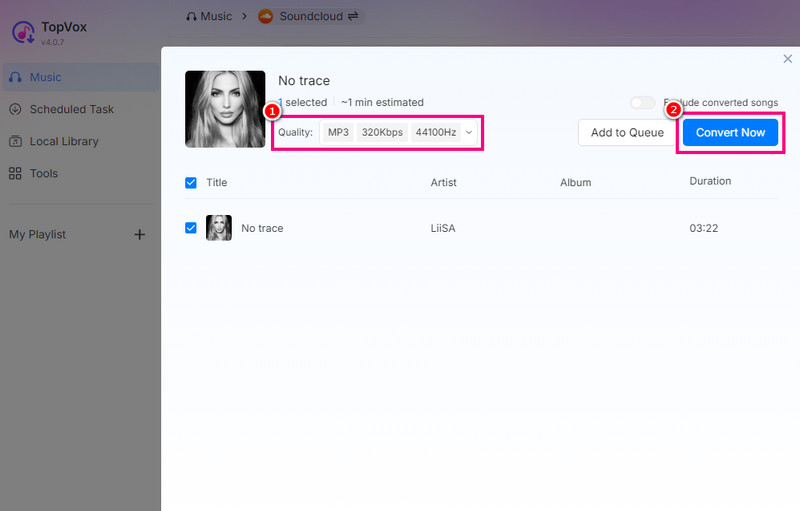
Step 4. You can now choose your preferred format and quality. Then, hit the Convert Now button from the right interface to start the conversion and downloading process.
If you want to learn more about the best SoundCloud song downloaders, you can view the comparison table below.
Please pay a visit: An effective way to convert SoundCloud to an FLAC file.
| SoundCloud Song Downloaders | TopVox All Music Converter | KlickAud | MusicVerter |
|---|---|---|---|
| Audio Quality | Up to 320 Kbps | 128 to 192 Kbps | Up to 320 Kbps |
| ID3 Tags | Preserves full ID3 tags (artist, album, cover art) | Limited | Basic |
| Batch Download | Supports Batch Download | Single Track Only | Limited Batch |
| Speed | Up to 35 times faster | Depends on the Internet | Depends on the Internet |
| Price | • Offer Free Version • The price starts at $19.95 | Free | • Offer Free Version • The price starts at $13.00 |
| Stability | Stable and has consistent performance | Sometimes Unreliable | Occasional Error |
Part 4. FAQs about How to Download SoundCloud Songs on iPhone
Q: Are all songs from SoundCloud downloadable?
A: The answer is no. You can only download the songs if the owner or artists allow it. You can also download the song if you have the Go and Go+ versions.
Q: Can I download songs as an MP3 file on SoundCloud?
A: Unfortunately, no. If you are using the SoundCloud platform, you can't save the song as an MP3 file. The music will only be saved inside the app.
Q: How much storage do offline downloads use?
A: It depends on the audio quality. If the quality is 128 Kbps, then it is 1MB per minute. If the quality is 256 Kbps, then it is 2 MB per minute.
Conclusion
Now you have learned how to download SoundCloud songs on an iPhone successfully. With that, always rely on the provided steps above to get your favorite music. Plus, if you want to use your computer for an effective downloading process, we recommend using TopVox All Music Converter. This program ensures to download all the music and give the highest audio quality, making it a remarkable music converter for users.
Owen Bannett is a music enthusiasm as well as a senior writer. He has paid close attention on the pros & cons of various audio formats, bitrate, sample rate and encoding methods. Always seeking the best listening experience, Owen has deep insights about lossless music and diverse music converters on the markets.