Epubor Audible Converter Review: AAX to MP3 Real Quick
AAX file formats are not universal, making them unsupported with most of the mobile devices we are using. Therefore, converting them into a universal file format like MP3 is a must so that you can play it with whatever device you are using. Good thing, there are various tools nowadays that can help you with that process. One of these tools is the Epubor Audible Converter. That is why in this article, we will review its features and ability to convert AAX to MP3. In addition, we will also give you an alternative that can also offer great features for you. Read this article now and discover more about it.
Part 1. What is Epubor Audible Converter?
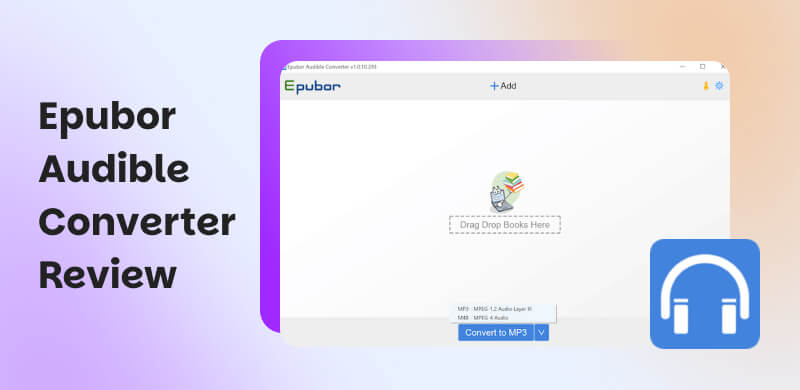
Epubor Audible Converter
Definition first what Epubor Audible Converter means, it is a software used to help users in removing DRM from Audible audiobooks and convert them into a universal file format such as MP3, M4B, and MP4. With those methods, users are now allowed to play their audiobooks on devices that do not support Audible in an AAX file format. This can also allow users to back up their purchased Audible books and have permanent access even without a subscription or an Audible application. This converting tool is suitable for those users who want to listen to Audible anytime, anywhere on any device, whether online or offline.
Key Features
- Support Various Formats: It can convert Audible AAX audiobooks to MP3, M4B, and MP4 format. This can be for easy playback.
- Chapter Splitting: You can use the tool to divide audiobooks by chapter and minute.
- High-Speed Conversion: It supports Batch converts files at 60X faster speed.
- Metadata Preservation: Maintain ID3 tags for audiobooks.
Pricing
| Price | License Type | Description |
| Free Trial | $0 | Limited. | ●Converts only part of the audiobook.
●Watermarks or restrictions apply. |
| 1 Year License | $29.99 | Annual Subscription. | ●Full-featured version.
●1 Year free upgrades .
●0 day money-back guarantee. |
| Full License | $39.99 | One-time purchase | ●Lifetime use, free updates.
●DRM removal & full conversion features. |
Part 2. How to Convert an AAX File to MP3 via Epubor Audible Converter?
If you are a Windows and Mac user, then using Epubor Audible Converter is simple for you. Please follow these detailed steps below to easily convert your Audible audiobook to MP3 or other file format.
Step 1. Download and install Epubor Audible Converter on your computer. Then login your account on it.
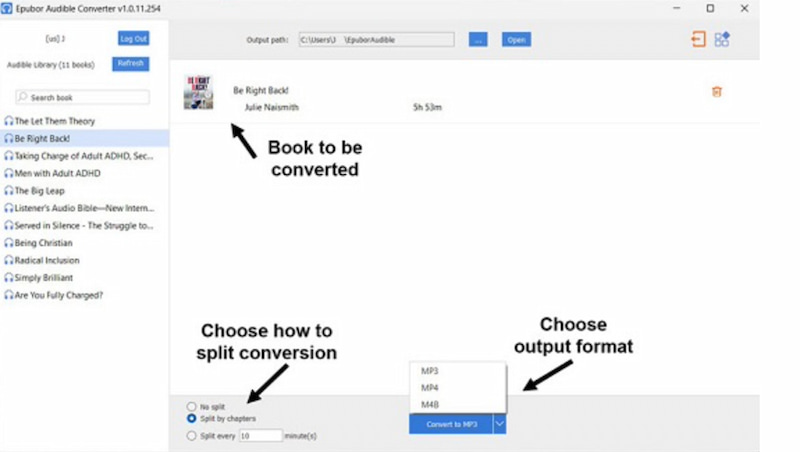
Step 2. After that, please add the file you want to convert. You can drag the file on the interface of the tool for an easy process.
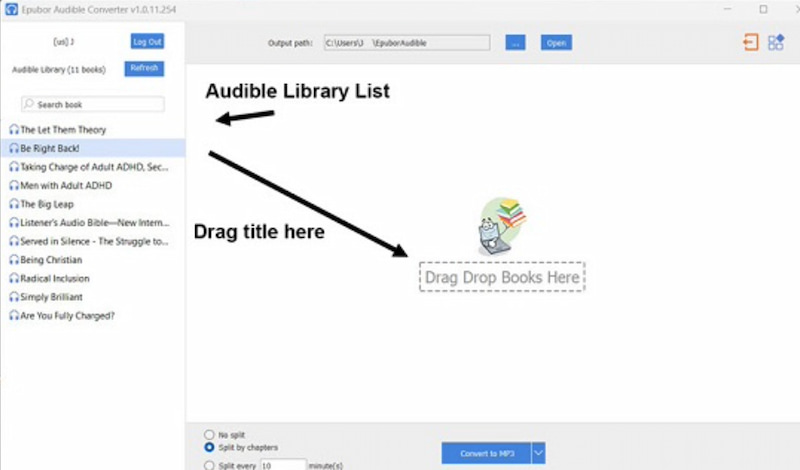
Step 3. You can now choose the file format you need for your files. In this case, choose MP3.
Step 4. As we proceed, click the Convert to MP3 button.
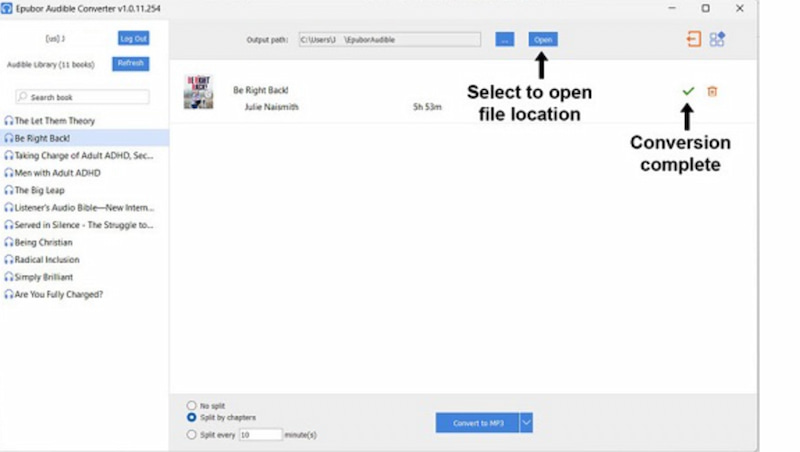
Step 5. After the conversion process, you can click the Open button. This can give you access to view Audible audiobook files.
Part 3. Is Epubor Still Worth Your Choice in 2026?
Epubor Audible Converter is still worth choosing in 2026. Because users love its simplicity and reliability as a DRM removal. In fact it is consistently earning high ratings from Trustpilot with 4.6/5.
Performance Test
- • Conversion Speed: Up to 60X faster than real-time.
- • Quality: Maintains high audio fidelity
- • Batch Processing: It can convert multiple audiobooks simultaneously.
Pros
- It has a fast conversion speed.
- Batch conversion that can save time.
- Chapter splitting feature for navigation.
- Metadata editing for better library management.
Cons
- Limited output for file formats.
- Paid license required after trial, which is expensive.
- Interface may feel basic compared to competitors.
Final Verdict
- • Choose It If: You want a fast, beginner-friendly, and reliable converter.
- • Not Ideal If: You prefer free and open-source solutions.
- • Best Fit: Beginners and everyday audiobook listeners.
Part 4. The Best Epubor Alternative: TopVox All Music Converter
More than Epubor AAX Converter, there are still great choices out there that can give you a balanced top performing feature for your AAX file. TopVox All Music Converter is among the trusted tools nowadays that can make your AAX to MP3 without complications. This tool is very versatile in supporting various platforms like Audible. More than that, the process you need to undergo here is very simple and no complicated steps are needed. Here are the simple steps you can follow to use it:
Key Features
- Multi‑Platform Support: The tool can easily work with Audible, Spotify, Apple Music, and more.
- Wide Format Compatibility: You can use it to convert to MP3, M4A, FLAC, WAV, AAC, and OGG.
- Batch Conversion: The tool can convert multiple files at once.
- High‑Speed Conversion: It is fast and stable for conversion.
- Metadata Preservation: You can retain ID3 tags like title, author, chapter.
Steps in Using TopVox All Music Converter
Step 1. The TopVox All Music Converter is free to download and install it on your computer.
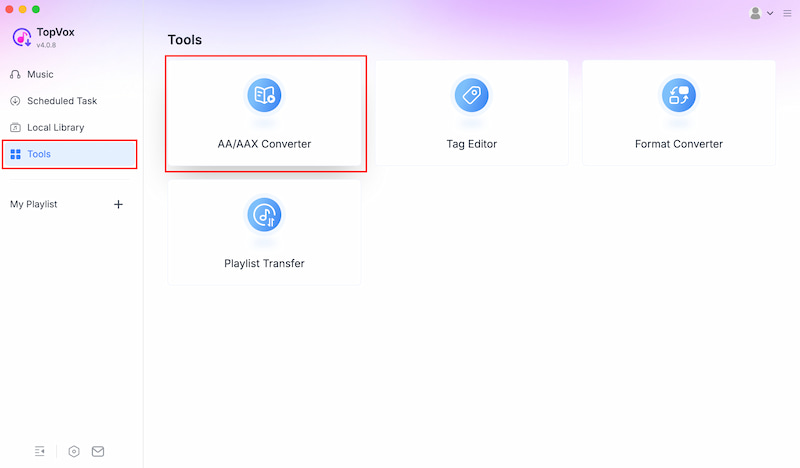
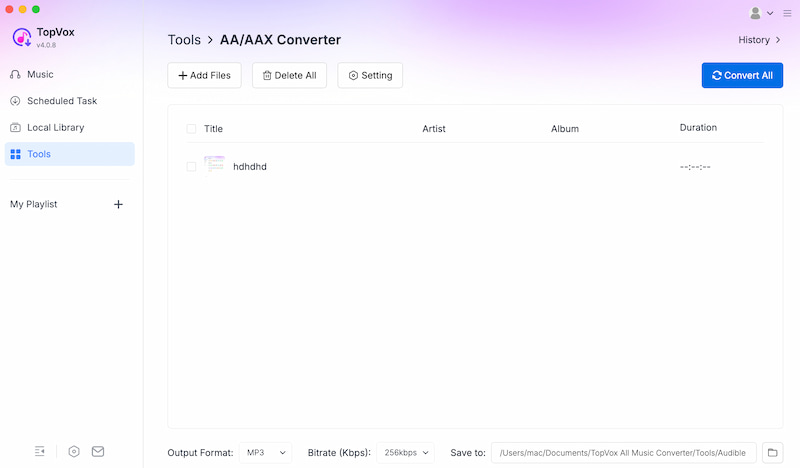
Step 2. Open the tool on your computer and access the platform it supports. From there, go to the Tools. Under the tools, you can see various features. Click on the AA/AAX Converter feature.
Step 3. You can now Add or Drop the AAX file you want to convert.
Step 4. From a new tab, select the AAX file. Allow it to load.
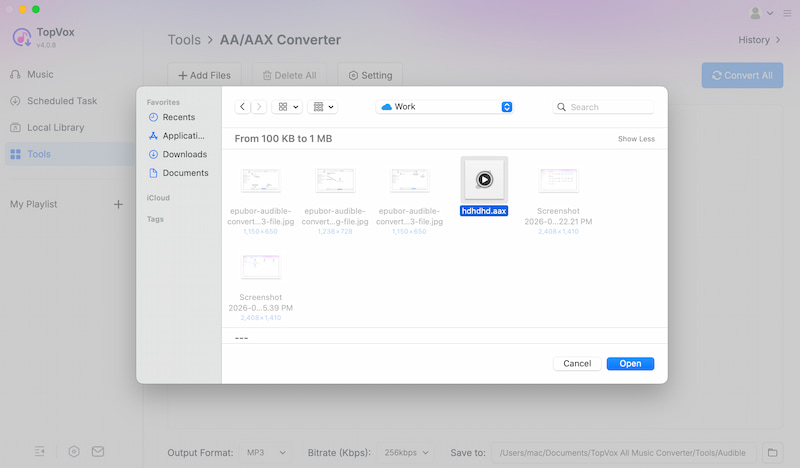
Step 5. After that, you can now click the Convert All button and allow your file to be MP3 with ease.
Verdict
For final verdict, TopVox All Music Converter is a great choice for you, especially if you want more than just Audible audiobook conversion:
- • Best For: Audiobook collectors and music lovers.
- • Why Choose It: It is versatile, super fast, and a quality preservation tool.
Part 5. TopVox VS Epubor: Comparison Table
Here is a quick table to compare TopVox and Epubor. Check out some elements and see what tool is best for you.
| TopVox All Music Converter | Epubor Audible Converter |
| Audio Quality | Preserves lossless quality with advanced codec handling. | Maintains 100% fidelity, but limited to formats. |
| Conversion Speed | ●Ultra-fast.
●Optimized for entire libraries. | Up to 60X faster. |
| Output Formats | ●MP3.
●M4A.
●FLAC.
●WAV.
●AAC.
●OGG. | ●MP3.
●M4B.
●MP4. |
| Supported Platforms | ● Audible.
● iTunes.
●Spotify.
●Apple Music.
●Tidal.
●Deezer. | Audible only. |
| Advanced Features | ●Batch conversion.
●Metadata preservation.
●Customizable output.
●Playlist export. | ●Batch conversion.
●Metadata editing.
●Chapter splitting. |
| Operating System | Windows & Mac. | Windows & Mac. |
FAQs on Epubor Audible Converter
Q: Is Epubor Audible Converter free?
A: No, the Epubor Audible Converter is not free. Although it has a free trial version it only allows you to convert one audiobook file. Thus, if you need an unlimited conversion feature then you will be needing to pay a license. The price list for its license starts at $29.99 for a one-year subscription. They also have $39.99 for a lifetime license. Both are only for one computer device only.
Q: Is the Epubor Audible Converter safe?
A: Yes, you can use the Epubor Audible Converter safely. In fact, it has a 4.6/5 rating from over 1101 reviewers on TrustPilot. Most of the review indicates a high level of user trust. Just an important tip, you should always download the tool from their official website to prevent viruses or any risks of unofficial sources.
Q: Is there a cracked version of Epubor Audible Converter?
A: No, there is no cracked version of the Epubor Audible Converter. Many users do not recommend using it either. Because the cracked version is illegal. In addition, this cracked version can also possess some virus and unofficial source risk that can affect the security of your computer.
Conclusion
We can now conclude that Epubor Audible Converter is a great tool that can make your AAX to MP3 effectively. But it is somehow expensive and the free trial is very limited. Therefore, having an alternative like TopVox All Music Converter is a great thing to have. In fact, this tool possesses a great feature and much wider functionality in terms of making your AAX file to MP3. You can now use it and discover more of its features.
Owen Bannett
Owen Bannett is a music enthusiasm as well as a senior writer. He has paid close attention on the pros & cons of various audio formats, bitrate, sample rate and encoding methods. Always seeking the best listening experience, Owen has deep insights about lossless music and diverse music converters on the markets.




 by
by