Must-Try Methods to Download Spotify Playlists for Free
For many Spotify lovers, they can dip into the musical world, but never have true ownership of their favorite music. Whether you are a Spotify Premium subscriber or a free user who wants to permanently access your music collections, you must master how to download Spotify playlists locally on your device. In this post, we'll explore 7 methods that cover both official and third-party solutions to perform the task. Hope you can find the best and most reliable option to keep your Spotify tracks forever.
Part 1. Software Solution to Download Spotify Playlists
Spotify App [Officially]
Spotify Premium lets you directly download playlists, albums, or songs from the desktop app. It's the most secure way to save your Spotify music for offline listening. This official method allows you to enjoy them even without internet access on authorized devices. You're only granted temporary access as long as your subscription remains active. Once it ends, all downloaded tracks become unavailable.
Here's how to download a Spotify playlist officially:
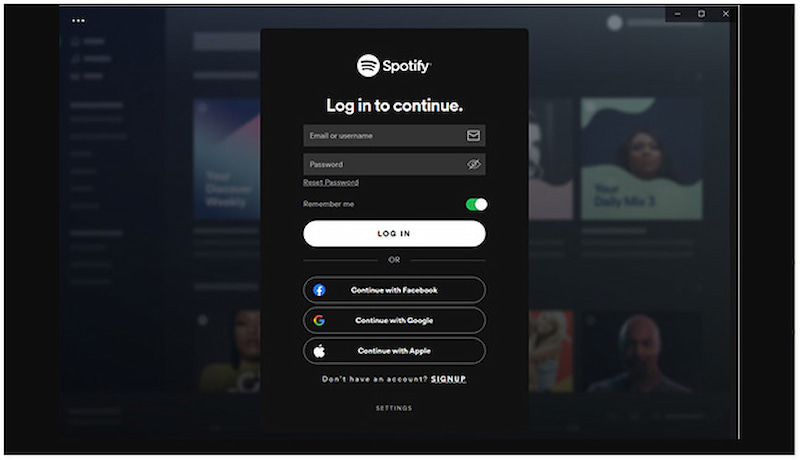
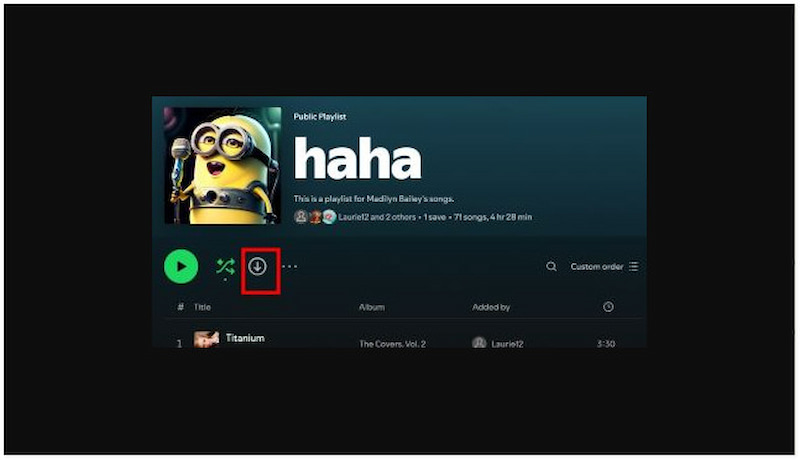
Step 1. Open the Spotify app on your system and log in using your Spotify Premium account. Proceed to the Your Library section and click Playlist to filter your saved playlists.
Step 2. Once you open the Playlist, look for the Download button and click it. Spotify will start downloading all the songs within that Playlist to your computer. After downloading, a green downward arrow will appear next to the playlist name. This indicates that the tracks are now available for offline playback.
Pro Tips: Offline files remain encrypted?
Downloading Spotify playlists using the official App doesn’t actually mean you own the music. The downloaded songs are only accessible in Ogg Vorbis format. You can take them as encrypted cache files that cannot be played outside the Spotify app. Besides, you need to have an internet connection every 30 days to keep the files valid. If you want permanent access to your favorite songs, go for a dedicated music downloader like TopVox All Music Converter. Read on!
TopVox All Music Converter🔥
TopVox All Music Converter is a multiservice music downloader bundle compatible with Windows and Mac. It lets you access and enjoy your favorite Spotify playlists anytime, permanently, without subscription restrictions. With advanced DRM-removal technology, it extracts the original Spotify music source and converts it to 48,000 Hz/320 kbps MP3 or lossless FLAC, delivering a lossless sound quality. The downloading speed is super-fast, and you can batch download many playlists in one go.
(The program is only for personal, non-commercial use.)
What to Look Forward to with the TopVox All Music Converter:
- Downloads songs, playlists, albums, podcasts, and audiobooks in one go.
- Bypasses DRM protection legally to enjoy full ownership of the Spotify playlist.
- Supports outstanding audio quality up to 320 kbps and 48,000 Hz (MP3/M4A).
- Converts and downloads songs up to 35× faster than traditional methods.
- Download Spotify playlists into MP3, M4A (AAC), WAV, FLAC, etc.
- Supports 9+ main streaming platforms, like Spotify, Apple Music, and Deezer.
Step 1. Begin by acquiring the free download of TopVox All Music Converter. Install the Spotify downloader, then wait for the installation to complete. Once finished, open the software to begin downloading the Spotify playlist.
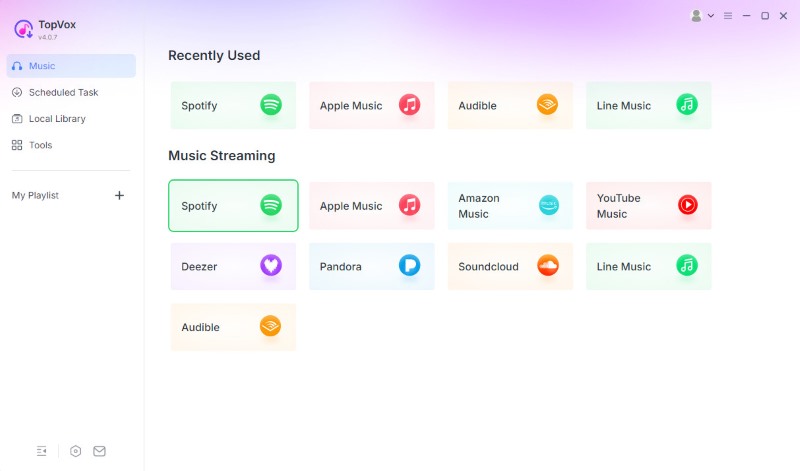
Step 2. Launch the software and choose Spotify to open the built-in browser. Log in your Spotify account to access your playlists or favorite tracks.
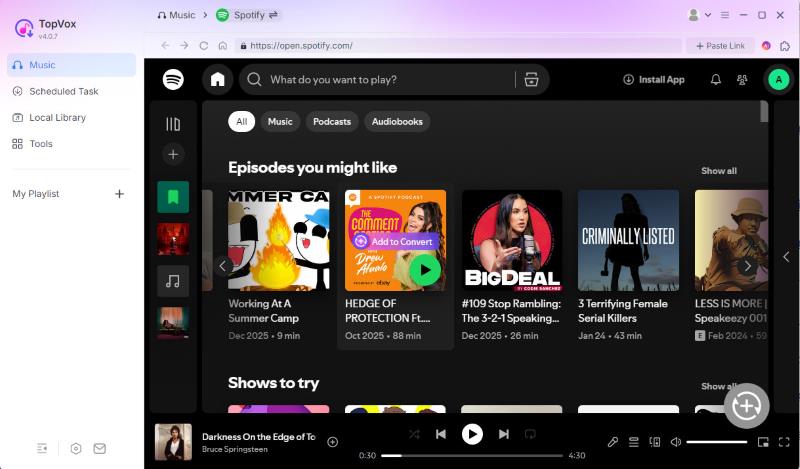
Step 3. Browse your library and choose the songs or playlists you want to download. You can click Add to Convert. You can also click the Add button (a plus icon at the lower right corner), and the program will automatically detect and load songs.
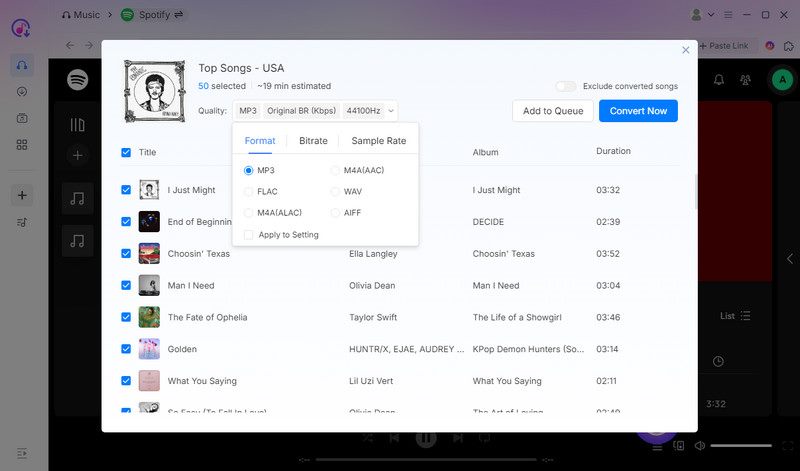
Step 4. By default, the software is set to MP3 (Original BR, 44,100 Hz), but you can easily modify it. Once all your songs are added and settings adjusted, click Convert Now to begin the process. It will automatically download and convert selected tracks or playlists at a fast speed.
User Testimonials:
After personally testing TopVox All Music Converter, I can say it's the best Spotify playlist downloader I've used. In my test, downloading a playlist of 100 tracks only takes about 32 minutes. Also, I could freely play my downloads on different media players and devices without restrictions.
SpotiKeep
SpotiKeep is a desktop software to download Spotify playlists to MP3 for free. It allows you to download playlists without a Premium subscription, giving you permanent access. Additionally, it maintains the original audio quality of your tracks and supports batch downloads.
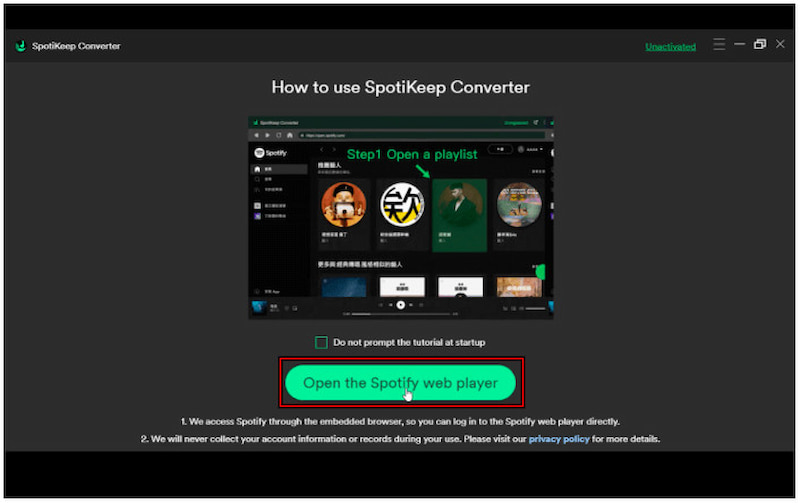
Step 1. In SpotiKeep, click Open the Spotify web player to open the Spotify web player. Browse and select the playlist you want to download..
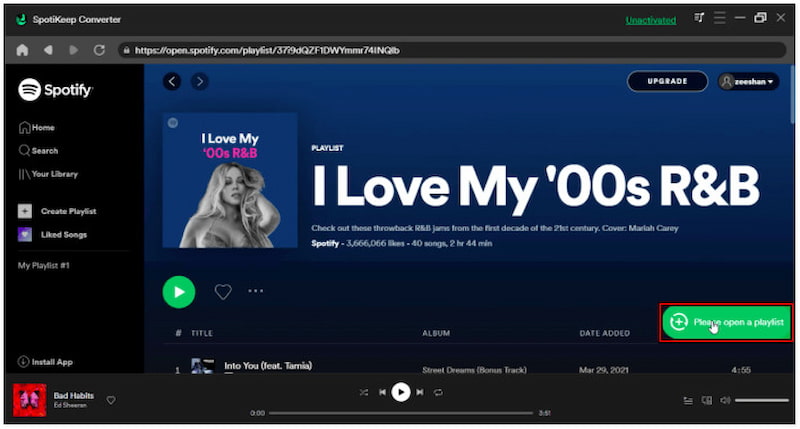
Step 2. Click the Please open a playlist button to load the playlist into the converter. All the songs from your selected playlist will appear in a list.
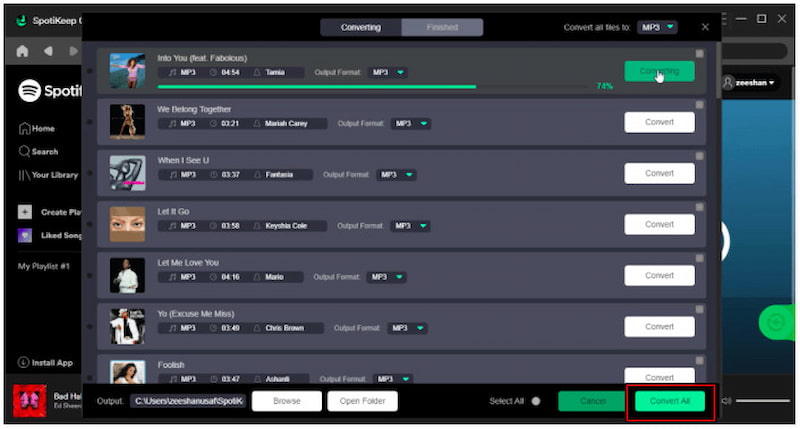
Step 3. SpotiKeep offers two download modes: single song download and batch download. To download the entire playlist, click Select All, then Convert All.
User Testimonials:
I liked how SpotiKeep lets you download entire playlists without needing a Spotify Premium account. However, the free trial has download limitations, and users must upgrade for full access, During a 30-day free trial, you can only convert 3 minutes for each audio file.
SpotiFlyer [Mobile]
SpotiFlyer is an excellent app to download a playlist from Spotify to Android. It lets you keep your favorite Spotify playlists offline without paying for a premium subscription. You can also use it as a SoundCloud, Gaana, JioSaavn, or YouTube music downloader.
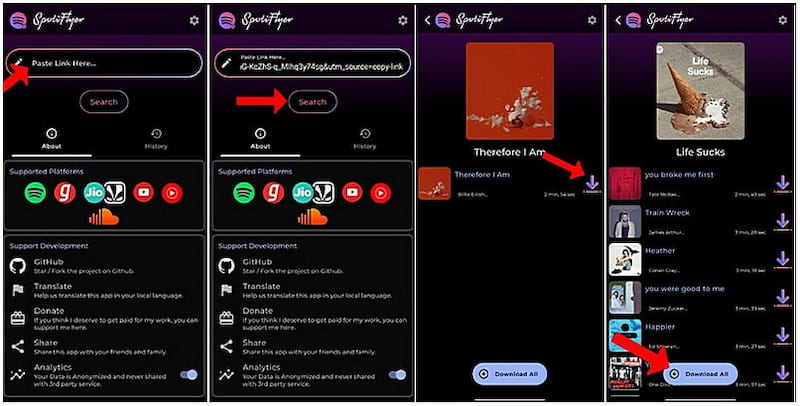
Step 1. Open a browser and go to the official SpotiFlyer website. On the homepage, select the correct version of SpotiFlyer based on your device’s OS.
Step 2. Now, open the Spotify app and go to the playlist you want to download. Tap the three-dot menu beside the playlist, select Share, and tap Copy Link.
Step 3. Return to SpotiFlyer and paste the copied link into the search bar. Once pasted, tap the Search button to let SpotiFlyer fetch the track or playlist details.
Step 4. After the search results appear, click the Download button next to each song. The app will automatically begin converting and saving the tracks as MP3 files.
User Testimonials:
I can say it’s a surprisingly efficient tool for downloading Spotify playlists as MP3s. However, downloads fail if the track isn’t available in SpotiFlyer’s source database.
Part 2. Free Online Ways to Download Spotify Playlists
SpotifyMate
SpotifyMate is an internet-based Spotify to MP3 converter to download Spotify playlists to MP3. It provides a free way to obtain Spotify audio files without installing software. It retains some essential ID3 metadata to maintain basic file organization post-download.
Step 1. Navigate to the Spotify web player and copy the Spotify URL you wish to download. In a new tab, reach the official SpotifyMate page and paste the copied Spotify link.
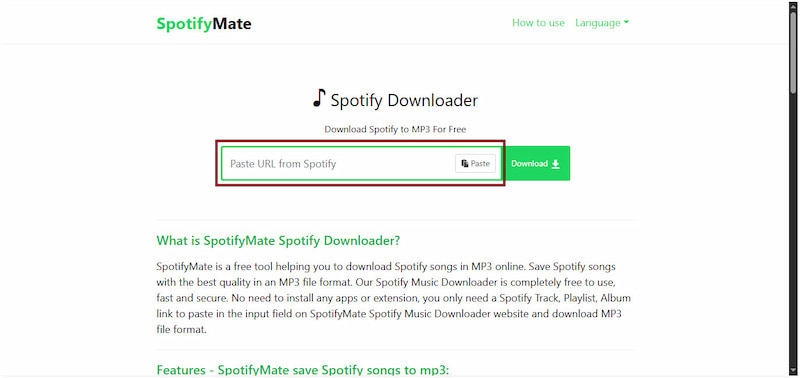
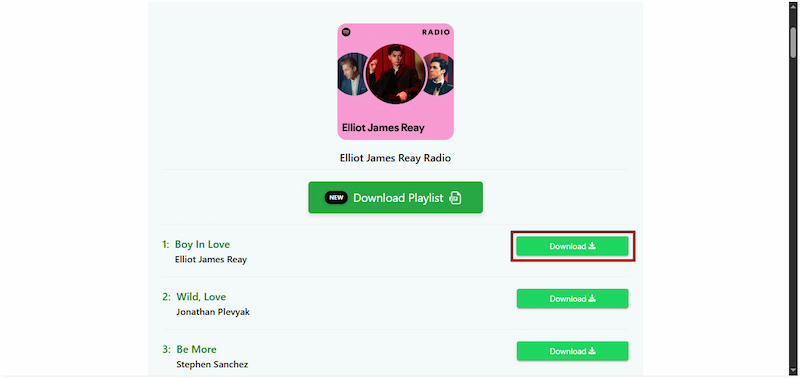
Step 2. Click Download next to the input field to process the link. Each track will appear individually, so you'll need to click Download for each song you want to save.
User Testimonials:
A downside of online music converters is that they are time-consuming. You have to manually copy and paste the URL of music, and then SpotifyMate generates download links for each song. Moreover, the audio quality is limited to 128kbps, which makes the sound a bit compressed.
SpotiDown
SpotiDown is a newly launched tool to download Spotify playlists online for free. It does not require any login or personal information, ensuring convenience during the download process. All downloads are available in 128 kbps MP3 quality, which is good enough for casual listeners.
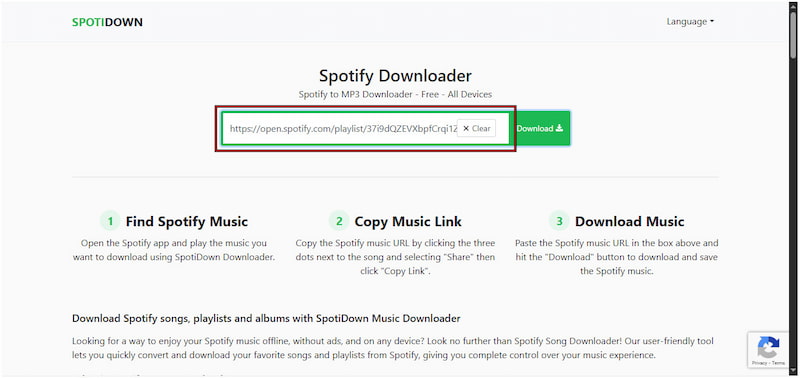
Step 1. Open the Spotify app and locate the track you want to download. Click the three-dot menu next to the song title, select Share, then click Copy Link.
Step 2. Using a browser, access the official site of SpotiDown and paste the copied Spotify link. Click Download to process the link and convert the Spotify song into an MP3 file.
User Testimonials:
I liked that the song was generated in seconds and ready to save on my computer. However, it doesn't support batch downloads, meaning I had to download each song manually. And sometimes, the tools will return an error that failed to match the correct audio files.
Pro tips: avoiding quality loss
Some online tools claim that they can save 320kbps MP3 files, while the actual audio quality is lower. Because the downloaded Spotify tracks are re-encoded into a higher bitrate format. Although the result still displays 320kbps, the sound quality has deteriorated. The best solution is to choose a desktop music downloader like TopVox All Music Converter, ensuring a true lossless output with full ID3 tags.
Spotiload
Spotiload, formerly known as Spotify VK Downloader, is a Spotify playlist download Chrome extension tool. It saves songs in MP3 format by matching tracks with available music on VK.com’s library. This tool lets you download Spotify playlists without a Premium subscription.
Step 1. Get Spotiload from the Chrome Web Store, then log in to your VK.com account. Launch the Spotify web player and navigate to the playlist you want to download.
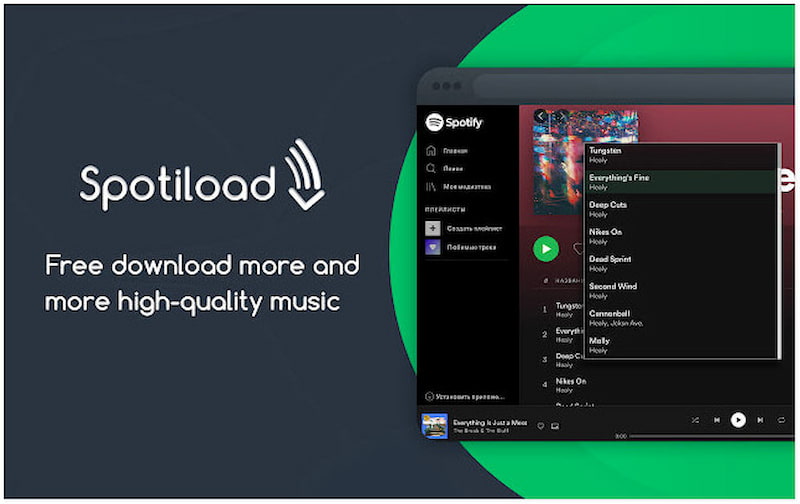
Step 2. Spotiload will automatically scan your selected Spotify playlist and search for matching tracks. Once Spotiload finds matches, a Download button will appear; click it to download the MP3.
User Testimonials:
During testing, I was impressed with how fast it scans and matches Spotify songs. However, since Spotiload relies on VK.com’s library, not all songs were matched correctly.
Part 3. Comparison of 7 Ways to Download Spotify Playlists
| Audio Quality | Output Formats | Batch Download | Speed | Supported Platforms | OS | Price |
| Spotify App | 24kbps~320kbps | Ogg Vorbis | ✅️ | Fast | Spotify | Mac OS X/Windows, iOS/ Android | $10.99/mo |
| TopVox All Music Converter | 320kbps/48000Hz or lossless H-Res | MP3, WAV, FLAC, AIFF, M4A (AAC), or M4A (ALAC) | ✅️ | 35x | Spotify and the other 8 music apps | Windows 7 or later (64-bit), macOS 10.14 or above | (14-day free trial)$19.95/mo
$139.95/lifetime |
| SpotiKeep | 128~320kbps | MP3, M4A, FLAC, WAV (only Windows) | ✅️ | 5x | Spotify | Windows 10/8.1/8/7, macOS 10.15-10.11 | (30-day free trial)$19.95/mo
$39.95/yr
$79.95/lifetime |
| SpotiFlyer | 160-320kbps | MP3 | ❌️ | Slow | Spotify | Online | Free |
| SpotifyMate | 128kbps | MP3 | ❌️ | Slow | Spotify | Online | Free |
| SpotiDown | 128kbps | MP3 | ❌️ | Medium | Spotify | Online | Free |
| Spotiload | 128kbps~160kbps | MP3 | ✅️ | Medium | Spotify | Chrome browser | Free |
FAQs on Downloading Spotify Playlists
Q1: Is it legal to download Spotify playlists to MP3?
A: Generally, downloading Spotify music for commercial use is a violation of Spotify's Terms of Service and copyright laws. However, personal usage is always allowed - such as listening or backing up offline. We recommend using professional tools only for your private collection instead of sharing it around.
Q2: How to import downloaded Spotify playlists to Apple Music without iTunes?
A: You can use the Playlist Transfer Tool of TopVox All Music Converter to finish the task. It connects both your Spotify and Apple Music accounts and syncs your Spotify playlists across platforms.
Q3: Which Spotify music downloader is faster to back up a large playlist?
A: TopVox All Music Converter supports advanced hardware acceleration to achieve 35x conversion speeds. You can back up Spotify playlists in a fraction of the time while other tools take hours to complete it.
Conclusion
While Spotify allows Premium users to download playlists, those tracks disappear once your subscription expires. This means you don’t truly own the music; you’re merely borrowing access for as long as you pay. If you want to keep your favorite songs, you’ll need a more flexible and permanent solution. TopVox All Music Converter is one of the powerful tools to download Spotify playlists. It lets you download and convert Spotify music to MP3 and other formats without any DRM restrictions. This allows you to store, transfer, and play your music anywhere, even without a Premium subscription.
Luna Harper
Luna Harper is a passionate music lover and an inspiring content sharer. She has explored most of the music converters available on the market, acquiring thorough knowledge of their features, usability, and differences. Luna enjoys using her professionalism to help fellow music lovers get superior audio quality.




 by
by