Download Audible Books to Computer: Get Audible Instantly
All of the audible books online are encrypted with Digital Rights Management. This DRM prevents us from downloading them and listening to them on our mobile phone or any other gadget because they normally come as AAX/AAXC. With that being said, many users are asking if there is a way to still get them for long-time save and other personal use? The answer is yes, downloading audible books to your computer is still possible. In line with that, we gather four methods that you can follow. Read this article now to discover.
Method 1: Download Audible Books via Official Website
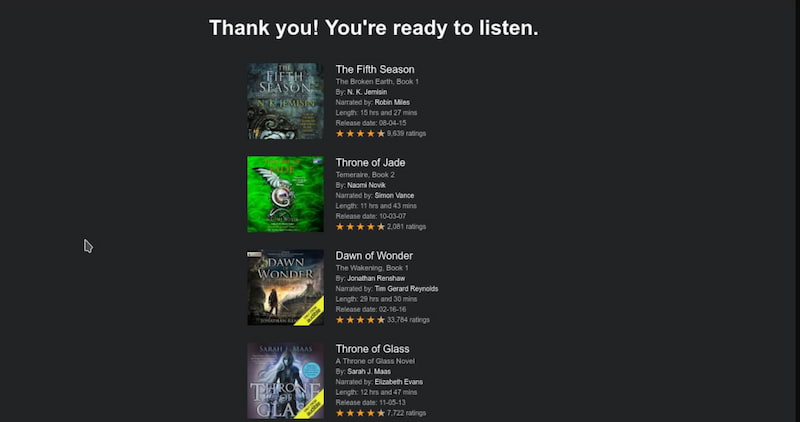
The first method we can use is the official way. Because Audible actually lets you download audiobooks directly using its official website. However, you can get the files as AAX/AAXC formats. That means they are only playable through Audible’s app or authorized software. Here’s a guide to do it below:
Step-by-step Instructions
Step 1. First, you need to log in to your Audible account through their official website.
Step 2. After that, please go to your Library section. From there, you can see all of the purchased audiobooks. Next, please select the audiobook you want to download.
Step 3. Then proceed with clicking the Download button to save the file to your computer.
Step 4. Finally, you can now open the downloaded file using Audible’s app, iTunes, or another supported player.
Limitations
- • The downloaded files are DRM‑protected. This simply means that they cannot be played on unauthorized devices and players.
- • You are restricted to use the Audible’s ecosystem.
- • Third‑party conversion tools are a must to make it as MP3 and playable with your device.
Method 2: Use Audiblesync to Download Audible Books to PC (Windows 10/11)
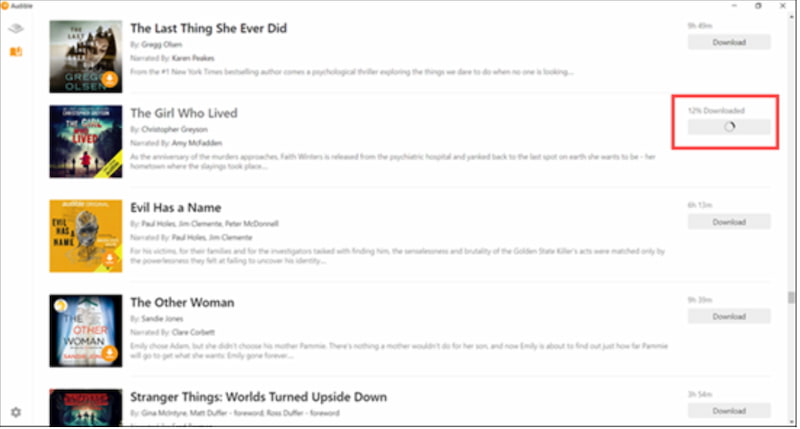
Our second method is made possible with the use of AudibleSync. This is Audible's official Windows desktop app for downloading audiobooks directly to your computer. This method works perfectly on Windows 10 and 11.However, it only downloads files in Audible’s proprietary AAX format, which remains DRM‑protected. Yet, here are the steps you need to take to use it:
Step-by-step Instructions
Step 1. First, you will need to install the AudibleSync app on your Windows 10 or 11 computer. Next, you sign in with your Audible account credentials.
Step 2. Open the tool now as you go to your Library inside the app. Proceed in viewing your purchased audibles.
Step 3. After that, you select the audiobook you want to download. Finally, you click the Download button.
Limitations
- • The audiobook is also saved to your PC as AAX format. This can only be played through AudibleSync or compatible devices.
- • This tool does not have a built-in converter that lets you convert AAX as MP3 for a universal playback.
Method 3: The Best Solution to Download Audible Audiobooks: TopVox
We shall now move to the leading methods among other methods here. The third method is made possible because of the TopVox All Music Converter. It is an all in one tool that can make you download audible books on your computer and also convert it after. All of the features you need are actually offered even in the free account. It is indeed a full platform for your audible to be saved instantly. We shall now discover more of its features and the simple steps to use it below:
Features
- Download audible books on various platforms like Audible, Spotify, Apple Music, and more.
- Convert AAX file to wide file format output like MP3, FLAC, and more.
- Maintains the ID3 Tag and Metadata perfectly.
Step-by-step Instructions
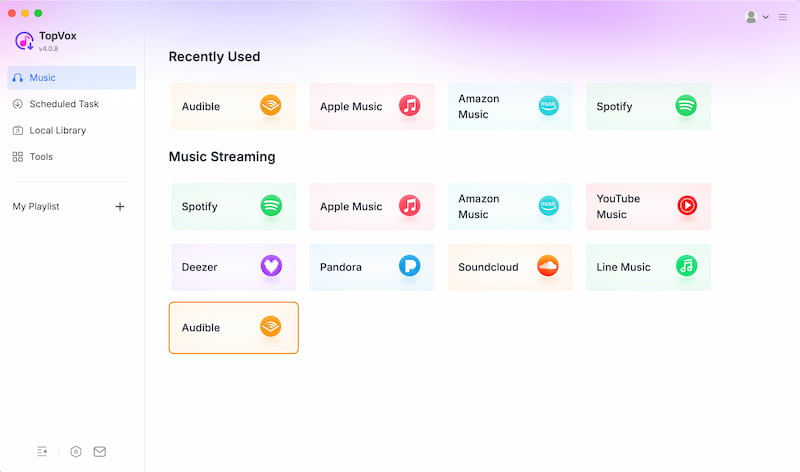
Step 1. Get TopVox All Music Converter for free on their official website. Then, open it to choose the platforms you need among the options.
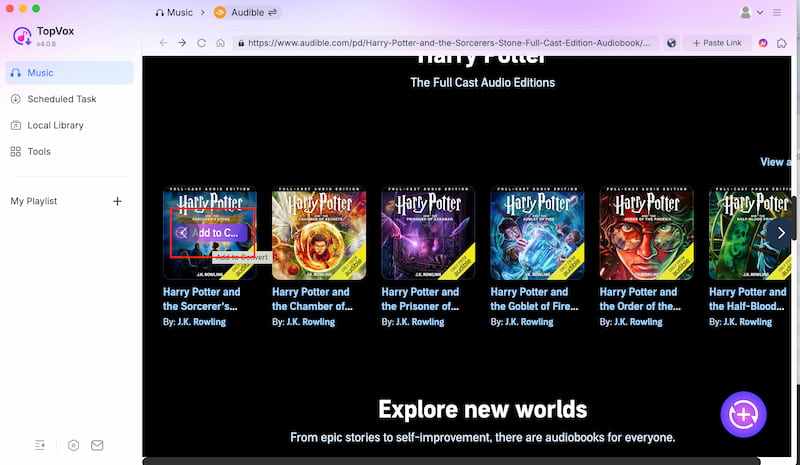
Step 2. Search the audible books you want to download. Click the Add To Convert button to proceed.
Note: The audible will be saved by AAX file format.
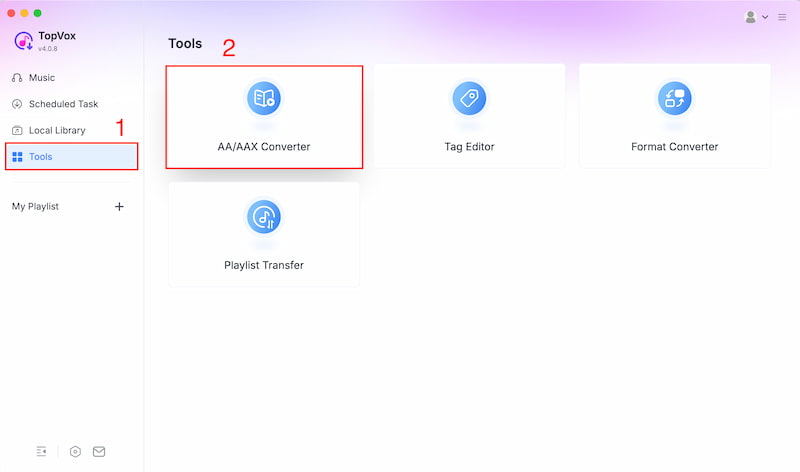
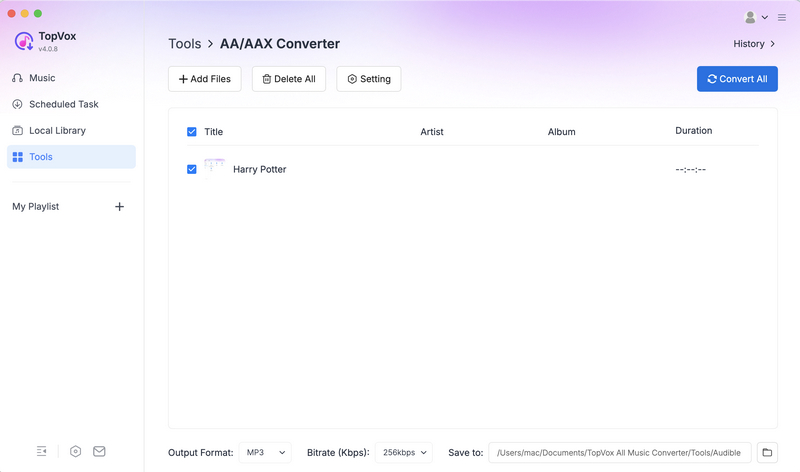
Step 3. Now, move to the Tools, and choose the Convert AA/AAX features.
Step 4. Add the downloaded AAX file, then select it on the interface. Finally, click Convert All Button.
Method 4: Free Tool to Download Audible Books to Computer
The fourth method is made possible with Libation. This is a free and open-source tool you use for downloading Audible audiobooks. You can easily use it if you want to listen to Audible audiobooks offline on their computer or non-Audible player. Follow these steps to use Libation downloading Audible books:
Step 1. Download Libation from GitHub. From there, you need to Extract the zip file and double-click Libation.exe to install.
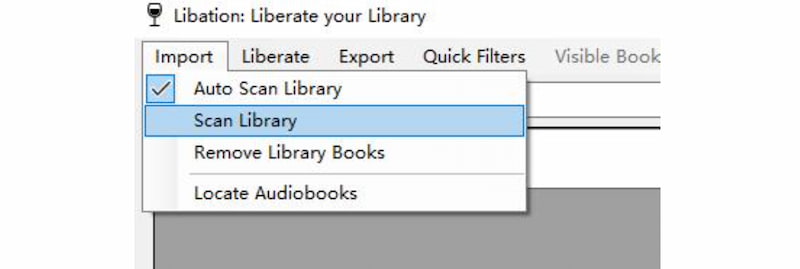
Step 2. After that, please open Libation, then go to Settings and select Account. Please log in properly for your account. Once logged in, find and click the Import button. This will scan your Audible library.
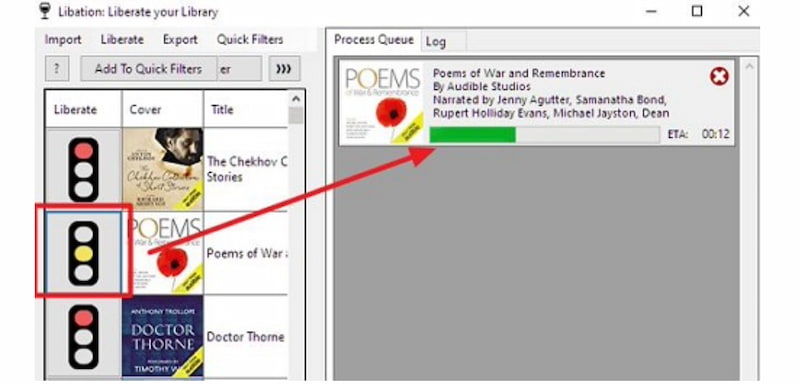
Step 4. Finally, you need to choose an audiobook and click the traffic light icon. This will allow you to start downloading.
Note: After downloading the audible, Libation will now allow you to convert the files to MP3 and M4B.
Comparison of 4 Ways to Download Audible books to Computer
Take a look at the comparison table with different factors to showcase the differences of each step. Here is a bigger picture to see what tool stands out:
| Audio Quality | Speed | DRM Removal | Output Format | Ease of Use | OS Support | Best For |
| Official Website | Original quality preserved. | Moderate. | No. | AAX/AAXC only. | Easy. | Windows, and macOS. | Users who want the official, safest method. |
| AudibleSync | Original quality preserved. | Fast. | No. | AAX only. | Easy. | Windows 10 and 11. | Windows users who prefer a dedicated app. |
| TopVox All Music Converter | High quality with ID3 tags. | Fast batch conversion. | Yes. | MP3, FLAC, more. | Very easy. | Windows and macOS. | Users who want full DRM removal and flexible formats. |
| Libation (Free Tool) | High quality. | Moderate. | Yes. | MP3 and M4B. | Moderate. | Windows, macOS, and Linux. | Tech‑savvy users who prefer free, open‑source solutions. |
FAQs on Downloading Audible Audiobooks
Q: Why are Audible files DRM‑protected?
A: Digital Rights Management protection exists to prevent users from copying the file unauthorized and sharing audiobooks for gaining money or commercial purposes. The DRM can ensure publishers’ rights but restricts playback to Audible’s ecosystem unless converted with third‑party tools.
Q: Can I keep Audible books after canceling my subscription?
A: Yes, purchased Audible books can remain in your library even after cancellation. However, they stay DRM‑protected and will not be played unless converted into open formats using external tools. In short, they are not playable until you renew your subscriptions.
Q: Can Audible books be played on any MP3 player?
A: Not directly. That is because Audible books are DRM‑protected that come as AAX files. Therefore, you will be needing a third‑party converter like TopVox or Libation to convert them into MP3 for universal playback. That will now allow you to play the file on your computer without protection from DRM.
Q: What formats do Audible audiobooks use?
A: All of the Audible audiobooks are downloaded in AAX or AAXC file formats. These file formats are encrypted, which limits us from playing them on our computer. Because you will be needing an Audible's ecosystem or authorized software like iTunes or AudibleSyn to play them.
Q: Is there a free way to download Audible books?
A: Yes. It was made possible by Libation. Because this tool is a free open‑source tool that downloads and converts Audible books into MP3 or M4B, though setup requires technical knowledge and patience.
Conclusion
We can now conclude this article by saying that downloading audible books to your computer is possible with various tools and methods. We can see above that there are different tools you can use from the official website or even with a third party tool. However, TopVox All Music Converter stands out the most among the methods above. That is because this tool is an all in one tool that offers both downloading capability and converting features. That is why many users love it. Use it now and discover more from its amazing features.
Owen Bannett
Owen Bannett is a music enthusiasm as well as a senior writer. He has paid close attention on the pros & cons of various audio formats, bitrate, sample rate and encoding methods. Always seeking the best listening experience, Owen has deep insights about lossless music and diverse music converters on the markets.




 by
by