How to Download Audible Books without Being Restricted
Those audible audiobooks we listen to are actually convenient ways to enjoy stories we love. But the Digital Rights Management, or DRM, can easily limit how we can access them. As we all know, DRM can prevent playback on non‑Audible devices and restrict ownership, especially once the subscription ends. Understandable why many users get frustrated. As many users do, the solution is to convert these files into a universal format, which is known as the MP3 format. This way, users can ensure long‑term access and personal control. In line with that, this article explores the best Audible downloaders for you. Expect that this tool can help you overcome DRM barriers and preserve your audiobook collections. Let’s get started.
3 Top-rated Audible Downloaders
TopVox All Music Converter
Best For: Smooth, high-quality download process.
Rating: 4.5/5.0
The tool is smooth, effective, and has a high-quality output for your audible downloads.
TuneFab Audible Converter
Best For: Chapter splitting feature.
Rating: 4.0/5.0
Manage each chapter from the Audible books you download.
Libation
Best For: Easy and no-cost process.
Rating: 3.5/5.0
Free and open-source process of downloading audiblebooks.
How We Test
Here are the criteria we considered when using these tools and when including them in our best list for Audible downloaders.
Conversion Performance & Audio Quality
We must measure conversion speed and stability, and compare the output audio to the original files. These criteria help us ensure there will be no quality loss, distortion, or missing chapters in the audible book we download.
Features and Compatibility
We evaluated the supported formats, batch conversion, DRM handling, and compatibility across devices. These features can help us ensure that the tools meet different user needs and usage scenarios. We need a tool with great features.
Usability & Customization
It is also important that we test the interface simplicity, ease of setup, and available customization options like bitrate, splitting, and metadata editing for better user control.
Part 1. TopVox All Music Converter: Best Audible Downloader
TopVox All Music Converter
We shall start with the best option that can help you download audiobooks with ease. TopVox All Music Converter supports various platforms, including Spotify and Apple Music, which are also popular for listening to your favorite audiobooks. With this tool, you can get them with a simple, smooth process. More importantly, all of these come from a high-quality output. There are more reasons why you should use TopVox. See some of the key features it offers and how we can use it easily:
Features
- Download audible books with ease.
- Smooth and simple process.
- High-quality output.
- Support various platforms for audiobooks and music.
How to Download Audible Books with TopVox
Step 1. Download the amazing TopVox All Music Converter for free and install it immediately on your computer.
Step 2. Now, open TopVox All Music Converter and access its clean interface. Among the options, choose the platforms you need, where you can see the audiobooks you want to download. In this case, choose Audible, for example.
Step 3. At this moment, you will see the interface of the platform you have chosen. Search for the audiobook you want to download, and click the Add to Convert button. Wait for a while, and your audiobook is ready.
Step 4. Now, select another format like MP3 so that it will be compatible with your computer. Then click Convert All and let the tool do the process.
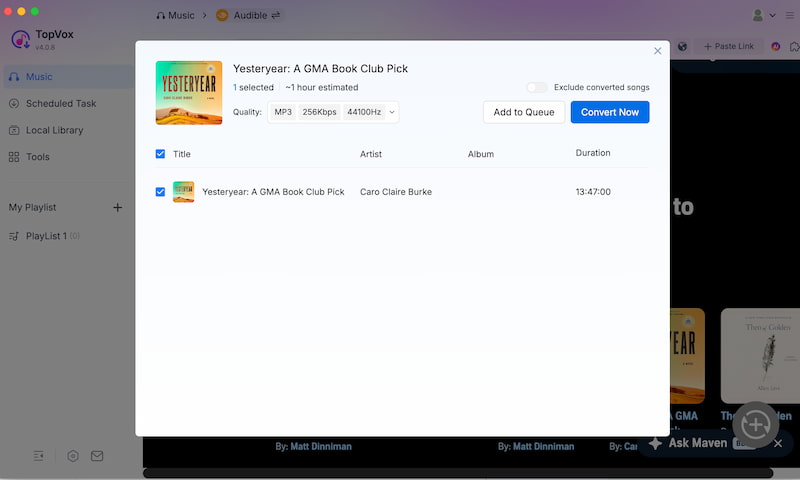
There you have it. The incredible tool of TopVox All Music with its ability to download audible books with ease. We can see that it is very simple to do and effective to use. Use it and learn more about its features.
Part 2. Top 4 Audible Downloaders
TuneFab Audible Converter
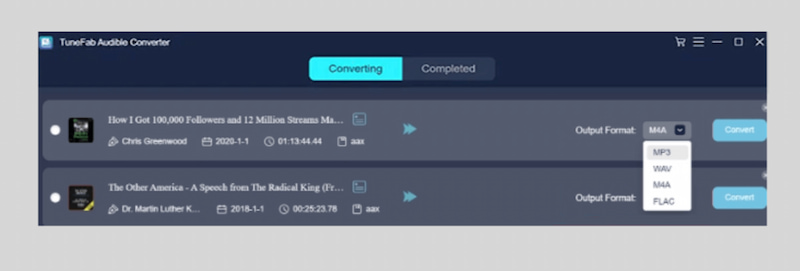
There are still other options to use for downloading audible books. One of them is TuneFab Audible Converter. This is a premium tool designed to help us remove DRM from Audible files we want to convert to MP3, WAV, FLAC, and M4A while preserving quality and chapters.
Pros
- Supports multiple formats like MP3, FLAC, WAV, and M4A.
- Preserves original quality and chapters.
- Fast conversion up to 60 times the speed.
- Batch processing supported.
- Built-in chapter/segment splitter.
Cons
- Higher price than competitors.
- Free trial is limited.
- Limited output customization.
- Fixed interface size.
- Some reported refund issues.
Epubor Audible Converter
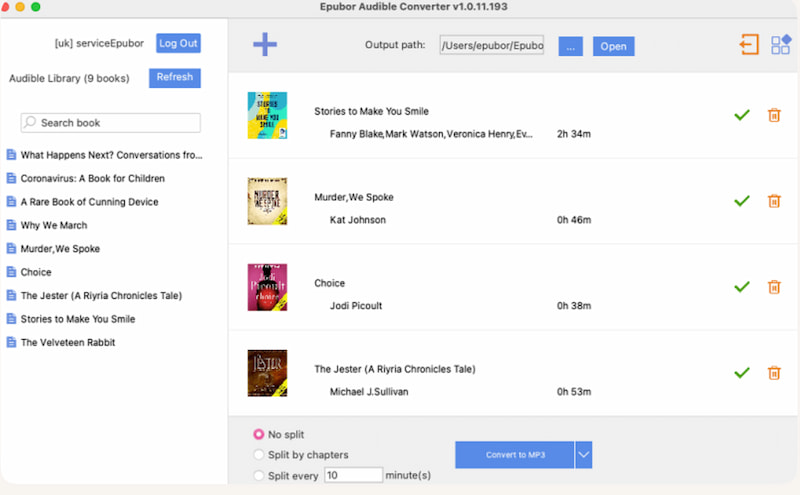
Next on the list is the amazing Epubor Audible Converter. This tool is known to be a beginner-friendly converter. It can also easily remove DRM and allow us to convert Audible books to MP3 or M4B. The entire process comes with a simple drag-and-drop interface. Therefore, do not worry if you are not tech-savvy because you can always use it with ease.
Pros
- Very easy to use with the drag & drop process.
- It supports chapter splitting.
- Preserves metadata and quality effectively.
- Batch conversion supported.
Cons
- Limited output formats for MP3 and M4B only.
- Some features are locked in the trial.
- No advanced audio customization.
- Cannot convert some formats.
- Paid software.
Libation
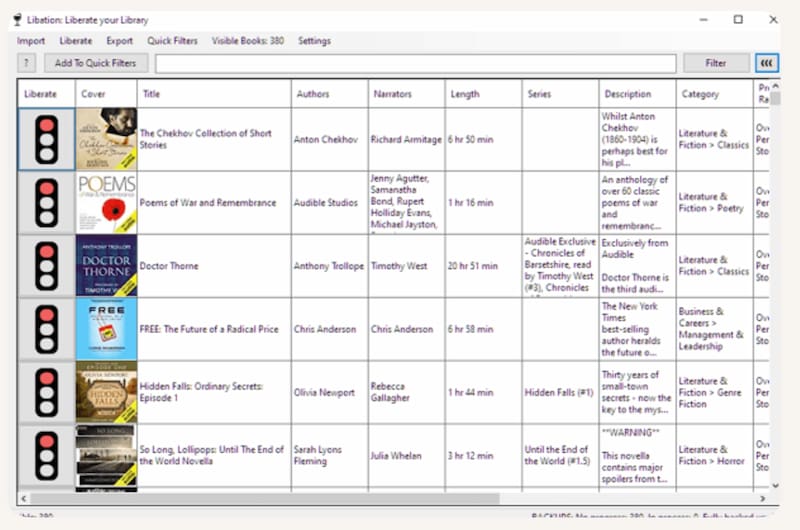
This one on the list will be Libation, which is a free and open-source Audible downloader. What is amazing about it is its ability to connect directly to your Audible account and download and manage audiobooks without cost. Everything is free to get your audible plus a smooth process. No wonder many users are also choosing this tool for their audiobook needs.
Pros
- Completely free and open-source.
- Can sync directly with the Audible library.
- No subscription required.
- Good for bulk downloading.
Cons
- The setup process can be technical for beginners.
- The interface of the tool is less polished.
- Limited official support.
- Occasional quality or format concerns are reported by the users.
AaxAudioConverter
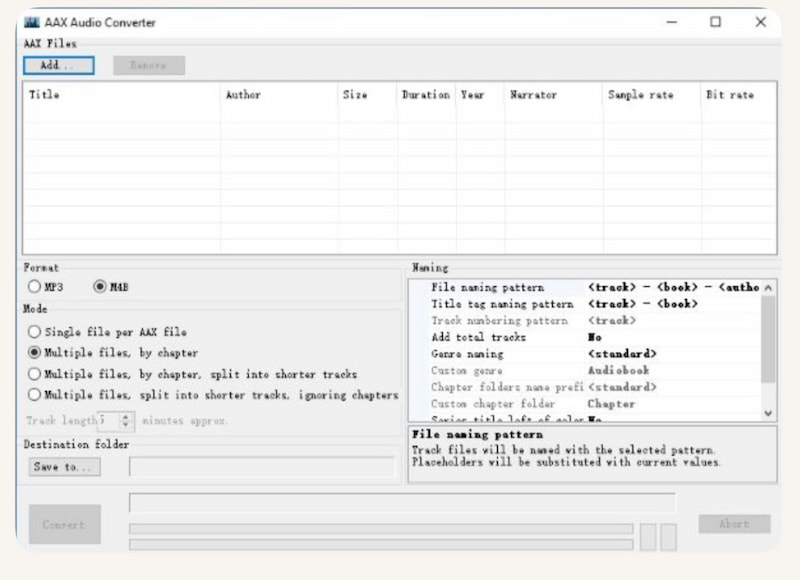
The fourth on the list but not least is AaxAudioConverter. This tool is a Windows-based open-source tool that can also easily convert AAX audiobooks into MP3 and M4A using the FFmpeg feature. This tool has strong support for chapter splitting and metadata. This gives us a technical but effective method to get audiobooks as MP3s.
Pros
- Free and open-source to download audible.
- Splits audiobooks into chapters automatically.
- Preserves metadata and structure with ease.
- Uses FFmpeg for efficient processing.
Cons
- It is limited to Windows users.
- Requires activation code setup.
- More technical setup.
- Does not bypass DRM directly.
Part 3. Comparison of 5 Audible Book Downloaders
| TopVox All Music Converter | TuneFab Audible Converter | Epubor Audible Converter | Libation | AaxAudioConverter |
| Audio Quality | High-quality. | Lossless and original quality preserved. | Lossless DRM removal and high-quality output. | Good. | Depends on FFmpeg settings. |
| Output Formats | MP3, M4A, WAV, and FLAC. | MP3, M4A, FLAC, and WAV. | MP3 and M4B. | Mainly M4B. | MP3, M4A and M4. |
| Conversion Speed | Fast. | Up to 60 times Speed. | Up to 60 times speed. | Fast. | Moderate to fast with FFmpeg-based. |
| Batch Conversion | Yes | Yes. | Yes | Yes. | Yes. |
| ID3 Tag Preservation | Yes | Yes plus editable. | Yes plus editable. | Yes with basic metadata). | Yes with embedded and export features. |
| Customize Output Settings | Moderate | Advanced with bitrate, sample rate, and splitting. | Limited customization. | Limited. | Moderate. |
FAQs on Audible Downloaders
Q: Is using an audible downloader legal?
A: Using an Audible Book Downloader is allowed as long as you only use it for personal matters. There will only be violations of the terms and conditions if we use the output for advertising, business, or other sharing to get money. Therefore, use a downloader for your own use only, but not for sharing.
Q: How do I remove DRM from audible books?
A: The audible books we are listening to are encrypted with DRM, AAX or AAXC. Therefore, converting them to MP3 is the only way we can remove DRM. That is why there are so many tools nowadays, like TopVox All Music Converter, that we can use to make an audible book as an MP3.
Q: Can I download audible books to my MP3 player?
A: Yes. However, this will become possible only after we convert them to MP3 because players for MP3 cannot read Audible’s AAX or AAXC formats.
Conclusion
As we get to the conclusion, we can say that getting audible books with ease is now possible as long as we have the best audible books downloader. Good thing we reviewed the best of the best options for you to make the process possible. One of these tools is TopVox All Music Converter, which is very straightforward for what it can offer. The process of downloading audibles has become easier compared to the other tools available.
Owen Bannett
Owen Bannett is a music enthusiasm as well as a senior writer. He has paid close attention on the pros & cons of various audio formats, bitrate, sample rate and encoding methods. Always seeking the best listening experience, Owen has deep insights about lossless music and diverse music converters on the markets.




 by
by