Viwizard Audible Audiobook Converter : Comprehensive Review
Audible is known for their AAX/AAXC file format, which are not compatible with many devices that we are using. That is why they are only playable with Audible platforms. This makes it more limited because it has a DRM or Digital Rights Management. Thus, if you want to save them on your file for long-time save and backup copy, then some users are using Viwizard Audible Converter to make it possible. That is why in this article we will review its features and capability to make it audible to universal file format.
Part 1. What Makes a Viwizard Audible Converter Unique?
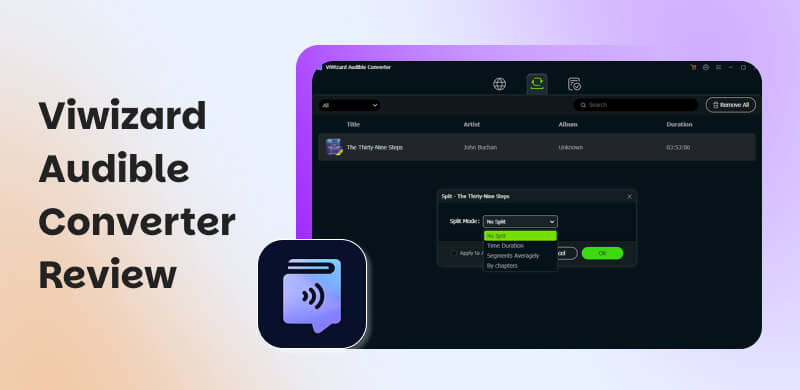
ViWizard Studio is among the world-wide most famous DRM solution providers. Nowadays, a special tool is finally introduced that can help us for DRM removal to Audible. This tool can now offer a professional Audible Converter that we can use to easily strip the DRM protection from Audible audio books we purchased. More than that, it can also convert the Audible audio books from AAX or AA format to MP3, M4A, WAV, WMA, FLAC, AAC, AC3, OGG, and other non-DRM-protected files. All of the process here can maintain the original metadata and chapter details on the file. What's great about it is the fact that it can work straight from the Audible files downloaded on your Mac or PC even if you do not open iTunes and authorize the audio books.
Key Feature of Viwizard Audible Converter
- Dedicated Audible Format. The tool existed specifically for us to manage AA and AAX files with ease. This can be used as a reliable tool in managing audiobook metadata. That is right, because the tool can preserve chapter markers, cover art, and ID3 tags.
- Lossless Audio Conversion. Through the process of converting, the tool is doing good when it comes to the maintaining of original audio quality during conversion. It also offers lossless output options. Moreover, with this tool we can now adjust bitrate, sample rate, and channels. These features that can balance file size and fidelity properly.
- Wide Format Compatibility. Managing your AA and AAX file and transforming them into universal files like MP3, M4A, M4B, FLAC, WAV, AIFF, AAC, AC3, and more. Using this tool can give us a great experience of playback of our file on any media player, smartphone, or audio device. All of this comes without Audible restrictions.
- Batch Processing Feature. This tool is also time saver, because it can support bulk conversion which allows users to convert multiple audiobooks. Moreover, the tool also includes a conversion queue. All of these come with progress animations which can show the percentage of completion for each file.
- Metadata Editing Feature. You can now manage audiobook files easily and effectively because this tool allows us to edit ID3 tags such as the title, author, genre, cover art. All of these exist to help us maintain a well‑organized audiobook library across devices.
Part 2. Performance and User Feedback of Viwizard Audible Converter
ViWizard Audible Converter is a great and reliable tool that we can use as a user‑friendly converting tool up until nowadays. This tool is suitable for audiobook listeners especially if they want DRM‑free files. Although the tool possesses minor drawbacks such as limited features offered on its trial feature and the issue with occasional performance hiccups.
Pros
- Fast conversion speeds.
- It is capable of preserving chapters, ID3 tags, and cover art.
- Wide format support such as MP3, M4A, FLAC, WAV, and more.
- Simple, beginner‑friendly interface.
- Strong customer service with quick refunds and support.
Cons
- Free trial only converts the first 30 seconds of each file.
- Occasional slowdowns with large batch conversions.
- Some users reported issues with product registration and setup.
- Rare cases of faulty files after interrupted downloads.
- Auto‑renewal billing complaints from a few users.
Users feedback
We reviewed some feedback from Trustpilot from 2025 to 2026 to know what other users are saying about the tool:
Positive
- • “Customers consistently praise the user‑friendliness and effectiveness of the products, highlighting their ease of use and reliable performance.”
- • “The customer service is frequently described as exceptional, with fast response times and helpful, knowledgeable staff.”
Critical:
- • Nicole Shank (Sep 2025), says that, “You can only convert full songs to MP3 files if you pay. If you use the free version, you can only convert the first thirty seconds of the song, which is not stated at all.”
- • More than that, other users are saying that the tool has a slow performance during large conversions.
- • There are also issues with product registration and setup.
Part 3. How to Download Audible Books to MP3 via Viwizard Audible Converter
After knowing the features we can get with Viwizard Audible Converter, let us now see how it does in terms of actual conversion. See the steps you need to follow below:
Step 1. First you need to load your Audible audiobooks into the converter. You can do it by clicking the Add Files button
Step 2. After that, you can now customize the output settings. Do it by choosing your preferred format and audio parameters. You can choose between MP3, M4A, FLAC, and more.
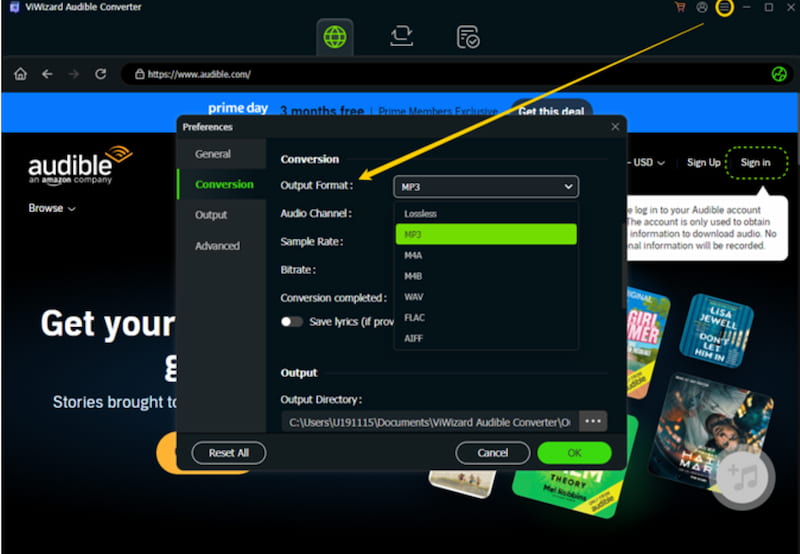
Step 3. Next, break down long files for easier navigation using the Edit icon next to book info
Step 4. Let us now proceed with converting files into DRM‑free formats. Click the Convert button. Here, you will need to wait a few seconds or minutes depending on file size

Step 5. Finally, please access the converted files. You can find and enjoy your DRM‑free audiobooks.
Part 4. The Best Viwizard Alternative: TopVox All Music Converter
TopVox All Music Converter
You might be worried about the poor performance noted by the users in Trustpilot, and maybe you do not want to risk it anymore. Good thing, we have a great alternative for you. TopVox All Music Converter is a leading versatile tool that can help us in converting audible AAX files with ease. It is a straightforward tool with fast conversion speed. From solo conversion to batch conversion process, everything comes with a fast and smooth process.
Key Feature
- It converts AAX files to a wide output format like MP3, WAV, M4A, AAC, ALAC, FLAC, AIFF, and more.
- Super fast and smooth conversion speed.
- Batch conversion feature is available.
- Simple and clean interface.
TopVox VS. Viwizard
| TopVox All Music Converter | ViWizard Audible Converter |
| Audio Quality | It can preserve chapters, cover art, and metadata across platforms. | Lossless output for AA/AAX files. |
| Speed | It handles long files in seconds under lossless mode. | Fast conversion, but occasional slowdowns with very large files. |
| Output Formats | MP3, WAV, M4A, AAC, ALAC, FLAC, AIFF, plus more. | MP3, M4A, M4B, FLAC, WAV, and AIFF. |
| Supported Platforms | It supports Amazon Music, Spotify, Deezer, YouTube Music, Audible, and more. | Focused on Audible AA/AAX only. |
| Advanced Features | ●Multi‑service downloader,.
●Batch conversion.
●Metadata editing.
●Ad‑free.
●Privacy‑focused. | ●Chapter splitting.
●Metadata editing.
●Customizable codec/bitrate. |
| OS Compatibility | Windows & Mac. | Windows & Mac. |
Verdict
If you are worrying about the performance of ViWizard due to mixed Trustpilot feedback, then TopVox All Music Converter is the stronger and more versatile alternative for you. It is the best choice because it’s a multi‑platform that can handle both audiobooks and music services with speed, quality, and reliability.
Part 5. How to Convert Audible to MP3 Using TopVox?
Step 1. Get the TopVox All Music Converter for free on their official website and install it on your computer.
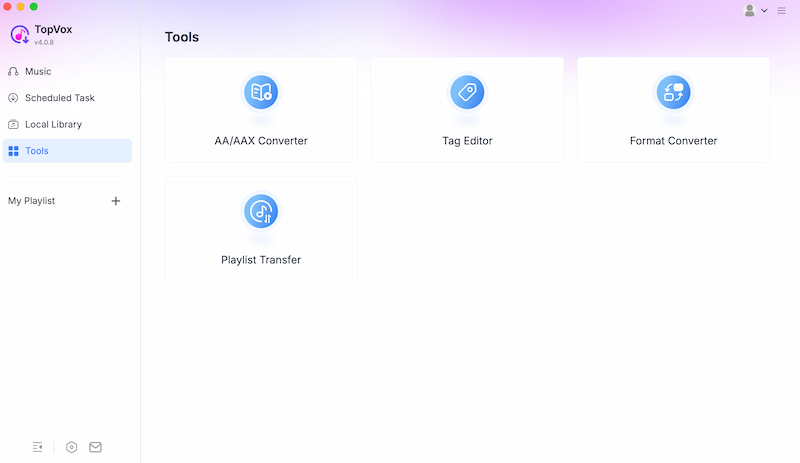
Step 2. From the interface, access the Tools. Among the options choose the AA/AAX Converter.
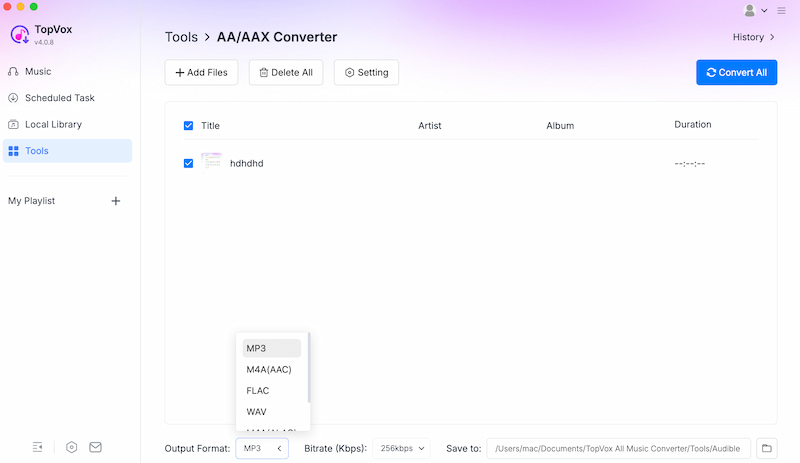
Step 3. Add the AAX file you want to convert. Then, select it once again to select the file format you need.
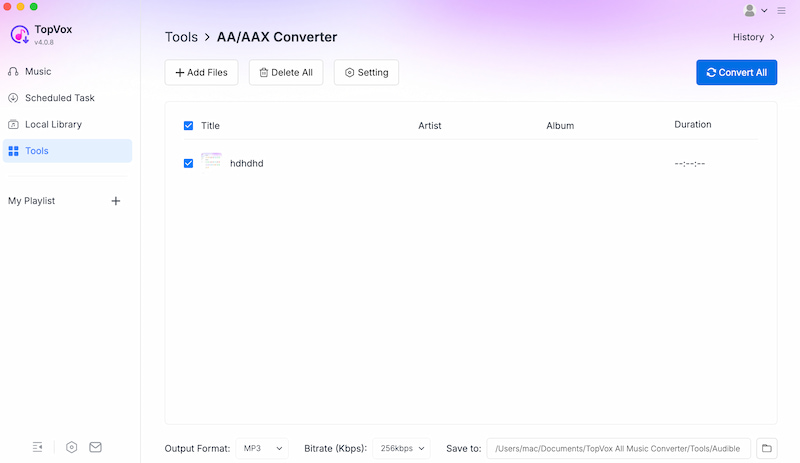
Step 4. Finally, please select the Convert All button.
FAQs on Viwizard Audible Converter
Q: Can I convert multiple audiobooks simultaneously?
A: Yes, batch conversion is supported and available. This feature allows users to have multiple files to be processed together with progress tracking and completion notifications.
Q: What output formats are available by Viwizard?
A: It supports MP3, M4A, M4B, FLAC, WAV, AIFF, AAC, and AC3. It is a bit limited compared with other tools that can offer wide compatibility across devices and players.
Q: Is the free trial limited to Viwizard?
A: Yes. The trial account with Viwizard only converts the first 30 seconds of each file. That means the tool really requires you to purchase for full audiobook conversions.
Conclusion
We can now conclude that Viwizard Audible Converter is a great tool that we can use to convert AAX to universal file format. However, there are some issues that are reported by users. So, TopVox All Music Converter is still the best option for converting your AAX file. This is a veritable tool with safe and fast conversion speed. Use it now for free.
Owen Bannett
Owen Bannett is a music enthusiasm as well as a senior writer. He has paid close attention on the pros & cons of various audio formats, bitrate, sample rate and encoding methods. Always seeking the best listening experience, Owen has deep insights about lossless music and diverse music converters on the markets.




 by
by