TunePat YouTube Music Converter: Features, Pros, Cons, etc.
TunePat YouTube Music Converter has become the most popular tool for users who want to convert and download songs from YouTube for offline listening. It can even give you a smooth conversion process, allowing you to get your desired result in just a few seconds. In this review, we will discuss more about the converter, including its key features, pros, cons, pricing, how to use it, and more. You will also discover the best alternative you can use for an excellent conversion process. Thus, read this review and get all the information you need.
Part 1. An Overview of TunePat YouTube Music Converter
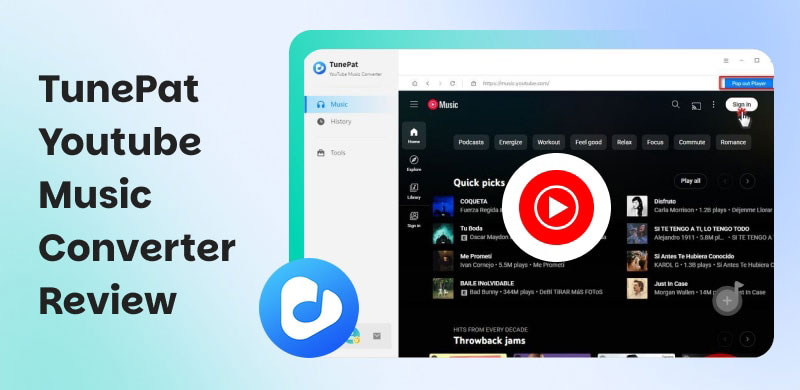
TunePat YouTube Music Converter is designed for converting and downloading any music from the YouTube platform. The good thing about this tool is that it can ensure that you save your music with the best quality. It can also handle batch conversion for converting multiple songs at once. With its capabilities, we can tell that the program is among the most reliable converters you can rely on to obtain your favorite music.
If you want to get more information about the converter, you can start reading everything below.
Key Features
Convert Music
One of the core features of the program is to convert your YouTube Music. This is perfect if you want to save the songs on your computer for offline listening purposes. Plus, this converter can help you convert the music to various formats. You can convert YouTube music to MP3, FLAC, AAC, M4A, and more. The best part here is that it can give you the best audio quality for up to 3220 kbps, resulting in a satisfying listening experience.
High Speed Conversion
The converter can offer a fast conversion process. You can convert YouTube Music up to 10× faster compared with other converters. This feature is perfect if you want to convert and download music while saving time.
Offers Batch Conversion
The program can offer its batch conversion feature. This feature is ideal if you want to convert and download all the music you want in just a single process. You can even convert your favorite playlist. With that, you don't have to consume much time during the conversion procedure.
Pricing Plans
TunePat YouTube Music Converter is not 100% free. If you want to get its overall features, you must get its premium versions. If you are interested in learning about its pricing plans, you can check the provided table below.
| 3-Month Plan | 1-Year Plan | Lifetime Plan |
| Price | $29.95 | $44.95 | $89.90 |
| Inclusions | • Auto-Renewal. Cancel Anytime
• 1 License for 1 Computer
• 3-Month Free Updates
• 5-Day Money Back Guarantee | • Auto-Renewal. Cancel Anytime
• 1 License for 1 Computer
• 1-Year Free Updates
• 5-Day Money Back Guarantee | • One-Time Fee
• 1 License for 1 Computer
• Lifetime Free Updates
• 30-Day Money Back Guarantee |
Part 2. Pros and Cons of TunePat YouTube Music Converter
Want to learn more about the pros and cons of the converter? In that case, read all the information from this section.
Pros
- Wide Format Support - The converter can convert YouTube Music to various formats, including AAC, MP3, WAV, FLAC, AIFF, ALAC, and more.
- Lossless Audio Quality - The software ensures the maintenance of the original sound quality of the music for better audio playback. It can even preserve the ID3 tag and metadata.
- Ease of Use - The converter can offer its comprehensive user interface, making it suitable for beginners or non-technical users.
- Video Support - Besides converting music, the program can also save YouTube Music videos with the best resolution of 4K.
- Extra Tools - The software can even offer extra tools, such as Format Converter, ID3 tags editor, and CD Burner.
Cons
- Paid License Required - The free version of the converter has various restrictions. You have to get the premium version to access more features.
- Occasional Metadata Gaps - There are times when the downloaded file has missing metadata.
- Personal Use Only - The music is for personal use only. Music redistribution is prohibited.
Part 3. How to Use TunePat YouTube Music Converter
Want to use TunePat YouTube Music Converter to convert your favorite song from YouTube? Then, you can follow the instructions below.
Step 1. You can start downloading TunePat YouTube Music Converter on your computer. After that, install and run it to start the conversion process.
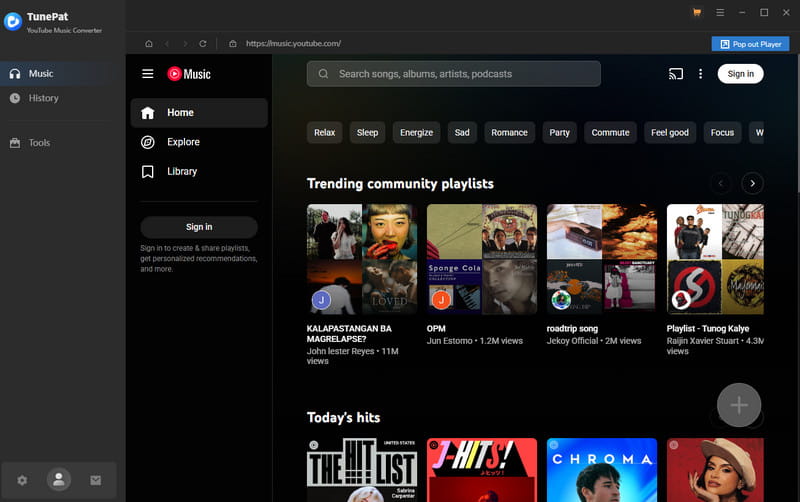
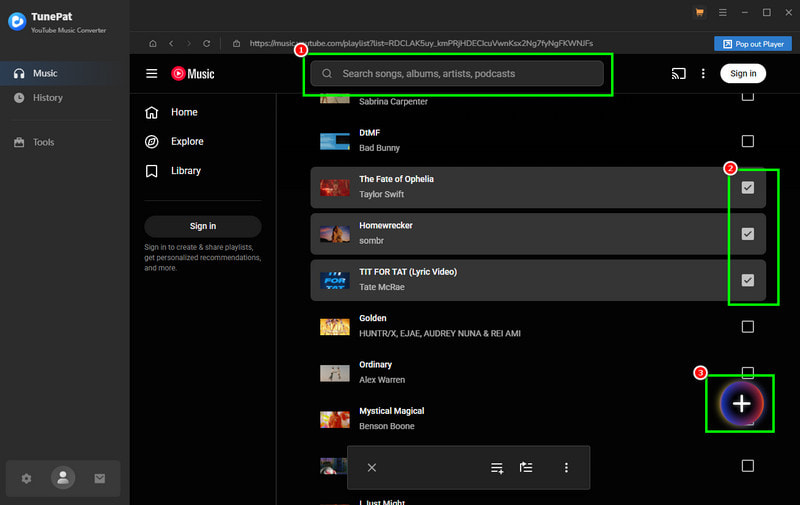
Step 2. After you launch the interface, go to the Search section to browse the music. Check the box of your preferred music. You can even tap the Plus > Add option to select all the music.
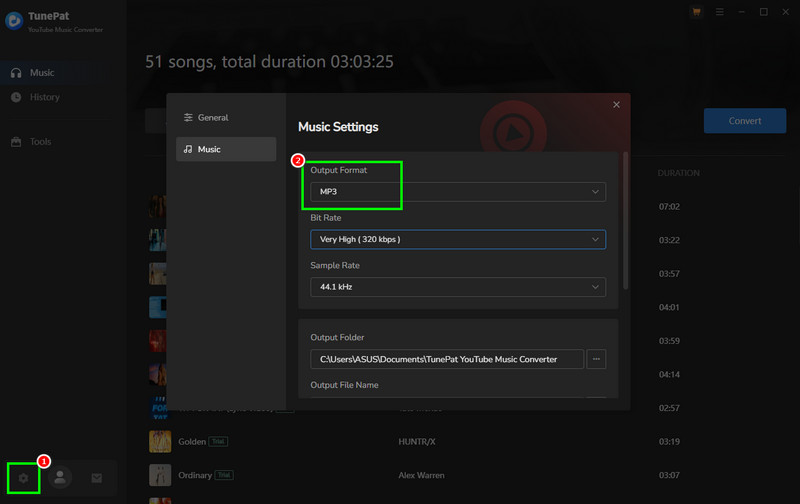
Step 3. After that, go to the Settings section and select your preferred audio output format. You can also choose your preferred quality, sample rate, and bitrate.
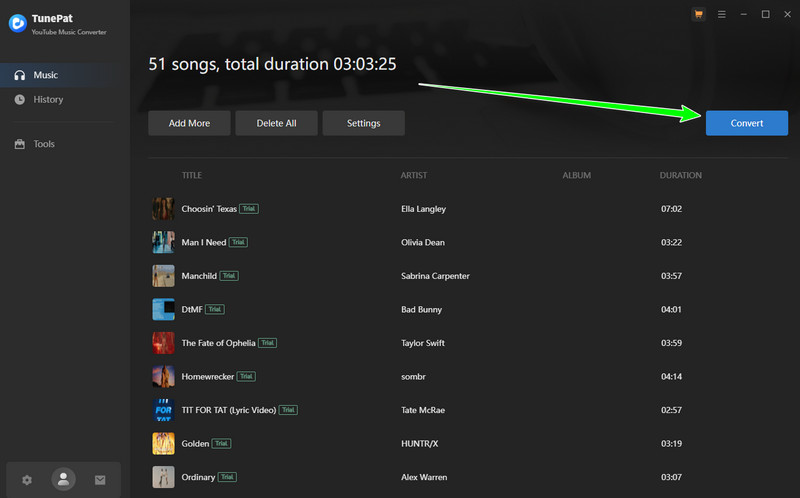
Step 4. For the final process, hit the Convert button above. After the conversion process, you can start listening to your music on your device.
Part 4. My Experience with TunePat YouTube Music Converter
After using TunePat YouTube Music Converter, we can tell that it is the most powerful and reliable converter you can access on your computer. It can even support batch conversion and offer a smooth conversion process, making it ideal for all users. The only drawback here is that the program is not 100% free. There are also various restrictions on the free version. But still, when it comes to the conversion process, you can get the result you need.
Part 5. Best Alternative to TunePat YouTube Music Converter
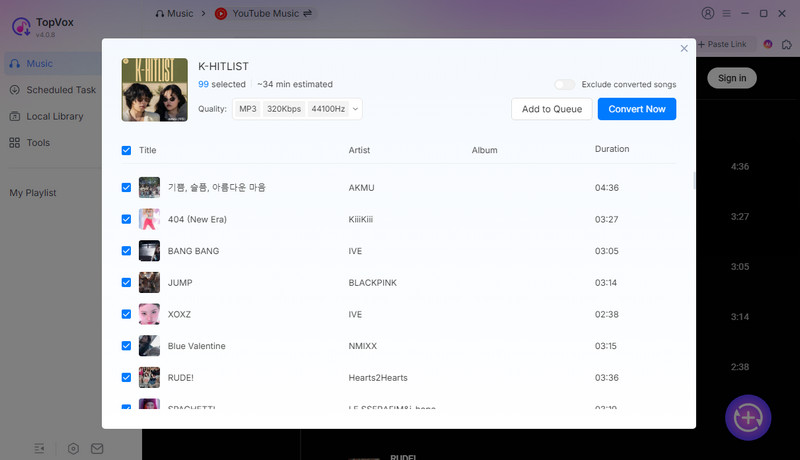
Do you want a faster conversion process so you can save more time and convert more music? In that case, it would be best to use TopVox All Music Converter. This converter can offer its fast conversion process up to 35× faster than TunePat. Aside from that, it has a more understandable user interface and offers more audio output formats, such as AAC, AC3, MP3, FLAC, ALAC, OGG, M4A, WAV, and more. You can also get the best audio quality for up to 320 kbps. With these capabilities, we can tell that it would be a wise choice to choose this program over the other one.
More Features
- It can download and convert playlists smoothly.
- The program can convert music to DRM-free formats, including MP3, AAC, FLAC, M4A, and more.
- The converter can convert music from various platforms, such as Spotify, Deezer, Apple Music, and more.
- It has a pre-built web player for instant audio playback.
To get more information about the two YouTube Music Converters, you can check the details below.
| TopVox All Music Converter | vs. | TunePat YouTube Music Converter |
| Up to 35× faster | Speed | Up to 10× faster |
| Up to 320 kbps | Quality | Up to 320 kbps |
• Lightweight
• Privacy-focused.
• Ad-free
• No tracking | Safety | Intended for personal use only |
| Starts at $29.95 | Price | Starts at $29.95 |
| AAC, M4A, WAV, FLAC, MP3, AC3, AIFF, etc. | Formats | MP3, AAC, FLAC, WAV, ALAC |
| Windows and Mac | Platform | Windows and Mac |
Part 6. FAQs about TunePat YouTube Music Converter
Q: Is TunePat YouTube Music Converter safe?
A: Definitely, yes. You can use the converter to download and convert your favorite music without worrying about your information.
Q: Is TunePat YouTube Music Converter easy to operate?
A: Absolutely, yes. The program has a simple user interface. With that, you can get your favorite YouTube music without any hassle.
Q: What is the best replacement for TunePat YouTube Music Converter?
A: If you want a better and faster superior converter, look no further than TopVox All Music Converter. This program ensures that you get a faster conversion process and better audio quality. You won't even encounter any trouble even using the free version.
Conclusion
With this detailed review of TunePat YouTube Music Converter, you have learned that it is the best converter you can use on your computer. IT can even offer a smooth and simple conversion process, making it ideal for all users. However, since it has various restrictions on the free version, you might need another converter. In that case, we suggest using TopVox All Music Converter. It has a faster conversion process and can save your music with the best quality. Its free version is also better since you can still get the result you need, which makes it the top choice as a converter.
Owen Bannett
Owen Bannett is a music enthusiasm as well as a senior writer. He has paid close attention on the pros & cons of various audio formats, bitrate, sample rate and encoding methods. Always seeking the best listening experience, Owen has deep insights about lossless music and diverse music converters on the markets.




 by
by