TuneCable Spotify Music Downloader Review [with Alternative]
 by Luna Harper | May 19, 2026 | Spotify
Since high-resolution streaming has become a standard, various audiophiles still crave reliable offline backups to safeguard their music libraries. So, can TuneCable Spotify Music Downloader keep the pace with Spotify's latest encryption protocols and 2026 system updates? According to early observations, it remains a good option for customers who want metadata retention and flexible format conversion, particularly those juggling free and premium accounts.
Although TuneCable Spotify Music Downloader maintains its position, TopVox All Music Converter, a new competitor, is changing the conversion market this year, suggesting that dedicated audiophiles may have different preferences. With that, if you want to learn more about TuneCable, see this review. You will even get more insights about these two Spotify downloaders.
Part 1. An Overview of TuneCable Spotify Music Downloader
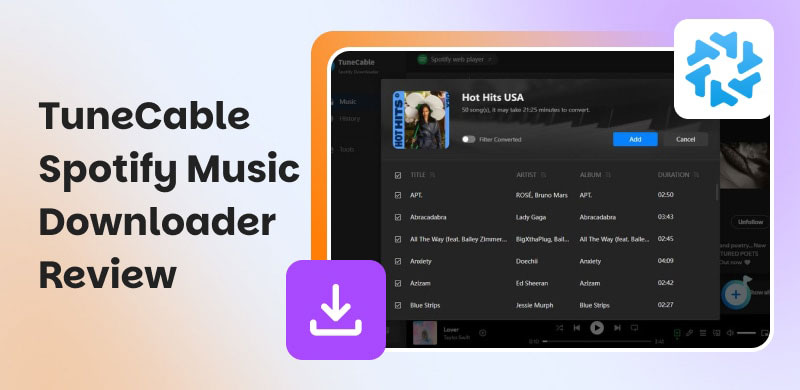
TuneCable Spotify Music Downloader is an excellent tool for your desktop. It offers a simple, smooth download process, making it an ideal tool for users. It can even support various audio formats, so you can save the audio and play it without compatibility issues. To get more insights about the capabilities of this music downloader, you can check its key features below.
Spotify Music Downloader
TuneCable Spotify Music Downloader is an excellent tool for your desktop. It offers a simple, smooth download process, making it an ideal tool for users. It can even support various audio formats, so you can save the audio and play it without compatibility issues. To get more insights about the capabilities of this music downloader, you can check its key features below.
The core feature of the software is to convert and download Spotify music. This way, you can have the music on your desktop for offline listening. It can even download a Spotify playlist at once. The good part here is that downloading the music is simple thanks to its user-friendly interface.
Wide Format Support
During the download, you can choose your preferred audio format. You can save the music as MP4, FLAC, AIFF, M4A, AAC, and more. With this wide range of support, you can save the music and play it on various media players or streaming platforms without any compatibility issues.
High-Quality Output
The good thing about this Spotify music downloader is that it lets you download music at up to 320 kbps. You can even adjust the bitrate based on your preferences. With that, you can expect a better listening experience during playback.
Fast Downloading Process
You can also download all the music you want at up to 10 times the speed of other music downloaders. It lets you download multiple songs without consuming much time.
Web Player Integration
Besides downloading Spotify music, TuneCable also offers a built-in web player. This feature allows you to play and listen to any Spotify songs while the process runs. It is perfect if you want to check the music before proceeding with the download.
Part 2. Pros and Cons of TuneCable Spotify Music Downloader
In this section, we will give you all the information you need about its advantages and drawbacks. To learn them all, please read the details below.
Good Things about TuneCable Spotify Music Downloader
- • The main interface of the music downloader is simple to operate.
- • It can preserve lossless audio quality and ID3 tags, album art, and metadata.
- • It can consistently produce high-quality audio.
- • The program can offer additional tools, such as CD burning, a format converter, an audio editor, and more.
Drawbacks of TuneCable Spotify Music Downloader
- • When using the free version, you can only download the first minute of the music.
- • The Mac version of the program can offer slower download and conversion speeds.
- • The music downloader requires a high-spec computer for smoother downloads.
- • Its premium version is pricey.
Part 3. How to Use TuneCable Spotify Music Downloader
Do you want to learn how to use the TuneCable Spotify Music Downloader? Then, you can follow/check the simple instructions below.
Step 1. Download the TuneCable Spotify Music Downloader apk on your desktop. After that, start signing in to your Spotify account.
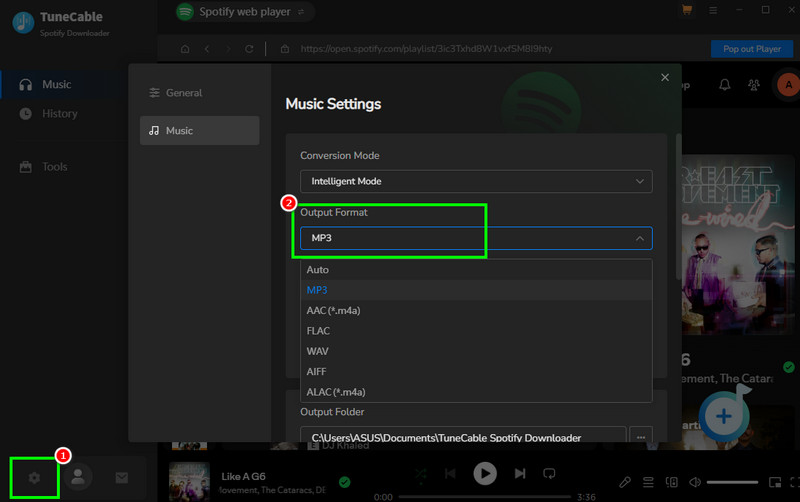
Step 2. You can now go to the Settings section below and select your desired format from the Output Format section.
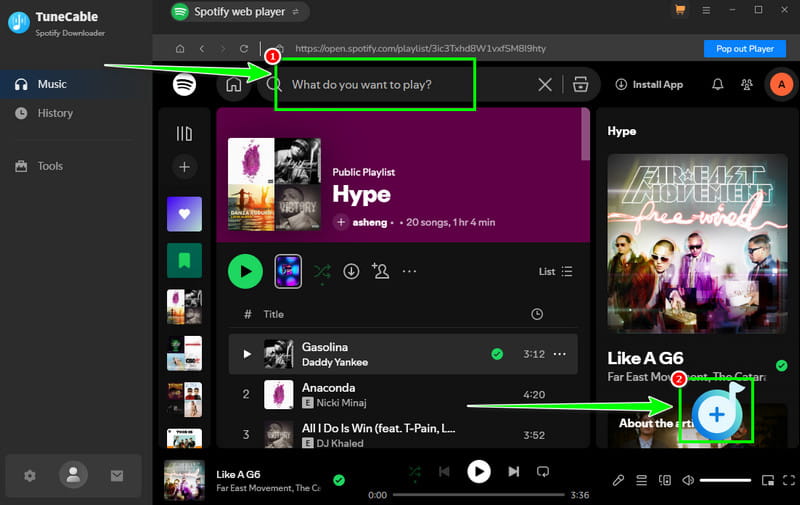
Step 3. Then, from the interface, go to the Search section to start browsing the music you want to download. Then, click the Plus > Add options to add them to the Conversion section.
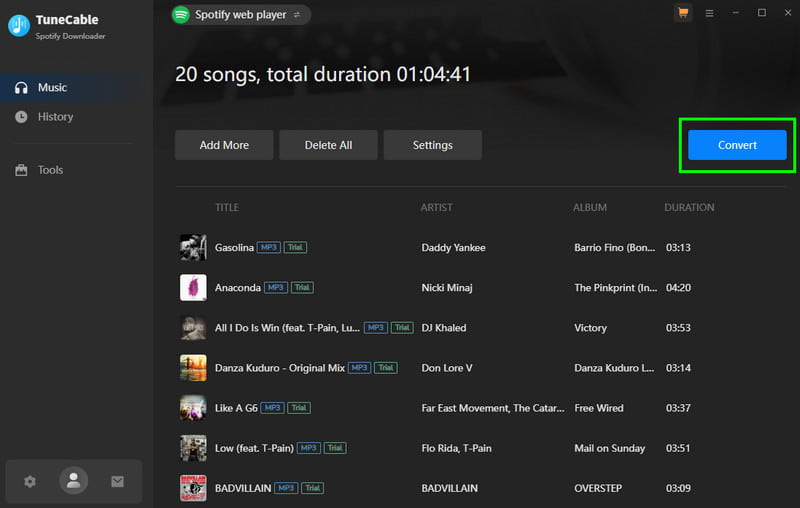
Step 4. For the final downloading process, start hitting the Convert button above. After that, the music will be saved on your desktop.
You can also visit: Detailed and honest review of TuneFab Music Converter.
Part 4. My Experience of Using TuneCable Spotify Music Downloader
After using the TuneCable Spotify Music Downloader, it is among the most reliable and effective Spotify music downloaders. It can provide a comprehensive user interface, a smooth download process, and good audio quality. The only drawback is that you cannot download the entire song with the free version. You can only convert and download the first 1 minute of the music. With that, to download the songs without any restrictions, using the program's paid version is highly recommended.
Part 5. Best Alternative to TuneCable Spotify Music Downloader
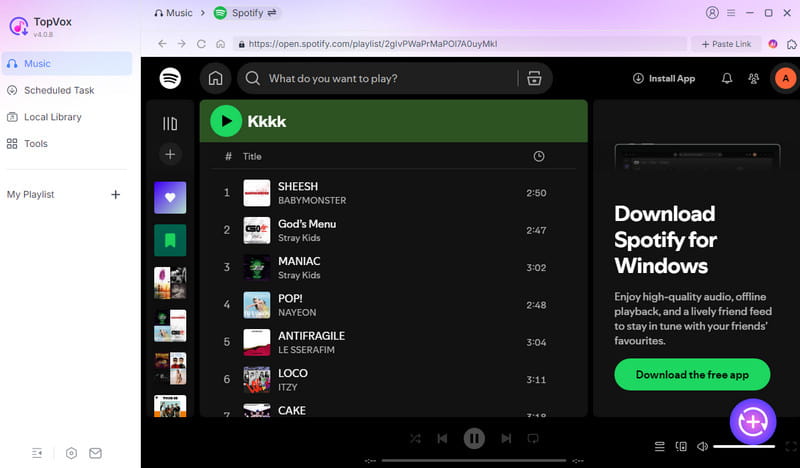
Do you want to download and convert Spotify music without any restrictions? In that case, we suggest using TopVox All Music Converter as the best alternative. With its ability to convert and download Spotify music, you can ensure you achieve the desired result after the process. It can even offer up to 35× faster conversion speed. Aside from that, it can also offer a batch conversion feature, ideal for downloading and converting multiple music files or playlists at once. The best part here is that you can save the music with high-quality sound up to 320 kbps. Thus, if you want the best replacement for TuneCable, look no further than TopVox All Music Converter.
100% Secure. No virus.
100% Secure. No virus.
Features
- The music downloader can offer a smooth conversion process.
- It can offer its pre-built web player for effective audio playback.
- The software can also download music from various platforms, including Apple Music, YouTube Music, Deezer, and more.
Part 6. TuneCable vs. TopVox: Comparison
For more information about the two excellent Spotify music downloaders, see the table below.
| TopVox All Music Converter | VS | TuneCable Spotify Music Downloader |
|---|---|---|
| 35 times faster | Speed | 10 times faster |
| Up to 320 kbps | Quality | Up to 320 kbps |
| Price starts at $19.95 | Price | Price starts at $69.90 |
| Lightweight, ad‑free, no tracking; processes files in a dedicated folder without affecting curated libraries. | Safety and Privacy | ad-free, safe for personal use; integrates with the Spotify app and web player. |
| MP3, AAC, WAV, FLAC, AIFF, and more. | Formats | MP3, AAC, WAV, FLAC, AIFF, and ALAC. |
| Windows and Mac | Platforms | Windows and Mac |
Part 7. FAQs about TuneCable Spotify Music Downloader
Q: Is TuneCable Spotify Music Downloader safe to use?
A: After using the software, we can tell that it is safe to access and use. It ensures that all your data is safe and that no information is shared without your consent.
Q: Is TuneCable Spotify Music Downloader worth using?
A: You cannot get the full song when using the free version. To consider the program as a worthy music downloader, you must access its premium version.
Q: What is the best replacement for TuneCable Spotify Music Downloader?
A: If you are looking for a better Spotify music downloader, we recommend using TopVox All Music Converter. With this remarkable tool, you can download and convert Spotify music faster and more smoothly, without any restrictions.
Conclusion
TuneCable Spotify Music Downloader is among the best programs for downloading your favorite Spotify music. It can offer fast conversion speeds and ensure you get the best audio quality. However, since the free version has various restrictions, you might need another downloader. If that is the case, we suggest using TopVox All Music Converter. This music downloader is far superior because it offers a faster conversion process, the best quality, and ensures you won't encounter any limitations during the process, making it a remarkable music downloader.
Luna Harper is a passionate music lover and an inspiring content sharer. She has explored most of the music converters available on the market, acquiring thorough knowledge of their features, usability, and differences. Luna enjoys using her professionalism to help fellow music lovers get superior audio quality.