4 Ways to Download Music from YouTube to Your Phone
Although YouTube is well-known as a video-sharing media platform, it is also a good place to enjoy plenty of unique music resources. But listening to music online is restricted by the weak network conditions and mobile data consumption. For many YouTube users, A 3-minute high-quality music track always uses over 7-8MB of data. If you have limited data plans or high data costs, you may have a desire to download music from YouTube to your phone in daily life. We’ll share 4 ways to help you achieve that and listen to downloaded music anytime.
Part 1. Official Way to Download Music from YouTube to Your Phone
Common users of YouTube are often interrupted by numerous ads. Alternatively, when you lock your screen or switch to another app, the music will pause automatically. However, these issues can be solved if you pay for YouTube Premium. Of course, it’s a prerequisite to download the songs to your phone for listening offline. The subscribers can download YouTube music to their phone within the app directly and quickly.
Here is a step-by-step guide [OS supported: Android, iOS, Web]:
Step 1. Go to the YouTube Music app on your phone and log in to your Premium account. New users can get a 1-month free trial.
Step 2. Select the songs, playlists, or albums you want to save. Click the three-dot menu at the top to find the download option.
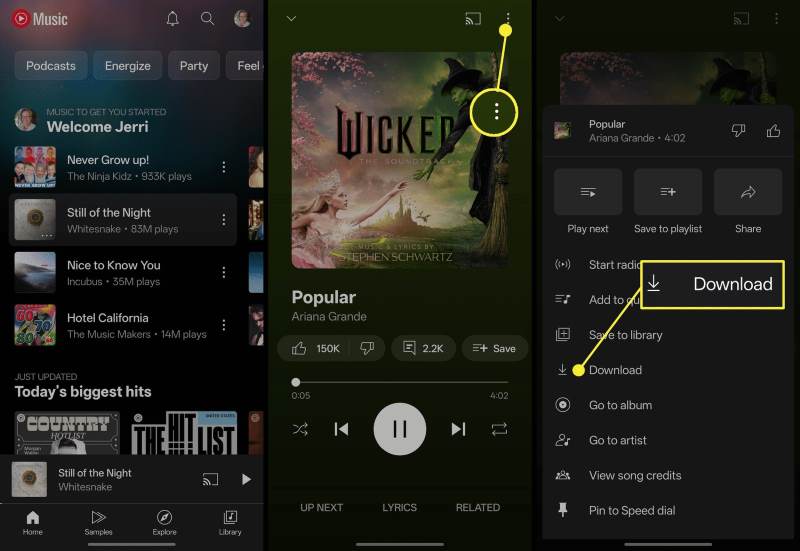
Step 3. Find the music through Downloads > Library. You can also turn on Smart downloads in the settings. Then the favorite songs in your listening history will be automatically saved under the Wi-Fi network condition.
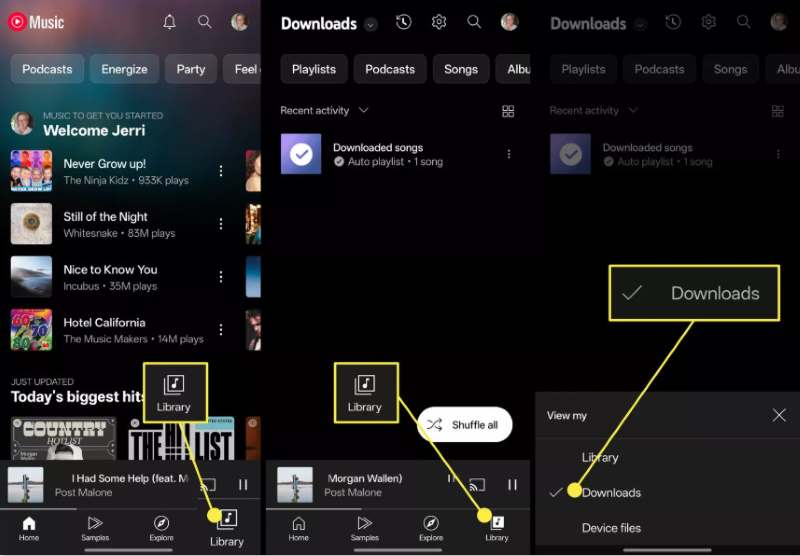
It’s safe and convenient to download music from YouTube to your phone with the official app. But once your subscription expires, the music won’t be played.
Part 2. Download Music from YouTube to Your Phone Using an Unlimited Desktop Software [Best]
As mentioned, keeping an indefinite subscription is a considerable expense. There’s a question about how to download music from YouTube to your phone without Premium. You need to try a legal third-party tool to achieve it. TopVox All Music Converter is an all-in-one, comprehensive music downloader. You can enjoy and download lossless music to multiple formats in the embedded streaming platforms of the app. Downloaded songs will retain the audio quality of the original tracks and keep ID3 tags for better management. You can download the app by clicking the link below. Let’s get a free trial!
Features
- Built-in streaming platforms, including YouTube Music, Spotify, Apple Music, Amazon Prime Music, Deezer, Pandora, SoundCloud, Line Music and Audible.
- Faster conversion speed is up to 35×.
- Convert music in high-quality up to 320kbps.
- Batch download of songs, playlists, or albums.
- Various output formats: MP3, WAV, FLAC, AIFF, M4A (AAC), or M4A (ALAC).
- Safe with no ads and malware.
[OS supported: Windows, macOS, transfer to Android & iOS]
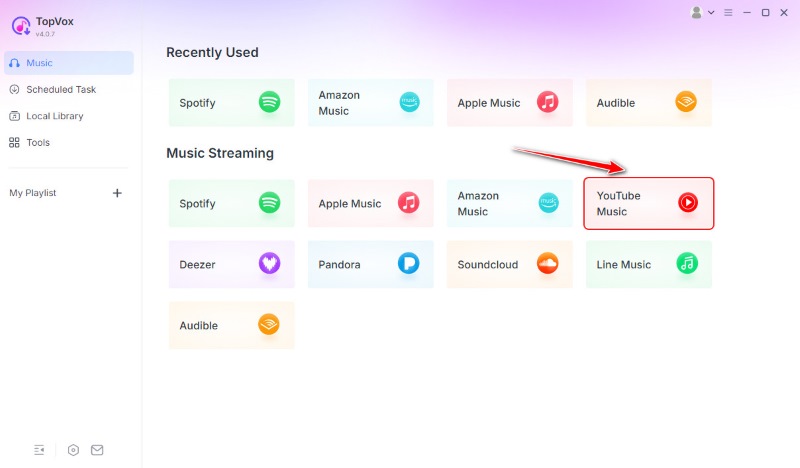
Step 1. Run the app on your computer. Choose and log in the YouTube Music in the main interface.
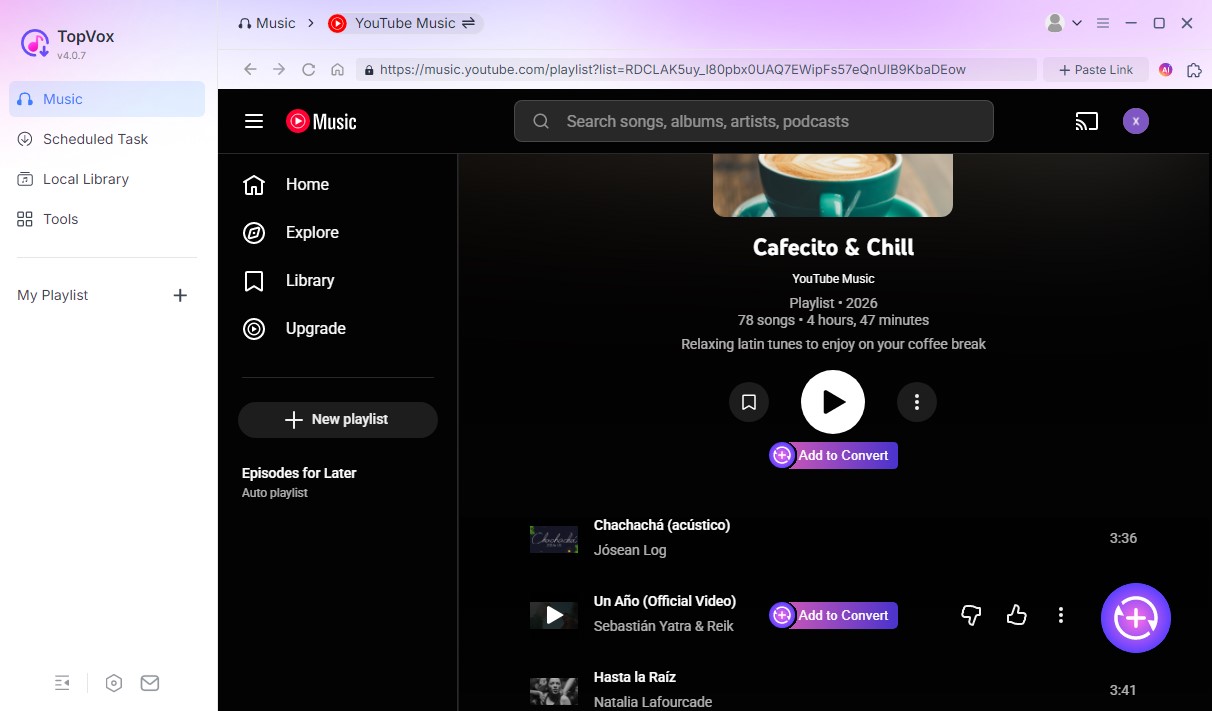
Step 2. Find the playlist you want to save and click Add to Convert.
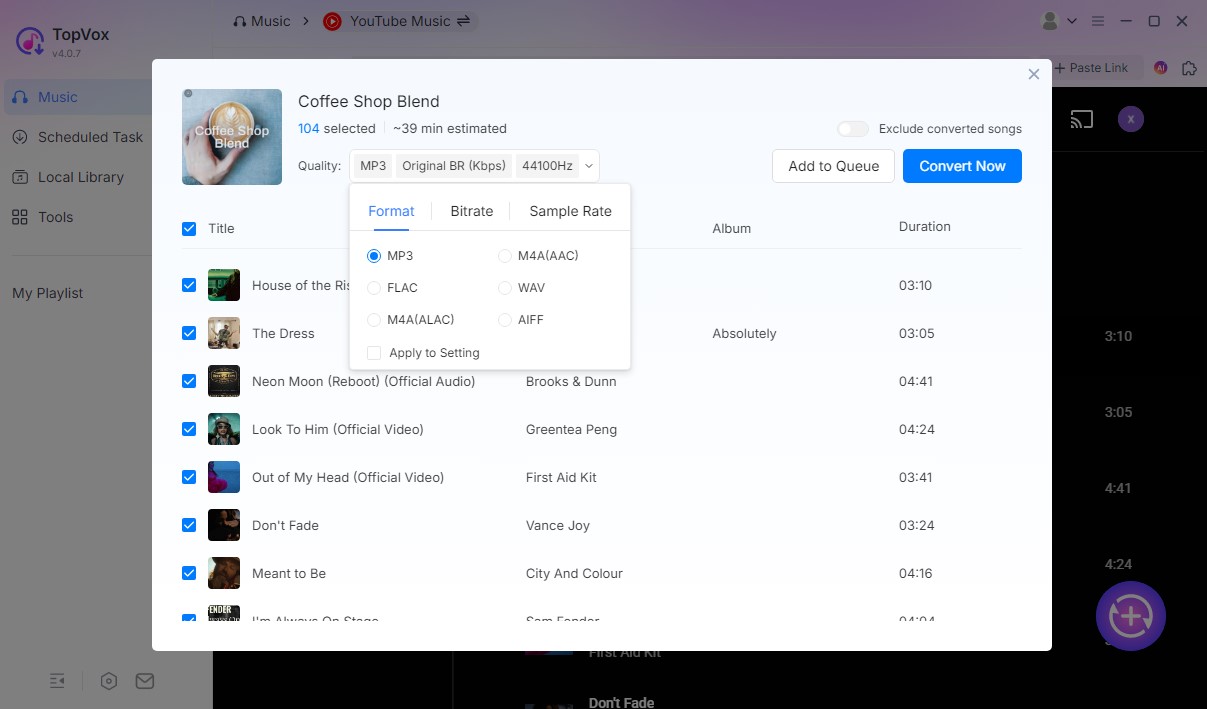
Step 3. Customize the output settings. And hit Convert Now to download the YouTube playlist to MP3.
Step 4. After the conversion finishes, you can transfer the songs from your local computer to your Android phone for offline listening.
Supported by DRM-removal technology, TopVox All Music Converter downloads the music from YouTube to your phone safely, and the success rate reaches 99%. Its clean interface and amazing downloading speed have also attracted mass attention.
Part 3. Download Music from YouTube to Your Phone via One Online Tool
If you don’t want to install any software, we recommend YouTube to MP3 Converter. It is an online YouTube to MP3 converter that requires no installation, adapting to different systems and devices, including Android, iOS, Windows, and macOS. It offers unlimited daily downloads of music from YouTube to your phone for free. And the simple operation process effectively meets the need for YouTube audio downloads.
OS supported: Android, iOS, Windows, and macOS [via browser]
Step 1. Open your YouTube mobile app and find the target videos. Click Share > Copy link to copy the URL.
Step 2. Access to the web converter in your mobile browser. Press the search box to paste the link and click Go.
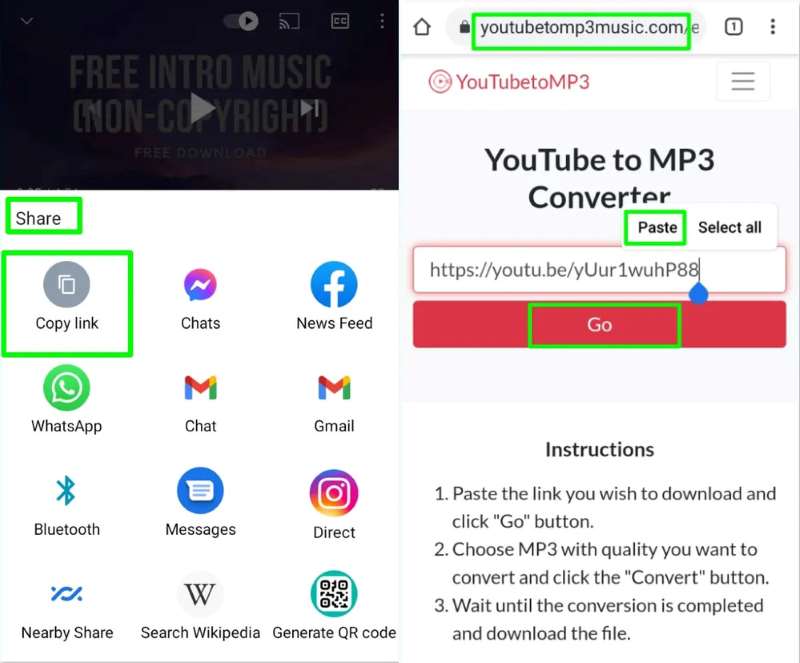
Step 3. After loading the video, you can personalize output parameters, like audio format and quality.
Step 4. Click the Convert button. When the conversion finishes, you can tap the Download button to store the music.
A unique feature is that it supports saving converted audio to other devices. You can download music to another phone by scanning the generated QR code. During the audio conversion process, this tool may display full-screen pop-up ads that require manual closure by the user. These ads affect the operational experience. Additionally, it's just very time-consuming to convert. One song typically costs several minutes.
Part 4. Download Music from YouTube to Your Phone via an Android App
For many Android users, the YouTube app does not work on their phone with a limitation of Google. It’s unavailable to download or play the content in the background. But you can do it all with NewPipe. You can download high-quality audio and video from YouTube without worrying about security. It freely offers special features that the official YouTube app.
The downloading operation is familiar with Part 3:
Step 1. Download the NewPipe app on Android.
Step 2. Copy the link to the music you want to download from YouTube.
Step 3. aste the link into the search box at NewPipe.
Step 4. Click Download and choose the audio to adjust the output format
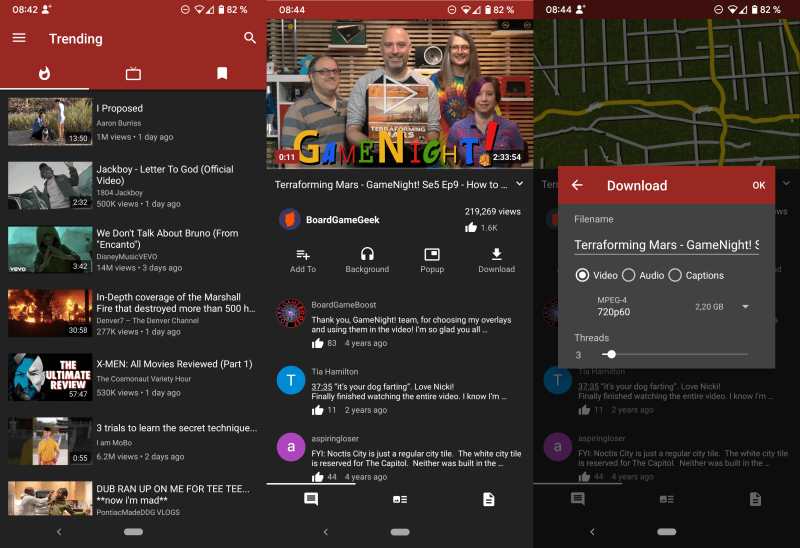
It’s an open-source software that cannot be found on the Google Play Store. You can check the source code and obtain the APK from GitHub to download it.
FAQs About Downloading Music from YouTube
Q1: How can I download music from YouTube to a Mac freely?
A: The YouTube Music app doesn’t have a desktop version now. You’d better use a third-party YouTube Converter that supports macOS, like TopVox All Music Converter, which has a free trial and a user-friendly experience to download YouTube music to your Mac.
Q2: Which music quality can help save the most space on a phone?
A: Bitrate of about 128-265 Kbps offers a good balance between space and quality for local storage.
Q3: Without installing an app, can I download music from YouTube directly?
A: Using an online converter is more feasible. In most cases, you just need to copy and paste the music link from YouTube Music to the converter’s search box and then click the download button.
Conclusion
With different types of YouTube users and various devices, there are several ways to download music from YouTube to your phone. Using the official method, please confirm you have already paid for the Premium. The online converter is convenient, but you should think ahead the security and stability risks. We prefer the safe desktop software TopVox All Music Converter to other tools. It can deliver a perfect conversion and meets all the requirements of downloading, including speed, efficiency, quality and etc.
Owen Bannett
Owen Bannett is a music enthusiasm as well as a senior writer. He has paid close attention on the pros & cons of various audio formats, bitrate, sample rate and encoding methods. Always seeking the best listening experience, Owen has deep insights about lossless music and diverse music converters on the markets.




 by
by