Learn 3 Instant Ways to Download Audible on Mac (Full Guide)
There are many ways to enjoy listening. The most common thing to do is purchase an audio book from audible and listen to it on the platform itself. Yet, not everyone can afford to buy audiobooks. Thus, other users are downloading them online and saving them to their computer. That is why this article exists to help you know the steps to take in order to download audible on Mac instantly. We prepared the best two methods in this post. Please see them all here as you are ready until the end.
Part 1. What You Need to Know Before Downloading Audible Books on Mac
Before we start with an actual download process of audible. Let us understand first the technicalities affect Audible audiobook access on macOS. Here are a few yet important key points you need to know:
Audible File Formats on Mac
- • Audible audiobooks are always in the format of AAX or AA.
- • Both formats are DRM‑protected.
- • Playback is restricted to authorized apps only.
Regional Restrictions
- • The options to download audibles vary by region.
- • There are countries where there are no download buttons, such as Japan, Canada, Italy, and more.
- • The limitations per region may differ because of various Audible’s licensing agreements.
Mac Compatibility
- • macOS versions: It can be downloaded and imported into Apple Books for offline listening.
- • Older macOS versions: There are compatibility issues. The common issue is the restriction to listening via a web browser.
- • Note: It is important to ensure that your Mac is updated. This can improve compatibility with Audible’s ecosystem. An instant reduction of playback limitations.
Part 2. Official Ways to Download Audible Files on Mac
We shall now move forward with the ways to get audible on Mac. In this part, you will know that audible provides two official ways for downloading audiobooks on macOS. These methods are keeping the files in Audible’s proprietary DRM‑protected formats. See them below:
Method 1. Direct Download from Audible Website
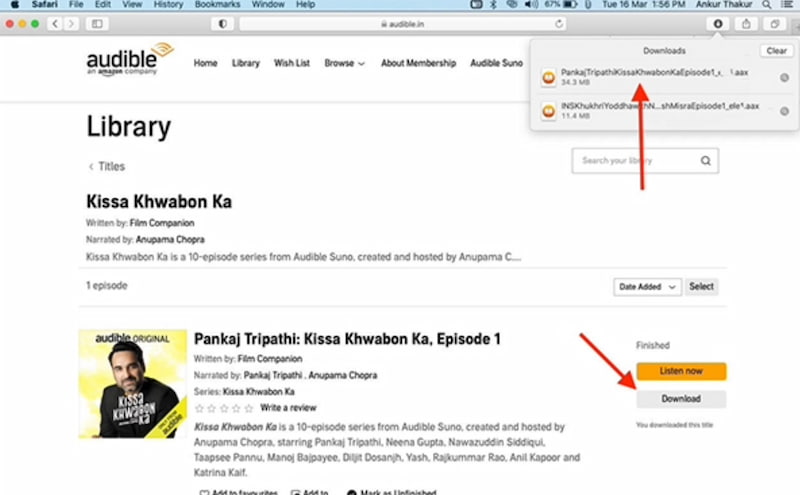
Step 1. Log in to Audible by opening your browser and go to audible.com. From there, you need to enter your account details.
Step 2. After that, please go to Your Library. In your library, you can now find all purchased audiobooks in your account.
Step 3. From there, choose the audiobook you want. It is now the time to Download the audiobook file to your Mac. Please click the Download button then save the file in AAX/AA format.
Method 2: Download Audible to Mac and Import to Apple Books
Step 1. You need to download audio books from Audible Then, save the audiobook file to your Mac. After that, you need to log in to Audible.com so that you will access your Library. Then, Click Download for your chosen book
Step 2. Now, open Apple Books. In this step, you can use Apple’s native app to manage audiobooks. Do it by launching Apple Books on your Mac, then go to File and see Add to Library.
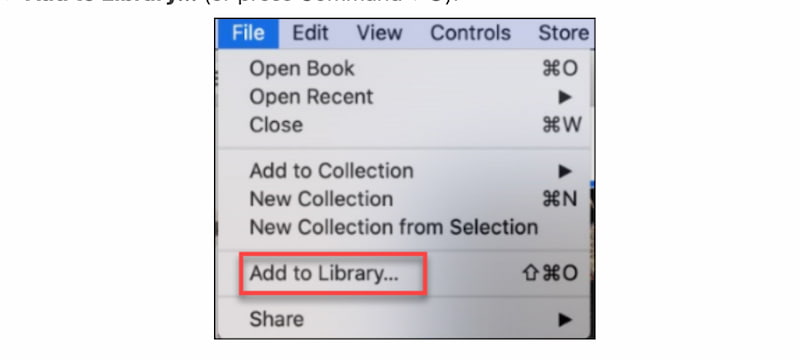
Step 3. After that, let us now import the Audible File. You can add the downloaded audiobook to Apple Books.
Step 4. Next, select the AAX/AA file you downloaded as you click Open to import
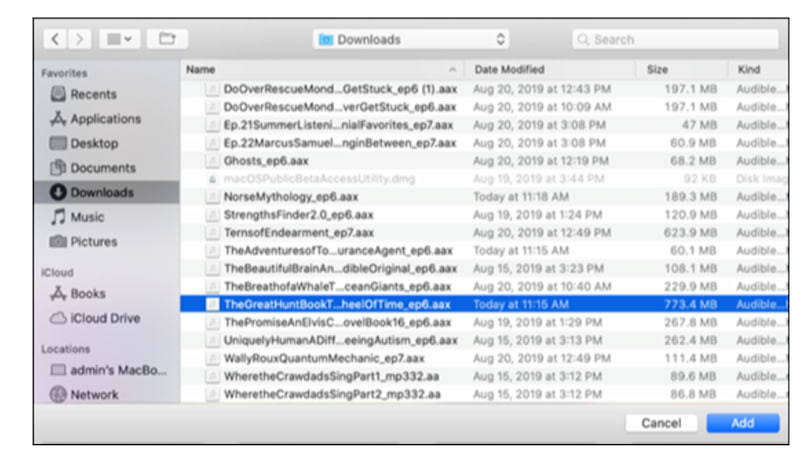
Step 5. Finally, Sign in with your Audible account inside Apple Books. Note that you need to confirm the authorization when prompted.
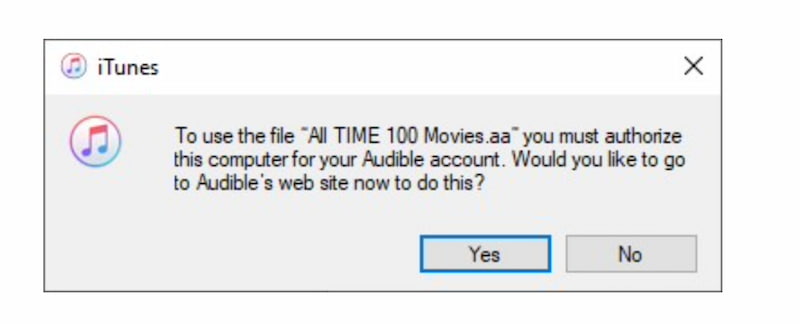
Limitations
- Available only in US and Canada marketplaces.
- Works only for books that you purchased.
- Files remain DRM‑protected.
- They cannot be played outside authorized apps.
Part 3. The Best Way to Download Audible on Mac: TopVox [drm-free mp3]
We can see above the two official ways to download audible on Mac. Yet somehow we can see that it is still limiting us or still there's money involved for purchase. That is why this next method is suitable for you, because this is a DRM-free download process without paying. That is possible with TopVox All Music Converter because this is an all-in-tool that allows users to download Audible and convert it with a universal format like MP3, FLAC, and more. Another great thing about it is the fact that it can do a batch conversation. Making you save time.
Features
- It supports wide platforms for Audible.
- DRM-free download process.
- It has a built-in converter.
Steps to Use TopVox All Music Converter
Step 1. Get TopVox All Music Converter for free.
Step 2. Open the tool and among the platforms it supports, choose Audible.
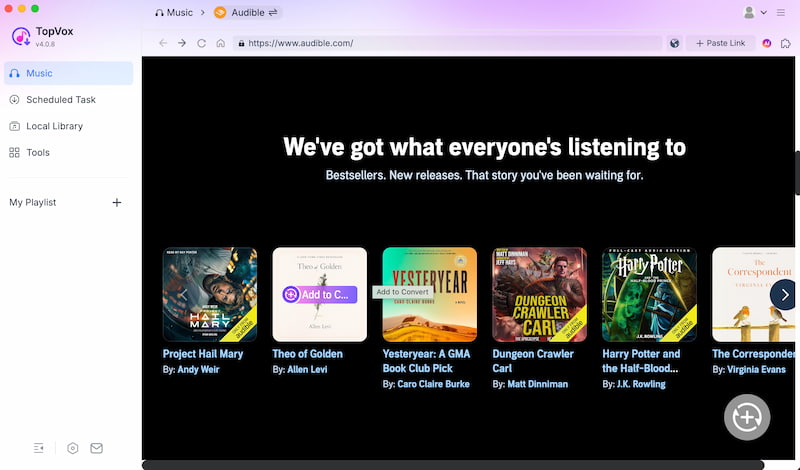
Step 3. Search the audio books you want to download. Then click the Add to Convert.
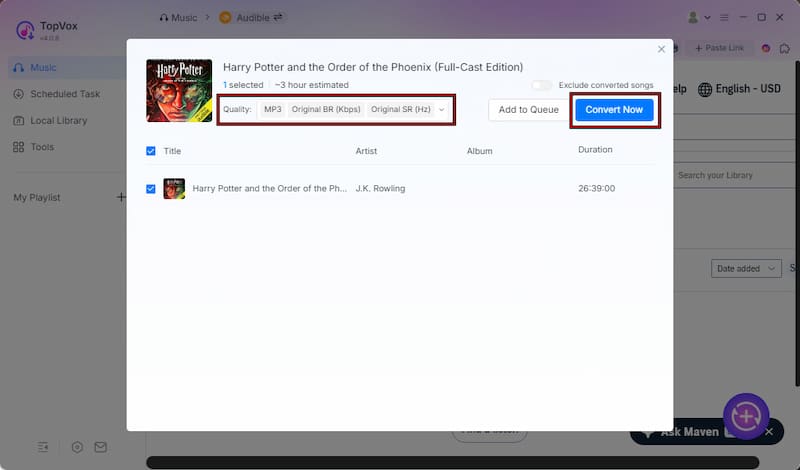
Step 4. Adjust the format, bitrate, or sample rate if needed. After you set everything, click Convert All to begin downloading your audiobooks.
Comparison Between Official Methods and TopVox
| Method 1: Direct Download (Audible Website) | Method 2: Download & Import to Apple Books | TopVox All Music Converter |
| Ease of Use | Simple. | Requires Apple Books setup & authorization | One‑click add and convert. |
| Audio Quality | Original AAX/AA quality preserved. | Original AAX/AA quality preserved. | High quality MP3/FLAC output. |
| Speed | Fast single download. | Moderate. | Fast batch conversion supported. |
| Compatibility | Plays only on Audible app or Apple Books. | Plays only on Apple Books. | Plays on any device with MP3, FLAC, WAV, and AAC. |
| DRM Removal | DRM remains. | DRM remains. | DRM‑free output. |
| Output Format | AAX/AA. | AAX/AA. | MP3, FLAC, WAV, AAC, etc. |
| Regional Support | US and Canada only. | US and Canada only. | Global. |
| Conversion Speed | Single file only | Single file only | Batch conversion saves time |
| Cost | Requires purchase of audiobooks | Requires purchase of audiobooks | Free download & conversion |
| Best Use Case | Quick download for US/CA users | Integration with Apple Books library | Universal playback, DRM‑free, multi‑platform |
FAQs on Downloading Audible Books on ac
Q: How do I download Audible books on a Mac computer?
A: Audible books can be downloaded from the website or Audible app. All of the audible files you download should be then imported into Apple Books. Yet, you can expect that DRM restrictions can limit the playback outside authorized applications.
Q: Can you download Audible books on iPhone or Android devices?
A: Yes. It is possible to do it. First you need to download the Audible app and sign in your account. From there, open your Library, and tap the download icon beside your audiobook. Then, you should now enable offline listening directly within the mobile application.
Q: Do Audible downloads work on Windows computers?
A: Yes. Audible books can be downloaded via Audible.com. Yet, it is important to know that you need to use Audible’s Windows app or authorized software to play it.
Conclusion
That’s how you download Audible on Mac. We can see a great process from their official website but still limited to playing it with an authorized app. Good thing, we have TopVox All Music Converter that can offer an all-in-one process for getting audible on Mac with ease. Use it now.
Owen Bannett
Owen Bannett is a music enthusiasm as well as a senior writer. He has paid close attention on the pros & cons of various audio formats, bitrate, sample rate and encoding methods. Always seeking the best listening experience, Owen has deep insights about lossless music and diverse music converters on the markets.




 by
by