How to Convert Spotify Podcasts to MP3 Offline and Online
Top Picks
• Most direct and safest method: Using Spotify officially
• Most professional and effective method: Using TopVox All Music Converter
• Most convenient for mobile users: Using SpotiFlyer
Podcasts on the Spotify platform have become one of the best sources of entertainment and information for millions of listeners. However, if you want to download your favorite episode from a podcast for offline listening, you must have Spotify's Premium version. Are you interested in learning how to download Spotify podcasts or playlists to MP3 files? We are here to provide you with various instructions and the best Spotify converter to help you download Spotify podcast episodes smoothly and effectively.
Part 1. Can I Download Spotify Podcasts/Playlists to MP3?
Spotify offers a variety of songs, playlists, and podcasts that you can listen to in high quality. However, many people wonder if it is possible to download them as MP3 files. If you are using the Premium version of Spotify, you can save and download DRM-protected songs directly from the app itself. However, please note that Spotify doesn't allow users to directly download them as MP3 files for offline playback outside the app. Additionally, if the paid version expires, the saved content will be deleted. Learn more about Podcasts and shows on Spotify.
Part 2. Official Way to Download Spotify Podcasts/Playlists to MP3
To download the Spotify podcasts or playlists officially, you must have a subscription plan. The good thing here is that the downloading process is simple. It will only take a few taps to achieve your desired output. Aside from that, when using the Premium version, you can add as many podcast episodes as you want.
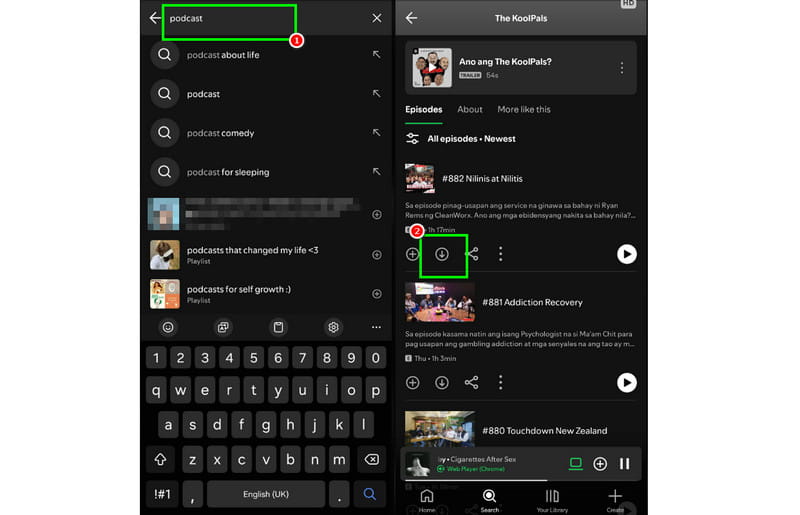
Step 1. Open your Spotify app and start accessing the Premium version.
Step 2. From the main interface, go to the Search section and start searching for your favorite songs, playlists, or podcast episodes.
Step 3. Now, tap the Download sign to start the downloading process. Once done, proceed to the library section to see and play the downloaded podcast.
With this process, you can effectively download your favorite songs, playlists, and podcasts on Spotify. However, always ensure that you are using the Premium version so that the podcast won't disappear.
Part 3. How to Save Spotify Podcasts to MP3 Permanently?
As we have discussed above, the saved podcast files on Spotify will be inaccessible after the premium version expires. Fortunately, there are various Spotify podcast downloaders and MP3 converters that you can use to save the songs permanently. To learn all the procedures, please refer to the methods below.
TopVox All Music Converter [All-in-One] ⭐⭐⭐⭐⭐
Best For: Batch downloads 320kbps MP3 or lossless songs, playlists, and podcast files with fast speed.
Supported OS: Windows 7 or later (64-bit), macOS 10.14 or above
TopVox All Music Converter is an ideal platform which provides all the features you need. It’s a one-stop solution that serves as a player, downloader, and ripper. You can instantly convert Spotify playlists to MP3, thanks to its fast 35× conversion speed. What we like here is that you can even download multiple podcasts or episodes simultaneously and keep with the best audio quality up to 320 kbps. This feature is ideal if you want to achieve your preferred result while saving more time. Thus, if you are looking for an amazing Spotify podcast to MP3 downloader, look no further than TopVox All Music Converter.
Features
- Converts Spotify podcasts 35 times.
- Downloads high-quality audio files with ID3 tags.
- Supports various formats, including ALAC, AIFF, FLAC, and more.
- Built-in web player is compatible with 9 streaming platforms.
- Support advanced features and tools.
How to download Spotify podcasts/playlists to MP3 via TopVox All Music Converter?
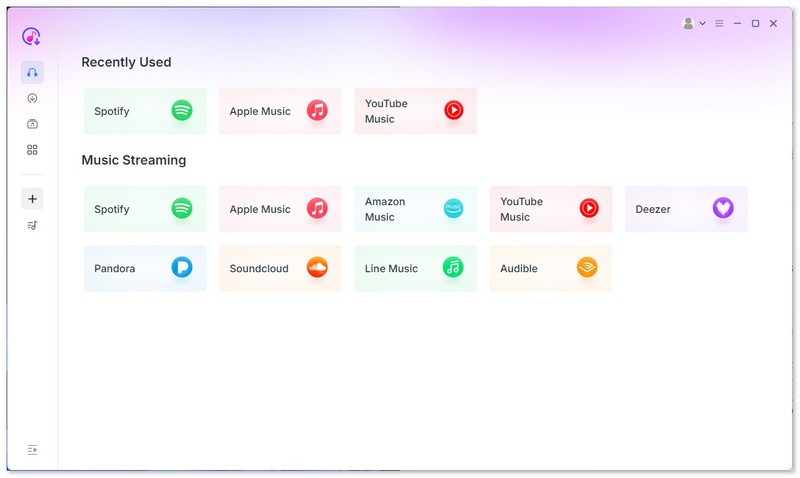
Step 1. Access and log in to TopVox All Music Converter on your computer. Then, navigate to the Spotify platform and sign in to your account.
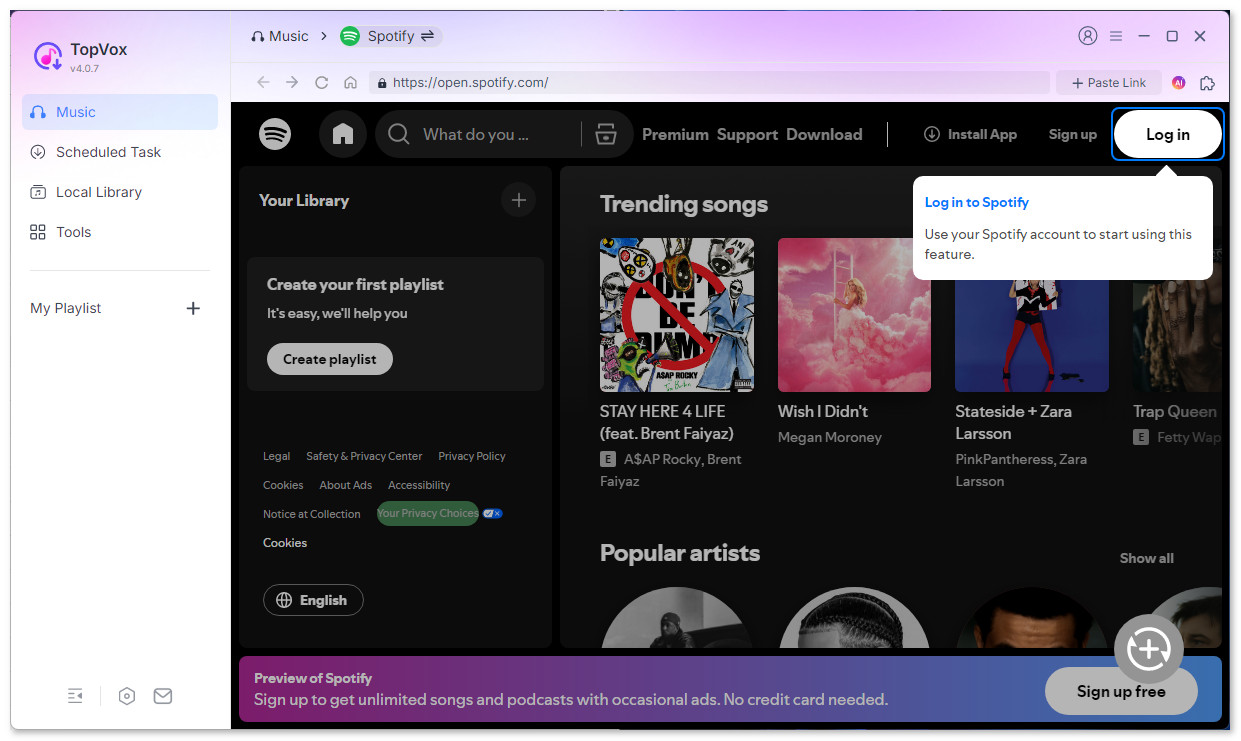
Step 2. Browse your favorite podcast episodes in your playlist or search box. Open the list and tap the Add to Convert option. You can also click the Plus icon in the lower right corner.
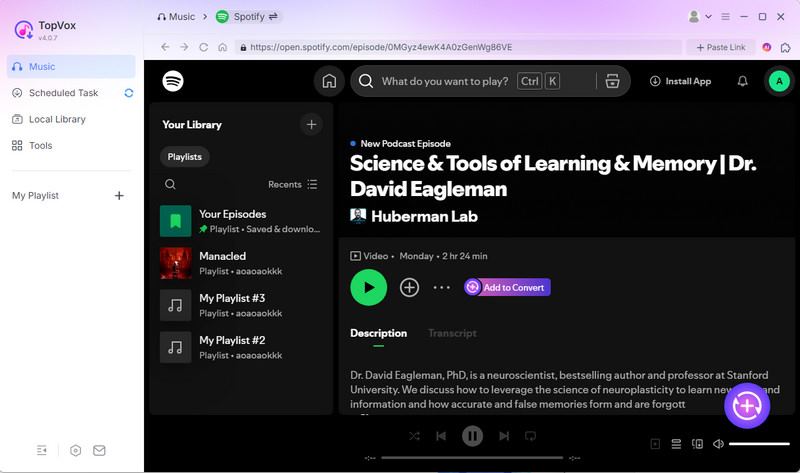
Step 3. After loading, you will see a pop-up window here. If you decide to download a single podcast episode, change the output quality and format here, then choose Convert Now. Once done, click the Add to Convert option.
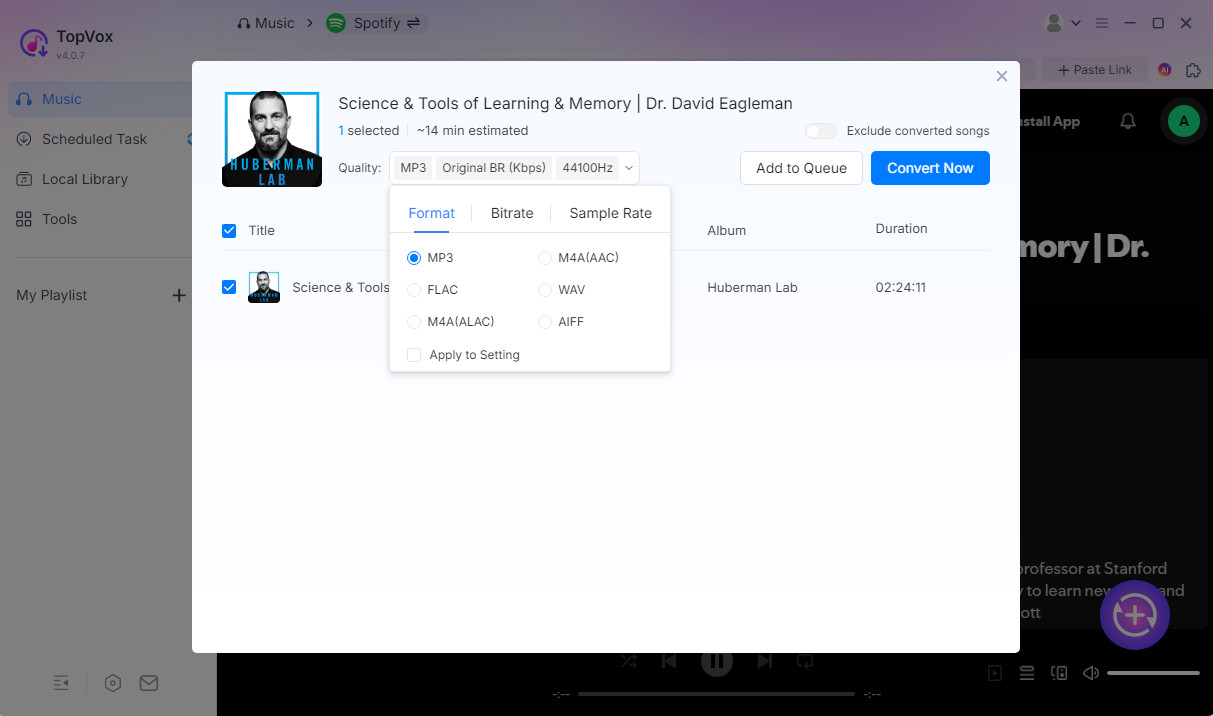
Step 4. Turn to the Scheduled Task list, select MP3 as Output Format, preferred Bitrate and storage location. Once finished, click Convert Now to download Spotify to MP3.
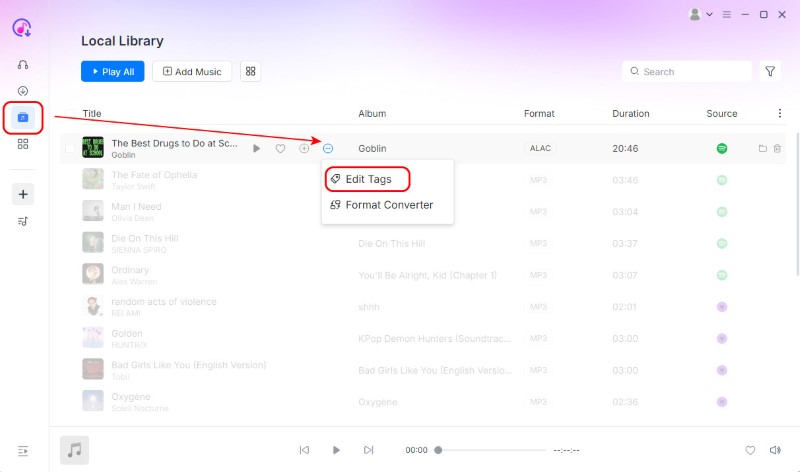
Step 5. If you want to rename the file for better management, go for Local Library > More Options > Edit Tags to change the Title, Artist, and other information.
Pros
- An all-in-one solution eliminates the need for multiple tools.
- Batch downloads podcast episodes at a fast speed.
- Keep with the original audio fidelity.
- Tag Editor makes it easy to organize your local music library.
Cons
- Converts the first 3 minutes of each song during a 14-day free trial.
Tested Review:
The built-in player makes it so easy to find my favorite podcast, and the 35x download speed is real—I moved my entire library to my PC in minutes. Plus, I have total control over the output parameters and settings. The saved file keeps sound quality as perfect as the source file with ID3 tags.
SpotiDown [Online] ⭐⭐⭐
Best For: Users who only need to save a few podcasts occasionally without installing software.
Supported OS: Web-based
If you want an online Spotify podcast to MP3 converter, you can try using SpotiDown. Thanks to its simplicity and comprehensive layout, you can easily and quickly access and download your favorite podcast to your device. The only drawback here is that you must have a strong internet connection since it is an online-based tool. To start downloading a Spotify podcast as an MP3, follow the procedure below.
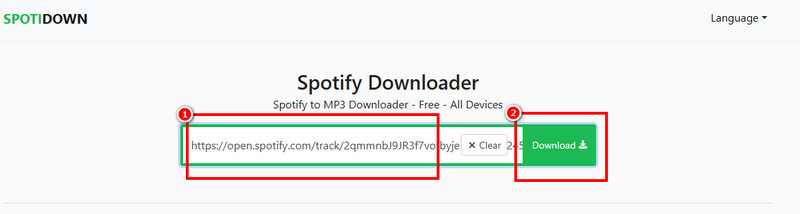
Step 1. Go to your browser and access the main website. Then, before proceeding to the next process, ensure that you have already copied the link of the Spotify podcast.
Step 2. From the tools main web page, paste the link and hit the Download button.
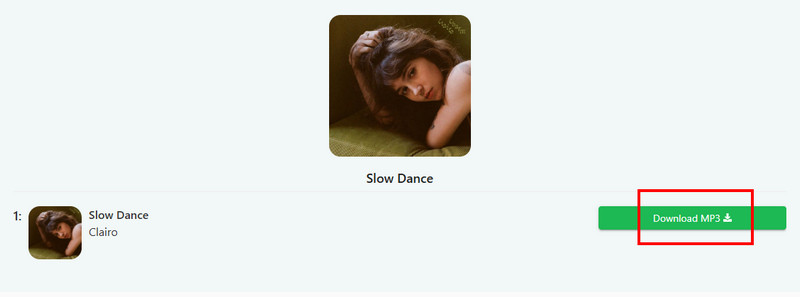
Step 3. Finally, tap the Download MP3 button to save the Spotify podcast on your device.
Pros
- Compatible with all browsers.
- Supports downloading podcasts at 320 kbps.
- The interface is clean and ad-free.
Cons
- Unstable downloading process.
- Limited customization options.
- Only download the first five tracks freely.
- Only paid users can batch download.
Tested Review:
You need to save a Spotify podcast to MP3 manually. Although we choose audio quality to 320kbps, many files actually keep 128kbps or 192kbps. Besides, this online tool lacks the stability of a dedicated desktop app, such as TopVox.
SpotiFlyer [Mobile] ⭐⭐⭐
Best For: Android users consider a free mobile app for downloading Spotify music on the go.
Supported OS: Android, Windows, Mac, Linux
For phone users, you can try the SpotiFlyer app to download Spotify podcasts to MP3 (not supported on iOS). What makes it unique is that it can deliver the best audio quality, enabling you to enjoy listening to your favorite episodes. Additionally, in terms of accessibility, the open-source tool is available on almost all major web platforms, including Chrome, Edge, Safari, and more. To start converting Spotify podcasts to MP3, follow the steps below.
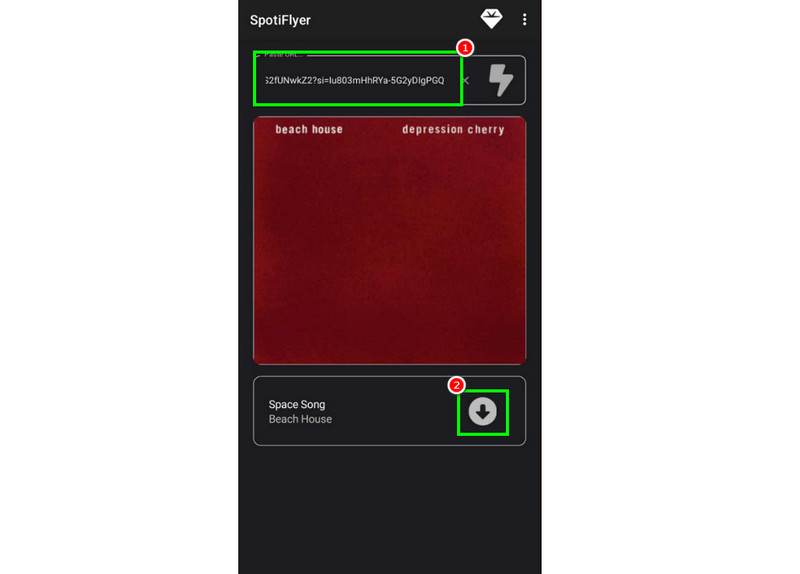
Step 1. Download the SpotiFlyer app on your Android. After that, install it to begin the process.
Step 2. After you copied the link from Spotify, paste it into the app. Then, the app will start the loading process.
Step 3. Press the Download function to start downloading the Spotify podcast on your mobile device.
Pros
- Works on Android, Windows, macOS, and Linux.
- Open-source on GitHub.
Cons
- Can’t control the audio quality during conversion.
- Original ID3 tags may be broken.
- Output format is only MP3.
- No support for the iOS system.
Tested Review:
With these methods, you can download all your favorite podcasts from Spotify without restrictions. SpotiFlyer is essentially a YouTube Ripper. When I paste a Spotify link, it searches for a matching video on YouTube and downloads the live audio version sometimes. Compared to TopVox, it downloads at a standard 1x or 2x speed, making the process much slower.
Part 4. Which is the Best Spotify Podcast to MP3 Downloader?
What do you think is the better tool to use to download a Spotify podcast to MP3? For further insight, please refer to the comparison table below.
| TopVox All Music Converter | SpotiDown | Spotiflyer |
| Audio Quality | Lossless (FLAC/WAV) & 320kbps | 320 kbps | 128 kbps |
| Conversion Speed | 35× (Hardware Accel) | Dependent on the browser | Standard (1-2×) |
| Batch Download | ✅️ | ✅️ (Paid) | ✅️ (Unstable) |
| Output Formats | MP3, FLAC, WAV, M4A, AIFF, ALAC | MP3 | MP3 |
| Download Source | Direct Source Decryption | YouTube/Third-party Mirror | YouTube Music API Matching |
| Built-in Player | ✅️ | ❌️ | ❌️ |
| ID3 Tag Accuracy | 100% (High-Res Cover & Metadata) | Poor (Often Missing Tags) | Medium (Occasional Mismatches) |
| Security & Ads | Clean & Ad-Free | Pop-ups & Redirects | Clean (Open Source) |
We can confidently say that TopVox All Music Converter is the best Spotify podcast converter and downloader available. It provides excellent audio quality for an enhanced listening experience. Additionally, it supports various formats, making it the best program. Thus, always use this platform for an effective and successful Spotify podcast to MP3 conversion process.
FAQs on Spotify Podcast to MP3
Q: Is Spotify free to download podcasts?
A: Yes. A free user can only download podcasts from Spotify. You can save no more than 10,000 tracks on a device. If you want convert other Spotify tracks, such as songs, playlists, or albums, you have to pay for the Premium plan.
Q: Can I permanently download Podcasts from Spotify?
A: Depends on. Using Spotify, you have to log in to your account to refresh your downloads every 30 days. To avoid the issue, you can choose a third-party downloader, such as TopVox All Music Converter, to help you transform Spotify podcasts to MP3 or other formats for permanent preservation.
Conclusion
For an effective Spotify podcast to MP3 conversion and downloading process, you can rely on all the methods we have provided in this post. Objectively speaking, if you want a seamless and straightforward process for converting your Spotify podcast into an MP3, we recommend using TopVox All Music Converter. With this software, you can access all the podcast episodes you want in the best quality, making it convenient for all users.
Luna Harper
Luna Harper is a passionate music lover and an inspiring content sharer. She has explored most of the music converters available on the market, acquiring thorough knowledge of their features, usability, and differences. Luna enjoys using her professionalism to help fellow music lovers get superior audio quality.


 by
by