Best Way to Download YouTube to MP3 Player for Free
How to download YouTube Music to an MP3 player? Well, saving and downloading YouTube Music to an MP3 player is an ideal method if you want to enjoy your favorite music offline, anywhere, and anytime. You can even arrange them based on your preferences for a better listening experience. With the right downloader, you can ensure that you get the result you need after the process. So, if you want the best method to get your favorite YouTube music on your MP3 player, check this tutorial, as we offer the best MP3 downloader you can access that can give you a smooth YouTube to MP3 player downloading process.
Part 1. Why Can't You Directly Move YouTube Music to an MP3 Player
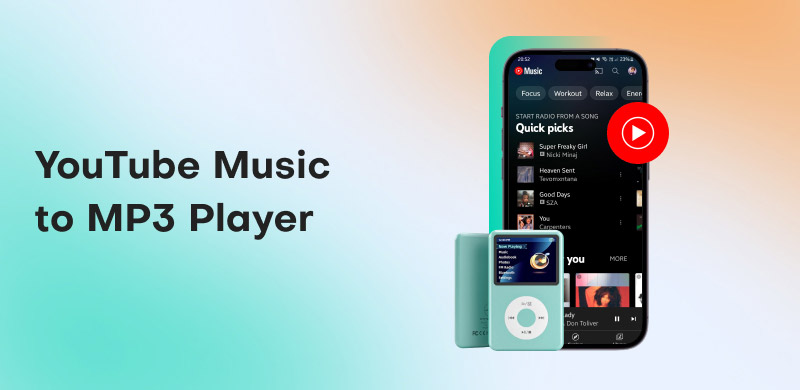
You are not allowed to directly move YouTube Music tracks to an MP3 player since the service uses encrypted streaming formats, such as AAC and Opus, and locks down downloads inside its app, even for those users who have access to the Premium version. It means that music is not stored as transferable MP3s but as protected cache data to the YouTube Music ecosystem. For more explanation, you can read all the details below.
Technical Hurdle: Encrypted Formats
The YouTube Music platform streams its content in Opus and AAC formats, depending on settings and device. These modern codecs are optimized for streaming, not for portable offline listening and transfer. Plus, these streams are DRM-protected and encrypted. It means that the RAW audio cannot be copied or converted into other formats, like MP3, without breaking the protection. Lastly, since MP3 players technically require standard MP3 files, you cannot move the YouTube Music since it offers a different format.
Subscription Trap: Premium Downloads
You thought that if you have a subscription plan, then you can download and move YouTube Music to an MP3 player? Well, unfortunately, that is still impossible. The premium version only allows you to make offline downloads. However, the downloaded songs are only saved and locked inside the app. Well, we can tell that the restriction is intentional. The platform ensures that offline listening is still tied to your subscription and prevents the distribution of copyrighted music.
Part 2. Best YouTube Music to MP3 Player Downloader
Do you want to learn how to download music to MP3 from YouTube? Then, the first thing you must do is to access an exceptional music downloader, like TopVox All Music Converter. With this program, saving and downloading your favorite music as an MP3 file will be a piece of cake since it can offer all the features you need. It can even give you a fast downloading speed up to 35 times faster. Additionally, its user interface is comprehensive, ensuring that you can use all the functions easily and smoothly. What makes it more powerful is that you can download and convert multiple YouTube Music tracks simultaneously, thanks to its batch conversion feature. With that, if you need an excellent program that can give you the result you need, access TopVox All Music Converter right away.
Core Features
If you want to get more insights about the music downloader, you must read all the details below. We will help you explore its features and how users can benefit.
High-Fidelity Audio Conversion and Download
The music downloader ensures that you can turn YouTube Music to MP3 with a crystal-clear audio quality. The program can even give you a quality of up to 320 kbps. It means that music enthusiasts and casual listeners can enjoy their favorite MP3s to the fullest.
Secure and User-Friendly Interface
TopVox emphasizes safe downloading by dealing with and avoiding malware risk and risky ads. The best part here is that it can give a straightforward user interface, allowing users to download music instantly. This is perfect for users who want to focus on enjoying their music rather than encountering any technical hurdles.
Batch Download Capability
The program allows multiple songs or an entire playlist to be converted and downloaded at once. It is perfect if you want to convert YouTube playlists to MP3. It can also save time and effort for users, especially those who want to transfer larger collections of music to their MP3 players in a single workflow.
Wide Format Support
The good news about the program is that it can support various audio formats. These are MP3, AAC, AC3, FLAC, WAV, M4A, and more. Users can enjoy this feature if they want to download their favorite music to a different format to prevent compatibility issues and ensure that their collections are future-proof.
How do you download music from YouTube to an MP3 player? If you want to get your favorite music, use the methods below.
Step 1. You can tick the Download buttons below to start downloading TopVox All Music Converter on your Mac or Windows.
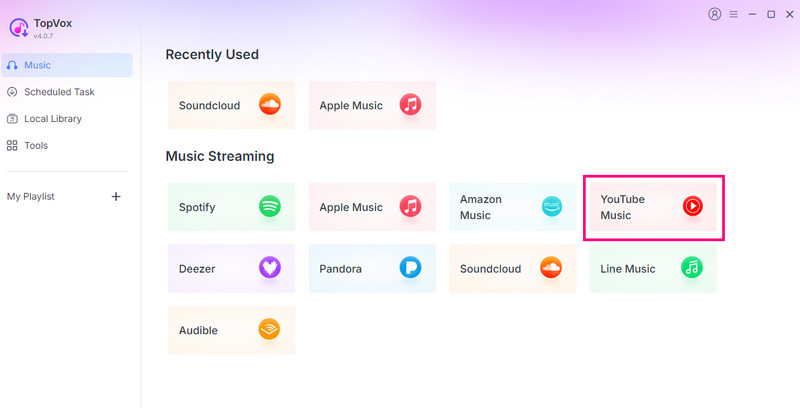
Step 2. After you launch the interface, proceed to the YouTube Music platform. You can also insert your account.
Step 3. Navigate to the Search section and browse the music you want to download. Once done, hit the Add to Convert option. You can also add the whole playlist.
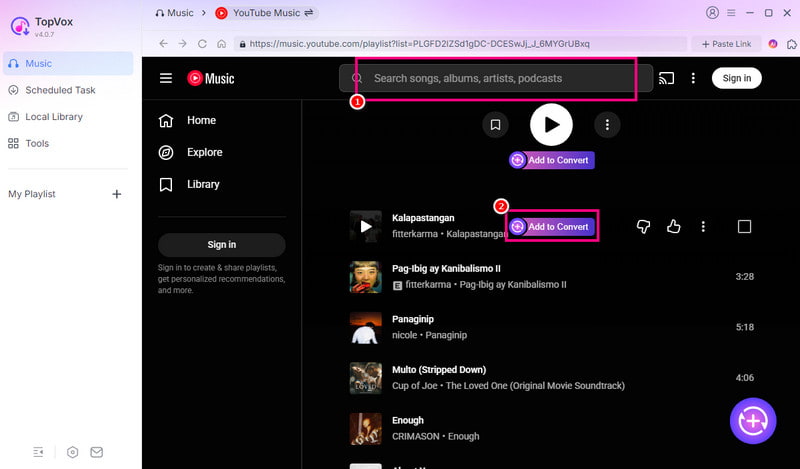
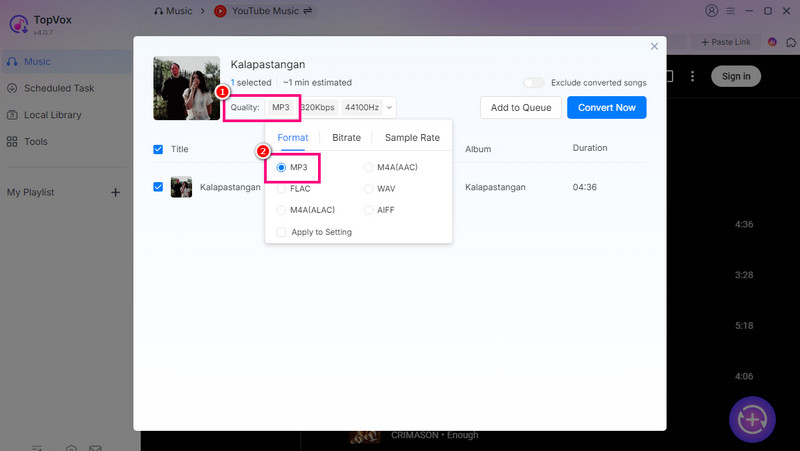
Step 4. Go to the Format section and hit the MP3 format. You can also change your preferred audio quality, bitrate, and sample rate.
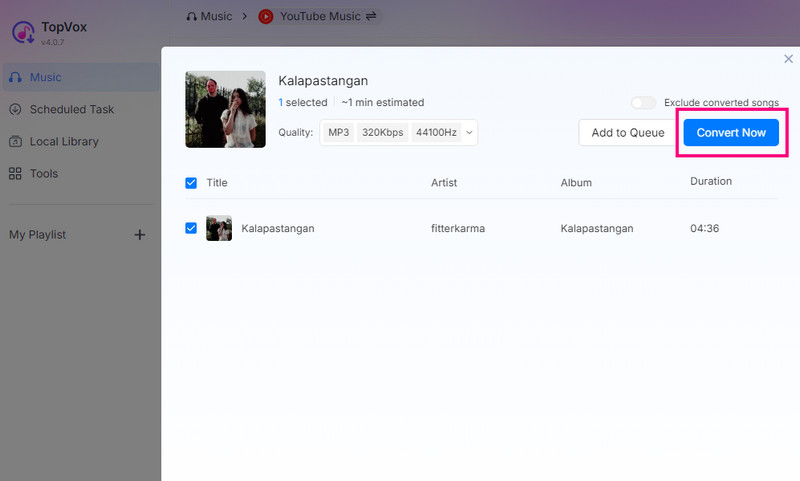
Step 5. To start the YouTube Music to MP3 conversion process, click the Convert Now button above. After the process, you can already open the music on your desktop without any restrictions.
Part 3. How to Transfer Converted MP3s to Your Player
After you download audio from YouTube to MP3, you can start the transfer process. If you want to start transferring your converted MP3 to your player, you can use all the methods from this section.
Method 1. Windows Users: Using File Explorer (drag and drop)
If you are a Windows user, you can use your File Explorer and go to the MP3 file. After that, ensure that your MP3 player is connected to your computer. Once done, start to drag and drop the MP3 file to the MP3 player folder. If the process is successful, you can start playing the converted MP3s on your MP3 player smoothly.
Method 2. Mac Users: Using Finder or Android Transfer
For Mac users, you can use the Finder to transfer the converted MP3s to your MP3 player. All you need to do is connect your MP3 player via USB cable. Then, locate the music from the Finder to drag and drop it to the 'Music' folder. For Android users, you can install the Android File Transfer to move the MP3 to your MP3 player.
Method 3. Transfer MP3s to Special Devices
If you are using a 'Sony Walkman,' you must install the Music Center for PC/Mac, which is Sony's official transfer software. Then, import the converted music to the Music Center platform. Once done, you can sync them to your Walkman. On the other hand, if you are using an 'Apple iPod,' you just need to add the MP3 to your iTunes or Finder. Sync your iPod with the Library to transfer the music. After that, you can start listening to the music.
Part 4. Why Choose TopVox All Music Converter
TopVox All Music Converter is an excellent program you can use to download YouTube Music to an MP3 player. To explore the reasons, you can see the details below.
Security
The software is completely malware-free and ad-free, unlike other online free converter sites that have risky pop-ups, hidden downloads, and even malicious software. TopVox ensures that you can have a smooth and successful conversion process without worrying about your information and music.
Stability
Unlike free tools that often suffer from unsuccessful downloads, cut-off tracks, and incomplete conversions, TopVox can provide a consistent result. With its robust engine, it guarantees that your MP3 files are high-quality and complete.
Batch Processing
This YouTube MP3 audio downloader supports batch download, letting you download and convert multiple YouTube Music tracks in a single process. With this program, you can ensure that you obtain all the music while saving much time.
Part 5. FAQs about YouTube to MP3 Player
Why do I need a converter like TopVox?
If you want a reliable converter that is safe, free, and powerful, this program is the best. It can even give high-quality audio for up to 320 kbps, giving you the best listening experience.
Is it safe to use a free online converter?
There are some legit online converters you can use to convert and download YouTube to MP3. However, since almost all converters have an ad, it might be risky. Thus, it is suggested to use an offline converter, like TopVox All Music Converter.
Can I batch download my entire YouTube Music playlist?
Take note that not all downloaders can download your playlist at once. So, if you want to download and convert your favorite playlist, ensure that the tool you use can support the batch conversion feature.
Conclusion
If you want to download YouTube Music to an MP3 player, then you can always use the method we have provided in this section. You also have all the details on how to transfer your converted file to your Mac, Windows, Android, and even to special devices. Plus, if you want a powerful converter and downloader, it is best to use TopVox All Music Converter. With this program, you can have a fast, smooth, and successful conversion process, making it the best YouTube to MP3 downloader and converter.
Ethan Carter
Ethan Carter creates in-depth content, timely news, and practical guides on AI audio, helping readers understand AI audio tools, making them accessible to non-experts. He specializes in reviewing top AI tools, explaining the ethics of AI music, and covering regulations. He uses data-driven insights and analysis, making his work trusted.




 by
by