Rip Music from YouTube to MP3 to PC and Mobile Devices
YouTube has become one of the most popular sites for discovering and enjoying new music. Many people want to download music from YouTube to enjoy offline, whether it's a live performance, remix, or rare track that isn't available on streaming platforms. This post will teach you how to rip music from YouTube to MP3 using free online tools or by recording directly from your device.
Part 1. Rip Music from YouTube and Save as MP3
If you want the most reliable and lossless way to rip MP3s from YouTube, TopVox All Music Converter is your best option. This amazing tool is not just for YouTube; it also works with prominent streaming services like Spotify, Amazon Music, SoundCloud, Apple Music, Deezer, and Tidal, allowing you to download songs from numerous platforms in one app. TopVox makes it easy to save your favorite tracks for offline playback or create your own personal music collection.
What is the TopVox All Music Converter?
TopVox All Music Converter is a professional-grade music downloader and converter that extracts high-quality audio while remaining secure. It lets you download and convert YouTube videos to MP3, M4A, FLAC, or WAV formats while preserving the original sound quality and ID3 tags (title, artist, album, and cover art). With its simple interface, even beginners may rip audio in a few clicks without requiring any technical knowledge.
TopVox is great for customers who value speed, audio quality, and simplicity, as it provides a dependable way to back up, organize, and listen to music offline without relying on streaming services.
Features
- Supports YouTube and 8 more streaming platforms.
- High-quality output: up to 320kbps MP3, lossless FLAC.
- Batch downloads: Rip whole playlists from YouTube
- Retains ID3 tags to keep music information structured.
- Ad-free experience: no interruptions or pop-ups.
How to Rip Songs from YouTube to MP3 with TopVox
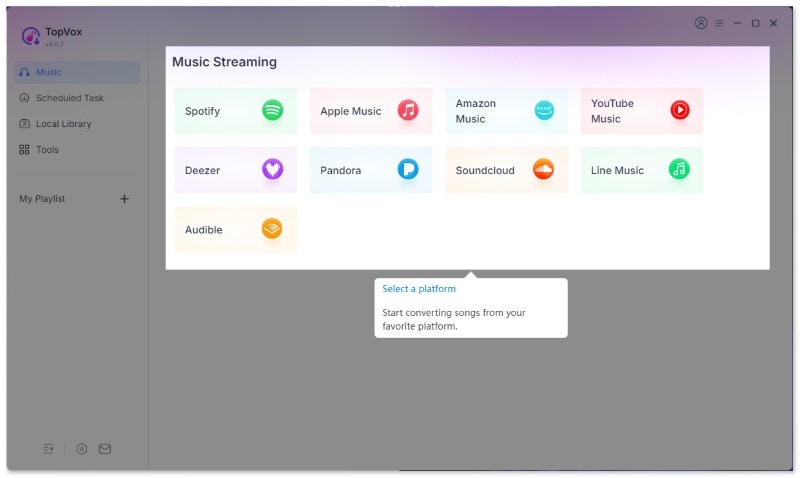
Step 1. Install and start TopVox All Music Converter. Then, access the YouTube platform from its main interface.
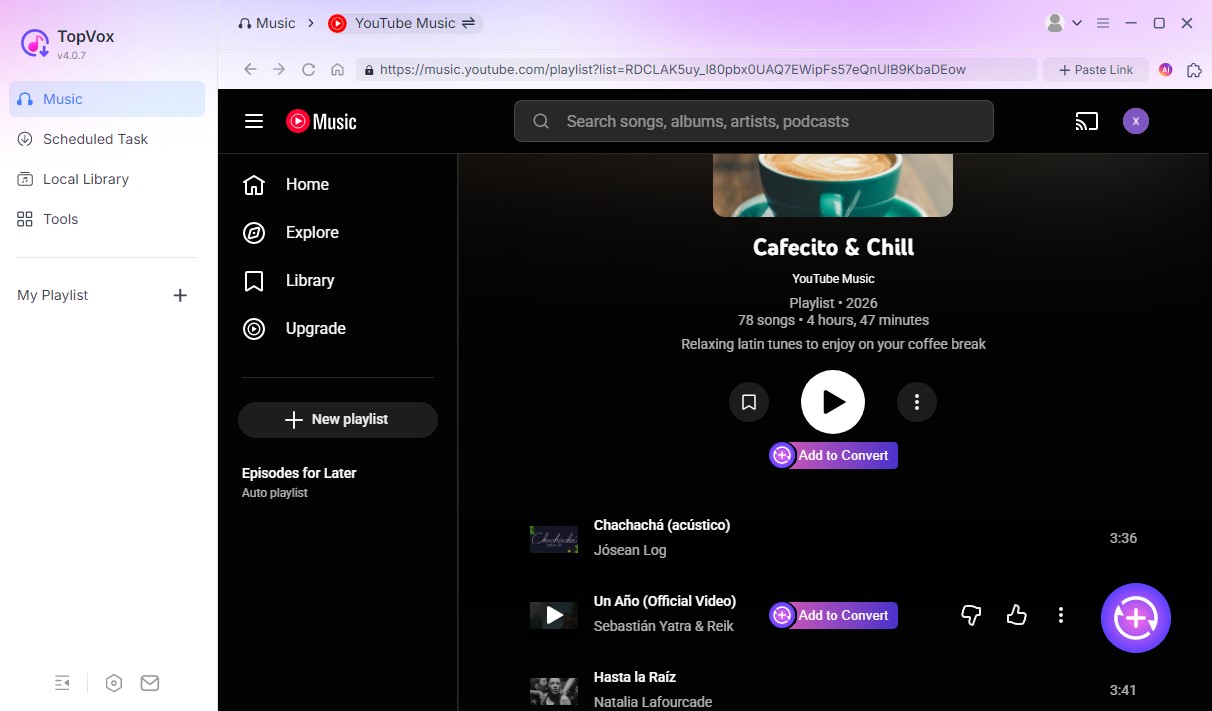
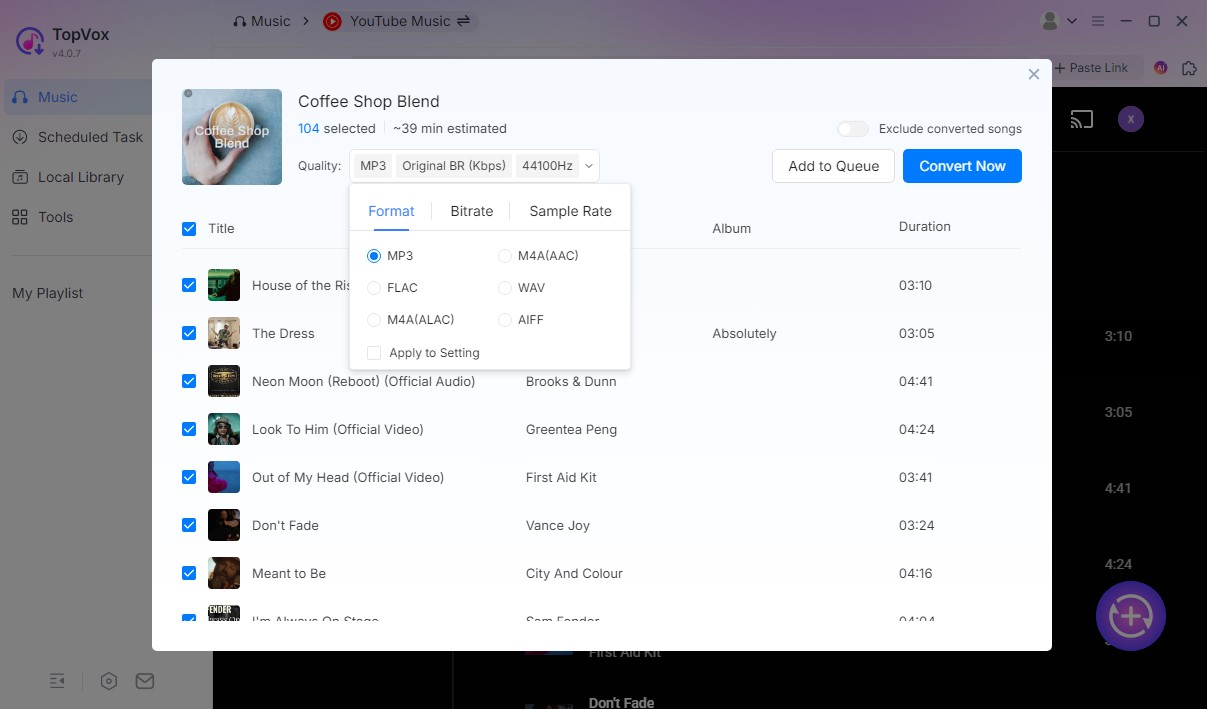
Step 2. After that, please choose the music you want to rip. Click Add to Convert or the Add button (a plus icon at the lower right corner), and then you will see a pop-up window.
Step 3. You can adjust output format and audio quality here. Click Convert Now if you have chosen the songs you want to download at once. If not, click Add to Queue for later conversion.
Step 4. Turn to the Scheduled Task list, choose the output place and click Convert All.
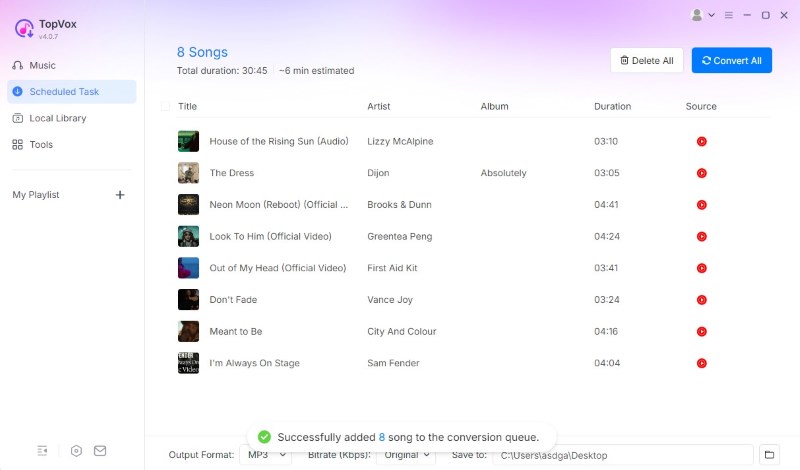
Within a few seconds, the app will rip the audio off YouTube and store it to your computer. You can now enjoy the music offline at any time.
Verdict
TopVox is an all-in-one, ad-free, and quick solution for ripping songs from YouTube in original quality. It's excellent for anyone looking to easily manage and keep their favorite YouTube tracks.
Part 2. Rip Sound Off from YouTube Videos Online
If you don't want to install software, you can rip sound from YouTube videos online using services like YTMP3. It's a free web-based converter that makes it simple to download MP3s from YouTube right from your browser.
What is YTMP3?
YTMP3 is a famous online YouTube to MP3 converter that allows you to download audio or video directly from YouTube without having to install any software. It's a free, browser-based application for quick and simple conversions. With simply a YouTube link, you can convert videos into high-quality MP3 (audio) or MP4 (video) files in seconds.
This online application is particularly useful for those who want to download songs, podcasts, or background audio from YouTube videos for later listening. It works seamlessly on PC, Mac, iOS, and Android devices, making it available at any time and from any location.
YTMP3 is known for being quick, easy, and safe to use, but users still need to be aware of YouTube's copyright policies when downloading video.
Features
- 100% free and browser-based.
- Converts YouTube videos to MP3 or MP4 in seconds.
- Works with PC, Mac, iOS, and Android.
- No software installation is required.
How to Rip Songs from YouTube to MP3 with YTMP3
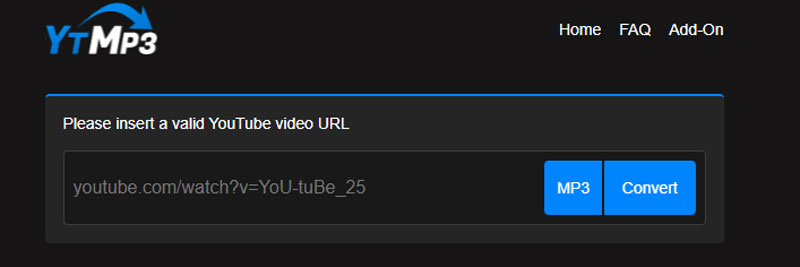
Step 1. Copy the YouTube video URL and paste it into Ytmp3
First, copy the URL of the YouTube video you want to convert. Then, navigate to the Ytmp3 website and paste the URL into the box on the home page.
Step 2. Select the Format to Convert
Second, you can select from the different formats. The website supports two file formats: MP3 (audio) and MP4 (video). If you wish to rip audio from YouTube, select the MP3 format. Finally, click the convert button to begin the procedure.
Step 3. Download the Transformed Files
Finally, click on the Download or Dropbox buttons. Clicking the button will download your file. You can also select to convert more. Otherwise, you can open the downloaded file.
Part 3. Free Way to Rip and Download Audio from YouTube
Another approach to get music from YouTube is to record it directly. This method works well when converters fail or when you wish to rip songs from YouTube that are private or banned for download.
Here's how to rip music from YouTube for free on iOS, Android, and PC/Mac.
Rip music from YouTube for iOS
You may utilize iPhones' built-in Screen Recording function to extract audio from YouTube videos. After you've recorded the video, use the App Store's GarageBand or MP3 Converter to convert it to MP3.
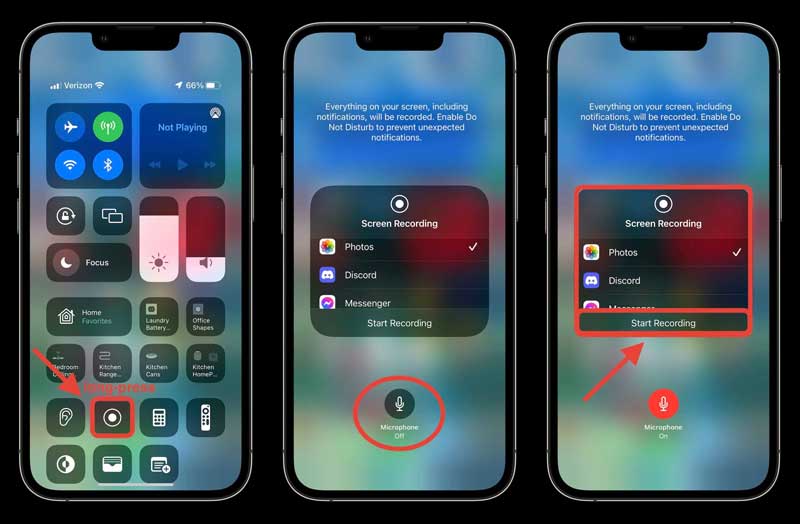
Step 1. Open Settings, see the Control Center to access the Screen Recording and turn it on.
Step 2. Begin playing the YouTube video you wish to capture.
Step 3. Stop the recording and then convert the file to MP3 using an app.
Verdict
This method is ideal for rapid, personal use. You do not require any additional software; however, the output quality is determined by your recording settings.
Rip songs from YouTube on Android
Android devices also support YouTube music ripping via built-in screen recorders or third-party programs such as AZ Screen Recorder. Convert the recording to audio using any MP3 converter program.
Step 1. Start the AZ Screen Recorder (or the built-in recorder).
Step 2. Play the desired YouTube video and record.
Step 3. Use an MP3 converter program to extract the audio.
Verdict
Simple and effective, albeit manual. Great for occasional YouTube rips or offline listening.
Rip MP3s from YouTube on PC/Mac
You can use tools such as OBS Studio or VLC Media Player to extract sound from YouTube videos on your PC. These are trustworthy and allow you to adjust the recording quality.
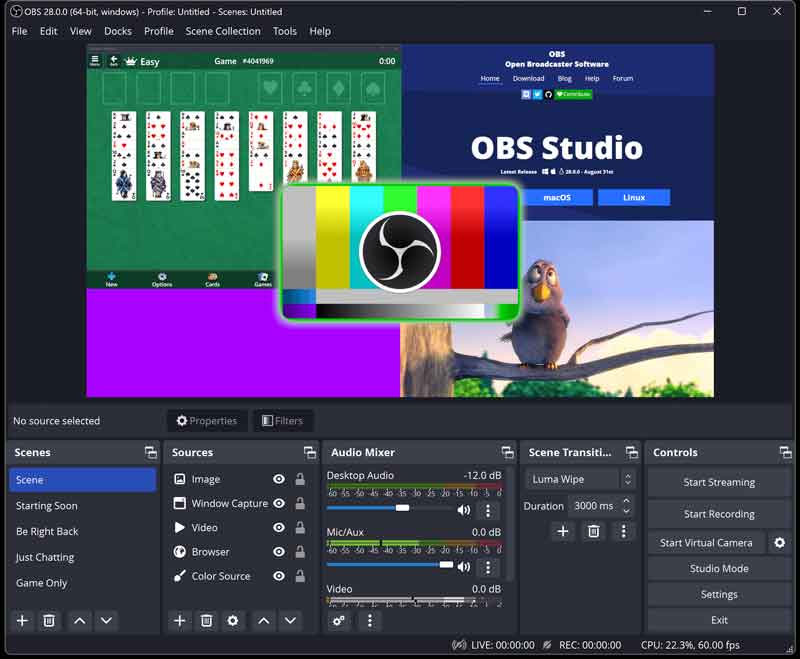
Step 1. Launch OBS Studio or and begin screen recording.
Step 2. Play the YouTube video that you want to record.
Step 3. Save and convert the recording to MP3.
Verdict
Recording allows you complete control over quality. It's a versatile method for extracting audio from YouTube, particularly when dealing with restricted or private content.
Part 4. FAQs about Rip Music from YouTube
Is it legal to copy music off YouTube?
Ripping YouTube music for personal offline listening is generally acceptable; however, sharing or disseminating copyrighted content without authorization is against YouTube's policies and copyright laws. Always use ripped files responsibly and solely for private use.
What is the best tool for ripping MP3s from YouTube?
TopVox All Music Converter is the optimal choice for high-quality, lossless MP3 rips. It's fast, supports many formats, saves metadata, and works on all major streaming services, not just YouTube.
Can I rip music from YouTube using my phone?
Yes. To rip songs directly from YouTube, use online programs like YTMP3 or iOS and Android's built-in screen recorders. Then, use an app to convert the recording to MP3.
Which format should I use when pulling audio from YouTube?
MP3 is the most popular file format for mobility and compatibility. If your device supports WAV or FLAC, select these for improved sound quality. With TopVox, you can quickly select your favorite output format.
How can I rip numerous songs from a YouTube playlist?
Use TopVox All Music Converter's batch download option. Simply paste the playlist link, select MP3 as the output format, and the utility will rip and save all music sequentially.
Conclusion
Ripping music from YouTube is now easier and safer with the appropriate tools. Whether you prefer professional converters like TopVox, simple online tools like YTMP3, or manual recording on your device, you can now rip YouTube songs in any format you like. If you want the highest quality, speed, and ease, TopVox All Music Converter is your best option. It allows you to download MP3s from YouTube, extract audio from videos, and arrange your favorite music with excellent fidelity.
Owen Bannett
Owen Bannett is a music enthusiasm as well as a senior writer. He has paid close attention on the pros & cons of various audio formats, bitrate, sample rate and encoding methods. Always seeking the best listening experience, Owen has deep insights about lossless music and diverse music converters on the markets.




 by
by