5 Ways to Rip Music from Spotify on Computer & Mobile [2026]
Are you tired of Spotify’s restrictive offline mode? With Spotify’s encrypted OGG Vorbis files, you don’t truly own the music you download. In this guide, we'll show you the 5 ways thatapplicable to different devices (computer, mobile, or browser) to rip music from Spotify, letting you enjoy your favorite Spotify collections anywhere, anytime!
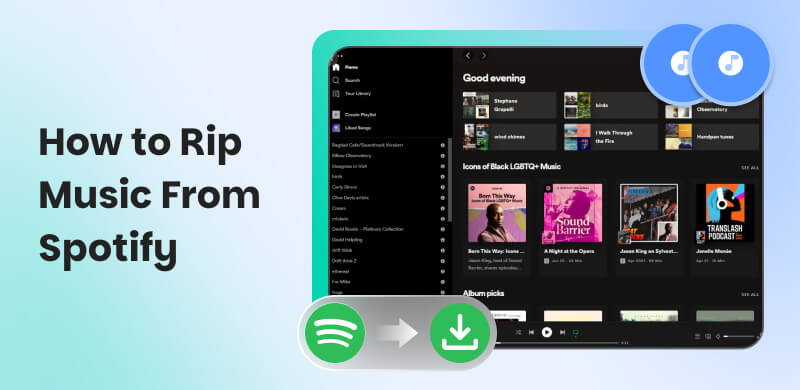
Why Ripping Beats Downloading?
The Core Problem: You Don't Really Own Downloaded Spotify Music
The offline mode of Spotify allows you to download encrypted OGG Vorbis files that are only playable within the Spotify app, meaning you don’t actually own them. You can’t transfer those Spotify songs to other devices for free, and you have to keep them active every 30 days with a connected internet connection. Additionally, once your subscription ends, the downloads will be removed.
The Solution: Ripping Unlocks Full Compatibility
When you rip music from Spotify, you can convert songs, playlists, albums, and podcasts into widely common formats like MP3 or FLAC. This gives you full ownership of the tracks and lets you play them without restrictions.
Quick Comparison: Spotify Premium vs. Professional Ripper
| Spotify Premium | Professional Ripper |
| Music Ownership | Rented, DRM-protected | Fully owned files |
| Device Freedom | Spotify app only | Playable anywhere |
| Audio Quality | 320kbps (via premium) | Lossless (320kbps/Original) |
Next, I will share several ways to rip Spotify songs on different devices.
Part 1: TopVox: The Professional Desktop Solution [Best for Quality & Speed]
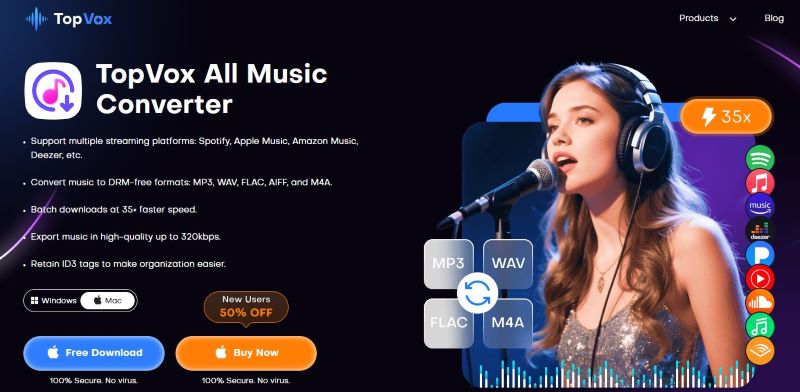
TopVox All Music Converter provides strong, comprehensive features among the many Spotify rippers I have used. While Spotify applies strict DRM encryption to lock the music library, this software automatically bypasses those protections to maintain offline access. You can extract individual tracks, entire albums, playlists, podcasts, and audiobooks directly into universal formats like MP3s, even though there's no Spotify subscription! It ensures every audio file is captured with High-fidelity sound quality and all ID3 metadata. And the batch conversion speed can reach 35×, allowing you to rip a Spotify collection without endless waiting. Actually, you can not only treat it as a Spotify ripper, but it is also a one-stop web player compatible with the main streaming platforms.
Key Features
- 9 Supported Platforms: Spotify, Apple Music, Amazon Prime Music, YouTube Music, Deezer, Pandora, SoundCloud, Line Music, or Audible.
- No Premium Required: Download all kinds of audio files using a Free Spotify account.
- Lossless Output Quality: Convert music to the original Bitrate and sample rate.
- Various DRM-free Output Formats: MP3, WAV, FLAC, AIFF, M4A (AAC/ALAC).
- 35× Batch Conversion Speed: One-time ripping playlists in seconds using advanced hardware acceleration.
- Perfect ID3 Tags: Automatically saves all metadata for easy organization.
Pros
- Works on both Windows & macOS.
- Intuitive operation for all users.
- No need to switch between the Spotify app and the ripper tool.
- Quickly receive converted tracks without loss of quality.
Cons
- Beyond the available free trial, you need to purchase a license to unlock full features.
To always stay in sync with Spotify and other music apps, TopVox All Music Converter provides frequent, free technical support to ensure the highest level of performance, efficiency, and security. While it’s a premium tool, it’s a one-time investment that saves you hundreds in long-term subscription costs.
Step-by-Step: How to Rip music from Spotify with this tool?
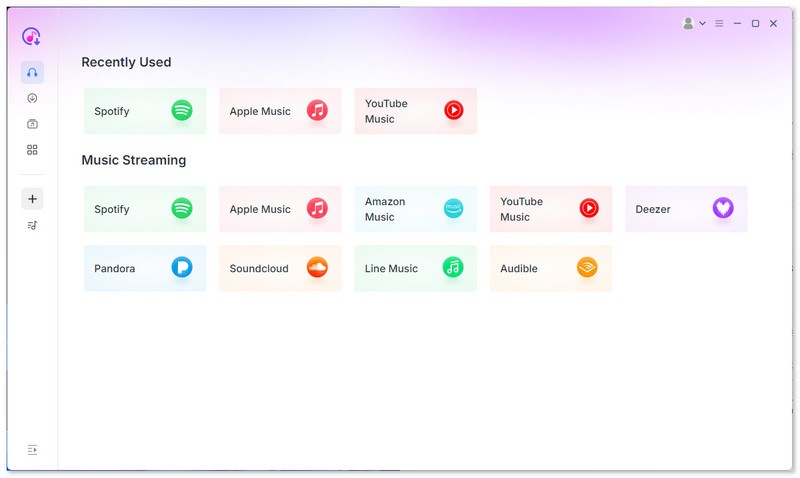
Step 1. After the installation, run it on your computer. Click the Spotify platform, then enter your Spotify account information.
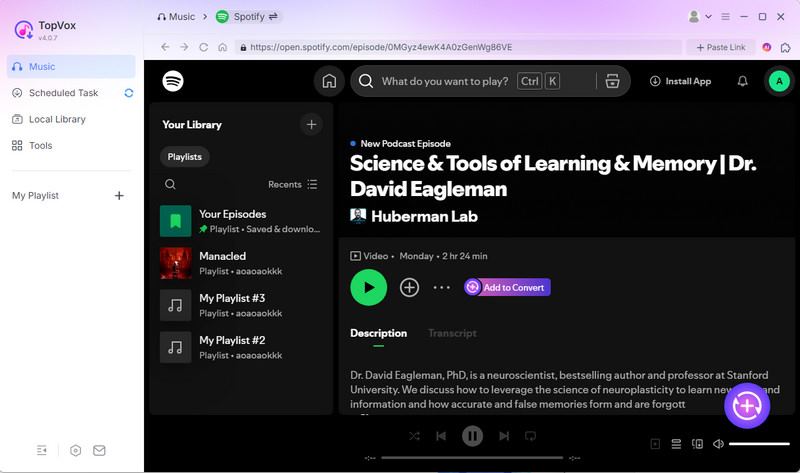
Step 2. Go to the Search section and browse the Spotify music you want to convert. Then hit the Add to Convert button. You can add as many songs as you want.
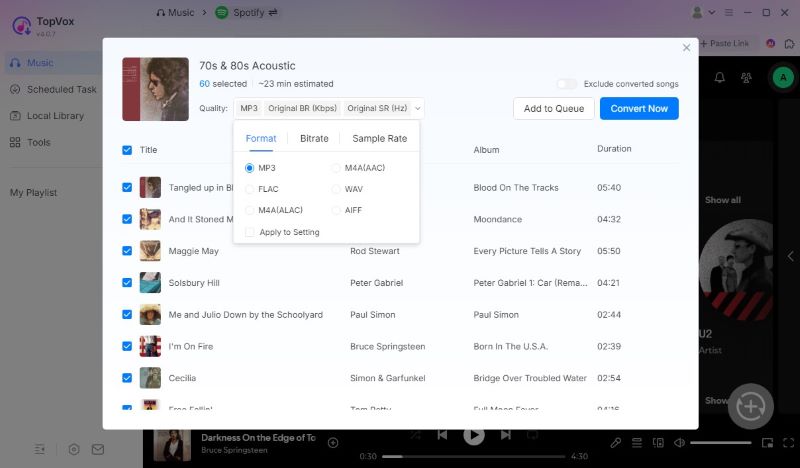
Step 3. Go to the Format section and choose a preferred output format like MP3. Once done, tap the Convert Now to begin converting your Spotify to MP3 format.
Part 2: How to Rip Music from Spotify on iOS/Android
If you don’t have access to a computer, there are Spotify rippers that work directly on mobile devices. However, these tools come with clear trade-offs in speed, quality, and reliability, viewed as convenience options rather than professional solutions.
Fildo [Android]
Fildo acts as a free interface for various third-party music search engines, rather than hosting any files itself. You can search Spotify songs manually or import Spotify playlists to MP3/FLAC for downloading offline music to your device. Note that it will not directly bind to the Spotify service, so some tracks can’t be downloaded successfully.
How to use it?
Step 1. Open the Fildo app on your Android. Click More > IMPORT SPOTIFY.
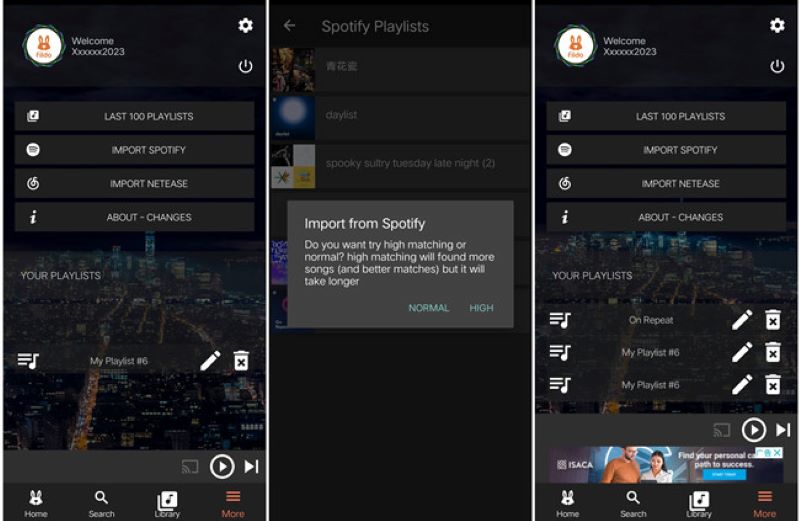
Step 2. Log in to your Spotify account, and the program will grab and display your playlists.
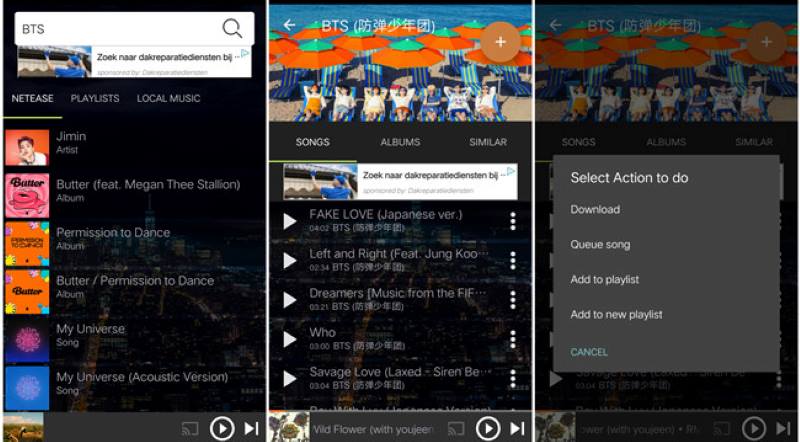
Step 3. Choose what you want to download and click the three-dot icon > Download.
Pros
- Access to music from mainstream hits or n major platforms.
- Download tracks into high-quality MP3s without a subscription.
- Totally free and user-friendly interface.
Cons
- It can’t be found in the Play Store or other official sites.
- Bitrate and audio quality can be inconsistent.
- The copyright of the files can be questionable.
Spotifydl Shortcut [iOS]
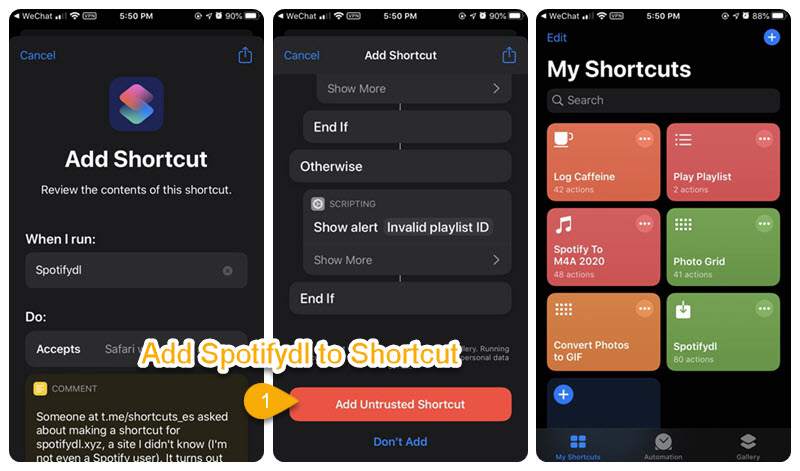
Relatively, there are few tool options for iOS users to rip music from Spotify. If your iPhone is running iOS 12, you can use an additional function to achieve it – the developer writes a script to access the Spotify app and get quick actions. To do that, you need a Spotifydl Shortcuts, which serves as a Spotify-to-mp3 converter. You can save high-quality MP3 audio files from Spotify just by following the steps below:
Step 1. Install the shortcut on your iPhone.
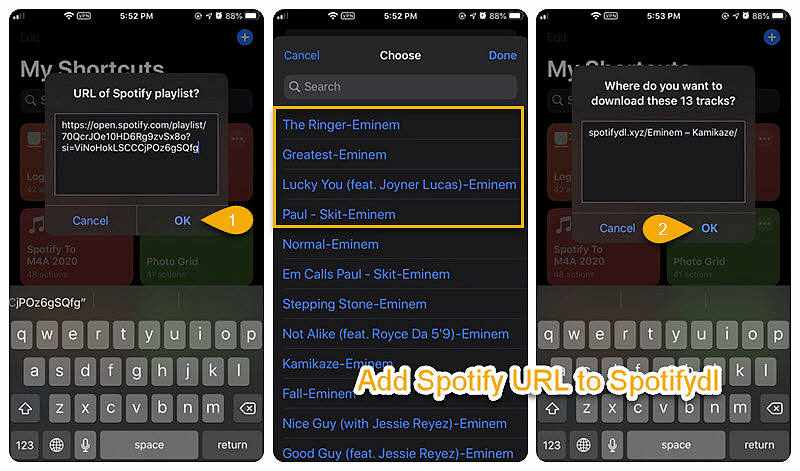
Step 2. Turn to your Spotify app and copy the URL of the playlist.
Step 3. Back to Spotifydl, an auto-populated information of “URL of Spotify playlist?” will show you. Then click OK to rip Spotify songs. Once done, you can find the converted tracks in Files > iCloud Drive > Shortcut.
Pros
- Supports ripping Spotify files at 320kbps.
- Easy operation for all.
Cons
- Need the Spotify app on your iPhone.
- Hard to convert playlists in bulk or rip Spotify albums.
- Only supports MP3 output format.
- Can’t keep up with ID3 tags and full metadata.
Pro Tips: How to avoid losing ID3 Tags?
One of the biggest pain points with this shortcut is messy metadata, making the complex management of all songs difficult. TopVox All Music Converter completely solves this issue. It ensures every converted track keeps:
- Song title
- Artist name
- Album name
- Release year
- Genre
- Year
- Track Number
And you can also edit ID3 tags freely, more details are in their User Guide.
Part 3: Free Online Tools to Rip Spotify Songs [Occasional Use]
If you only need a couple of tracks and don’t mind confusing ads or lower audio quality, the web-based approach works well. Those online tools don’t require installation and are accessible on any device. Usually, these rippers are used in the same way: copy and paste the Spotify audio link is ok.
SpotiDown
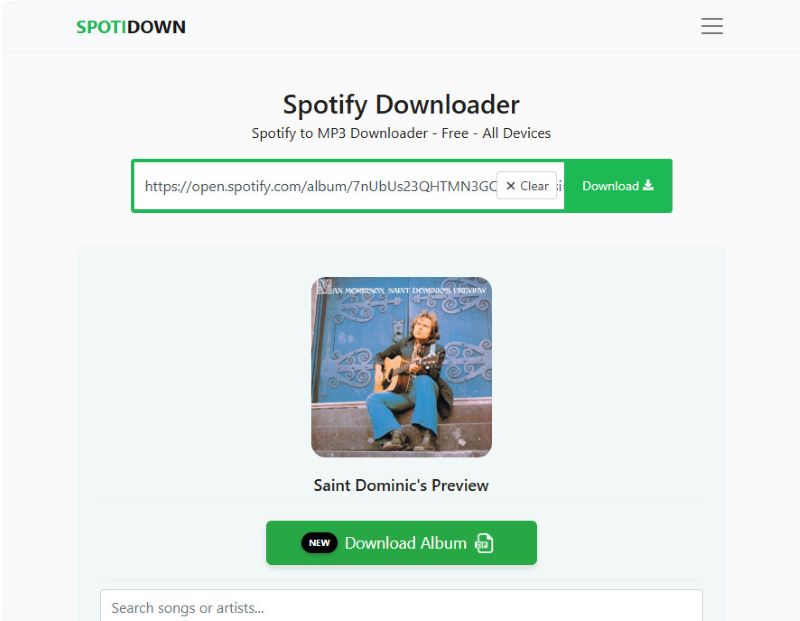
SpotiDown is a web-based, streamlined tool designed for users who want a quick way to save Spotify content for offline use. It works on any operating system and automatically embeds ID3 tags in downloaded MP3s, keeping your local library organized. With the limited customizations available, you’re not allowed to choose bitrate or output format. Besides, free users can only rip 5 songs of each playlist, and will have SpotiDown.App name on MP3 Files. To get the whole playlist, you have to pay for the Premium Plan.
Pros
- Receive all the metadata of each song.
- Support batch (ZIP) download.
- Clean and simple interface with no ads.
Cons
- Only the MP3 format is supported.
- The audio quality is lower than 320kbps.
- Can’t rip podcasts and audiobooks.
SpotMate.online
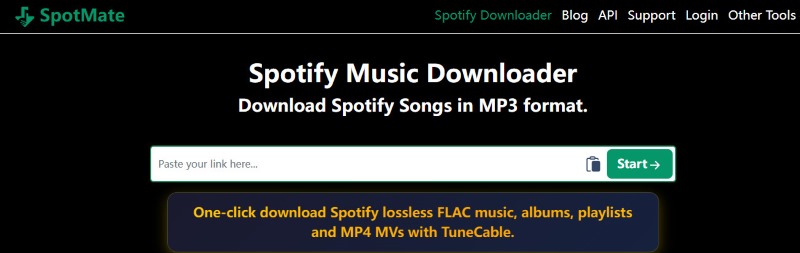
SpotMate is another free online Spotify downloader that offers a seamless ripping process. You can enjoy the freedom to convert your favorite songs to MP3 files without a Spotify account. Although it’s easy to use, the site will pop up some ads to interrupt your experience or mislead you to unsafe pages. Once I filled in a music link, the website could not read the information quickly and took a long time to load.
Pros
- Swift Spotify songs to high-quality MP3 files.
- No software installation or login requirements.
- Free to use on various devices.
Cons
- Only supports the MP3 format.
- Can’t download playlists in batches.
- Unstable output audio quality and success rate.
- No support for Spotify podcasts, audiobooks, etc.
Comparison of 5 Ways to Rip Music off Spotify
| TopVox All Music Converter | Fildo | Spotifydl Shortcut | SpotiDown | SpotMate |
| Supported Platforms | Windows, macOS | Android Only | iOS Only | Browser | Browser |
| Output Formats | MP3, WAV, FLAC, AIFF, M4A (AAC/ALAC) | MP3, FLAC | MP3 Only | MP3 Only | MP3 Only |
| Max Audio Quality | 320kbps / Lossless | 320kbps | 320kbps | 320kbps (claimed) | 128-320kbps (unstable) |
| Conversion Speed | 35× | Fast (mobile local parsing) | Medium (network-dependent) | Medium (paid faster) | Medium |
| Batch Download | ✔ | ✔ | ❌ | ✔ (Premium) | ❌ |
| Stability | Very High | Medium (occasional matching errors) | Medium (depends on script updates) | Medium (server fluctuations) | Low (prone to disconnection & failure) |
While mobile tools and online Spotify rippers provide users with great convenience, they are far from equal in desktop software when handling large-scale tasks. Online platforms are frequently limited by browser instability and poor network connectivity, leading to interrupted downloads or compressed audio quality. In contrast, TopVox All Music Converter supports more robust features to ensure reliable, high-bitrate outputs.
FAQs on Ripping Music from Spotify
Q: Does Ripping Music from Spotify Reduce Audio Quality?
A: The quality depends on which ripper you choose. Some online Spotify-to-MP3 converters can degrade lossless audio quality. Top desktop software, like TopVox All Music Converter, extracts audio at the original bitrate and sample rate.
Q: Is it legal to rip Spotify music?
A: Personal use is feasible and permitted under copyright laws in most regions. But commercial use (selling, sharing, monetizing) is universally illegal. Always choose secure tools and avoid those unavailable in official app stores or on untrustworthy official websites.
Conclusion
All methods mentioned in the post are effective for ripping music from Spotify. You can choose any of these according to your demand. For convenience, mobile tools or online converters are more suitable. If you pursue a stable and high-quality ripping process, TopVox All Music Converter is the first choice.
Luna Harper
Luna Harper is a passionate music lover and an inspiring content sharer. She has explored most of the music converters available on the market, acquiring thorough knowledge of their features, usability, and differences. Luna enjoys using her professionalism to help fellow music lovers get superior audio quality.




 by
by