How to Download Music from YouTube on Android using 4 Ways
 by Owen Bannett | May 19, 2026 | YouTube
Having to listen to music even without an internet connection is a great experience. However, that would only become possible if we download first. Good thing, downloading music from YouTube on Android is possible and easy to do. Because this article will help you do that, allow us to introduce four effective methods that you can follow to get your favorite music from YouTube on Android. Check the complete details now. Read this article for that.
Method 1. Download Music from Youtube on Android: Official Way
If you are a premium user of YouTube, then downloading the music you want to listen offline will be easy for you. Because you already have the privilege to do it. In this method, you will have two options to make it, the manual download and smart download. The steps are written below;
Way 1: Manually Download
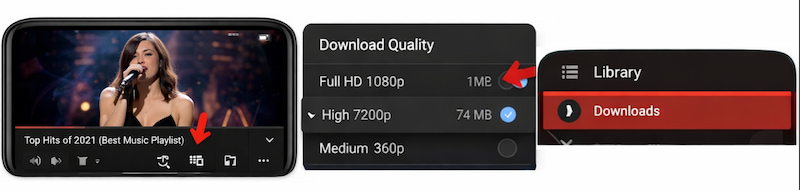
Step 1. Open the YouTube app on your Android mobile phone. From there, we need to search for the music you want to listen to offline.
Step 2. See the Download button. It mostly comes as a downward arrow below the music you searched.
Step 3. After doing that, please choose the quality of the music video.
Step 4. After all, once downloaded, the video will be available offline in your Library and see the Downloads section whenever you would like to listen to it offline.
Note: Since you are downloading the music from YouTube, the output will always come as video. So whenever you are listening to the music, you will just let the video play.
Way 2: Smart Download
In the way of Smart Downloads, you have the capability to keep your offline library fresh even without manual effort. Good thing, you can still delete or manage the music anytime.
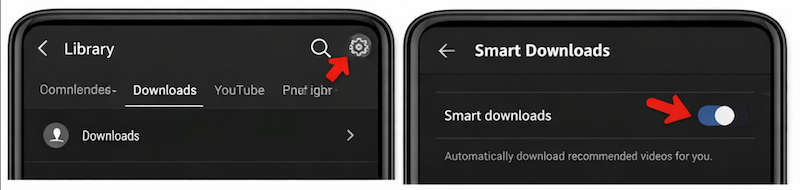
Step 1. First, we need to go to the YouTube app and see the Library for Downloads.
Step 2. From there please tap Settings or the gear icon. Among the options, please enable Smart Downloads.
Step 3. From there, the YouTube app will automatically download recommended music based on your watch history when connected to Wi-Fi. That means, the algorithms do all the work for you. Similar to the first methods, these music will appear in your Downloads section for offline listening on your Android.
Method 2. How to Download Music from YouTube on Android Without Premium
If you do not have a premium account, then the first method is something you cannot do. Good thing, we already foresee it. Therefore, let us now proceed with the second method that allows us to download music from YouTube without premium. That will be possible as long as we are using TopVox All Music Converter. This tool possesses all features that you need to get the music for offline listening on Android. In TopVox All Music Converter, you can get music with different platforms such as YouTube, Amazon, Apple Music, and more with an instant process. Take a look on what abilities it can offer and how you do it:
Features
- You can have a quick download for offline playback.
- Free to download and install the tool.
- It has a fast saving of tracks.
- Cross-device compatibility.
Step in Using TopVox All Music Converter
Step 1. You download TopVox All Music Converter from their website. Then install it immediately on your computer.
100% Secure. No virus.
100% Secure. No virus.
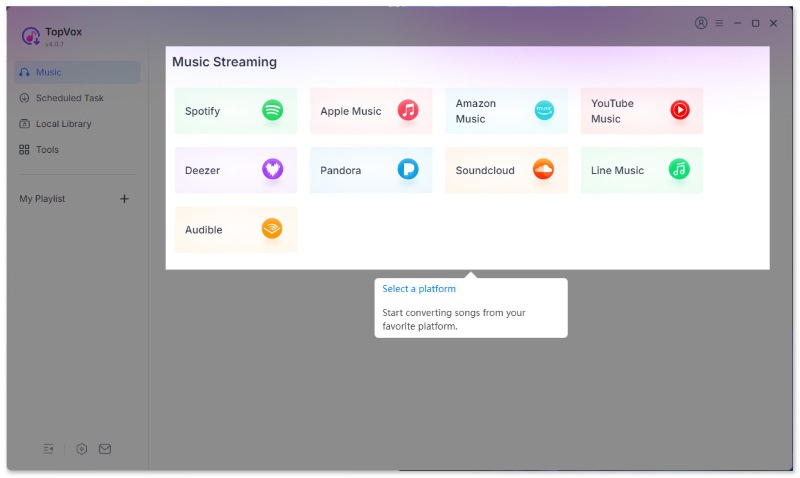
Step 2. From the interface of the tool, you choose among the options of the platforms it supports. Please choose a YouTube site.
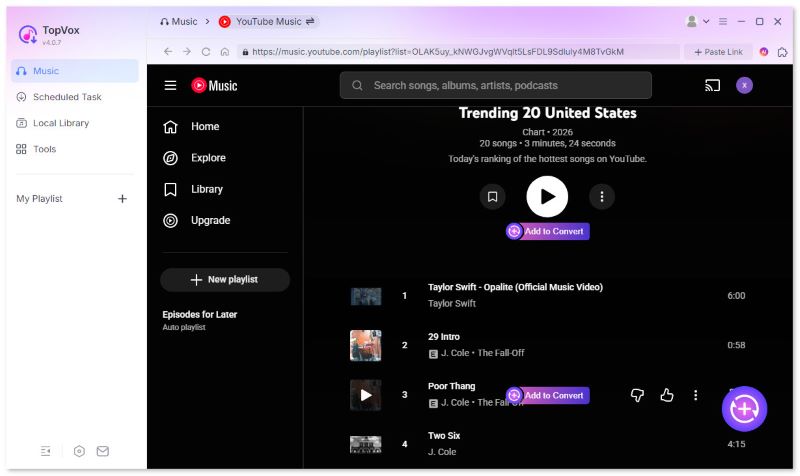
Step 3. Now, the tool will allow you to search the music you would like to listen to offline. Click the Add icon now and start downloading in the conversion list. After a few seconds, your music will be ready to listen offline.
Method 3. Download Music from YouTube on Android Online
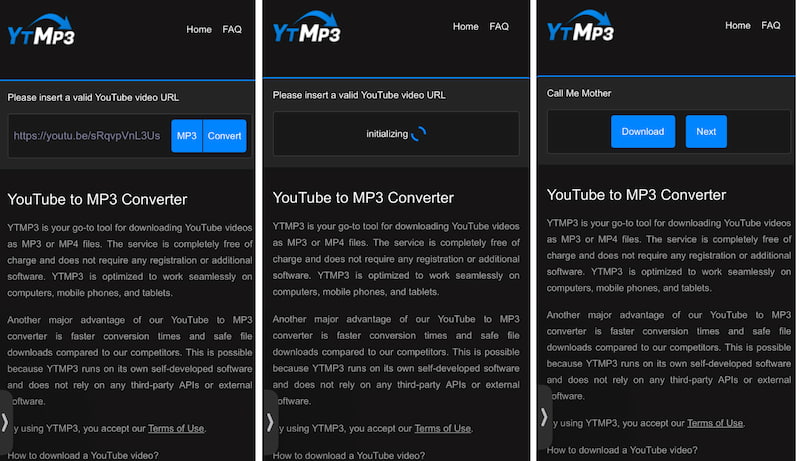
Getting music you love to listen to even when you are offline is now possible with using an online tool. YTMP3 is a popular online tool that allows users to download the music from YouTube using its URL only. In this tool, you can convert the video into MP3 to save it as music directly on your file manager on Android. Here are simple steps to follow:
Step 1. Open the browsers you are using on your phone. From there, search for the YTMP3 site.
Step 2. After that, open YouTube and search for the music you would like to have offline. Please copy the URL of the music.
Step 3. Go back to the YTMP3 site and paste the URL on the tab. Now click the Convert button to proceed.
Step 4. Allow the tool to initialize the music. After that click Download.
Method 4. Download Music from YouTube on Android with Android APK
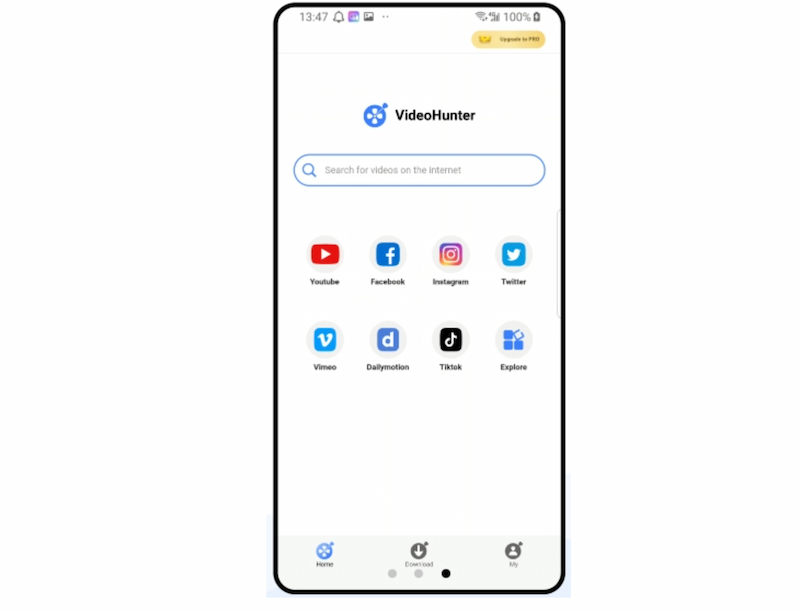
For the fourth method, we have the amazing APK of VideoHunter for Android. This tool is a third‑party APK app that allows users download and convert YouTube videos into audio or even video files directly on our Android device. Most importantly, it supports MP3 formats and offers a simple interface that gives us experience and an easy download process. More than that, the tool provides offline playback that makes it convenient for saving music for us.
Step 1. Get VideoHunter APK from a trusted site like APKPure.
Step 2. In Settings see the Security to enable Install unknown apps option.
Step 3. At that moment, please open the APK file and tap Install.
Step 4. We also need to copy first the YouTube link and paste it into VideoHunter.
Step 5. After that, please select MP3 as the file format . Then finally, tap Download and wait for a few seconds and your music will be saved.
Conclusion
We can now conclude that getting YouTube music to listen offline on an Android phone is possible. Good thing, the four methods above are effective and something you can follow. It does not matter if you have a premium version or not. Because even if you do not have one, then the process will also become possible as long as you choose the best method for you. If you are looking for recommendations, then many users love to use TopVox All Music Converter, for it offers a one of a kind process of downloading YouTube music for Android to listen offline.
Owen Bannett is a music enthusiasm as well as a senior writer. He has paid close attention on the pros & cons of various audio formats, bitrate, sample rate and encoding methods. Always seeking the best listening experience, Owen has deep insights about lossless music and diverse music converters on the markets.