2026 Proven Ways to Download Songs from SoundCloud to Your Phone
 by Owen Bannett | April 7, 2026 | SoundCloud
Want to learn how to download songs from SoundCloud to your phone? Well, saving your favorite SoundCloud is convenient if you want to enjoy the music offline and create your playlist. Since SoundCloud is a streaming platform, there are certain procedures and tools you can access to save tracks effectively. In this tutorial, we will teach you how to download your favorite music from SoundCloud for a better listening experience. Thus, read here and learn the most reliable and successful music downloading procedure.
Part 1. Why Can't I Download SoundCloud Songs Directly on My Phone
Wondering why you can't download your favorite songs from SoundCloud on your phone? Well, there are various reasons behind that. First, SoundCloud is primarily designed for streaming audio. It means that you cannot download the music on your phone directly and permanently. Even if you are using the SoundCloud Go+ version, you can only save the songs from the app itself for offline listening.
In addition, since the music is encrypted, there is no chance for you to share or transfer the music like a regular MP3. On the other hand, local MP3 files are ideal if you want to share, move, and copy the music on any device. Plus, the limitation of the official app lies in its lack of file-sharing options, subscription costs, and the fact that the music is still stored inside the SoundCloud platform.
Part 2. Download SoundCloud Songs with Artist's Permission
After reading all the information above, you now have enough idea that SoundCloud can't let you download a song directly to your phone. But the good part here is that there is an exception. If the Artists permit you to download their music, then you can download the song via the download feature. The best part here is that you don't have to access SoundCloud's paid version. All you need is to get the music, save it as a WAV format, and enjoy it while listening offline.
If you want to download SoundCloud to your phone with the artist's permission, you can use the simple steps below.
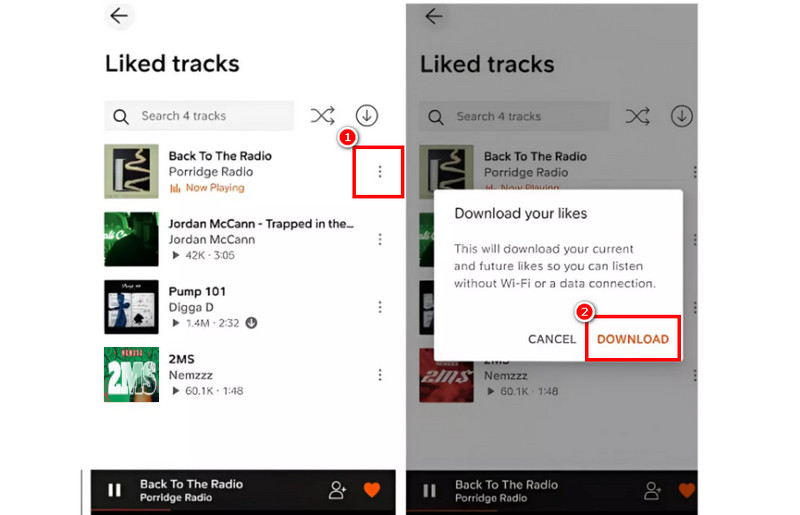
Step 1. Download and launch the SoundCloud app on your mobile phone. After that, you can start inserting your account.
Step 2. Then, you can begin going to the Search section to browse all the music you want to download.
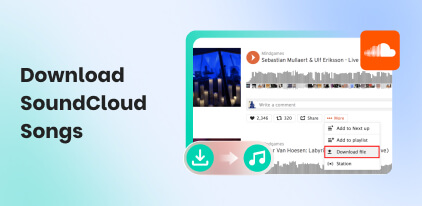
Step 3. Click the three-dot option, and you will see the Download button. Press it to start the downloading process.
Step 4. Once done, you can start listening to the music on your phone without any internet connection.
Limitations
Even if the artist permits you to save and download their music from SoundCloud, there are still some restrictions you might encounter. Some of them are:
- • You can only save the music as a WAV format. Since this format is not that widely supported, you might encounter some compatibility issues when playing the song on other media players or devices.
- • It can offer low-quality audio. It can only let you play the music at 128 Kbps.
- • The saved music is only for the personal user. Retribution, remixing, and commercial use of music are strictly prohibited.
- • Not all music is downloadable. You have to search for the music with a download button to get the song and save it to your device.
Part 3. Download SoundCloud Songs to Your Phone via TopVox All Music Converter
Are you looking for another music downloader that lets you download songs from SoundCloud? In that case, you can use TopVox All Music Converter. This software is ideal if you want to download and save the SoundCloud song to any DRM-free format, such as MP3, AAC3, FLAC, WAV, M4A, and more. You can even save the song with the best quality for up to 320 kbps. The best part here is that it has a fast conversion process for up to 35× faster, making it better than other downloaders. It can even deal with SoundCloud restrictions, making it more powerful and remarkable. With that, if you need a reliable music downloader that can save and convert any SoundCloud music, it would be better to access TopVox All Music Converter.
To get more details about the program, you can read everything in the table below.
| Features | Benefits to Users |
|---|---|
| Supports Batch Conversion | What makes the program ideal is that it can support its batch conversion feature. This feature helps users convert and download multiple music files in just a single go. |
| Supports Various Formats | Users can download music in various formats. They can download SoundCloud to MP3, M4A, AAC, FLAC, WAV, and more. It is perfect if you don’t want to avoid compatibility issues. |
| User-Friendly Interface | The good thing about the program is that it can offer a simple user interface. It is helpful for users who want a smooth conversion process. |
| Built-In Web Player | The program can offer its built-in web player. It is good for users who want to play their favorite music during the downloading process. |
| Download Music from Various Platforms | It can download music from various audio streaming platforms, including Spotify, Apple Music, Deezer, Pandora, and more. |
To download the music on your device using the program, you can follow the steps below.
Step 1. Tap the Download button below to access TopVox All Music Converter. Then, start launching the software on your computer.
100% Secure. No virus.
100% Secure. No virus.
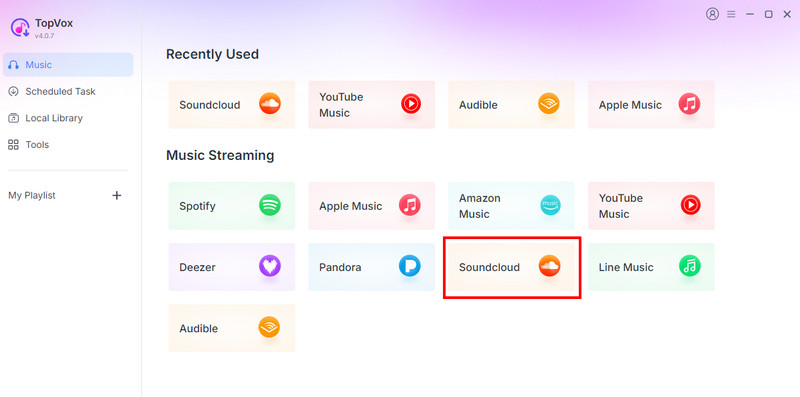
Step 2. Then, from the primary interface, select the SoundCloud platform and create your account.
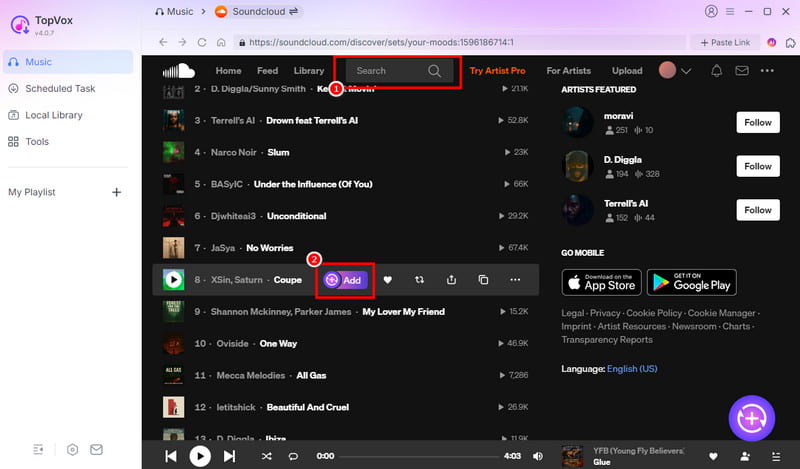
Step 3. Once the main interface shows up, go to the Search section to browse your favorite music. Click the Add button to move the music to the Conversion section.
Step 4. You can start choosing your preferred audio format and quality. Then, you can begin hitting the Convert Now option to begin the downloading and conversion procedure.
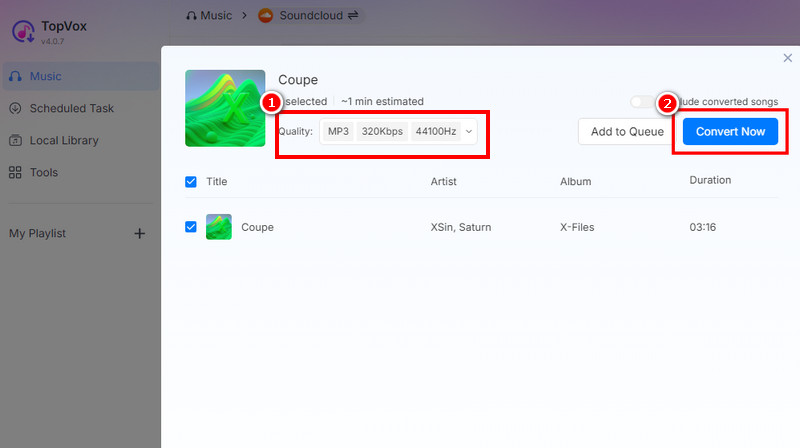
After that, you can now transfer the music to your mobile device.
Part 4. Online Tools to Download SoundCloud Songs to Android and iOS
Want to learn how to download SoundCloud songs on iPhone and Android using an online tool? Then, see all the information in this section.
Method 1: Download Songs from SoundCloud Using KlickAud
If you need an online tool you can use on your browser to download songs from SoundCloud, you can use KlickAud. This tool is ideal if you want to save your favorite music with the best quality. It also doesn't have any ads, allowing you to download music smoothly. Use the steps below and learn how to download SoundCloud songs on iPhone.
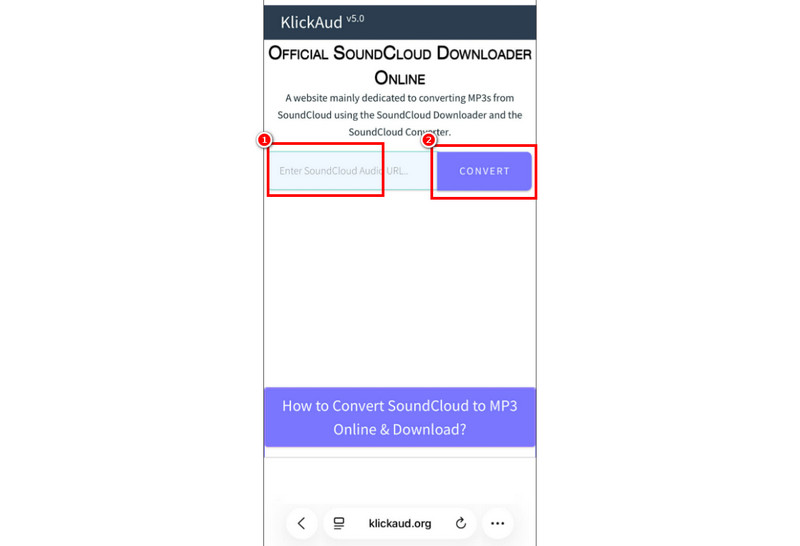
Step 1. Access KlickAud on your browser. Then, go to the SoundCloud platform to copy the link to the music.
Step 2. For the next process, paste the link to the tool and hit the Convert button.
Step 3. After the process, you can start listening to the music.
Method 2: Download Songs from SoundCloud Using SCloudSave
SCloudSave is another online tool you can use on your phone to download any music from SoundCloud. What we like about this tool is that it has a simple user interface, making it ideal for non-professional users. To learn how to download SoundCloud songs on Android and iPhone, see the steps below.
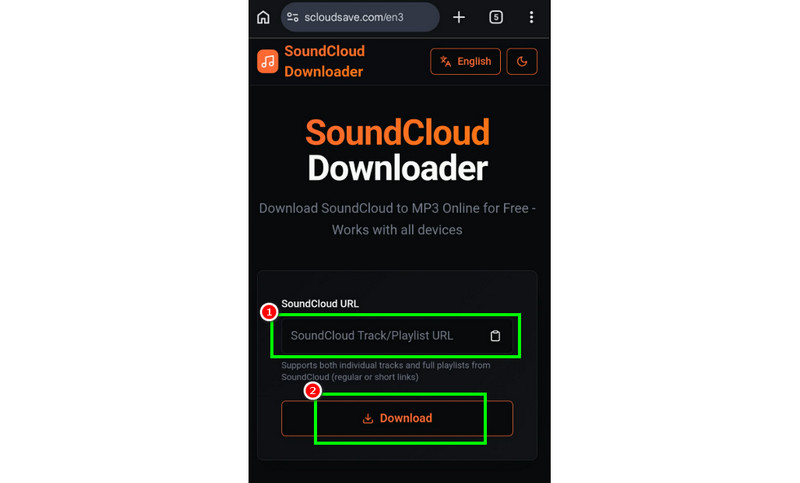
Step 1. On your phone, open your browser and access SCloudSave. Then, start copying the link of the music from the SoundCloud platform.
Step 2. After you paste the link, hit the Download button below.
Step 3. Once the process is done, you can already open and play the audio.
Method 3: Download Songs from SoundCloud Using Cobalt.tools
For our last online tool, we suggest using Cobalt.tools. This is a perfect tool if you want to instantly save and download SoundCloud songs on your phone. What we like here is that you can access it on various web platforms, making it more accessible to users.
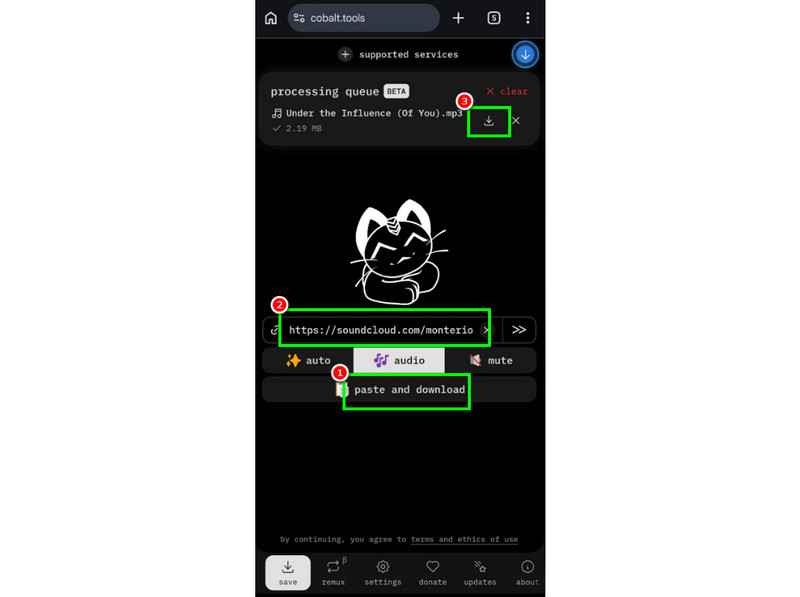
Step 1. Access Cobalt.tools on your browser using your iOS or Android.
Step 2. Then, after copying the link, paste it into the tool and hit the Paste and Download button below.
Step 3. Finally, tap the Download symbol above to start saving it on your device.
Limitations of Online SoundCloud Downloader
These online tools are ideal if you want to download songs from SoundCloud without installing any software. However, these tools have various drawbacks. Since they are web-based, you must have an internet connection. Plus, some of the tools only support a few formats, making it bad news for users. With that, if you want a better and more powerful music downloader, it is better to access TopVox All Music Converter.This program is far superior since it can give all the features and save the music with the best quality.
Part 5. FAQs about How Can I Download Music from SoundCloud to My Phone
Do I need a subscription to save songs for offline listening?
Yes. If you want official offline downloads within the SoundCloud app, you need a SoundCloud Go+ subscription to unlock the feature.
What is the disadvantage of artist-enabled downloads?
Artist-enabled downloads only offer 128 Kbps quality, are limited to WAV, and are strictly for personal use—no remixing or sharing allowed.
Is third-party software safe to download SoundCloud songs?
Yes, if you use trusted tools like TopVox All Music Converter. It protects your data and ensures safe, high-quality downloads without risks.
Conclusion
To learn how to download music from SoundCloud to your phone, you can rely on the methods we have provided in this article. With that, you can download all the music you want on your phone. Plus, if you want a better music downloader, you can access TopVox All Music Converter. This program ensures that you can download and convert SoundCloud songs to various formats and the best quality for up to 320 kbps. Thus, always use this software to achieve your desired result.
100% Secure. No virus.
100% Secure. No virus.
Owen Bannett is a music enthusiasm as well as a senior writer. He has paid close attention on the pros & cons of various audio formats, bitrate, sample rate and encoding methods. Always seeking the best listening experience, Owen has deep insights about lossless music and diverse music converters on the markets.