3 Methods to Download Music from Pandora Without Premium
 by Luna Harper | July 2, 2026 | Pandora
Summary
Using TopVox All Music Converter:
1. Open the software and select the Pandora tile.
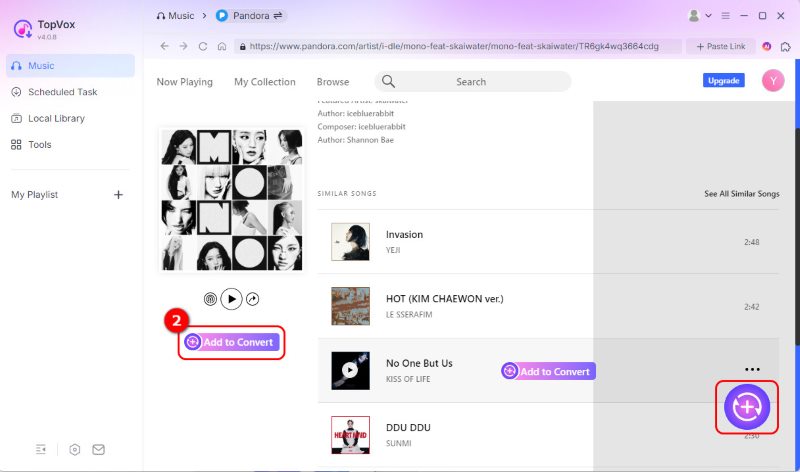
2. Click +Add to Convert to add the target Pandora music.
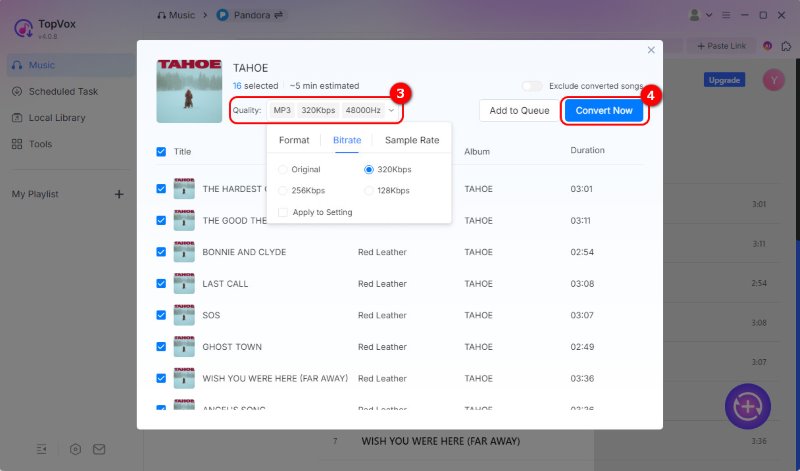
3. Select an output format and click Convert Now.
Capturing Music Using Apowersoft Free Online Audio Recorder
Pandora does not provide a native way to download audio files. The most common way to obtain your music is to stream-rip or record using Apowersoft Free Online Audio Recorder.
Using Coconut Video Downloader
1. Open the Pandora web player and find the music you want to download.
2. Activate the extension to detect the currently playing media.
Select the audio file from the detected list and click Download.
It’s frustrating to be comfortable with enjoying the music of your choice, but then to suddenly realize that the subscription for Pandora has ended. All of a sudden, you can’t access your downloads offline, and you hear ads while listening to music. Most importantly, you find yourself once again requiring an internet connection to listen to your favorite music. If you’re using the free version of Pandora, you are constrained to limited playback options and no offline downloads. If you aren’t going to renew your Pandora Plus or Premium subscription, it's a good idea to download your favorite Pandora songs and store them locally. In this post, we'll show you how to download music from Pandora without Premium using several effective methods. By the end of this post, you should have all of the information you need on downloading music from Pandora.
Part 1. Can I Download Pandora Music?
Yes, you can download music from Pandora, but it depends on your subscription package. Offline downloads are available only to Pandora Plus and Pandora Premium subscribers. With a free Pandora subscription, you can only listen to music online, as there is no option to download songs. With Pandora Plus, you get partial access to offline listening, but not full downloads. Here, Pandora does not let you choose what to download. Instead, it automatically downloads the songs you play most often. Meanwhile, Pandora Premium offers more offline listening options. It allows you to download any song you wish.
Part 2. TopVox All Music Converter
TopVox All Music Converter, as the name suggests, is an all-in-one streaming music converter and downloader. With it, you can download any songs, albums, and playlists without a Premium subscription. It can download encrypted content to DRM-free formats, including MP3, FLAC, M4A (ALAC/AAC), WAV, and AIFF. You can also customize the bitrate of up to 320 kbps and sample rate (up to 48 kHz). Apart from Pandora, it also supports Spotify, Apple Music, Amazon Music, YouTube Music, Deezer, SoundCloud, Line Music, and Audible.
Features
- Batch-download many songs in one go at 35x the speed.
- Permanently save songs for listening without DRM limitations.
- Download Pandora albums, songs, and playlists without a Premium subscription.
- Preserve the exact source’s audio resolution and bitrate without re-compressing the file.
Here's how to download music from Pandora without a premium
100% Secure. No virus.
100% Secure. No virus.
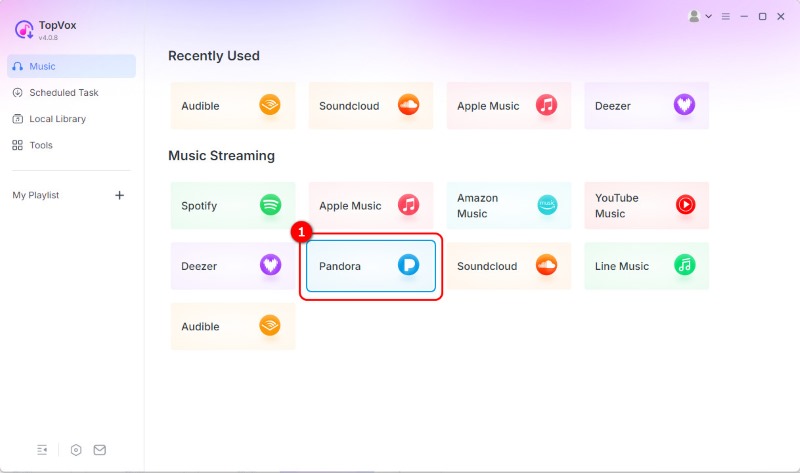
Step 1. Download TopVox All Music Converter and complete the installation. After setup, launch the software and select the Pandora tile from the dashboard. Sign in to your Pandora account to access the For You feed.
Step 2. After you locate the music, click + Add to Convert to add them to the queue. If you do not want to sign in to the site, copy the link to the music from the Pandora site. Then, click + Paste Link and paste the copied URL to convert the tracks via link.
Step 3. The default settings on TopVox allow you to download files in MP3 format (256 kbps, 44,100 Hz). It is easy to change the file format to your preferred format, such as FLAC or WAV. After configuring all the settings, click Convert Now.
TopVox All Music Converter lets you download songs, playlists, and albums from Pandora. It can export tracks to DRM-free formats, ensuring offline playback on different devices. Aside from songs, playlists, and albums, you can also download stations on Pandora.
Part 3. Download Music from Pandora for Free
Apowersoft Free Online Audio Recorder
Apowersoft Free Online Audio Recorder operates differently for saving Pandora songs. Instead of downloading the song, it records the audio from the computer's speakers (system sound). After recording Pandora music, it will be downloaded automatically and saved as an MP3 file.
To record: If this is your first time using the tool, you need to download the launcher first. After downloading the launcher, click Start Recording and select System Sound as your recording source. Open Pandora in another tab and play the song you want. Go back to the Apowersoft homepage and click Start Recording to begin, and once the music has finished, click Stop.
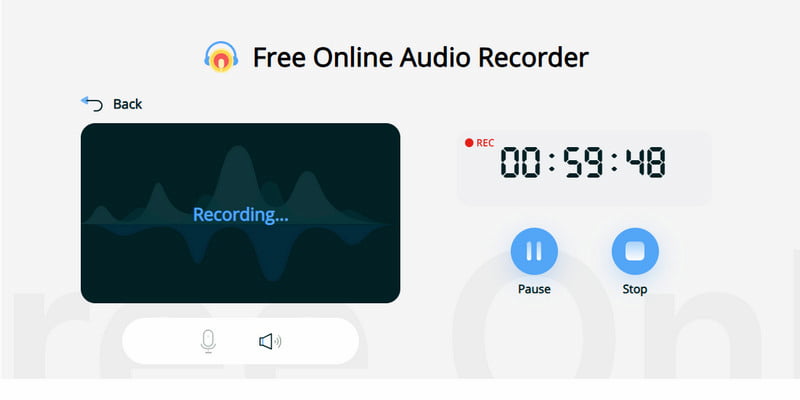
The Apowersoft Free Online Audio Recorder lets you record unlimited audio without time restrictions. However, the recording takes the same amount of time as the song itself. Also, it can only save recordings in MP3 format.
Coconut Video Downloader (Chrome Extension)
Cococut Video Downloader is a browser extension that can save music from the Pandora web player. It detects media playing in your browser, including Pandora music, and lets you download supported audio. It can also detect playlists, albums, and even podcast episodes.
Step 1. Add the Cococut Video Downloader extension to your Chrome browser. After installation, open the Pandora web player and find the music you want to download.
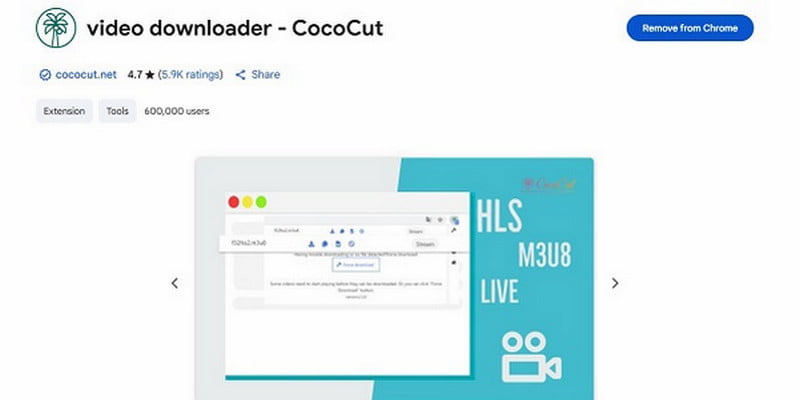
Step 2. Click the Cococut Video Downloader extension in your browser to detect the currently playing media. Select the audio file from the detected list, and click Download.
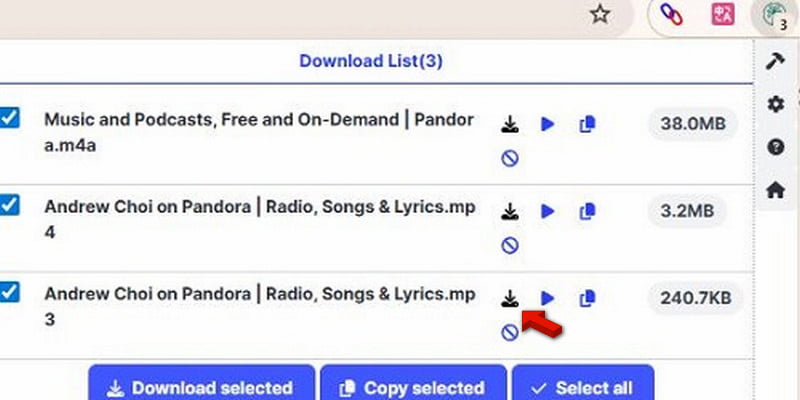
Cococut Video Downloader is an easy and quick way to download music from Pandora's web player. But there’s a catch: the primary function of CocoCut is the interception and downloading of media in video form. For MP3 conversion, use external software to download the video file. For this, we suggest using Pandora music downloader instead.
FAQs about Downloading Music from Pandora Without Premium
What are Pandora's limitations on free music?
Pandora ends 40-hour mobile limit. Six months after implementing a 40-hour cap on free listening, Pandora will remove all time restrictions, enabling unrestricted ad-supported streaming for users without subscriptions. This has been possible due to the successful introduction of other means of controlling listening time.
Can I save music from Pandora to my phone?
Yes, you can download music from Pandora to your phone for offline use. However, you can only do it through the Pandora app with a paid subscription. If you want to save music from Pandora to your phone without a subscription, use method 1 above.
Is Pandora music safe to use?
Yes, Pandora is a secure music streaming platform and a safe environment free of malware. However, parents should be concerned about explicit language, adult-oriented podcasts, and ads, as the application is intended for individuals aged 12 and above.
Conclusion
It is not a difficult task to download music from Pandora without a Premium membership. Just ensure you master what methods to use. Regardless of whether you use browser extensions, recording websites, or specialized music downloaders, each tool has its strengths. If you want fast, efficient downloading of Pandora songs, playlists, and albums in high-quality formats, TopVox All Music Converter is the ultimate tool. It supports batch downloading, multiple output options, and lossless audio. Please remember that you are required to use the software responsibly, in accordance with Pandora's and copyright rules.
Luna Harper is a passionate music lover and an inspiring content sharer. She has explored most of the music converters available on the market, acquiring thorough knowledge of their features, usability, and differences. Luna enjoys using her professionalism to help fellow music lovers get superior audio quality.