Best 4 Tools to Remove Audible DRM: Windows/Mac, Online, and Best Tools
Audible books on different platforms are encrypted with AAX/AAXC and protected by Digital Rights Management or DRM. That means, you cannot play these types of files unauthorized third-party devices or MP3 players. All of these files are playable only on the platforms where they are uploaded. However, there are ways to remove it and many tools are available now to remove audible DRM. That is why in this article, we will introduce four great methods that you can follow. Check out the best tools for Windows/Mac, Online, and a great all-in-one-tool.
Part 1. What is Audible DRM and Why to Remove It?
For you to know, the audible audiobooks we love to listen to from different platforms are distributed in AAX/AAXC formats. These formats are known to use Digital Rights Management or DRM encryption. It is technology that exists to protect copyrighted content of audible by locking the files to the Audible ecosystem or to the platforms where it is uploaded. In simple words, these audiobooks can only be played through the Audible app and authorized devices with legit accounts.
Moreover, the process of removing DRM is allowed but not for sharing or distributing files. It is allowed as long as you use it for creating personal, unencrypted backups. This is possible through converting the AAX/AAXC files into MP3 or M4B. This allows listeners to have a long‑term access to their library, despite having no subscription.
Part 2. Remove Audible DRM on Mac/Windows
We get to know that Audible only provides limited legit ways to burn audiobooks to CDs. One of the legit ways to do it is via iTunes for Mac or Windows Media Player for Windows users. These methods technically remove DRM but are cumbersome, time‑consuming, and outdated compared to modern converters. These methods are not the one you are looking for if you want MP3 for digital playback and other universal file formats. But if a physical CD is what you want, then here are the steps to do it:
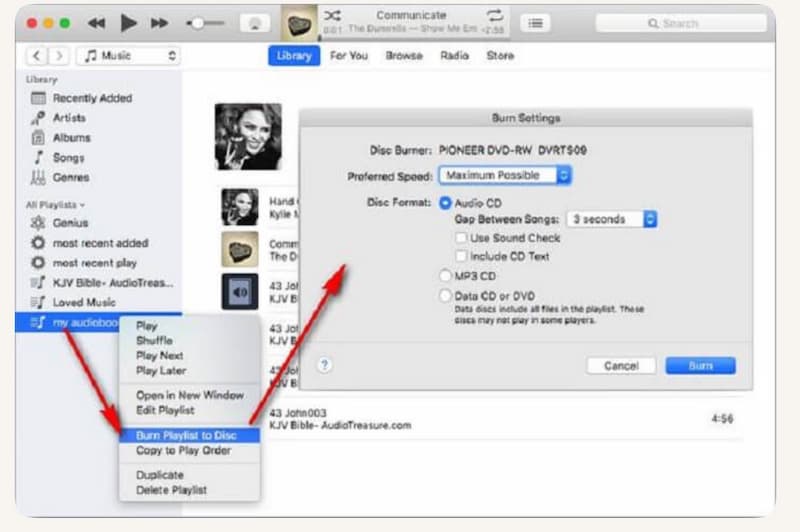
Remove DRM on Mac using iTunes
Step 1. You need to install iTunes. From there, please authorize your Audible account.
Step 2. Now, import the Audible audiobook you want to convert into your iTunes.
Step 3. After that, please insert a blank CD and burn the audiobook as an audio CD. From there, rip the CD back into iTunes as MP3 or AAC files.
Pros
- Officially supported by Audible/iTunes.
- Produces DRM‑free audio once ripped.
Cons
- Requires physical CDs and a CD drive.
- Time‑consuming to do.
- Loss of metadata when burned.
- Not practical for large libraries.
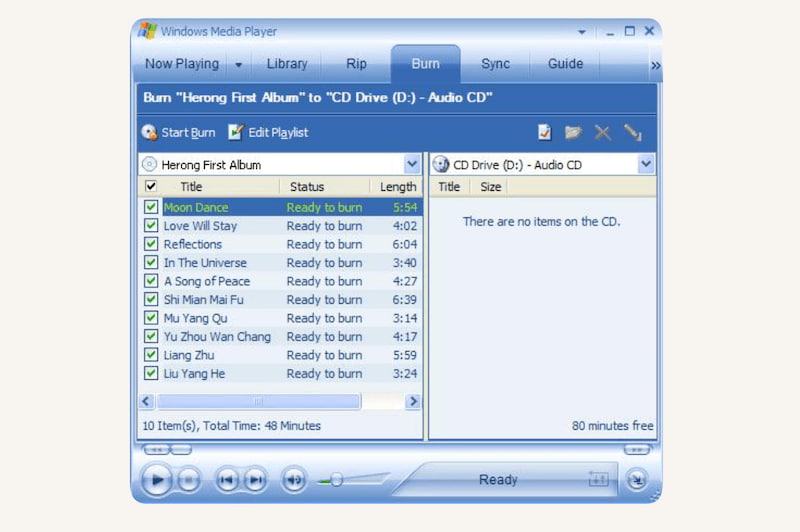
Remove DRM on Windows Using Windows Media Player
Step 1. We need to authorize your Audible account in Windows Media Player.
Step 2. Then, burn the audiobook to a blank CD.
Step 3. Finally, rip the CD back into Windows Media Player as MP3 or WMA files.
Pros
- It can work with built-in Windows software.
- Produces playable DRM‑free files.
Cons
- Same CD burning limitations as iTunes.
- Slower process, especially for long audiobooks.
- Metadata and chapter info lost.
- Requires multiple discs for large books.
Part 3. Remove Audible DRM Using TopVox All Music Converter
We shall now introduce you to TopVox All Music Converter which can offer you an all-in-one tool for converting an Audible audiobook into a universal file format. This is pure digital, that makes it a more accessible and fast conversion process for its users. This tool supports wide options of platforms like Amazon, Spotify, and more. Many users love it because of its batch conversion. Let's see what more it can offer and how we can easily use it.
Features
- Supports various platforms and sources for audibles.
- Various file formats such as MP3, WAV, FLAC, AIFF, and M4A.
- Super fast conversion speed.
- It is secure and protected.
Steps to Use TopVox All Music Converter
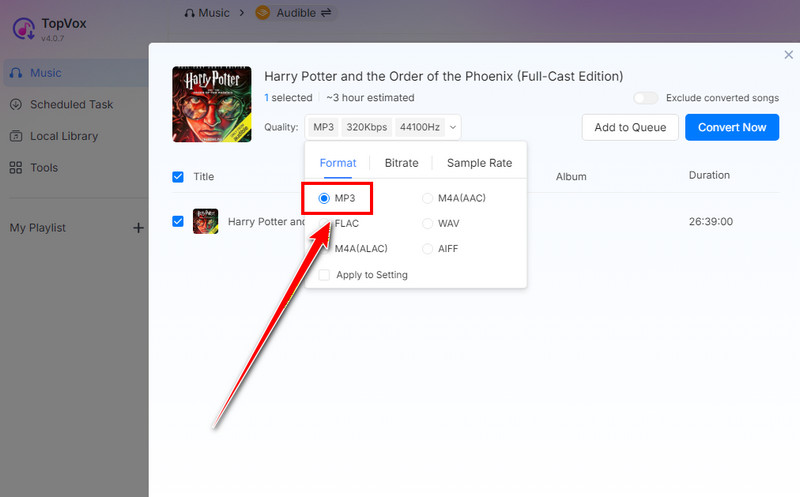
Step 1. Download TopVox All Music Converter and install it on your computer for free.
Step 2. Open the tool immediately and choose Audible platform.
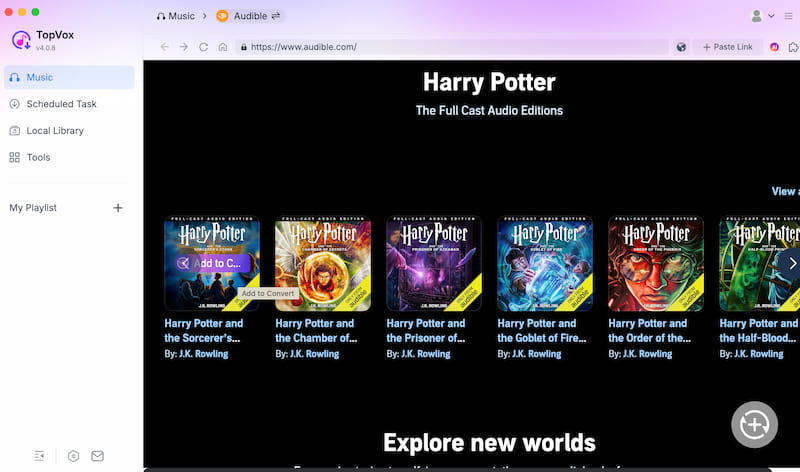
Step 3. After that, search the audible on the platforms. Click the Add to Convert.
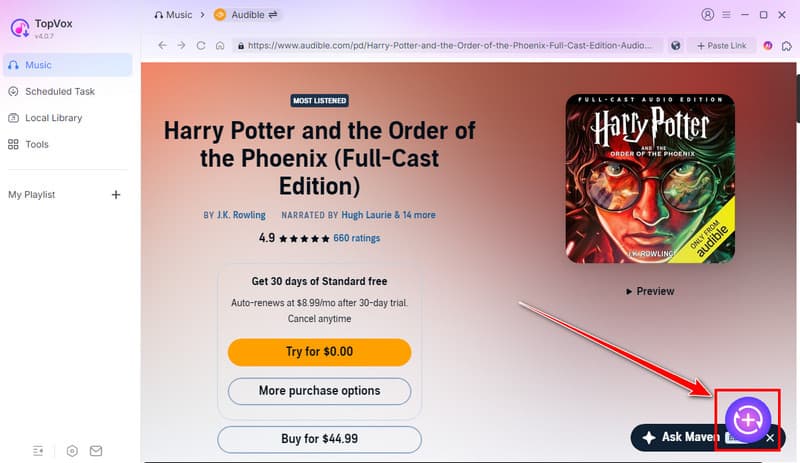
Step 4. Go to the Format section and adjust the output format, quality. Finally, click Convert All to start. You can listen to Audible books offline without DRM.
Part 4. Using Free Online Audible DRM Remover
Online‑Audio‑Converter.com
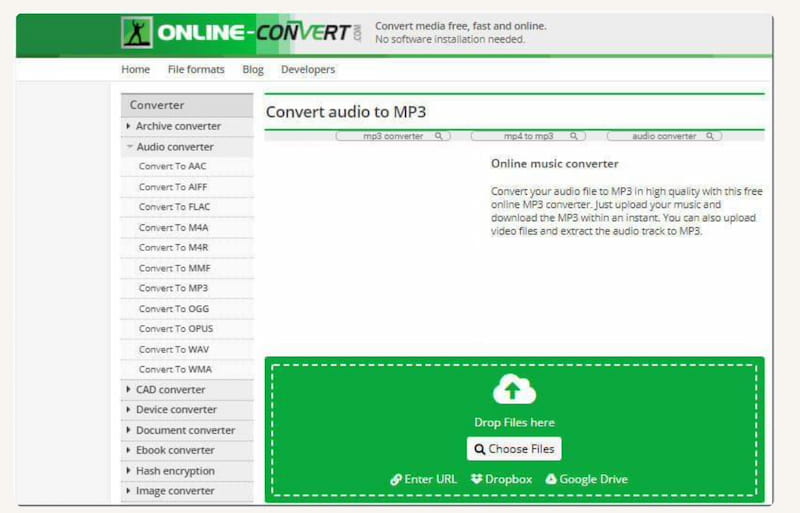
There are also some websites like Online‑Audio‑Converter.com that have the ability to convert Audible files directly in the browser or online process. These tools are great for people because they require no installation and work across devices. Meaning, a direct process is waiting for you.
Steps to Use Online Tool
Step 1. We need to visit the online converter site.
Step 2. From there, you can upload your Audible file with AAX/AAXC format..
Step 3. Now, choose an output format like MP3 or M4A. Then click Convert and download the result.
Limitations & Risk
- • There are privacy concerns.
- • File size limits.
- • Slow speeds in conversion.
- • DRM failures with its process.
Verdict
This online converter is very convenient for small and non‑DRM files.
Part 5. Remove Audible DRM using Audacity
Another method to make the removal of DRM possible is using Audacity. It is known to be a free, audio recording program. In this tool, instead of decrypting DRM it captures the audiobook playback in real time. Therefore, recording the full audible is the strategy here. Audacity is a digital audio editor and recorder, ensuring that you still get quality output.
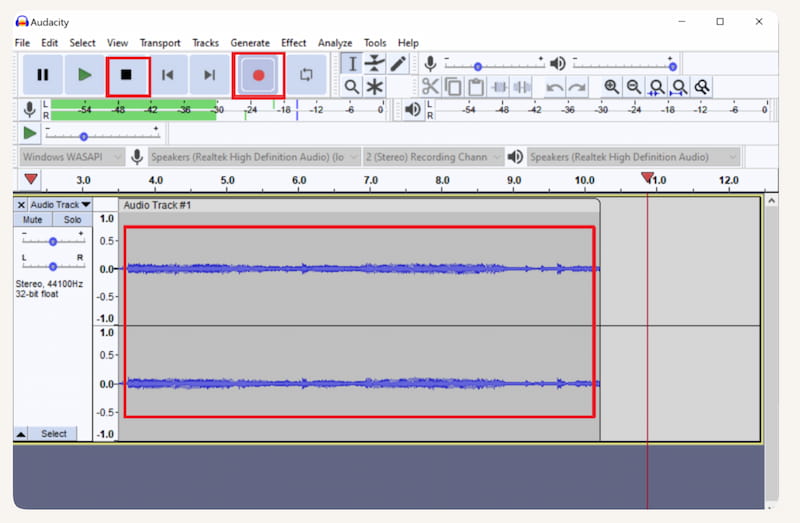
Step 1. Install Audacity on your computer. After that, we need to set the recording source to Stereo Mix.
Step 2. After that, please play your Audible audiobook in the Audible app or iTunes.
Step 3. Record the entire playback in Audacity. Finally, export the recording as MP3 or WAV.
Pros
- Free and open‑source tool for everyone.
- Works on any DRM‑protected audio since it records playback.
- Produces universally compatible files.
- Safe and secured.
Cons
- Real‑time recording.
- Manual process with risk of interruptions.
- No chapter markers or metadata preserved.
- Lower audio fidelity compared to direct converters.
Verdict
Audacity is a last‑resort method. Yes it is functional but inefficient. Especially if you are a serious audiobook collector. That means, professional converters like TopVox remain the best option.
Part 6. Comparison of 4 Ways to Remove Audible DRM
| OS | DRM Removal | Quality | Formats | Speed | Best For | Pricing |
| iTunes for CD Burn | Mac | Yes. | Loss of metadata. | MP3 and AAC. | Slow. | Users wanting physical CDs. | Free. |
| Windows Media Player for CD Burn | Windows | Yes. | Loss of metadata. | MP3 and WMA | Slow. | Windows users with CD drives. | Free. |
| TopVox All Music Converter | Mac and Windows. | Yes. | High and preserves metadata. | MP3, WAV, FLAC, AIFF, and M4A. | Fast. | Serious collectors and large libraries. | Paid. |
| Online‑Audio‑Converter.com | Web | Limited. | Variable and unreliable. | MP3 and M4A. | Moderate. | Quick and casual use. | Free. |
| Audacity | Mac, Windows, and Linux | Indirect. | Lower fidelity and no metadata. | MP3 and WAV. | Very slow. | Last‑resort fallback. | Free. |
FAQ on Audible DRM Remover
Q: Is removing Audible DRM legal?
A: Legality varies by country. Well, generally the process of removing DRM in audible is permitted only for personal use. That means, the distribution or sharing of DRM‑free files is prohibited.
Q: Which formats can DRM‑free audiobooks use?
A: Converted files are recommended to be saved as MP3, M4A, WAV, FLAC, or AAC. These file formats can ensure compatibility across devices and players.
Q: What’s the easiest DRM removal method?
A: Many users are suggesting to use professional converters like TopVox All Music Converter. That is because of their fast, secure, batch conversions, preserving quality and metadata. This is undeniably better than manual CD burning.
Q: Are online converters for audible safe?
A: Online converters for converting audible can have privacy risks, slow uploads, and file size limits. These are the most common reasons why they are unreliable for large Audible libraries.
Q: Does DRM removal affect audio quality?
A: As long as you use professional tools, then you can expect that it can preserve original quality. Because recording methods like Audacity and other online tools may reduce fidelity and lose metadata.
Conclusion
Therefore we can now conclude that getting an audible nowadays is simple. Thanks to the existing methods from burning CDs, converting, and recording. You just need to choose what works best for you. If you need recommendations, without a doubt TopVox All Music Converter is the one to choose. Because of its fast, reliable, and secure process. Use it now and get audible with ease.
Ethan Carter
Ethan Carter creates in-depth content, timely news, and practical guides on AI audio, helping readers understand AI audio tools, making them accessible to non-experts. He specializes in reviewing top AI tools, explaining the ethics of AI music, and covering regulations. He uses data-driven insights and analysis, making his work trusted.




 by
by