Convert SoundCloud to MP3 Formats with the Best Quality
Do you want to convert and download SoundCloud to an MP3 file? Saving your music from SoundCloud offers various benefits. You can keep your music on your device, edit it, and listen to it offline. The best part here is that you can have them forever. With that, if you are searching for the best way to download your favorite music, you are in the right place. This article provides various methods for achieving your primary objective. Without anything else, see this post and learn more about the best and effective downloading and conversion process.
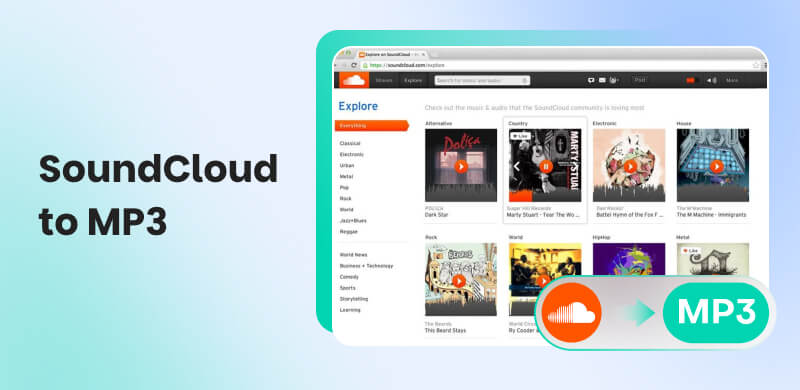
Part 1. Official Method to Download SoundCloud to MP3
If you are a SoundCloud member, downloading your favorite music is a possible task. What makes the tool remarkable is that it can ensure to give you get the best audio quality for a satisfying listening experience. Additionally, SoundCloud allows you to download your entire playlist, making it more suitable for music enthusiasts. With that, you can follow the simple steps below to begin downloading SoundCloud to MP3 format.
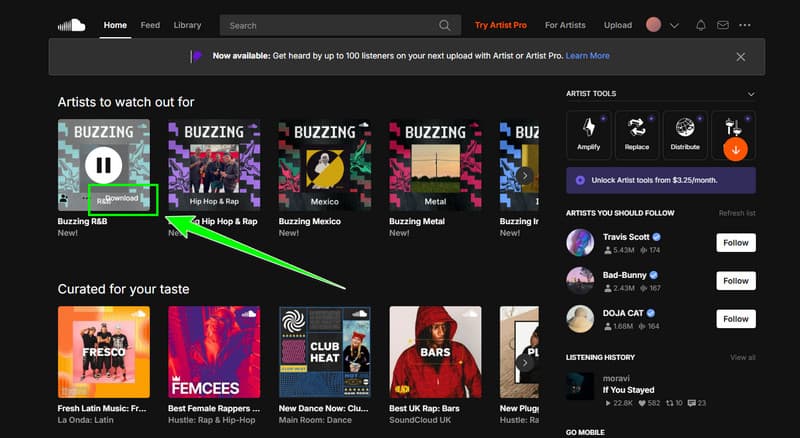
Step 1. Open your browser and access SoundCloud. After that, get the premium version and create your account.
Step 2. After that, you can go to the Search section and browse the song you want to download and convert.
Step 3. After choosing the song, you can hit the Download button below. After the process, you can now begin playing the music.
This process is perfect for users who are members of the platform's premium plan. With this process, you can ensure that you can get the song you want. However, take note that if the plan expires, then the music will also disappear.
Part 2. Best Way to Download SoundCloud to MP3 with 320 Kbps
Do you want to download MP3 from SoundCloud with the best quality? If so, you can try accessing TopVox All Music Converter. This program is ideal if you want to convert music and achieve the best quality, up to 320 kbps. With this quality, you can tell that you can get a better listening experience. Moreover, the music converter enables seamless navigation through all its functions without encountering any issues. You can also download your favorite playlist smoothly. Aside from that, what makes the program powerful is that it has a built-in web player. It means that, in addition to converting, you can also use the software as a web player for listening to music. Therefore, if you need the most powerful music player, it would be best to access TopVox All Music Converter.
Features
- The music converter can offer a straightforward user interface.
- The program can convert and download DRM-protected music.
- It can download music from various platforms, such as Amazon Music, Apple Music, Pandora, Spotify, and more.
- It can convert and download music with the best quality.
To initiate the SoundCloud to MP3 conversion process, please follow the detailed instructions provided below.
Step 1. Download and launch TopVox All Music Converter on your desktop. Then, you can begin with the main process.
Step 2. After you run the program, click the SoundCloud platform. Then, start inserting your account. You can just connect your Gmail account.
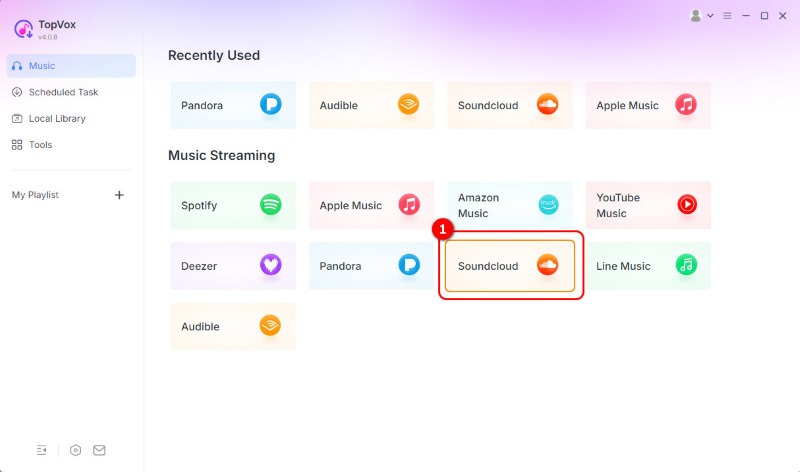
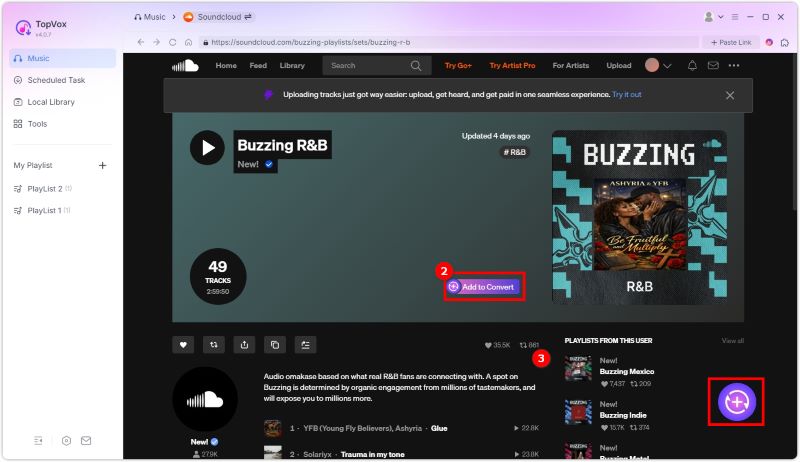
Step 3. You can now browse the music from SoundCloud in the Search section. Then, tick the Add button to insert all the selected music into the Conversion section.
Step 4. Select the MP3 option from the Format section. You can also choose 320 kbps from the Audio Quality section. Once done, hit Convert Now to start the conversion and saving process.
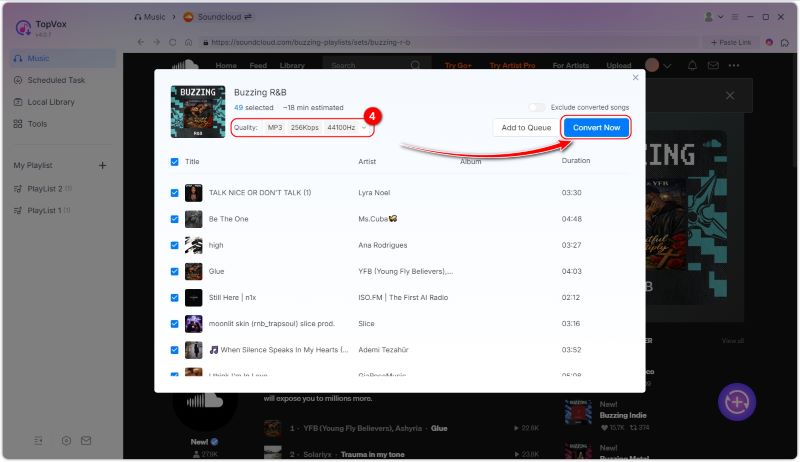
If you want to convert SoundCloud to MP3, there is no doubt that this program is perfect. With its fast and smooth conversion process, you can ensure that to achieve the result you want. Plus, it can convert SoundCloud to other formats. You can download SoundCloud to WAV, FLAC, AAC, M4A, and more.
Part 3. Online Ways to Download SoundCloud to MP3
If you want an online converter that can turn your favorite song from SoundCloud to MP3, read everything in this section.
Method 1. Download SoundCloud to MP3 Using SoundcloudMe
Would you like to download the SoundCloud link as an MP3? If so, you can try using SoundcloudMe. This tool is ideal for those who want a fast conversion process. Additionally, it can facilitate a smooth conversion process. The best part here is that you can access the tool on all web platforms. The only drawback here is that some ads appear during the download process. Also, the tool doesn't support the batch conversion feature. However, if you want to download the song from SoundCloud and convert it into MP3, you can follow the steps below.

Step 1. o to your browser and access SoundcloudMe. Then, proceed to the SoundCloud platform and copy the music link.
Step 2. Then, paste the link to the tool and tap the Download button.
Step 3. After the loading process, click the Download Track button to save the music to your computer.
Method 2. Download SoundCloud to MP3 Using KlickAud
KlickAud is another online tool that allows you to download SoundCloud music to MP3. The good part here is that it can automatically download the music to MP3 format, making it more convenient for users. Additionally, the tool offers a fast conversion process and a simple layout, making it suitable for all users. The good part here is that you can download as much music as you want. It is also 100% free, which is good news for everyone. The only drawback here is that you must have a fast/stable internet connection for a smoother conversion process. If you want to use this online tool to convert SoundCloud to MP3, you can check the process below.
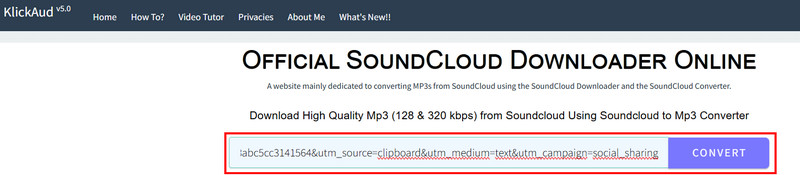
Step 1. From your browser, you can access KlickAud to begin the conversion process. Before proceeding to the next step, you must copy the music link from the SoundCloud platform.
Step 2. After that, you can paste the link from the tool. Then, tap the Convert function to initiate the conversion process.
Step 3. For the final process, tap the Download the Song option. Once done, you can play the music on your media player.
Method 3. Download SoundCloud to MP3 Using MusicVerter
For our last online tool for converting SoundCloud to MP3, we have MusicVerter. This tool is one of the most reliable, as it ensures the best audio quality up to 320 kbps. Aside from that, it has a simple conversion process. With just two clicks, you can achieve the result you want, making it ideal for both professionals and non-professional users. By offering a hassle-free experience, MusicVerter ensures that music enthusiasts don't have to worry about losing access to their favorite music tracks when they're offline. With that, you will have easy access to your entire music collection on any device. To start downloading a SoundCloud playlist as an MP3, follow the steps below.
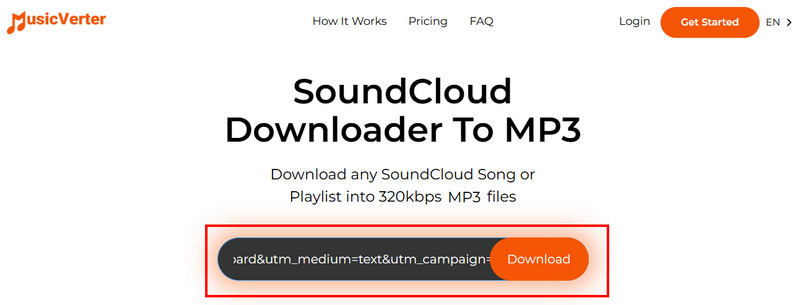
Step 1. Access MusicVerter on your browser. Then, proceed to the SoundCloud platform and start copying the music link you want to download and convert.
Step 2. Then, you can paste the link to the tool. After that, tap the Download button. After the process, the tool will automatically save the music on your desktop.
Step 3. With these online methods, it is clear that downloading an MP3 file from SoundCloud is possible. However, ensure you have a stable/fast internet connection for a smooth conversion process.
You can also check: Explore the best SoundCloud playlist downloaders.
Part 4. Save SoundCloud to MP3 via Recorder
If you need a recorder for recording music from SoundCloud, there is no doubt that Audacity is the best software to use. With this program's recorder feature, you can get the result you need. What makes it better is that you can enhance the recorded audio. You can adjust the pitch, volume, fade level, remove noise, and more. If you'd like to try recording and saving SoundCloud tracks to MP3 for free, see the methods below.
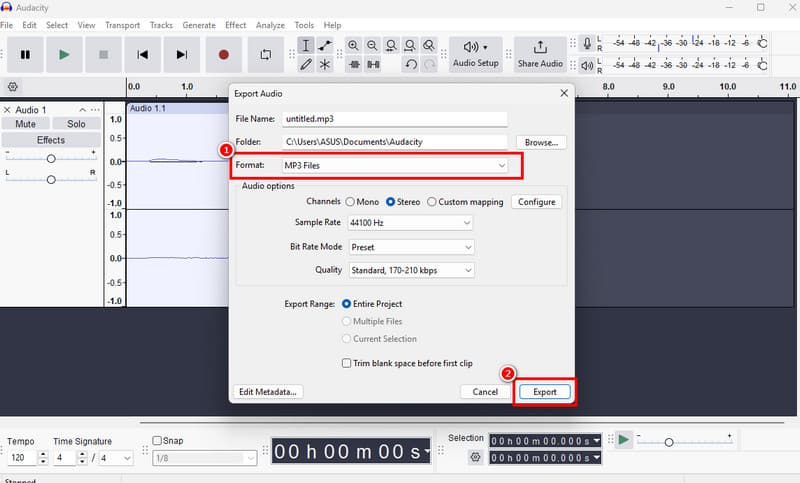
Step 1. Install Audacity on your desktop. After that, click the Record function. While recording, you can now play the music from SoundCloud.
Step 2. After the process, hit the Stop button. Then, proceed to File > Export Audio > Export to Computer.
Step 3. Finally, go to the Forum section and select MP3. Once done, tap Export for the final saving process.
With this recording process, you can get the MP3 file from SoundCloud for free. Thus, if you want to use a recorder, feel free to access Audacity.
Part 5. FAQs about SoundCloud to MP3
Is MP3 a better format?
When it comes to compatibility, there is no doubt that MP3 is the ideal format. With this format, you can play your music on all media players without any compatibility issues.
Is it legal to download SoundCloud to MP3?
If the owner enables the download feature, then downloading the music is legal. Thus, always ensure that the music is available to download.
Is SoundCloud safe?
Definitely, yes. This platform is among the top choices for streaming music. You can trust this platform to keep your data and music safe.
Conclusion
After reading this post, it becomes clear that downloading SoundCloud tracks to MP3 is a relatively straightforward task. Thus, use all the methods from this tutorial and see which method is perfect for you. Additionally, if you are looking for an exceptional program that delivers excellent music quality, it is best to access TopVox All Music Converter. This software can deliver the best results, leading to an enhanced listening experience.
Owen Bannett
Owen Bannett is a music enthusiasm as well as a senior writer. He has paid close attention on the pros & cons of various audio formats, bitrate, sample rate and encoding methods. Always seeking the best listening experience, Owen has deep insights about lossless music and diverse music converters on the markets.




 by
by