Listen to Spotify Offline on Devices: With/No Premium [2026]
In Short
You can listen to your Spotify songs offline with a Premium account. But there are many unavoidable restrictions from the officials, such as limited downloads, online requirement every 30 days, offline listening in the app only and so on. For a better experience, try to use a robust Spotify audio downloader, TopVox All Music Converter, to download music permanently.
When you're on a long flight or outside where your internet can’t go, listening to Spotify offline with a free account is unable to meet your needs. You can download Spotify locally on Premium. However, there are some official limitations that can interrupt your perfect listening experience. Tired of recurring monthly subscription services? Want to enjoy unlimited access to every song? We will provide another effective way to preserve your Spotify music in your local library permanently.
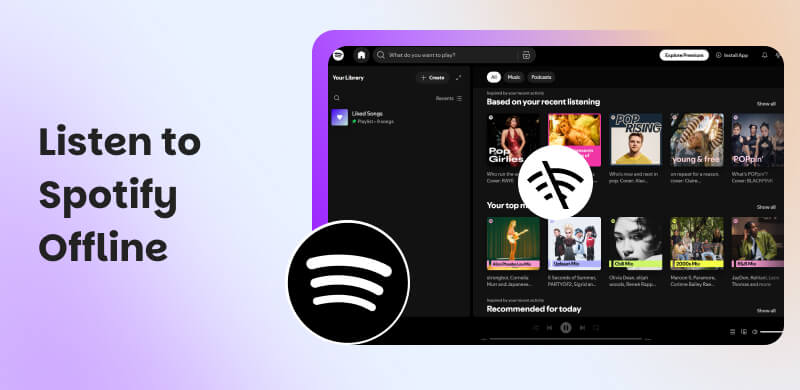
Part 1. Can You Listen to Spotify Tracks Offline?
• Offline Listening: Need a Spotify Premium
Want to download songs from Spotify? You have to get a Spotify Premium membership to hear that, though. A free user can only download podcasts from the app. Paid users are allowed to save and listen offline up to 10,000 tracks on 5 different devices. That means you can download up to 50,000 songs in total, covering the basic needs of most of us. Due to DRM protections, you can access those saved songs in the Spotify app only.
| Price |
| Premium Individual | $12.99/month |
| Premium Due | $18.99/month |
| Premium Family | $21.99/month |
| Premium Student | $6.99/month |
• Offline Mode for Spotify
Streaming music online always requires an internet connection. When you turn on the Spotify Offline Mode, you can play all tracks normally, even if you close the network or want to save mobile data or battery. Using this mode, make sure there is enough storage area for keeping all audio files on your devices.
Here’s a guide to turn on Spotify Offline Mode on Desktop/Mobile:
On Windows/Mac
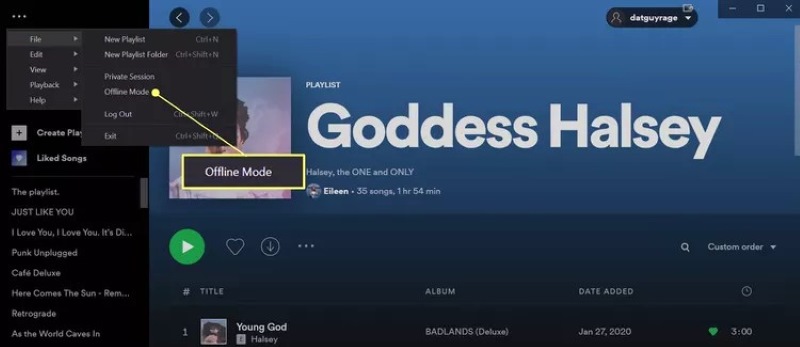
For Windows, click the three-dot icon in the top-left corner. Choose File > Offline Mode to activate it.
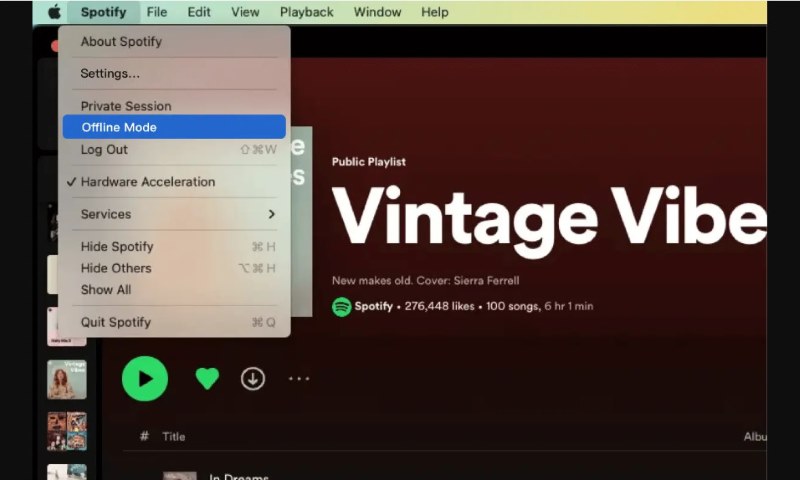
For Mac, choose the Apple menu > Spotify > Offline Mode.
On Android/iPhone
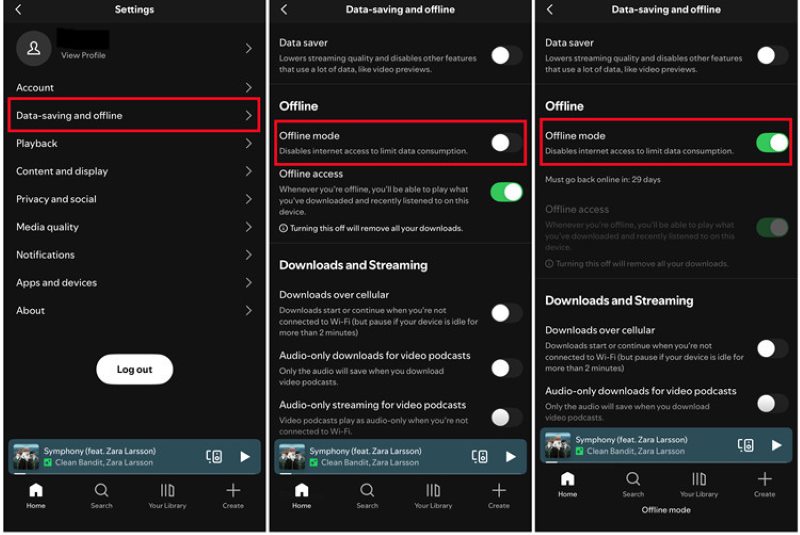
Click your profile picture at the top and tap Settings and privacy, scroll down and select Data-saving and offline, then switch the Offline mode on.
Part 2. How to Play Spotify Songs Offline with Premium? [Official]
Premium subscribers can download Spotify songs under a Wi-Fi connection to avoid consuming too much mobile data. Plus, check and clean your file store from time to time. We recommend at least 1GB of free memory. Then, follow the steps to enjoy offline music:
On Windows/Mac
Step 1. Open the Spotify app. Target what you want to download, including playlists, albums, or podcasts.
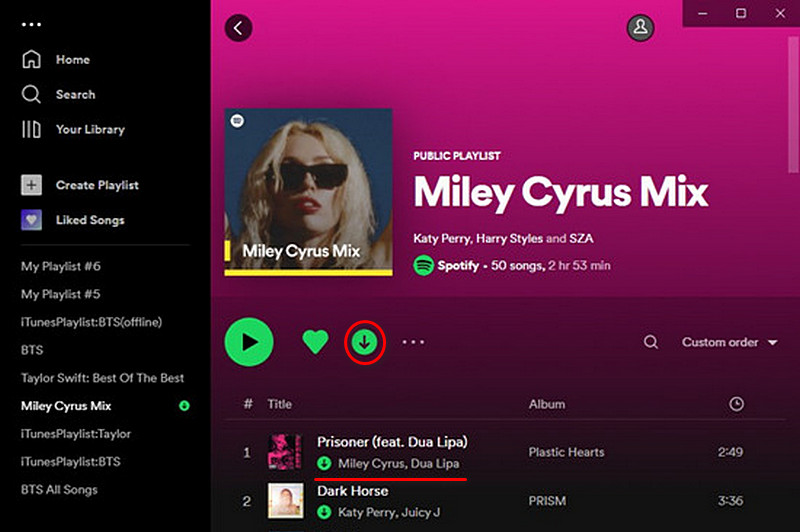
Step 2. Click a small down arrow to download those tracks on your computer. Once finished, a green mark will appear below the song titles.
Step 3. Now turn on the Offline Mode (refer to Part 1) to listen to your Spotify music offline, whether on a flight or outdoors with poor internet.
On Mobile
Step 1. Create a new playlist or select the existing one from Your Library.
Step 2. Click the download button to start the process.
Step 3. You can find your saved files under Downloaded filter.
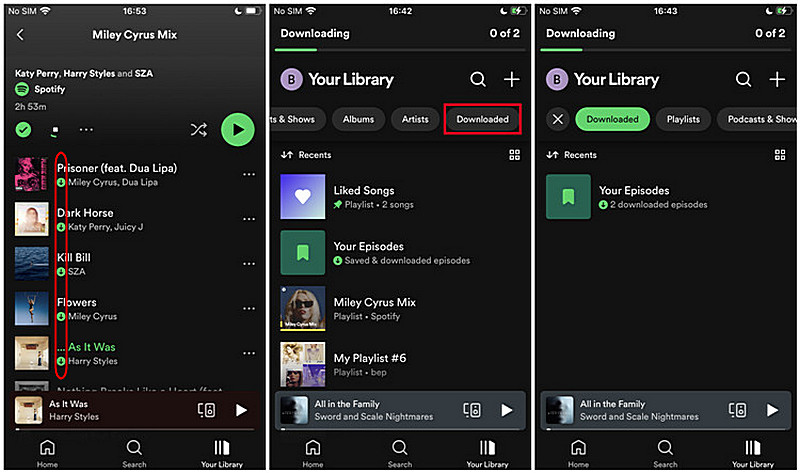
Limitations:
Note that the music file will expire, although you have downloaded it to your devices. Go online at least every 30 days to ensure your downloads have active playback. The official claims that to do so helps collect play data to compensate artists. Besides, Spotify uses AAC and Ogg Vorbis as audio formats, which are not supported by most devices, like MP3, car players, etc. And if you delete the app, any downloaded music also disappears.
Part 3. How to Listen to Spotify Offline without Premium? [Best]
If you may expect:
True ownership of music;
No subscription fees;
No expiration rules;
No device limits;
Play anywhere;
Then you need to convert Spotify music into local audio files using a music converter. This is where TopVox All Music Converter comes in. The software is designed for an all-in-one solution for music, supporting play, download, and convert audio files from popular streaming platforms, even if you are a Free user. Dislike limited output formats on Spotify, it can transfer songs, playlists, albums, podcasts, and audiobooks to different audio formats like MP3. You can also customize output parameters according to your preferences. No longer need to worry about those offline listening restrictions, you can even listen to Spotify songs in the TopVox web player without installing the Spotify app.
Features
- 9 Supported Platforms: Spotify, Apple Music, Amazon Prime Music, YouTube Music, Deezer, Pandora, SoundCloud, Line Music, or Audible.
- No Premium Required: Download Spotify songs using a Free Spotify account.
- Lossless Output Quality: Convert music to the original Bitrate and sample rate.
- DRM-free Output Formats: MP3, WAV, FLAC, AIFF, M4A (AAC/ALAC).
- 35× Batch Conversion Speed: One-time downloading in seconds using advanced hardware acceleration.
- Perfect ID3 Tags: Automatically saves all metadata for easy organization.
Pros
- Quickly receive converted tracks without loss of quality.
- 99% success rate for music downloading.
- Works on both Windows & macOS.
- Intuitive operation for all users.
- No need to install the Spotify app.
Cons
- The free trial lasts for 14 days only.
Tutorial: How to Listen to Spotify music Offline?
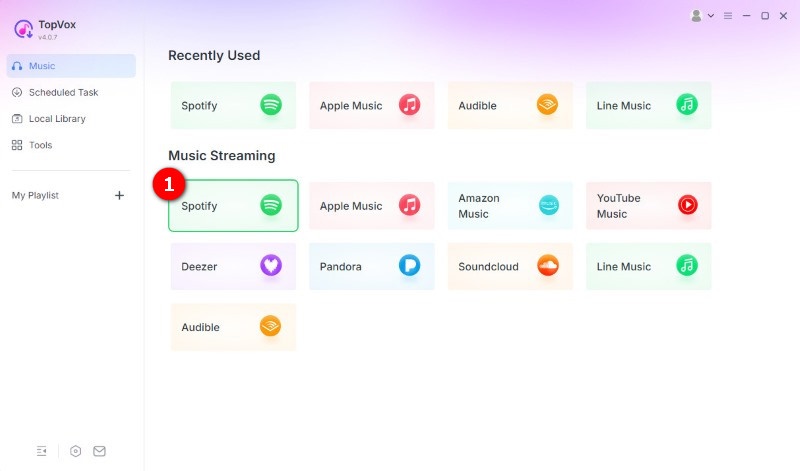
Step 1. Install and register the software on your computer. Then choose the Spotify platform on the homepage and log in to your Spotify account.
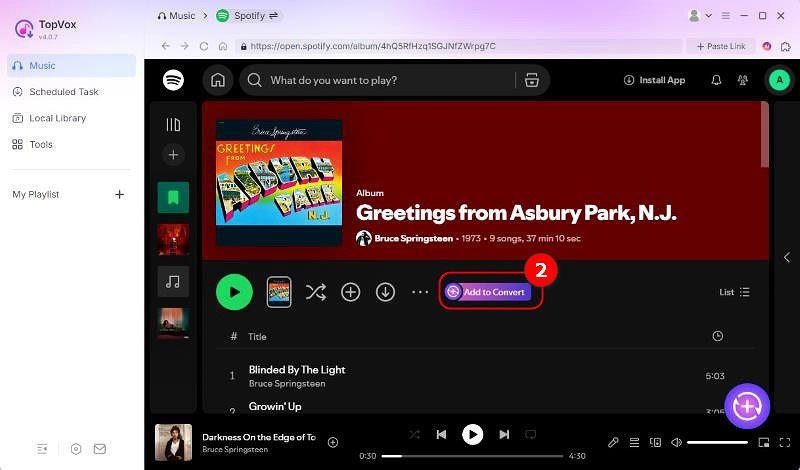
Step 2. Search for the Spotify music you want to download offline. Then hit the Add to Convert button or click the Add button (a plus icon at the lower right corner) to load music.
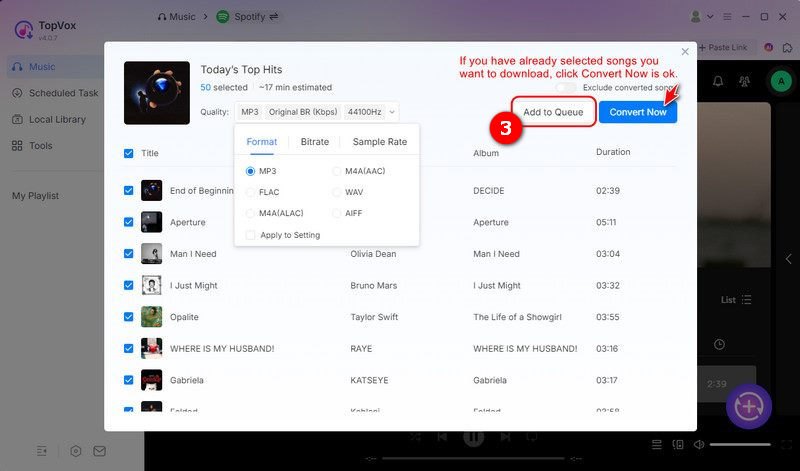
Step 3. Go to the Format section and set the preferred output format and audio quality. Once done, tap the Add to Queue to put the selected songs in the downloading list later. You can move to choose other collections.
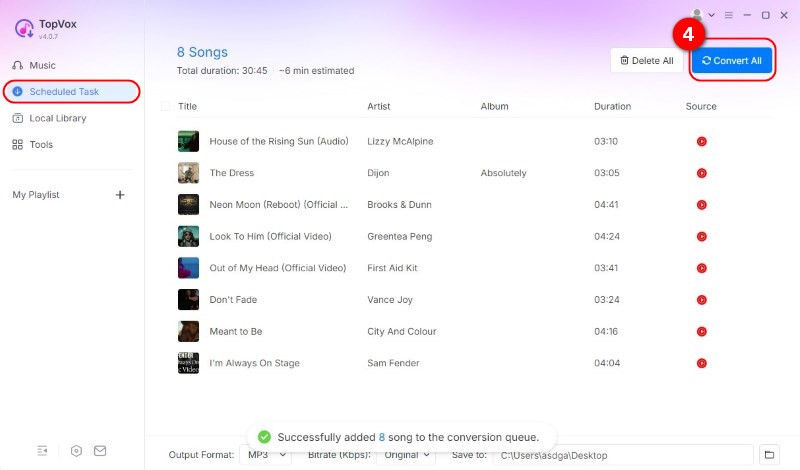
Step 4. Go to the Scheduled Task to ensure the songs. Then you can click the Convert All to download music on Spotify without Premium and listen to them offline.
To always stay in sync with Spotify and other music apps, TopVox All Music Converter provides frequent, free technical support to ensure the highest level of performance, efficiency, and security. While it’s a premium tool, it’s a one-time investment that saves you hundreds in long-term subscription costs.
Part 4. Spotify Premium vs. TopVox All Music Converter
| TopVox All Music Converter | Spotify Premium |
| Save Songs Forever | ✅ | ❌ |
| Listen Offline on Other Devices | ✅ | ❌ |
| Audio Quality | 320kbps/48000Hz or Lossless (Customized) | 256kbps for web player, 320kbps on desktop/mobile |
| Audio Format | MP3, WAV, FLAC, AIFF, M4A (AAC), or M4A (ALAC) | Ogg Vorbis, FLAC, AAC |
| Download Speed | 35× | 1× |
| Batch Download | ✅ | A playlist every time |
| Pricing | Lifetime License $139.95 | Normally $12.99/month (155.88/Year) |
Verdict:
Spotify Offline Mode is like an expensive music rental service rather than getting access to songs. While TopVox makes it possible for you truly convert and save high-quality Spotify music to more common formats for local collection. You can have unlimited playback on any MP3 player, car tablet, or mobile device.
Part 5. Troubleshooting: Why can’t I play Spotify Music Offline?
• Can’t Download?
1. If you can't find the download button on the interface, it is often because of an expired premium membership. Please confirm and renew your premium plan.
2. Make sure you have enough storage space to download offline music.
3. If your devices or tracks exceeded the limit, you can’t make it.
• Can’t play downloaded songs?
1. Make sure your internet connection is active.
2. If you don't have an internet connection for more than 30 days, some downloaded songs or playlists may be deleted or out of sync. Remember to reconnect to the internet regularly to keep your downloads.
3. Turn off the power-saving mode or free Spotify from background application restrictions. Check out whether any cache-clearing and battery-saving apps are open. They will frequently stop running essential software services.
4. If not above, restart or reinstall the app and re-download songs.
FAQs on Playing Spotify Offline
Q1: Can you listen to Spotify offline with a free account?
A: NO. A free Spotify account is forbidden to download music except for podcast files. You can upgrade your account to a Premium for offline listening, or choose another music downloader like TopVox All Music Converter to download music from Spotify to your computer.
Q2: How do I switch Spotify to the Offline Mode?
A: Mobile and tablet:
Step 1. Go to Settings in the Spotify app.
Step 2. Choose the Data-saving and offline, and turn Offline mode on.
Desktop:
Mac: Apple menu > Spotify > Offline.
Windows: Click the three-dot icon and tap File, then activate Offline Mode.
Conclusion
Enabling Offline Mode, you can listen to Spotify music offline with a Premium membership, if you would like to pay for copyright. Here, we recommend you try TopVox All Music Converter, a professional audio downloader, to free yourself from confined devices, internet conditions, and DRM protection, mastering the best solution to download your favorite tracks.
Luna Harper
Luna Harper is a passionate music lover and an inspiring content sharer. She has explored most of the music converters available on the market, acquiring thorough knowledge of their features, usability, and differences. Luna enjoys using her professionalism to help fellow music lovers get superior audio quality.




 by
by